How to Fix Disapproved Products in Google Merchant Center (2026 Guide)
A disapproved product in Google Merchant Center is completely invisible in Google Shopping — it does not appear in any auction, regardless of your bid. Every disapproval is lost revenue until it is fixed. This guide covers the most common disapproval reasons in 2026, how to diagnose them in Merchant Center Diagnostics, and how to fix each one.
Step 1: Find Your Disapprovals in Merchant Center Diagnostics
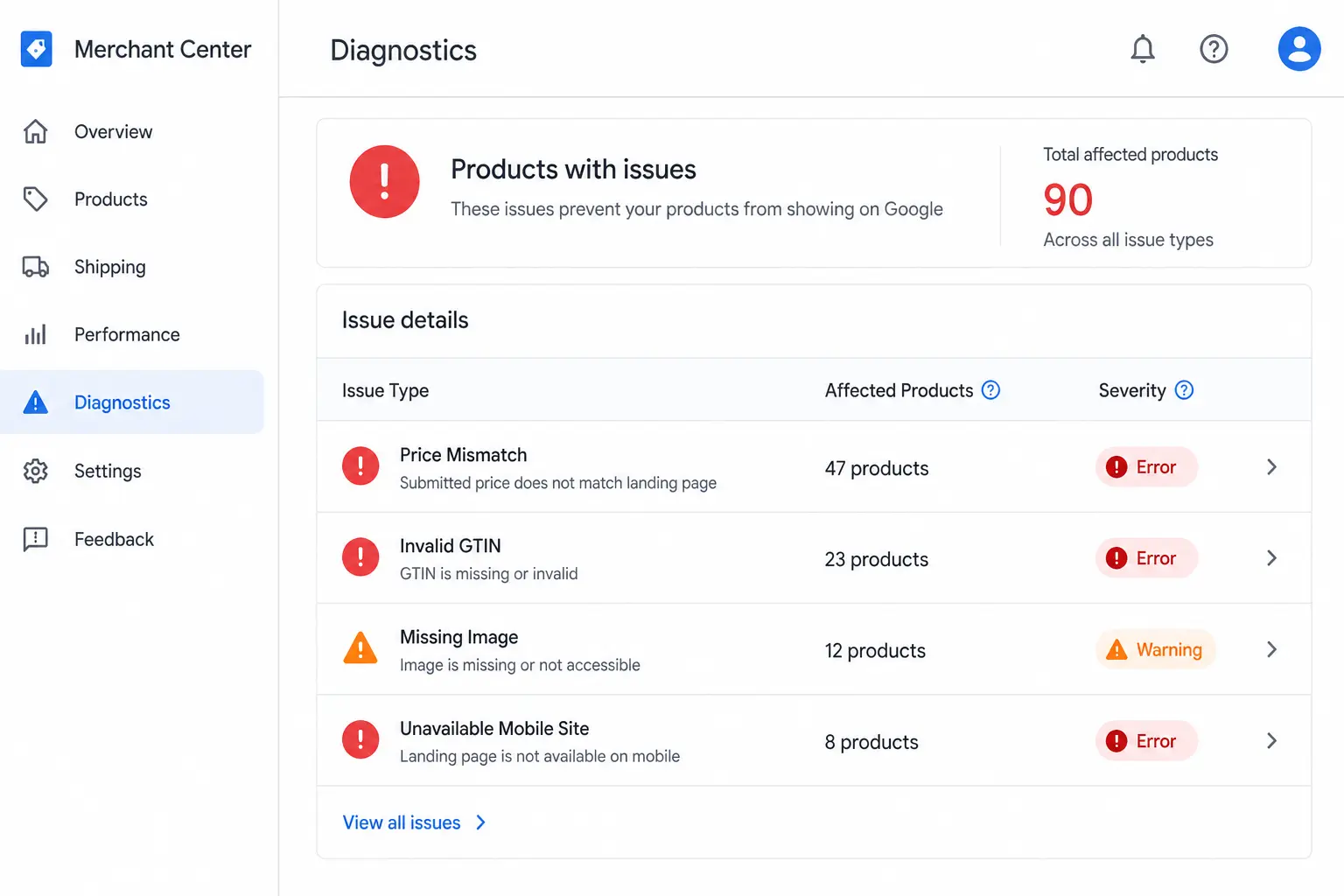
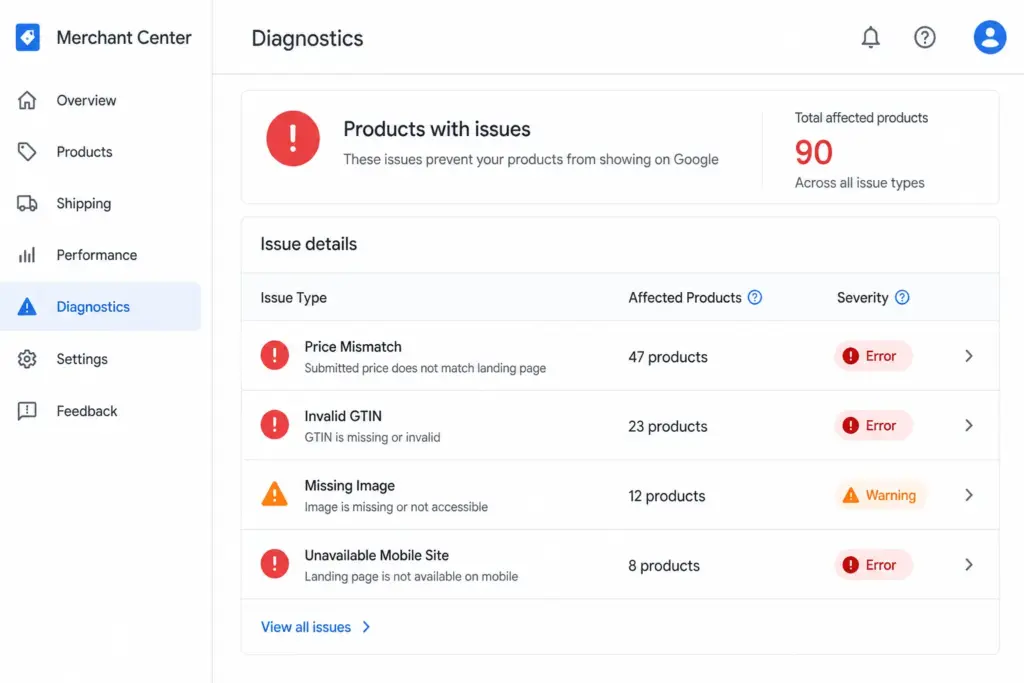
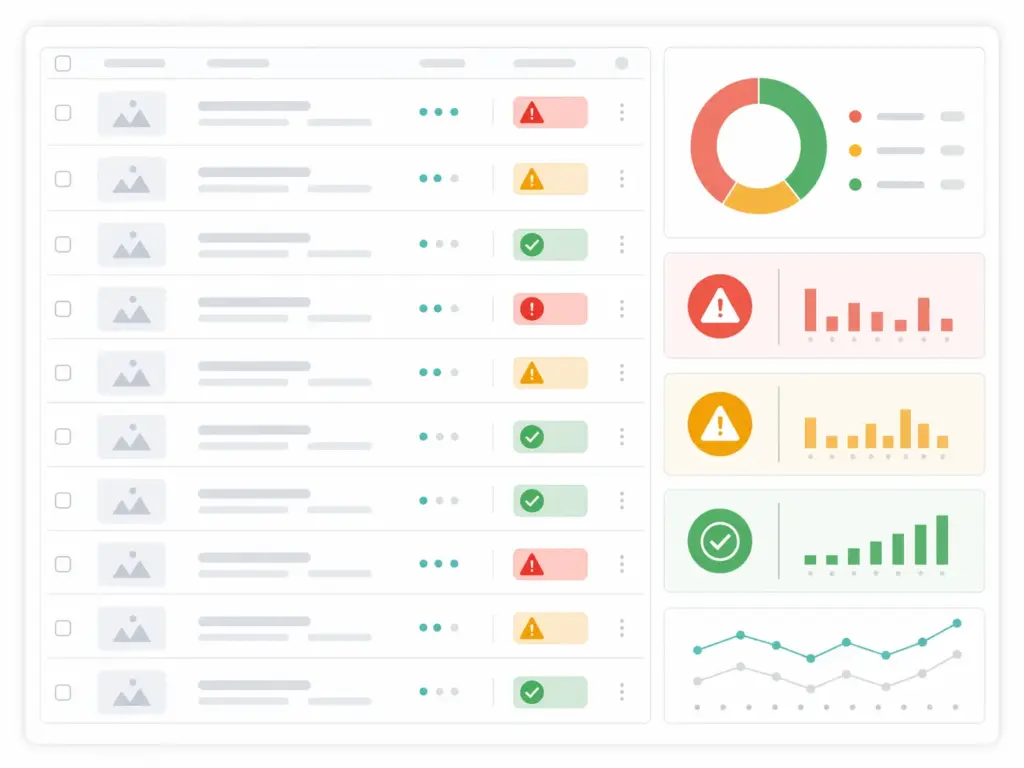
Every disapproval and warning in your Merchant Center account is visible in one place: Products → Diagnostics. This is your starting point for every feed fix. Do not attempt to diagnose issues from inside your feed file — always check Diagnostics first.
The Diagnostics tab shows:
Every active issue grouped by type
The number of products affected by each issue
The severity — Error (disapproved) vs Warning (limited performance)
A link to see exactly which products are affected
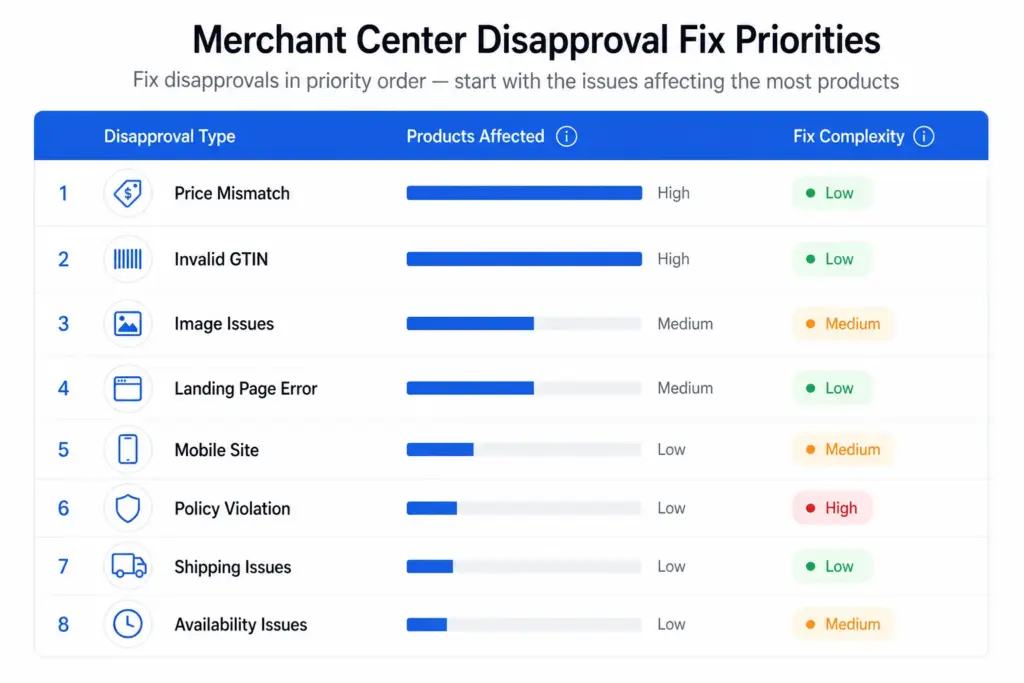
Fix errors first — these products are completely absent from Shopping. Warnings are second priority — these products appear but underperform. For a complete reference on feed attribute requirements before you fix, see the Google Shopping Feed Guide.
The 8 Most Common Disapproval Reasons and How to Fix Each
1. Price Mismatch
What it means: The price in your feed does not match the price on the product landing page. Google crawls your landing pages and compares them against your feed. Even a 1p discrepancy triggers a disapproval.
Common causes: Flash sales or promotions that updated the website price but not the feed. Manual feed updates that were delayed. Currency or tax display differences between feed and page.
Fix: Update your feed to match the current landing page price. Set your feed to fetch at least daily — twice daily during promotion periods. Use sale_price and sale_price_effective_date attributes for promotions rather than changing the price field.
2. Invalid or Missing GTIN
What it means: Your product has an invalid GTIN (wrong check digit, wrong length, test/placeholder value) or is missing a GTIN that should exist.
Fix: Validate all GTINs before submitting using the GTIN Validator. For custom or handmade products with no GTIN, set identifier_exists to FALSE — do not leave the GTIN field blank. Full GTIN requirements are covered in the GTIN compliance guide.
3. Image Not Meeting Requirements
What it means: Your product image is too small (below 100×100px for non-apparel, 250×250px for apparel), contains a watermark or promotional text, uses a placeholder image, or shows a white square instead of the product.
Fix: Replace with a clean product image — minimum 800×800px recommended. No overlays, no text, no borders. Image must show the actual product, not a lifestyle image for Shopping ads (lifestyle can be used as additional images via additional_image_link).
4. Landing Page Not Working
What it means: Google cannot crawl your landing page — it returns a 404, requires login, redirects to a different product, or loads incorrectly on mobile.
Fix: Verify the link URL in your feed returns a 200 status, loads correctly on mobile, and matches the specific product (not a category page or homepage). If the product has been deleted, remove it from your feed.
5. Unavailable Mobile Site
What it means: Google’s mobile crawler cannot access your landing page. Often caused by a separate mobile site (m.yoursite.com) returning errors, or a responsive site that breaks on mobile crawler user agent strings.
Fix: Test your landing page URLs using Google’s Mobile-Friendly Test. Ensure your server is not blocking Googlebot-Image or mobile crawler user agents. If you have a separate mobile domain, ensure it is live and returning 200s.
6. Mismatched Value (Price, Availability, Condition)
What it means: A feed attribute value does not match what Google finds on the landing page — most commonly availability (feed says “in stock”, page says “out of stock”) or condition (feed says “new”, page indicates “refurbished”).
Fix: Ensure availability updates in your feed match real-time stock status on your site. Set up automated feed updates triggered by stock changes rather than scheduled batch updates.
7. Prohibited or Restricted Content
What it means: Your product falls into a Google Shopping policy-restricted category — alcohol, pharmaceuticals, adult products, gambling products — without the required account-level policy compliance setup.
Fix: Review Google Merchant Center’s shopping policies for restricted verticals. Apply for restricted product programme access if eligible. Some categories are prohibited entirely and cannot be fixed.
8. Incorrect Tax or Shipping Setup
What it means: Your Merchant Center account does not have tax and shipping configured for the target country, or your shipping settings conflict with what is shown on the landing page.
Fix: Go to Merchant Center → Settings → Shipping and Tax. Configure shipping settings for every country you are targeting. Ensure stated delivery times match what is shown at checkout on your site.
How to Prevent Disapprovals Recurring
Daily feed updates minimum — price and availability changes must propagate to your feed within 24 hours
Validate GTINs before submission — run every GTIN through the GTIN Validator before uploading a new feed
Set up Merchant Center email alerts — Merchant Center can email you when feed processing errors occur. Turn this on under Settings → Notifications
Monitor Diagnostics weekly — new disapprovals can appear when Google re-crawls your landing pages and finds discrepancies
Use sale_price for promotions — never change your regular price field for a promotion. Use sale_price + sale_price_effective_date so the price reverts automatically
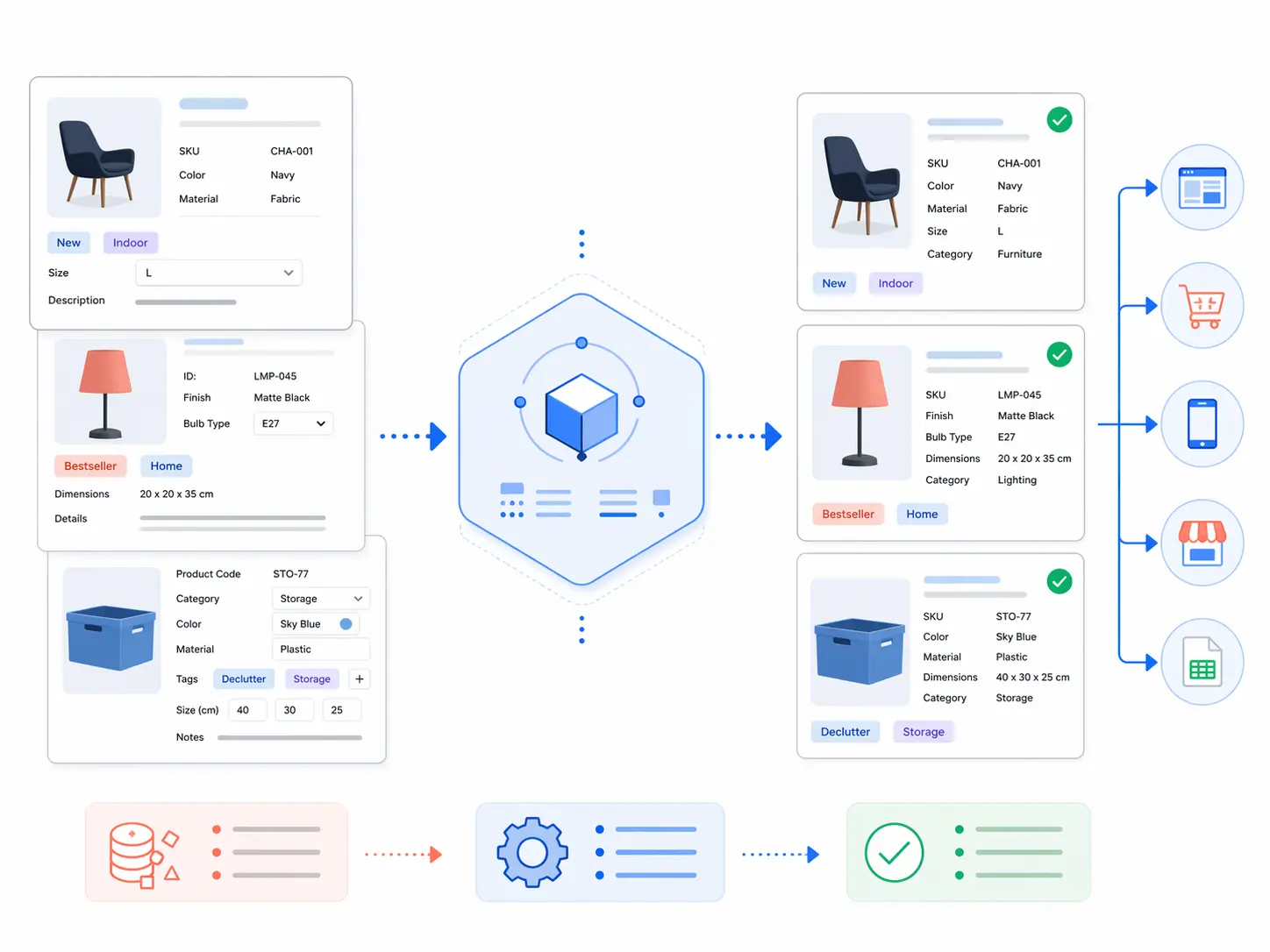
For teams managing large catalogs where feed errors appear regularly, the root cause is almost always data quality at the source — inconsistent pricing, stale stock status, or GTIN errors that need fixing in your product data before they reach the feed. The Feed Generator and LynkPIM free plan help you manage feed quality upstream before issues reach Merchant Center.
Frequently Asked Questions
How long does it take for Google to approve products after fixing a disapproval?
Data-related disapprovals (price mismatch, missing attributes) are typically resolved within 24–48 hours of submitting the corrected feed. Policy-related disapprovals that require a manual review request typically take 1–3 business days after submitting the review request in Merchant Center Diagnostics.
What is the difference between a disapproved product and a product with limited performance?
A disapproved product is not shown in Google Shopping at all — it has been rejected and will not appear in any auction. A product with limited performance is shown but with reduced visibility and auction eligibility, typically due to missing recommended attributes like GTIN or brand. Fix disapprovals first — they represent complete loss of visibility.
What is the most common reason products are disapproved in Merchant Center?
Price mismatch — where the price in the feed does not match the price on the landing page — is the most common data-related disapproval cause for most ecommerce stores. Invalid or missing GTINs are the second most common. Both are entirely preventable with daily feed updates and GTIN validation before submission.
Can I request a review after fixing a policy disapproval?
Yes. After fixing the issue that caused a policy disapproval, go to Products > Diagnostics in Merchant Center and use the Request Review button for the relevant issue. Google will review your account and products within 1–3 business days. Do not request review before fixing the underlying issue — repeated reviews without resolution can escalate the restriction.
Flat vs Hierarchical Product Taxonomy: Which Is Right for Your Catalog?
The structure of your product taxonomy determines how your catalog scales, how your site filters work, and how well your products map to Google Shopping categories. Flat and hierarchical are the two fundamental structural approaches — and choosing the wrong one for your catalog size and complexity creates problems that get harder to fix the longer they go unaddressed.
What Is a Flat Taxonomy?
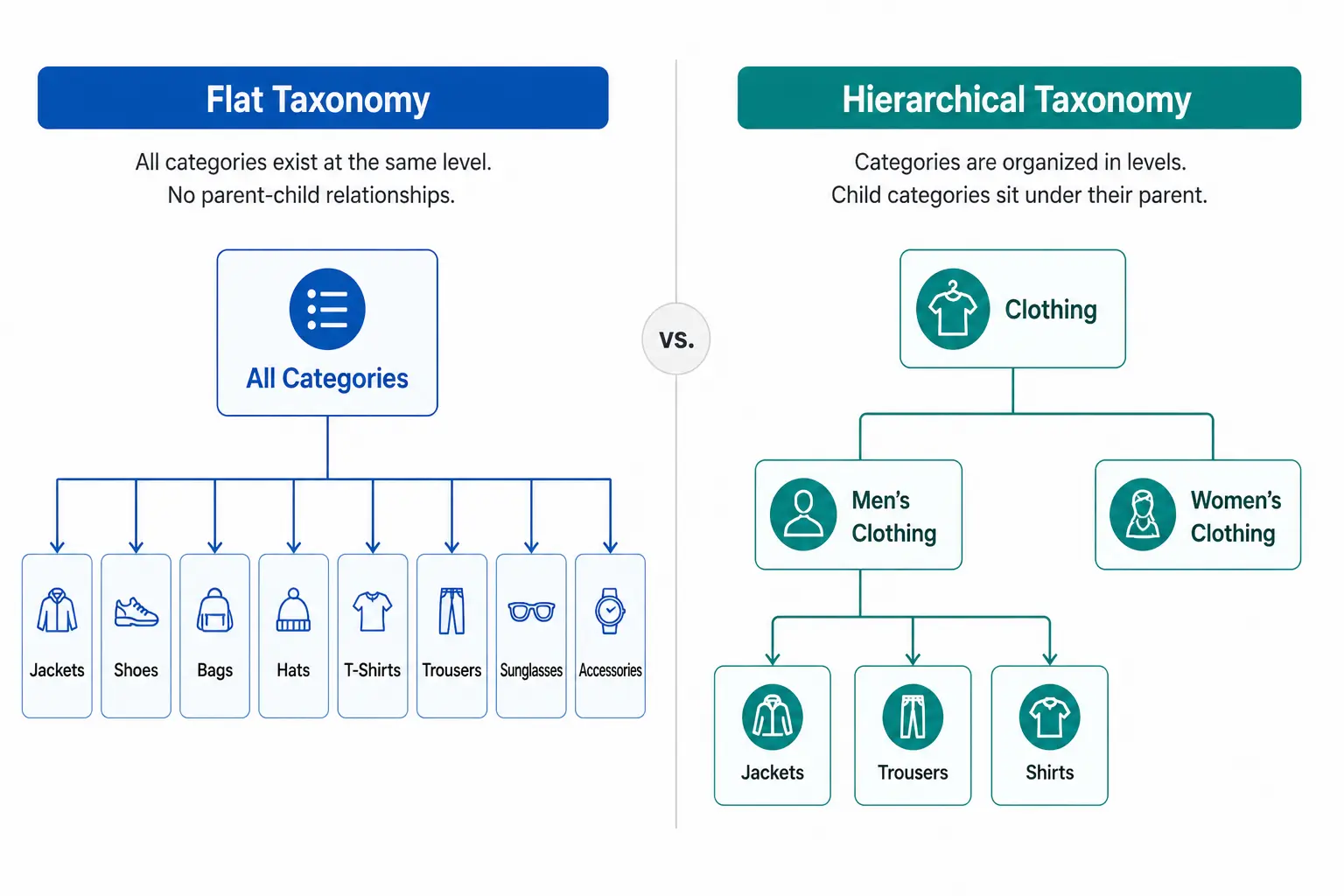
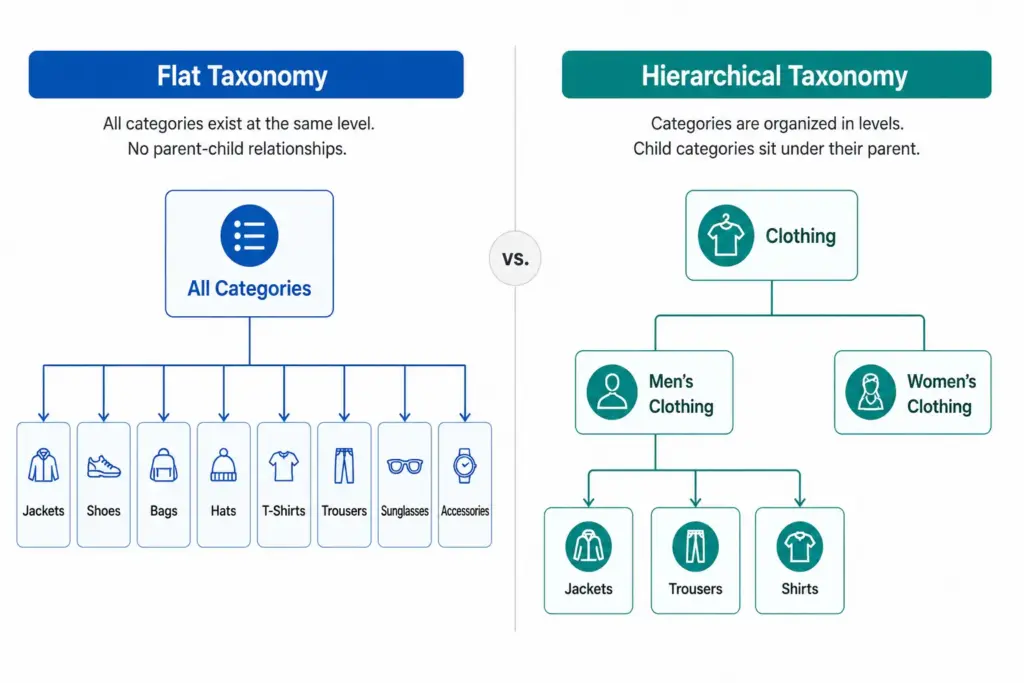
A flat taxonomy has a single level of categories. Products sit directly under a top-level category with no subcategories beneath it. The entire catalog structure is one layer deep.
Example: A small accessories store with a flat taxonomy might have: Bags, Scarves, Hats, Belts, Sunglasses, Jewellery. Every product sits directly under one of those six categories. There are no subcategories — “Bags” is not further divided into Handbags, Crossbody Bags, Clutches, Tote Bags.
Flat taxonomies are easy to set up and easy to understand at a glance. They work well when the catalog is small and products within each category are genuinely similar enough that no further subdivision adds value.
What Is a Hierarchical Taxonomy?
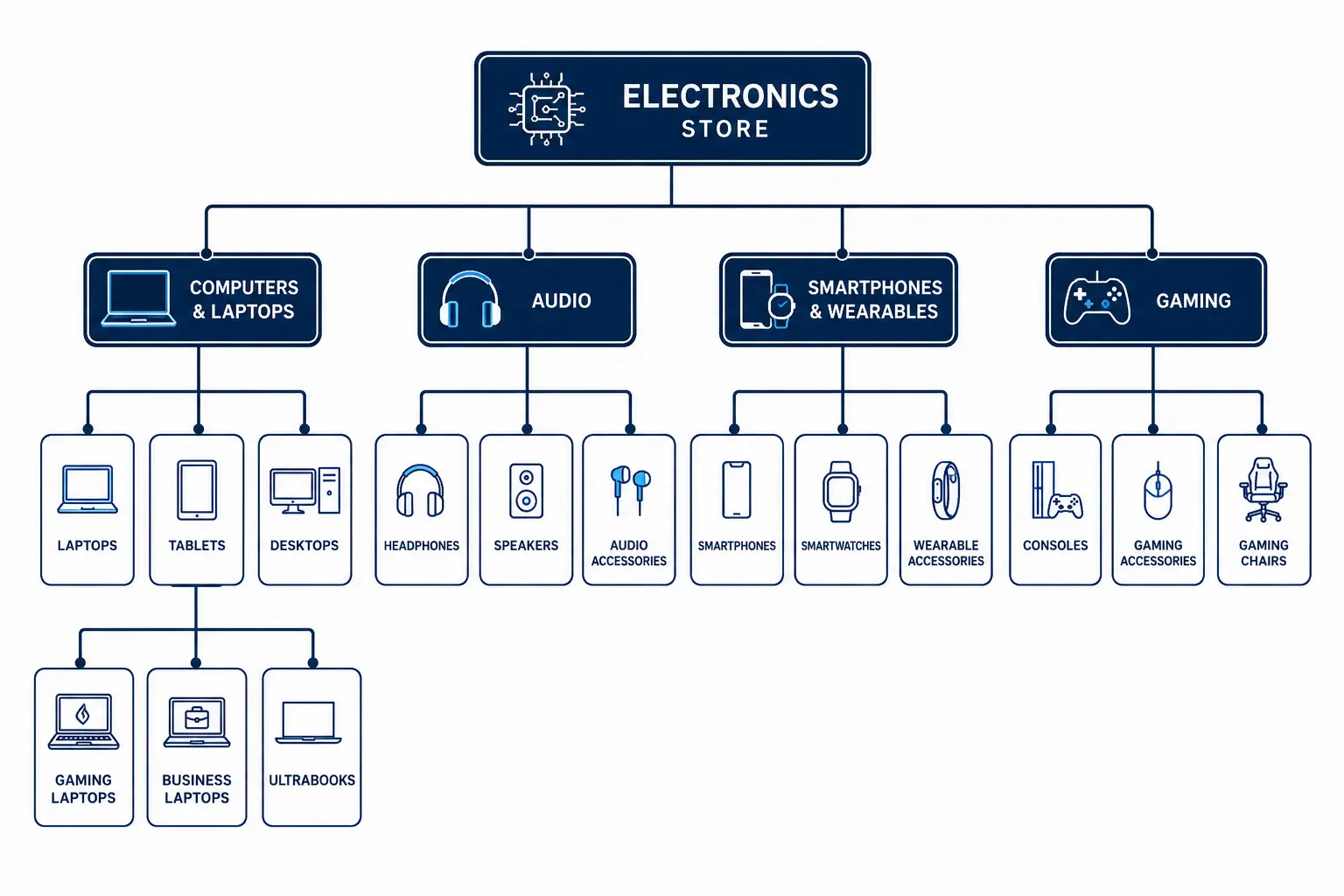
A hierarchical taxonomy has multiple nested levels. Categories contain subcategories, which may contain further subcategories, down to the most specific product type level.
Example: The same accessories store with a hierarchical taxonomy: Bags > Handbags > Leather Handbags. Or Bags > Crossbody Bags. Each level adds specificity — and with it, the ability to filter, map to Google’s taxonomy precisely, and manage products by type without the entire “Bags” category becoming unnavigable.
Any catalog with 200+ products or multiple product types
Navigation
Simple — works when categories are few and clear
More complex but enables breadcrumb navigation and drill-down filtering
Filter accuracy
Limited — attributes apply across entire category
High — attributes defined per subcategory, filters are specific
Google category mapping
Imprecise — top-level categories rarely match Google leaf nodes
Precise — subcategories map directly to Google taxonomy leaf nodes
Scalability
Poor — adding products creates category bloat
High — hierarchy absorbs new product types without structural change
Maintenance
Low initially, high as catalog grows
Higher upfront, lower long-term
Channel mapping
Difficult — manual per-product mapping often required
Systematic — subcategory maps once to each channel
When Flat Taxonomy Works
Flat taxonomies are appropriate in a small number of specific situations:
Catalog under 200 SKUs with a genuinely narrow product range where subcategories would be redundant
Single-category specialty stores — a store that sells only coffee beans, only yoga mats, or only one type of product doesn’t need a hierarchy
Early-stage stores planning to restructure as the catalog grows — a flat structure is a valid starting point if you know it will be replaced
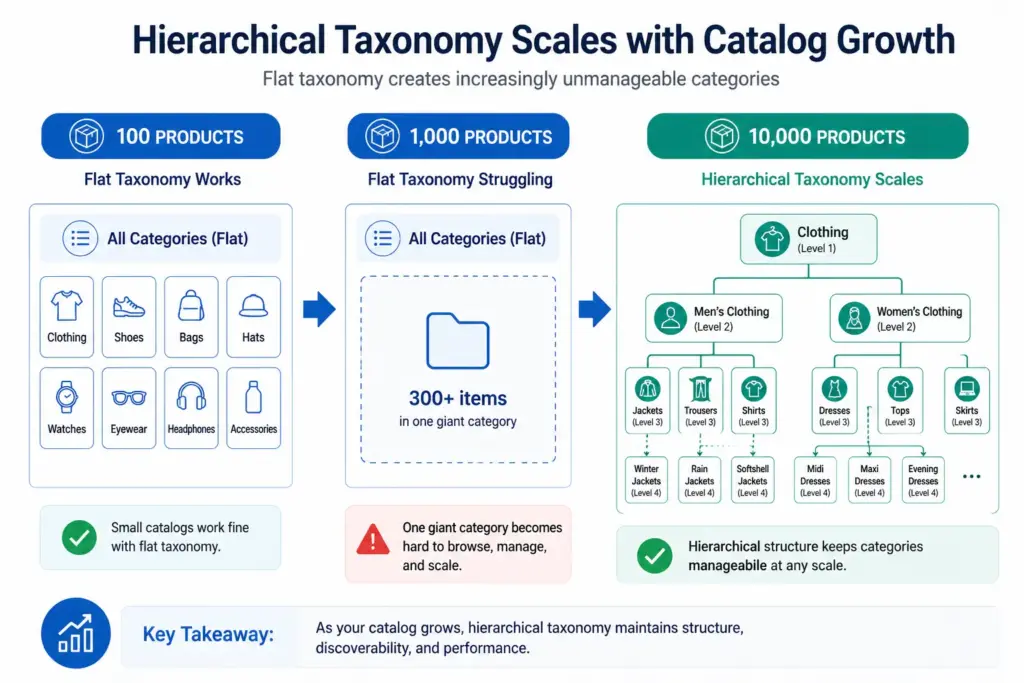
In all other cases, the limitations of flat taxonomy become apparent quickly as the catalog grows. The most damaging limitation is Google Shopping performance — flat taxonomy categories rarely correspond to Google’s taxonomy leaf nodes, resulting in products being assigned to broad parent categories that hurt auction relevance.
When Hierarchical Taxonomy Is Required
Hierarchical taxonomy becomes necessary when any of these conditions are true:
Your catalog has more than 200 products
You sell across multiple product types that require different attribute sets
You need accurate Google Shopping category mapping below the parent level
Your site needs faceted filtering (filter by colour, size, material etc.)
You sell across multiple channels that each have their own taxonomy
Your team needs to manage products by type for buying, merchandising, or reporting
For most ecommerce stores, the answer is hierarchical. The question is not whether to use hierarchical taxonomy but how many levels and how specifically to define subcategories. For the full build process, see How to Build a Product Taxonomy From Scratch.
The Google Shopping Argument for Hierarchical Taxonomy
Google’s product taxonomy has over 6,000 categories. It goes 5–7 levels deep in most categories. A flat internal taxonomy maps to Google’s parent-level categories at best — “Clothing” instead of “Apparel & Accessories > Clothing > Activewear > Track Jackets & Hoodies”.
The difference in Shopping performance between a product mapped to a parent category and one mapped to the correct leaf node can be significant — better relevance matching means your products appear for more specific search queries at lower CPCs. If Google Shopping is a meaningful channel for you, hierarchical taxonomy is not optional.
Migrating from Flat to Hierarchical
If your catalog currently has a flat structure and you are outgrowing it, migration is straightforward in principle — though it requires careful execution to avoid breaking navigation and losing indexed URLs.
Design the new hierarchical structure before touching anything live
Remap every product to its new subcategory in a staging environment
Set up 301 redirects from old category URLs to new subcategory URLs
Update your feed’s google_product_category values to the new leaf-node mapping
Update your sitemap and request GSC re-indexing after going live
Rankings may dip briefly after migration as Google recrawls the new structure. This is normal and temporary — the long-term gains in navigation, filtering, and channel performance outweigh the short-term disruption.
A flat taxonomy has a single level of categories with no subcategories. Every product sits directly under a top-level category. Simple to set up but breaks down as catalog size grows — filters become unwieldy, Google category mapping becomes imprecise, and category pages become unmanageable.
What is a hierarchical product taxonomy?
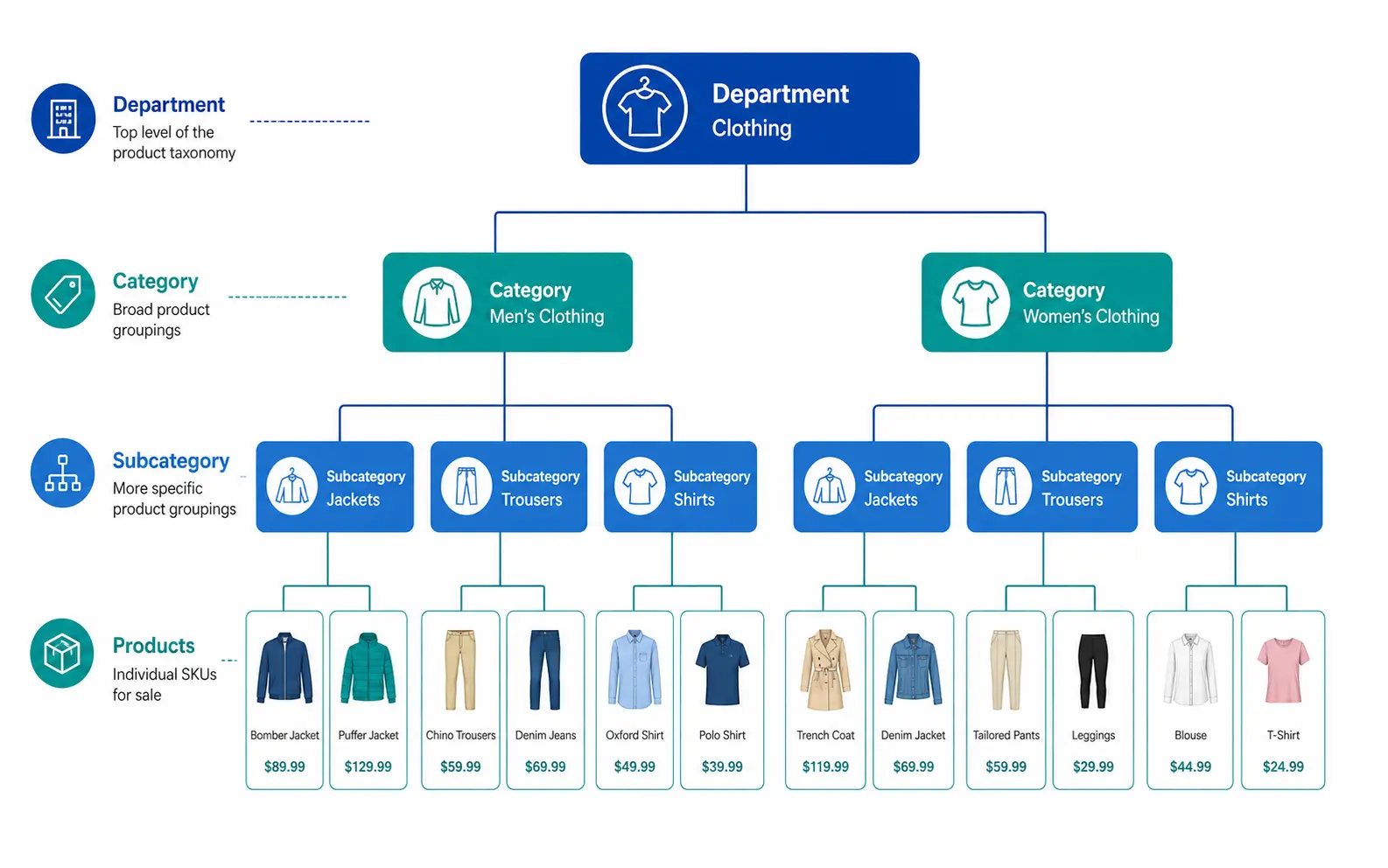
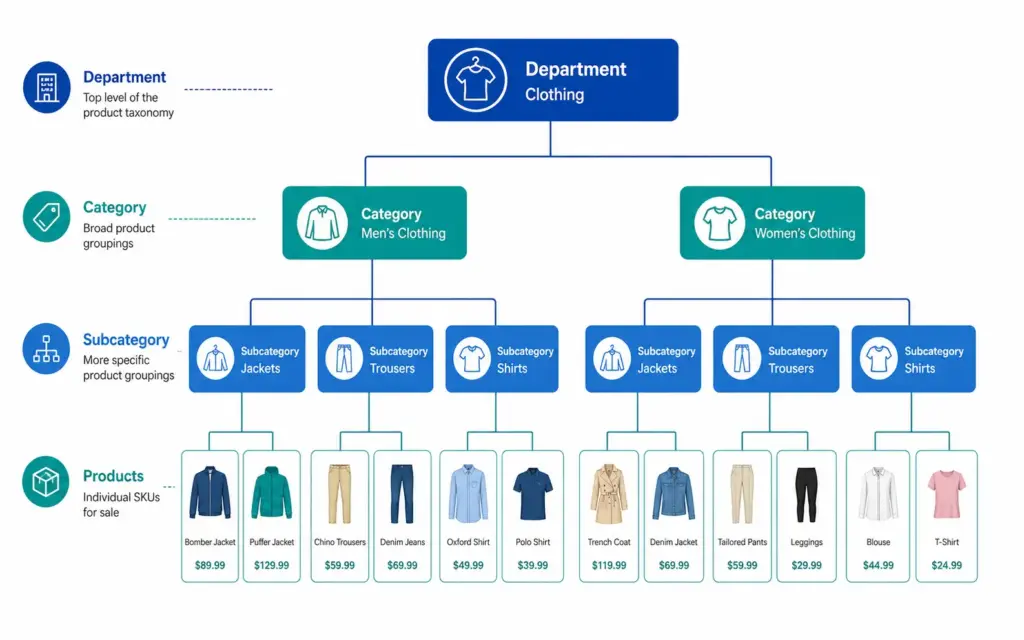
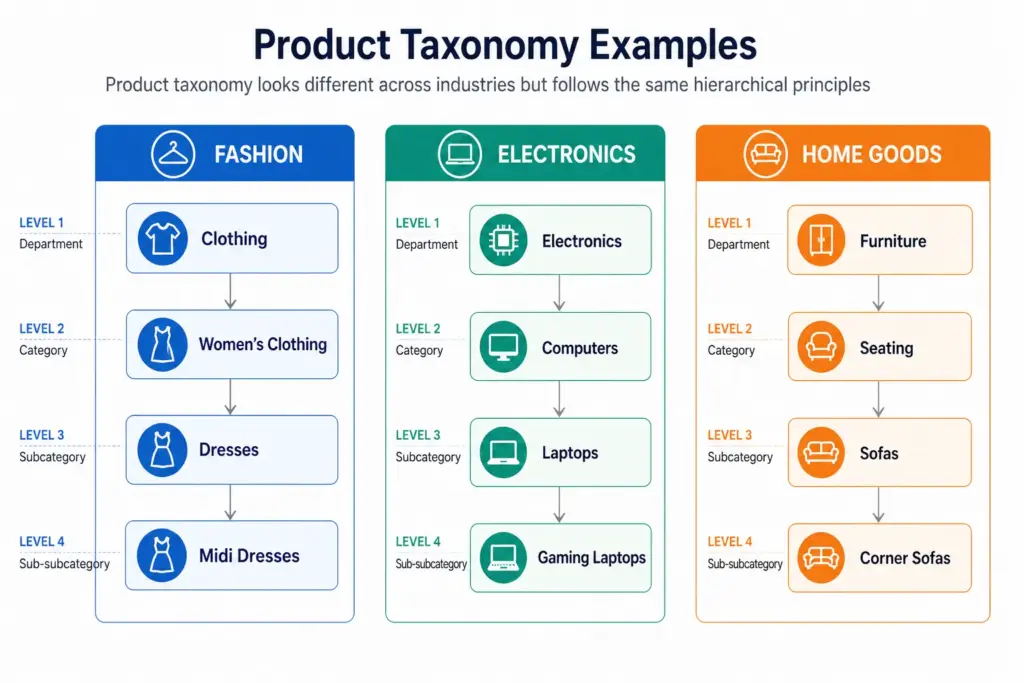
A hierarchical taxonomy has multiple nested levels — typically Department > Category > Subcategory > Product Type. Products sit at the most specific level. This structure scales to any catalog size and enables precise Google category mapping and deep attribute-based filtering.
When should you use a flat taxonomy?
Flat taxonomies work for small catalogs under 200 products with a genuinely narrow product range where subcategories would be redundant. Specialty retailers with a single product type can use a flat structure effectively. For most ecommerce stores with varied product ranges, hierarchical is the right choice.
Can you migrate from flat to hierarchical taxonomy?
Yes. The process requires designing the new hierarchy, remapping products to new subcategories, setting up 301 redirects from old category URLs, updating feed category mapping, and requesting GSC re-indexing. Rankings may dip briefly during migration but recover as Google processes the new structure — and long-term performance gains are significant.
What Is Product Taxonomy? Definition, Examples and Why It Matters
Product taxonomy is the classification system that organises your products into a structured hierarchy. It determines how products are grouped, named, and navigated — on your website, inside your catalog management system, and across every sales channel you use.
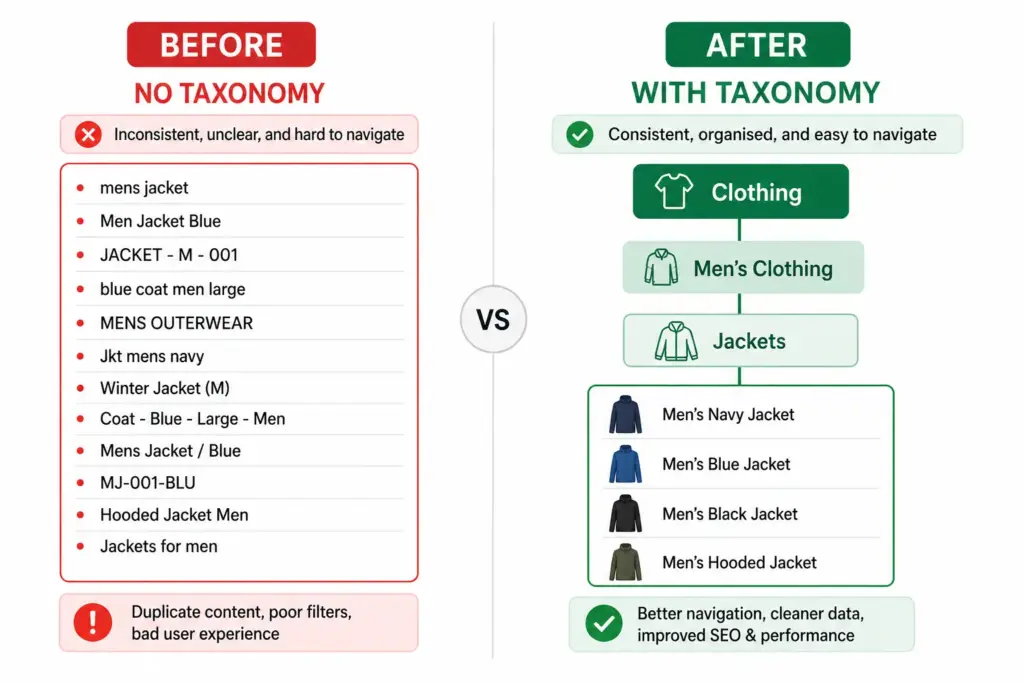
Get it right and customers find products faster, your Google Shopping feed performs better, and your team can manage thousands of SKUs without chaos. Get it wrong and you end up with inconsistent categories, broken filters, and channel mapping errors that cost you sales daily.
Product Taxonomy Definition
A product taxonomy is a hierarchical system for classifying products into groups based on shared characteristics. The word comes from the Greek taxis (arrangement) and nomos (law or method) — it is, literally, the rules by which products are arranged.
In practical ecommerce terms, a product taxonomy answers three questions for every product in your catalog:
What type of product is this? (Product Type / Subcategory)
What category does it belong to? (Category)
What department does that category sit under? (Department)
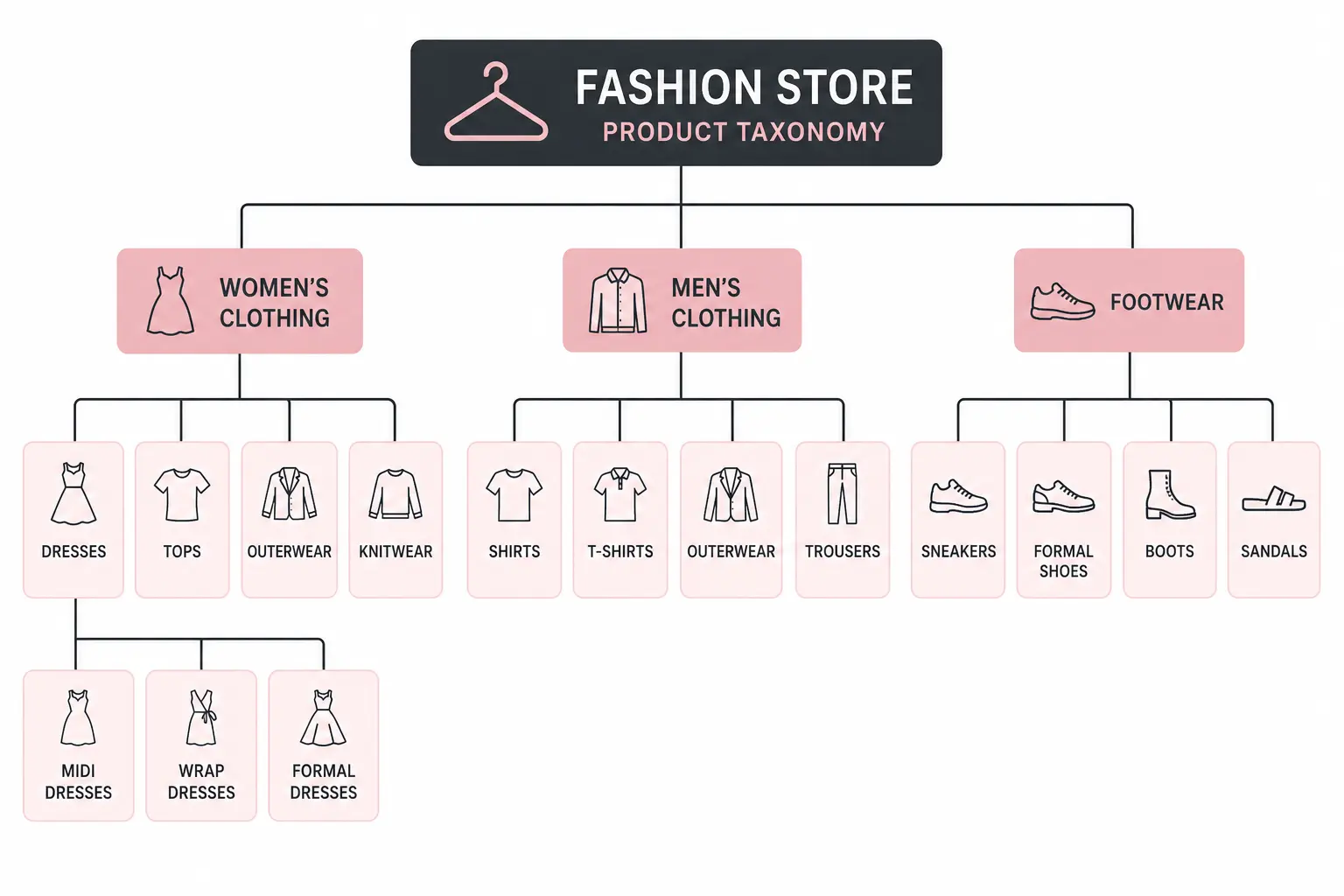
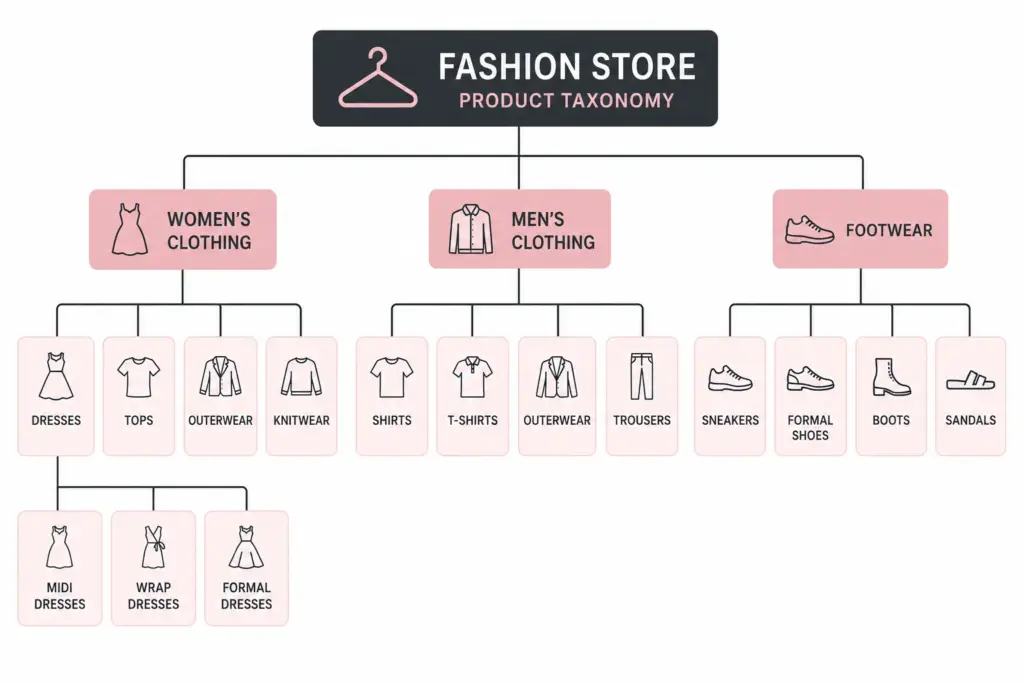
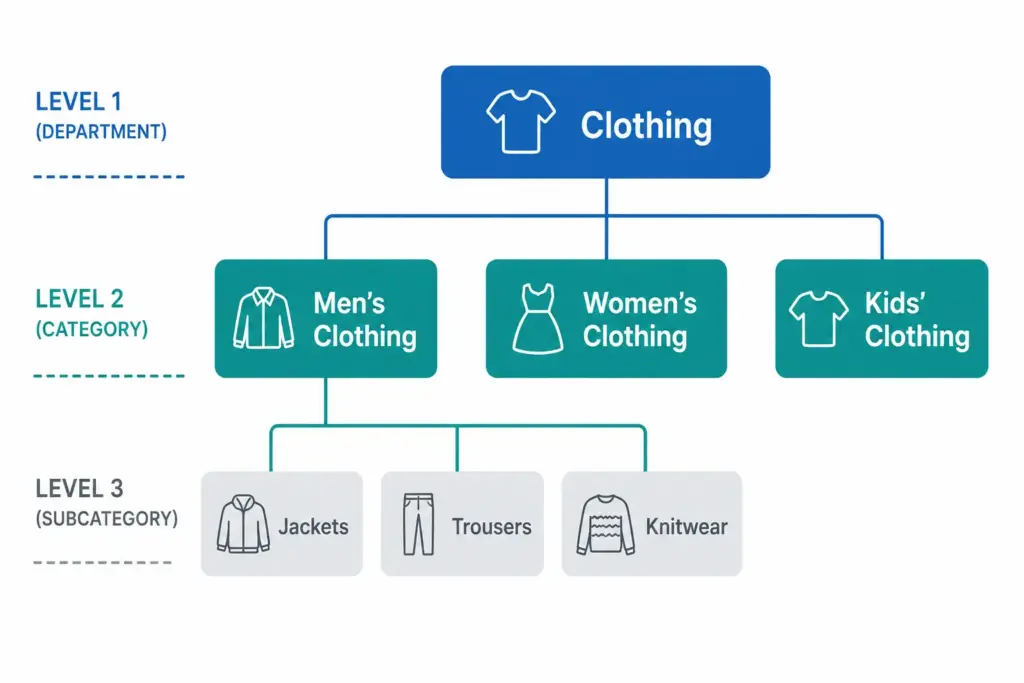
Those three questions map to the three levels every functional taxonomy needs: Department → Category → Subcategory.
A Simple Product Taxonomy Example
Level
Name
Example
Level 1 — Department
Clothing
Clothing, Footwear, Accessories
Level 2 — Category
Men’s Clothing
Men’s, Women’s, Kids’
Level 3 — Subcategory
Men’s Jackets
Jackets, Trousers, Shirts, Knitwear
Level 4 — Product Type
Men’s Rain Jackets
Rain Jackets, Leather Jackets, Puffer Jackets
Every product in the catalog sits at the most specific level — Level 3 or Level 4 — not at the top. A product is never just “Clothing”. It is always “Men’s Rain Jackets” or “Women’s Running Shoes”.
Taxonomy vs Categories vs Attributes — What’s the Difference?
These three terms are often used interchangeably but they are distinct concepts.
Taxonomy — the overall classification system and its rules. The framework.
Categories — the individual nodes within the taxonomy. Men’s Jackets is a category.
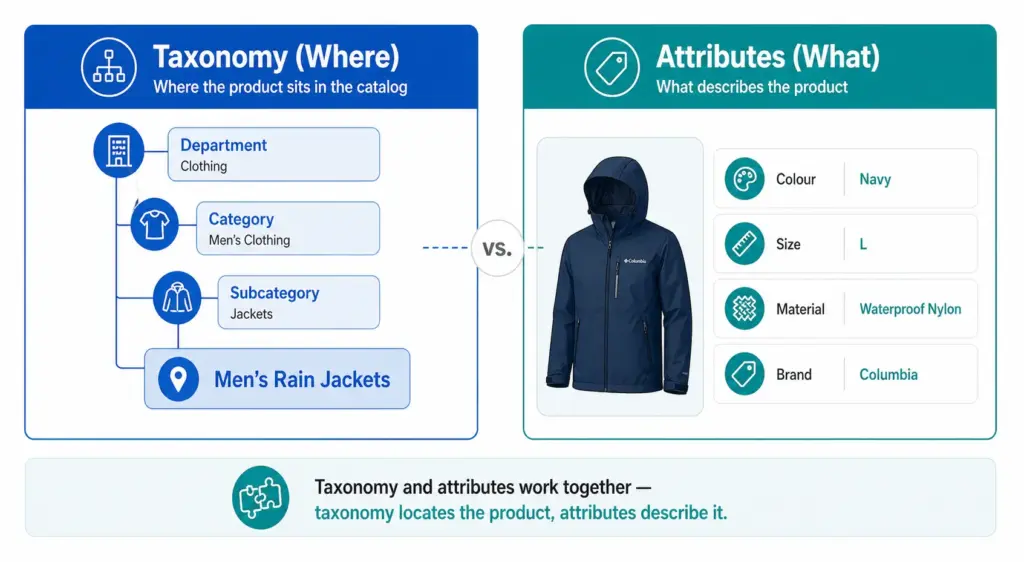
Attributes — the properties of a product within its category. Colour, Size, Material, Brand are attributes of a product in Men’s Jackets.
Taxonomy tells you where the product lives. Attributes describe what the product is. Both are necessary. A product without a taxonomy position cannot be found by browsing. A product without attributes cannot be filtered or matched to specific search queries.
Why Product Taxonomy Matters for Ecommerce
1. Site navigation and search
Your taxonomy is the structure your site navigation and filters are built on. If your taxonomy is flat or inconsistent, your filters do not work. Customers searching for “blue running shoes women size 7” cannot filter to that result if Colour, Activity, Gender, and Size are not structured attributes on products in the correct subcategory.
2. Google Shopping performance
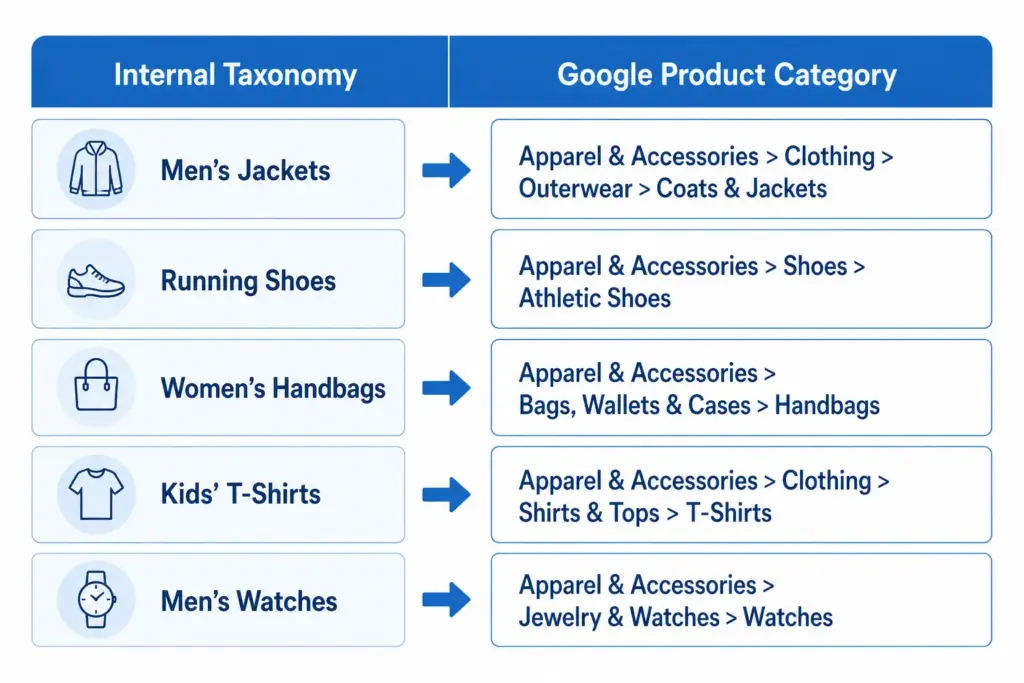
Google Shopping requires a google_product_category value for every product. This value must map to Google’s own taxonomy at the most specific level available. A jacket submitted as “Apparel & Accessories” instead of “Apparel & Accessories > Clothing > Outerwear > Coats & Jackets” loses relevance in every Shopping auction it enters. Your taxonomy must map to Google’s.
3. Channel feed mapping
Every major channel — Google Shopping, Amazon, Facebook Catalogue, retail marketplaces — has its own category taxonomy. Your internal taxonomy needs to translate cleanly to each one. A well-structured internal taxonomy makes this mapping straightforward. A chaotic one makes it a manual monthly project.
4. Internal catalog management
A consistent taxonomy means your team can find, update, and report on products by category without ambiguity. Without it, “running shoes” might live under “Athletic Footwear”, “Sports”, “Men’s Sports”, and “Women’s Running” in the same catalog — making bulk updates, seasonal campaigns, and channel exports all harder than they need to be.
Flat vs Hierarchical Taxonomy
Two structural approaches exist for product taxonomy. For most ecommerce stores with more than a few hundred products, the difference matters significantly. The full comparison is covered in the Flat vs Hierarchical Taxonomy guide, but the key distinction is:
Flat taxonomy: One level of categories, no subcategories. Simple but breaks down above ~200 products. Filters become unwieldy and Google category mapping becomes imprecise.
Hierarchical taxonomy: Multiple nested levels. Scales to any catalog size. Enables precise Google category mapping and deep attribute-based filtering.
Product Taxonomy in Practice — Real Examples
Across industries the hierarchy principle stays the same but the depth and attribute requirements differ significantly. A fashion taxonomy needs colour normalisation, size system declarations, and seasonal attribute management. An electronics taxonomy needs technical specification attributes and compatibility data. A home goods taxonomy needs dimension attributes and material normalisation. Each industry guide is linked below.
How to Build Your Product Taxonomy
The full step-by-step build process is covered in How to Build a Product Taxonomy From Scratch — from auditing your products through to Google category mapping and documentation. The short version:
Define what your taxonomy needs to do — navigation, channel mapping, or both
Audit your existing products before designing any categories
Design 5–12 top-level departments
Build at minimum three levels of hierarchy
Define attribute sets per subcategory
Map every subcategory to a Google product category leaf node
Document the rules
Before building, take the PIM Readiness Score to identify where your current product data governance has gaps. The free Taxonomy Template at lynkpim.app gives you a pre-built starting point for 5 industries.
Frequently Asked Questions
What is product taxonomy in ecommerce?
Product taxonomy is the hierarchical classification system used to organise products into categories, subcategories, and product types. It defines the structure that powers site navigation, search filters, channel feeds, and internal catalog management.
What is the difference between product taxonomy and product attributes?
Taxonomy defines where a product sits in the hierarchy — Men’s Clothing > Jackets. Attributes define the properties of that product within its category — Colour: Navy, Size: L, Material: Nylon. Taxonomy organises the catalog structure; attributes describe individual products within it.
Why does product taxonomy matter for Google Shopping?
Google Shopping requires a google_product_category value for every product in your feed, mapped to Google’s own taxonomy at the most specific leaf-node level. Broad or incorrect category values reduce relevance matching and hurt Shopping auction performance — your products appear for fewer relevant queries and at lower positions.
How many levels should a product taxonomy have?
A minimum of three levels: Department (Level 1), Category (Level 2), and Subcategory (Level 3). Larger catalogs benefit from a fourth level (Product Type). More than four levels rarely adds value and increases maintenance complexity without meaningful benefit to navigation or channel mapping.
What is the difference between a flat and hierarchical product taxonomy?
A flat taxonomy has one level of categories with no subcategories — simple but breaks down above ~200 products. A hierarchical taxonomy has multiple nested levels that scale to any catalog size, enable precise Google category mapping, and support deep attribute-based filtering. For the full comparison see Flat vs Hierarchical Taxonomy.
Product Taxonomy for Electronics: Handling Complex Variants at Scale
Electronics catalogs present a different set of taxonomy challenges than fashion or general merchandise. The variant complexity is not size and colour — it is processor speed, RAM configuration, storage tier, connectivity standard, and compatibility matrix. Customers buying a laptop know exactly what specs they need. Your taxonomy either surfaces those specs in filters or loses the sale.
What Makes Electronics Taxonomy Complex
Technical specification depth: A single laptop model can have 12+ relevant attributes. All need to be captured, validated, and filterable.
Rapid product obsolescence: New chipsets and standards appear constantly. Your taxonomy needs to accommodate new attributes without breaking existing products.
Compatibility dependencies: Accessories are valid only for specific parent products. A charger is not just a charger — it is a charger for a specific voltage, connector type, and device family.
High-consideration buying: Electronics customers compare on specifications more than any other category. Incomplete data does not just affect discoverability — it directly prevents conversion.
Recommended: Driver size, Frequency response, Noise cancellation type, Battery life, Impedance, Microphone (yes/no), Codec support (AAC, aptX, LDAC)
Handling Variant Structures in Electronics
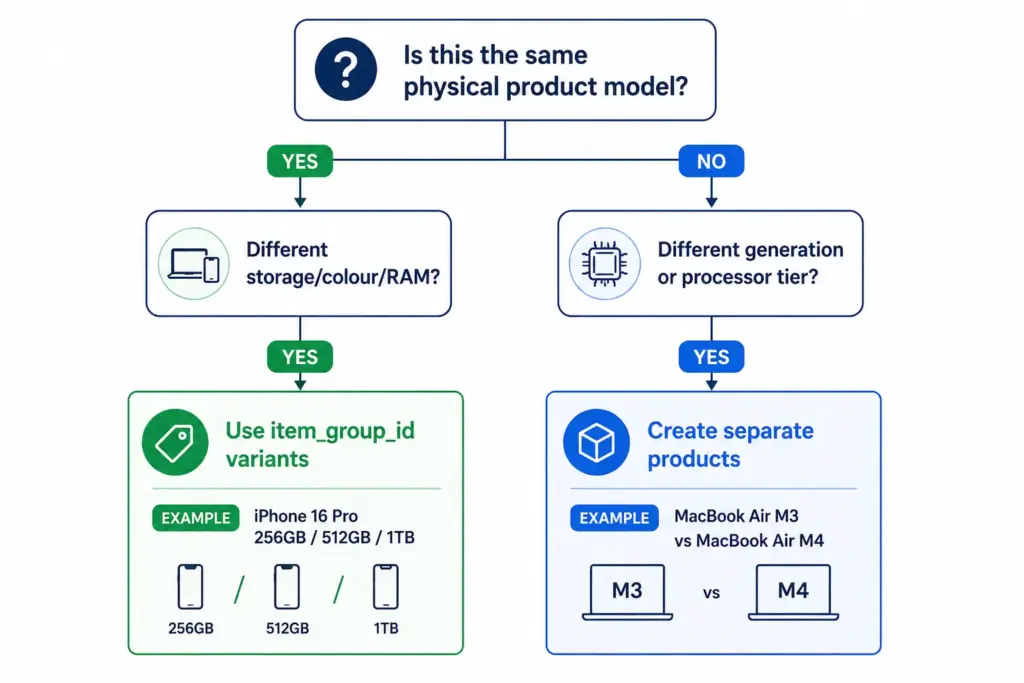
Electronics variants behave differently from fashion variants. In fashion, variants of the same product differ only in size and colour — the product is the same. In electronics, different storage configurations can have meaningfully different prices, performance profiles, and target buyers.
Variant approach (same item_group_id): All configurations of the same physical product model are variants. Customers can switch between them on the same product page. Use this when the products are the same model with configuration differences only.
Separate product approach: When the “variant” is effectively a different product — different processor tier, different generation, meaningfully different positioning — treat as separate products. Different model generations should be separate products, not variants of each other.
For how variant management compares across categories, the fashion taxonomy guide covers the simpler size/colour variant model as a useful contrast.
Compatibility Attributes — The Electronics-Specific Challenge
Accessories in electronics require compatibility data that no other category demands at the same scale. A USB-C cable not rated for Thunderbolt 4 is useless to someone buying it for a high-end laptop. A phone case for one model does not fit its larger variant.
Build compatibility into your taxonomy as a structured attribute, not as free-text description:
compatible_with — a list of compatible product IDs or model references from your own catalog
connector_type — USB-C, USB-A, Lightning, Thunderbolt 4, HDMI 2.1 etc.
voltage / wattage — for chargers and power accessories
form_factor — for components (ATX, Micro-ATX, Mini-ITX for PC cases and motherboards)
Structured compatibility data enables “compatible accessories” widgets on product pages — a meaningful cross-sell driver in electronics where accessory attach rates are high.
Electronics > Computers > Computer Components > Hard Drives & Storage > Solid State Drives
Mirrorless camera body
Cameras & Optics > Cameras > Digital Cameras
Smart TV 65″
Electronics > Video > Televisions
Managing Rapid Product Turnover
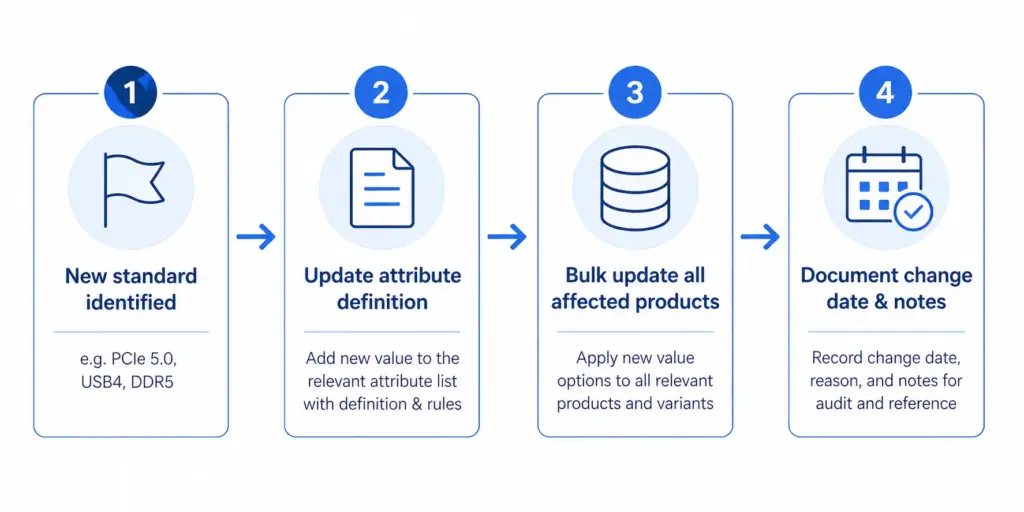
Electronics catalogs face a unique taxonomy maintenance challenge: product generations. A new processor standard, connectivity format, or storage type can require new attribute values across hundreds of products simultaneously.
Build this into your taxonomy governance from the start: attribute value lists need a version-controlled update process, not ad hoc additions. When a new standard appears, update the attribute definition, update all products in that category in bulk, and document the change date.
At scale, this requires product data tooling that can apply bulk attribute updates to entire categories. The PIM Readiness Score will show you where your current setup has gaps — and the LynkPIM free plan lets you start managing this properly without a large budget or implementation timeline.
For a broader comparison of how taxonomy decisions differ across industries, see the Flat vs Hierarchical Taxonomy guide — the structural decision matters more for electronics than for most other categories due to the depth of specification attributes required at every level.
Frequently Asked Questions
Should different laptop storage configurations be variants or separate products?
Use variants (same item_group_id) for storage, colour, and RAM configuration differences within the same physical model — customers can switch between them on the same product page. Create separate products for different processor generations or model tiers that represent meaningfully different products with different performance profiles and target buyers.
What compatibility attributes should electronics accessories have?
At minimum: compatible_with (list of compatible product IDs or model references), connector_type (USB-C, USB-A, Thunderbolt 4, HDMI 2.1 etc.), voltage and wattage for chargers and power accessories, and form_factor for PC components. Structured compatibility data enables “compatible accessories” widgets on product pages and reduces returns from incompatible purchases.
How do you handle new technical standards in an electronics taxonomy?
Treat attribute value lists as version-controlled documents. When a new standard appears — PCIe 5.0, USB4, DDR5 — update the attribute definition for the affected subcategory, bulk-update all products in that category, and document the change date. Ad hoc additions without bulk updates leave older products with stale or missing values, which hurts both filter accuracy and feed performance.
What Google product category should I use for NVMe SSDs?
Use the leaf-node category: Electronics > Computers > Computer Components > Hard Drives & Storage > Solid State Drives. Never use a parent category like “Electronics” or “Electronics > Computers” — Shopping relevance and auction performance depend on using the most specific category available for every product.
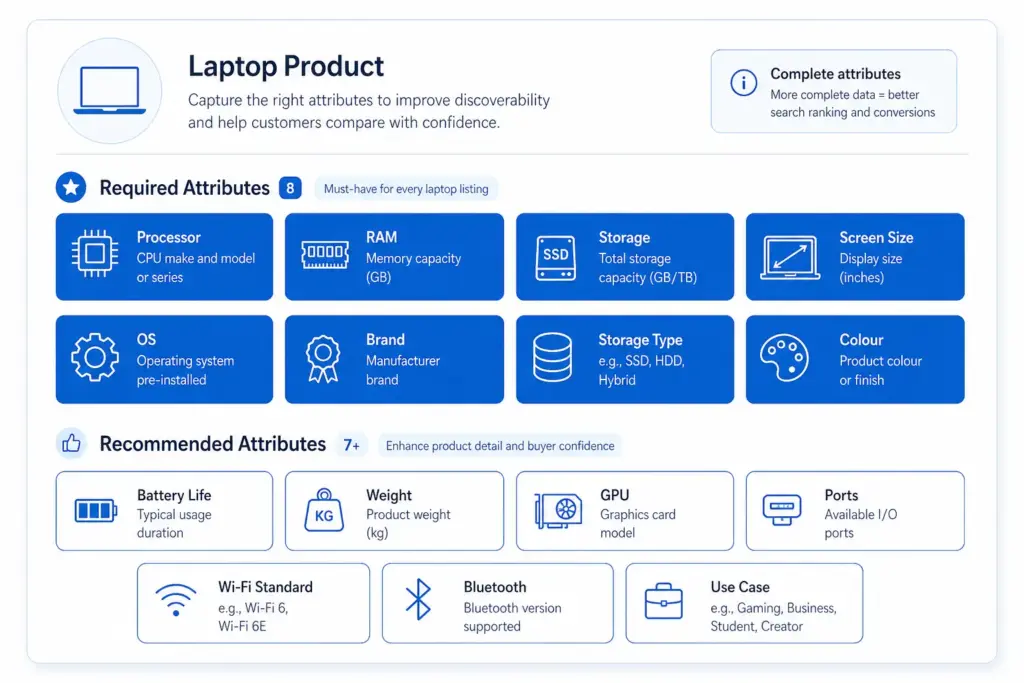
How many required attributes does a laptop product need?
At minimum 8 required attributes: Brand, Processor family, Processor model, RAM (GB), Storage capacity (GB), Storage type (SSD/HDD/NVMe), Screen size (inches), and Operating system. Recommended additions that significantly improve discoverability and conversion include GPU, battery life, weight, screen resolution, ports, Wi-Fi standard, and use case (gaming / business / ultrabook).
Product Taxonomy for Fashion Ecommerce: The Complete Industry Guide
Fashion is the most complex product taxonomy challenge in ecommerce. No other category has the same combination of variant depth (size × colour × material), seasonal rotation, brand complexity, and the need to align with both customer search language and Google’s own category hierarchy simultaneously.
This guide covers how to structure a fashion taxonomy that works for site navigation, Google Shopping, and internal catalog operations at the same time.
Why Fashion Taxonomy Is Uniquely Difficult
High variant depth: A single jacket style can generate 40+ variants (4 colours × 5 sizes × 2 materials). Each needs proper categorisation.
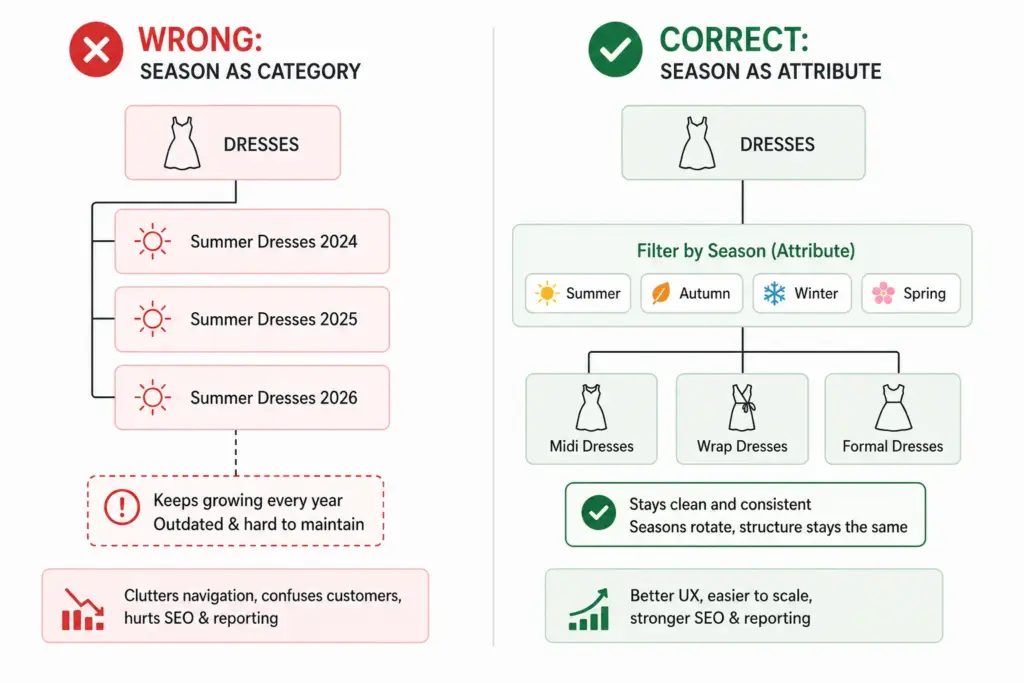
Seasonal rotation: Categories like “Summer Dresses” need to exist, disappear, and reappear without breaking your taxonomy structure.
Cross-gender categorisation: Unisex products that appear in both Men’s and Women’s categories require clear rules.
Trend-driven additions: New product types appear faster in fashion than almost any other category — your taxonomy needs to accommodate them without restructuring.
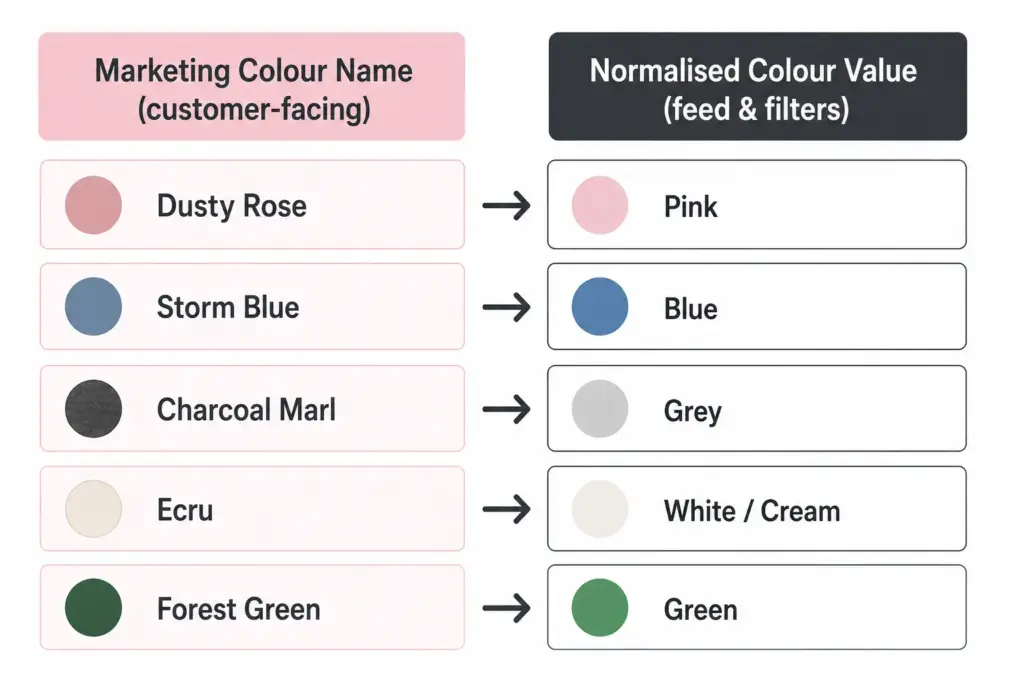
Colour management is where fashion taxonomy most often breaks down. Fashion brands use marketing colour names (“Dusty Rose”, “Storm Blue”) that are meaningful to buyers but problematic for Google Shopping and site search filtering.
The solution is a two-field colour approach:
Marketing colour name: Used in product titles and descriptions facing customers — “Storm Blue Puffer Jacket”
Normalised colour value: Used for feed submission and filter attributes — “Blue”. This maps to Google’s accepted colour values and makes site filters work correctly (“Filter by: Blue, Green, Red”).
Without normalised colour values, your “Navy”, “Dark Navy”, “Midnight Navy”, and “Storm Blue” all appear as separate filter options rather than grouping under “Blue”. Customers cannot find what they are looking for and conversion on filtered searches drops.
Size Management and International Sizing
Fashion brands selling internationally face size system conflicts. A UK 10 dress and a US 10 dress are different sizes. A European 40 and a US 8 are the same women’s dress size. Declare your size system in every product record using the size_system attribute.
For brands selling across regions from a single catalog, the cleanest solution is to store size in your primary size system and maintain a size conversion reference table as a documented data standard — not as additional product fields that will create mapping errors when updated.
Seasonal Category Management
Fashion taxonomy needs seasonal flexibility without permanent structural changes. Two approaches work well:
Season as an attribute, not a category: Keep “Summer Dresses” as a filter value (season = Summer) rather than a permanent subcategory. This prevents your taxonomy from accumulating dead branches as seasons pass.
Evergreen subcategories with seasonal tags: “Dresses” is the permanent subcategory. “Summer” is a tag or attribute. Products appear in the Dresses subcategory year-round; the Summer filter surfaces them seasonally. This is the more scalable approach for catalogs with high seasonal turnover.
Mapping Fashion Taxonomy to Google Product Categories
Every fashion subcategory needs a Google product category mapping. Use Google’s leaf-node values (the most specific level) for best Shopping performance. The mapping should be documented and applied consistently — not manually re-entered per product.
The difference between flat and hierarchical taxonomy structures for fashion is covered in detail in the Flat vs Hierarchical Taxonomy guide — worth reading before finalising your structure.
Once your fashion taxonomy is structured correctly, implementing it at scale requires a system that can enforce attribute validation and apply category-level rules automatically. The PIM Readiness Score takes 5 minutes and shows you where your current product data setup has gaps.
Download the free Product Taxonomy Template at lynkpim.app — the Fashion & Apparel tab includes the full category hierarchy, attribute set, and Google mapping pre-built for clothing, footwear, and accessories.
Frequently Asked Questions
How should fashion ecommerce handle seasonal categories in a product taxonomy?
Use season as an attribute rather than a permanent category. Keep “Dresses” as the permanent subcategory and assign season = Summer as a tag or attribute value. This prevents the taxonomy from accumulating obsolete branches (Summer Dresses 2024, Summer Dresses 2025) that clog navigation and require ongoing cleanup.
What is the two-field colour approach for fashion product data?
Store two colour values per product: a marketing colour name for customer-facing content (Dusty Rose, Storm Blue) and a normalised colour value for feed submission and site filters (Pink, Blue). Without normalised values, multiple shades of the same colour appear as separate filter options — “Navy”, “Dark Navy”, “Midnight Navy” become three separate filter choices instead of one “Blue” group.
How many top-level categories should a fashion taxonomy have?
Most fashion stores work well with 6 to 8 top-level departments: Women’s Clothing, Men’s Clothing, Kids’ Clothing, Footwear, Accessories, Swimwear, and Lingerie & Nightwear. Avoid creating top-level categories for product types you carry fewer than 20 products in — use attributes and filters instead.
How do you handle unisex products in a fashion taxonomy?
Set gender = unisex in the product attributes and assign the product to the most appropriate department based on primary customer intent. For your Google Shopping feed, use gender = unisex and surface products in both Men’s and Women’s navigation via tags or multi-category assignment depending on your platform.
What Google product category should I use for women’s dresses?
Use the leaf-node value: Apparel & Accessories > Clothing > Dresses. Avoid the parent category Apparel & Accessories > Clothing — the more specific your Google product category, the better your Shopping feed relevance. For formal dresses, go one level deeper if possible.
How to Build a Product Taxonomy From Scratch (Step-by-Step Guide)
Most product taxonomy problems do not start with bad intentions. They start with a spreadsheet, a growing catalog, and someone who just needed to categorise 50 products quickly. Three years later there are 3,000 products, four naming conventions, and no one knows which category rules apply where.
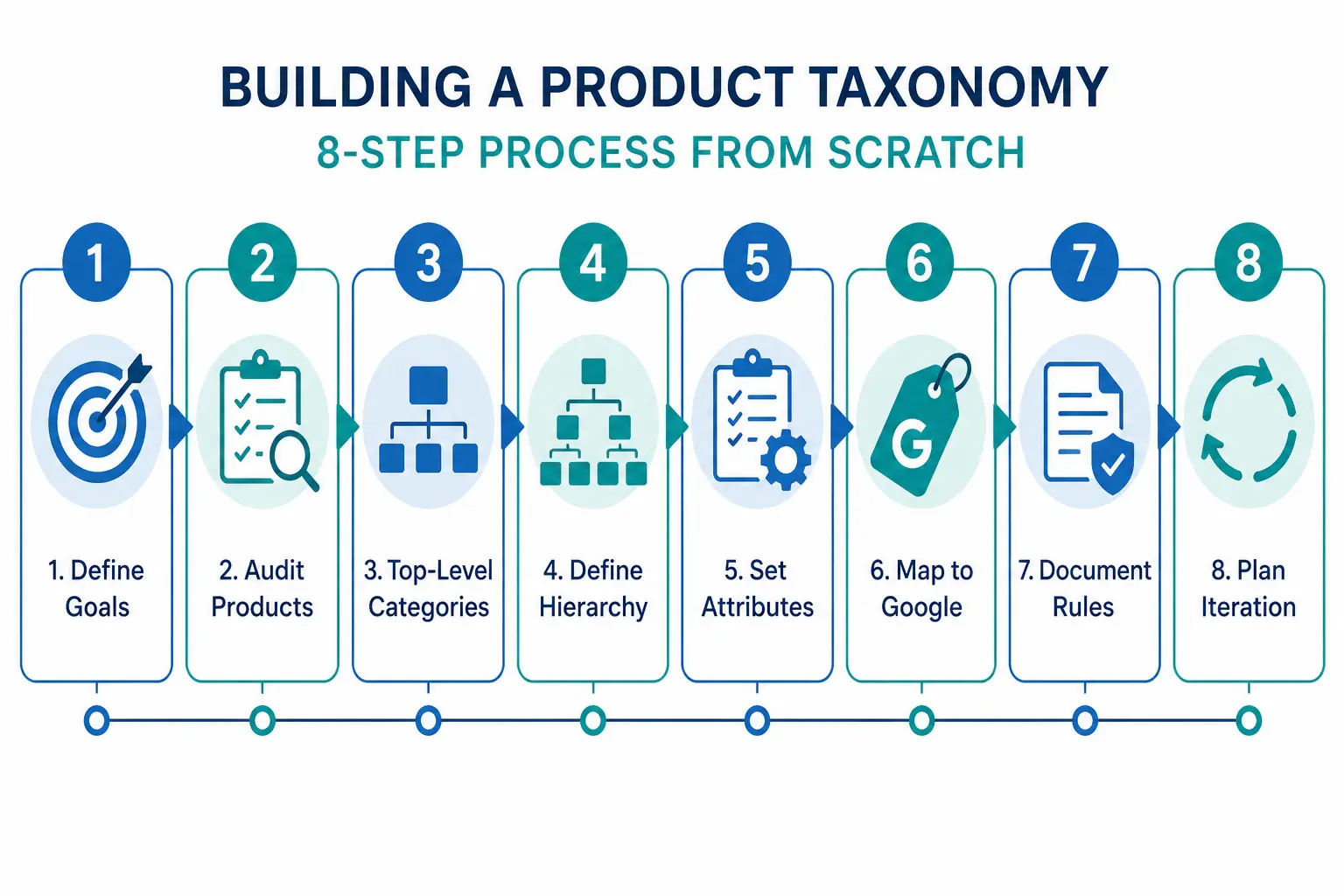
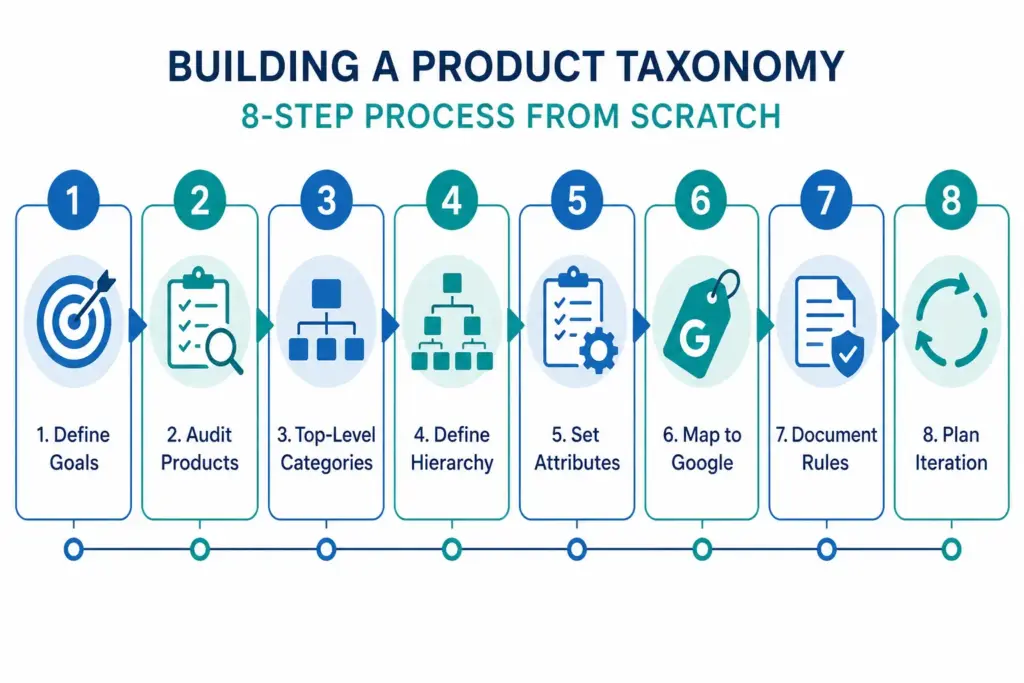
Building a taxonomy properly from the start — or rebuilding one that has grown without structure — requires the same process regardless of catalog size. This guide walks through every step.
Step 1: Define What Your Taxonomy Needs to Do
Before you name a single category, decide what jobs your taxonomy needs to perform. Most ecommerce catalogs need it to do three things simultaneously:
Power site navigation and search — customers browse by category and use filters. Your taxonomy is the structure those filters sit on.
Map to channel requirements — Google Shopping, Amazon, and marketplaces have their own taxonomies. Yours needs to translate cleanly to theirs.
Organise internal operations — product teams, buyers, and merchandisers use the taxonomy to find, update, and report on products.
These three jobs sometimes conflict. A taxonomy built purely for internal operations often does not map well to how customers search. Understanding the priority before you build prevents rework. For background on what taxonomy is and why it matters, the What Is Product Taxonomy guide covers the foundations.
Step 2: Audit Your Existing Products
Export every SKU you have. Look at the full list before designing any categories. You are looking for:
Natural groupings — what products obviously belong together?
Edge cases — products that do not fit neatly into an obvious category
Volume distribution — how many products fall into each potential category?
Attribute patterns — what attributes do products in the same group share?
A category with 2 products and a category with 2,000 products suggest the hierarchy is off. Aim for relative balance across categories at the same level, with narrow subcategories only where genuine product differentiation exists.
Step 3: Design Your Top-Level Categories
Top-level categories are your broadest groupings. For most ecommerce catalogs, 5–12 top-level categories is the right range. Too few and subcategories get unwieldy. Too many and customers cannot find their starting point.
The test for a top-level category: a customer with no prior knowledge of your store should be able to assign a product to the correct top-level category without thinking about it. If it requires judgment, the category is too vague.
Two approaches to defining top-level categories
Customer-first approach: Start with how customers describe what they are looking for. Use your site search data, Google Search Console queries, and competitor category names as evidence of natural language groupings.
Google-first approach: Start with Google’s product taxonomy at the top level. This makes channel mapping easier later and ensures your categories align with how the largest product discovery platform in the world organises products. You can always use internal-facing names that differ from the Google-facing values.
Step 4: Define 3 Levels of Hierarchy (Minimum)
A functional product taxonomy needs at least three levels:
For larger catalogs, Level 4 (product type) is worth adding: Men’s Jackets → Rain Jackets, Leather Jackets, Padded Jackets.
The difference between a flat and hierarchical taxonomy matters significantly for navigation and channel mapping. The Flat vs Hierarchical Taxonomy guide covers when each structure is appropriate.
Step 5: Define Attributes per Category
Attributes are the product properties that apply within a category. Every category in your taxonomy needs a defined attribute set — the list of fields that must be filled for a product in that category to be considered complete.
Category
Required Attributes
Recommended Additions
Men’s Jackets
Brand, Colour, Size, Material, Gender
Waterproof rating, Fill weight, Packable
Running Shoes
Brand, Colour, Size, Gender, Surface type
Drop height, Cushioning level, Width
Laptops
Brand, Processor, RAM, Storage, Screen size
Battery life, Weight, Graphics card
Step 6: Map to Google’s Product Taxonomy
Once your internal taxonomy is defined, create a mapping document that links each of your subcategories to its corresponding Google product category value. Use Google’s official taxonomy file to find the correct IDs. Map at the most specific level possible — leaf nodes, not parent categories.
Step 7: Document the Rules
A taxonomy that exists only in someone’s head is a single point of failure. Document:
Category definitions — what does and does not belong in each category
Naming conventions — title case vs sentence case, singular vs plural
Attribute validation rules — acceptable values for controlled attributes like colour and size
Exception handling — what happens to products that span categories
The PIM Readiness Score assessment helps you identify where your current product data governance has gaps before you build on top of it. Free, takes 5 minutes.
Step 8: Build with Iteration in Mind
No taxonomy survives contact with a growing catalog unchanged. You will need to add categories as you expand into new product areas. You will discover edge cases your initial rules did not cover. You will probably need to split an overpopulated subcategory 18 months after launch.
Build with this in mind: keep hierarchy levels consistent, avoid category names that are too specific, and review your taxonomy structure annually against site search data and channel performance.
Ready to apply this? Download the free Product Taxonomy Template at lynkpim.app — pre-built for Fashion, Electronics, Home Goods, Food & Beverage, and B2B Industrial. Use it as a starting point rather than building from a blank page.
Once your taxonomy structure is set, see how it applies to specific industries: fashion ecommerce taxonomy and electronics taxonomy both cover the unique requirements of their categories in detail.
Frequently Asked Questions
How many levels should a product taxonomy have?
A minimum of three levels: Department (Level 1), Category (Level 2), and Subcategory (Level 3). Larger catalogs benefit from a fourth level (Product Type). Going beyond four levels rarely adds value and increases maintenance complexity without meaningful improvement to navigation or channel mapping.
How often should you review and update your product taxonomy?
Review your taxonomy structure at least once per year against site search data, channel performance data, and catalog growth. Attribute value lists for technical categories may need updating more frequently — for example when new product standards or formats appear in electronics or components.
Should your internal taxonomy match Google’s product taxonomy?
Not necessarily. Your internal taxonomy should reflect how your team and customers think about products. What matters is that every internal subcategory maps to the correct Google product category leaf node in your feed — the two systems can use different naming as long as the mapping document is maintained and applied consistently.
What is the difference between a category and an attribute in product taxonomy?
A category defines where a product sits in the hierarchy — for example, Men’s Jackets. An attribute defines a property of that product within its category — for example, Colour = Navy, Size = L, Material = Nylon. Categories organise the catalog structure; attributes describe individual products within it.
How many top-level categories should a product taxonomy have?
For most ecommerce catalogs, 5 to 12 top-level categories is the right range. Too few and subcategories become unwieldy. Too many and customers cannot find their starting point. The test: a customer with no prior knowledge should be able to assign any product to the correct top-level category without thinking about it.
Google Shopping Feed for Apparel: All Requirements Explained (2026)
Apparel is the most attribute-heavy category in Google Shopping. Miss a required field and your products either disapprove or lose out in auctions to competitors whose feeds are complete. This guide covers every attribute Google requires or strongly recommends for clothing, footwear, and accessories — with the exact values and format Google expects.
Why Apparel Feeds Are Different
Google’s feed requirements for apparel go beyond the standard required attributes that apply to all products. Clothing and shoes have mandatory variant attributes, specific size system declarations, and stricter image requirements. A feed that works fine for non-apparel will generate warnings and limited performance for clothing.
For a full foundation on how Shopping feeds work, the Google Shopping Feed Guide covers the base layer before you add apparel-specific requirements on top.
Required Attributes for All Apparel Products
Attribute
Required?
Notes
id
Yes
Unique per variant, not per style
title
Yes
Include colour, size, material in title
description
Yes
150+ characters recommended
link
Yes
Must land on the specific variant page
image_link
Yes
800×800px minimum, no overlays
price
Yes
Must match landing page exactly
availability
Yes
in stock / out of stock / preorder
google_product_category
Yes
Use specific leaf node, not parent category
brand
Yes
Required for all apparel
item_group_id
Required for variants
Same value for all variants of one style
color
Required for variants
Up to 3 values separated by /
size
Required for variants
One value per product
age_group
Required for variants
adult / kids / newborn / infant / toddler
gender
Required for variants
male / female / unisex
item_group_id — The Most Important Apparel Attribute
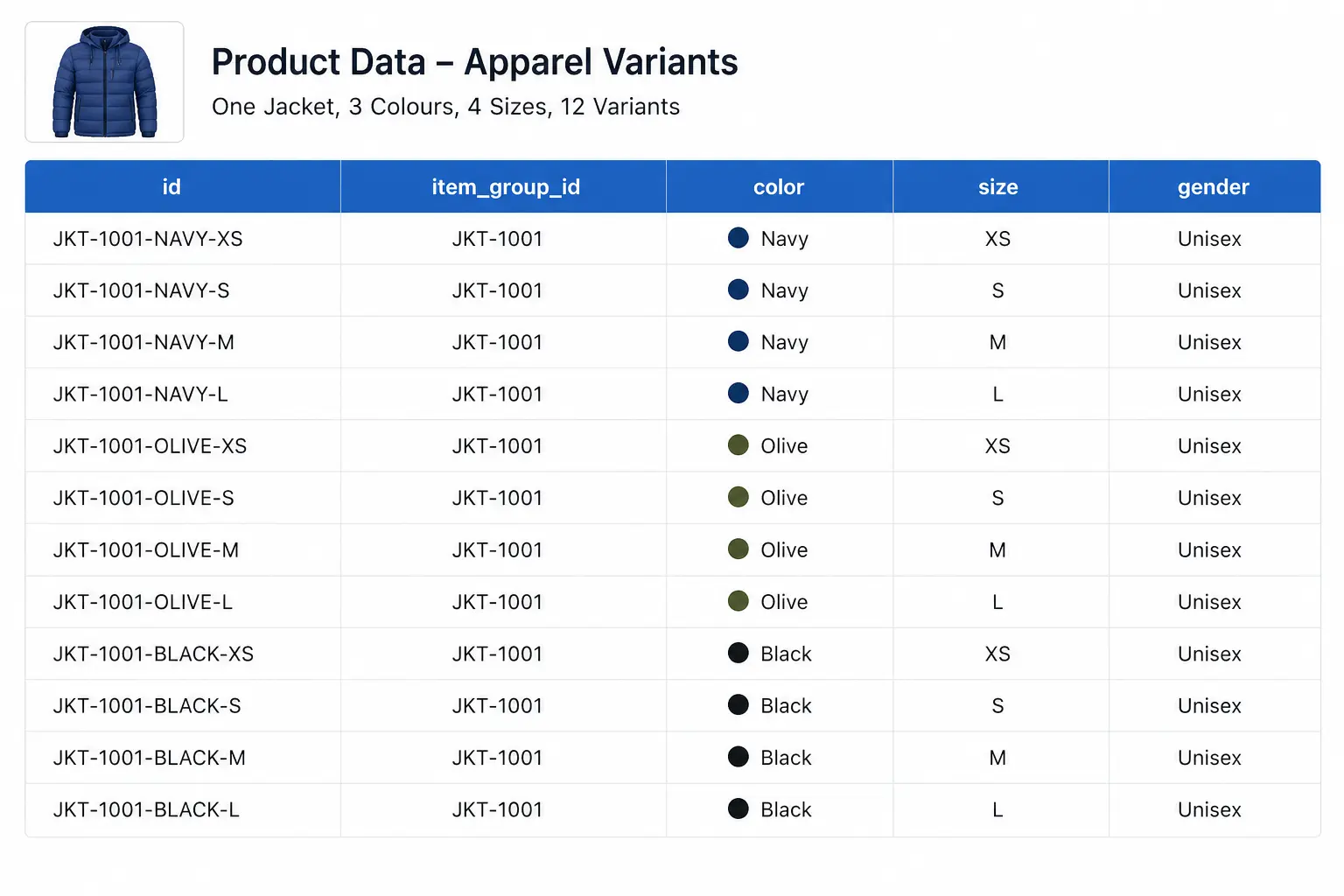
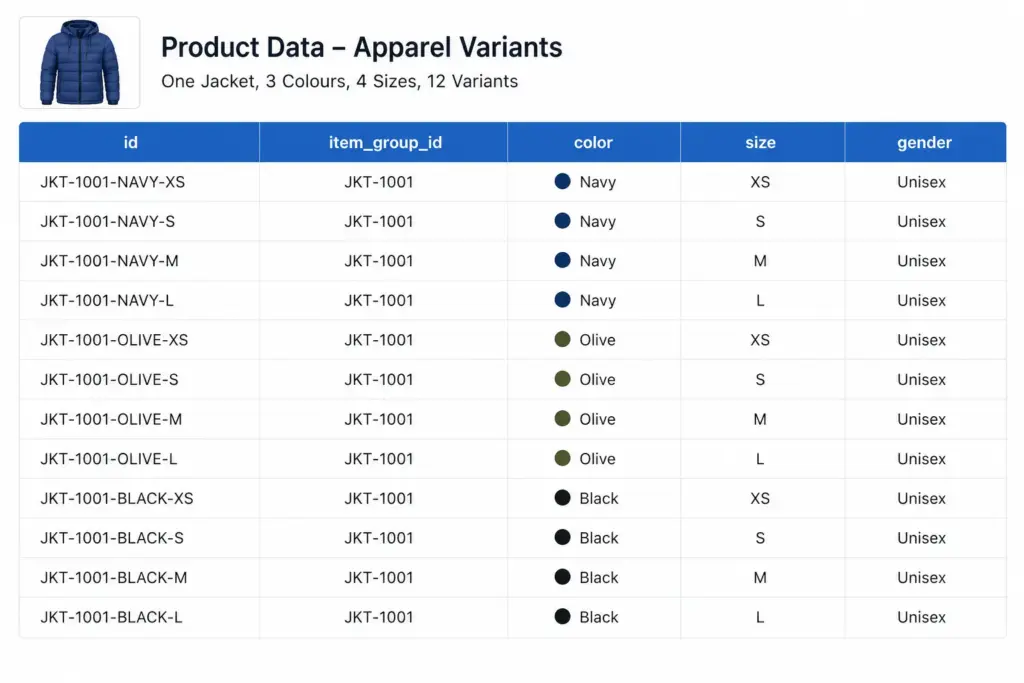
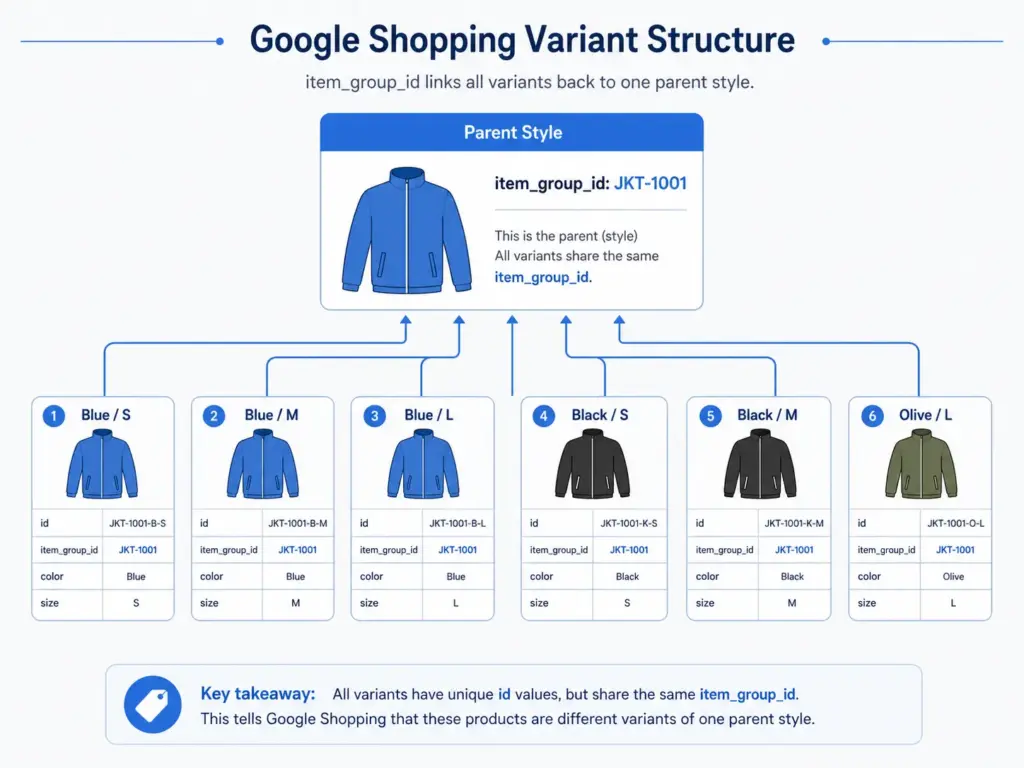
If you only fix one thing in your apparel feed, fix item_group_id. This attribute tells Google which products are variants of the same style. Without it, Google treats a navy size S jacket and a navy size L jacket as two completely unrelated products — and cannot display them as one listing with size options.
The rule: every size, colour, and material variant of the same product must share the same item_group_id value. The parent SKU is the natural choice — if your base product code is JK-2401, all variants carry JK-2401 in item_group_id regardless of their individual IDs.
For GTIN compliance per variant, see the GTIN requirements guide — each variant needs its own valid GTIN in apparel.
Colour Requirements
Colour values must be descriptive and human-readable. Google rejects values that are not recognisable colour names.
Acceptable: Navy, Coral, Charcoal, Slate Blue, Off White
Not acceptable: #003366, Color-4, 01, N/A
Multi-colour: Separate up to 3 values with a forward slash — Navy/White/Red
Maximum length: 100 characters per colour value
Size Requirements and Size Systems
Size values should reflect the labelled size on the product, not a numeric internal code. Use the size_system and size_type attributes to add context to your size values.
size_system
Declares which regional size standard you are using. Accepted values include: AU, BR, CN, DE, EU, FR, IT, JP, MEX, UK, US. This matters for international catalogs — a “10” in US women’s shoes is not the same as a “10” in UK shoes.
size_type
Describes the cut: regular, petite, plus, tall, big, maternity. Use this when your sizing differs from standard. It helps Google match your products to queries like “plus size summer dress”.
Image Requirements for Apparel
Apparel has stricter image rules than other categories because product appearance drives click decisions more directly.
Minimum 800×800px — 1000×1000px or larger recommended for Shopping ads
White or neutral background strongly preferred
No watermarks, promotional text, or overlays of any kind
The image must show the specific colour variant — do not use one image for all colour variants
Use additional_image_link (up to 10 images) — alternate angles, flat lay, and detail shots all improve CTR
Google Product Category for Apparel — Go Deep
Broad category values are one of the most common apparel feed mistakes. “Apparel & Accessories” as a category value is almost useless for relevance. Google’s taxonomy goes 5–7 levels deep for clothing and footwear — use the deepest applicable level.
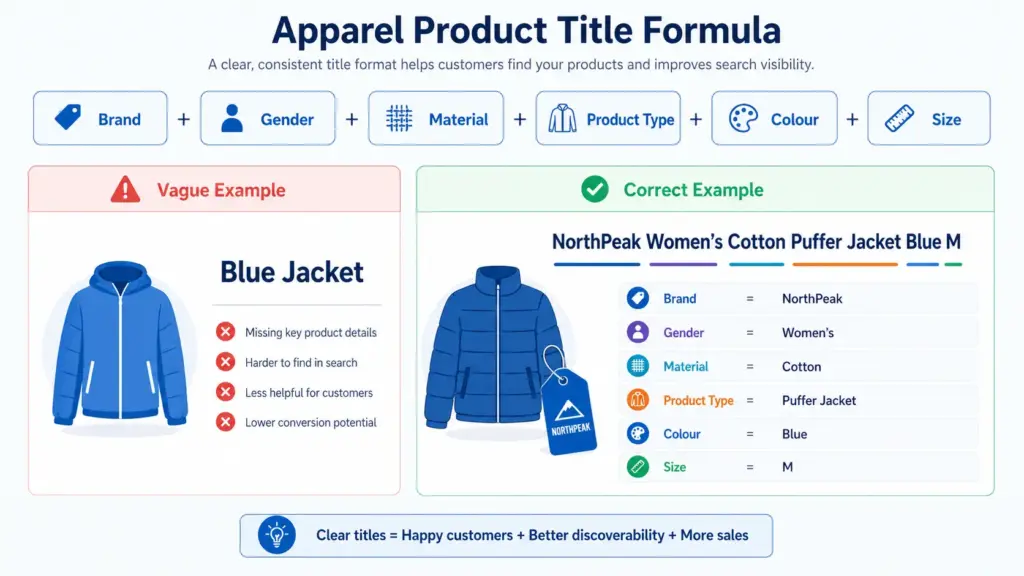
Example: Columbia Women’s Waterproof Softshell Jacket Navy Size 12
For seasonal products, add the season before the product type: Columbia Women’s Summer Lightweight Running Jacket Coral Size 10
Before You Submit — Validate Your Feed
Apparel feeds have the highest disapproval rates of any Shopping category because of the variant attribute requirements. Before submitting, check:
Every variant has a valid GTIN — use the GTIN Validator to check in bulk
All variants of the same style share the same item_group_id
Colour values are human-readable, not codes or hex values
Size values are declared with size_system if selling internationally
Images are per-colour-variant, not one image reused for all variants
Managing apparel variant data at scale — especially across multiple channels — is where spreadsheet-based approaches break down. Learn how LynkPIM handles variant management without the manual overhead. For campaign performance after your feed is clean, see how to use custom labels for bid segmentation.
Frequently Asked Questions
Is GTIN required for all apparel products?
Yes, for products that have manufacturer-assigned GTINs. Custom or handmade products with no GTIN should set identifier_exists to FALSE in the feed — do not leave GTIN blank without this declaration or you will receive a Limited Performance warning.
Do I need separate products for each size and colour?
Yes. Each unique size/colour/material combination is a separate product in your feed with its own ID. They are linked back to the parent style via item_group_id.
Can I use the same image for different colour variants?
Technically Google will not always disapprove this, but it will hurt your CTR significantly and may trigger a mismatched colour warning. Use colour-specific images wherever possible.
Custom Labels in Google Shopping: How to Use Them for Bid Segmentation (2026 Guide)
Custom labels are one of the most underused levers in Google Shopping. While most advertisers compete on the same bids across their entire catalog, smart merchants use custom labels to segment by margin, seasonality, and performance — bidding high only where it pays off.
This guide covers exactly how to set up custom labels, which segmentation strategies deliver the most impact, and how to manage them efficiently when your catalog changes.
What Are Custom Labels in Google Shopping?
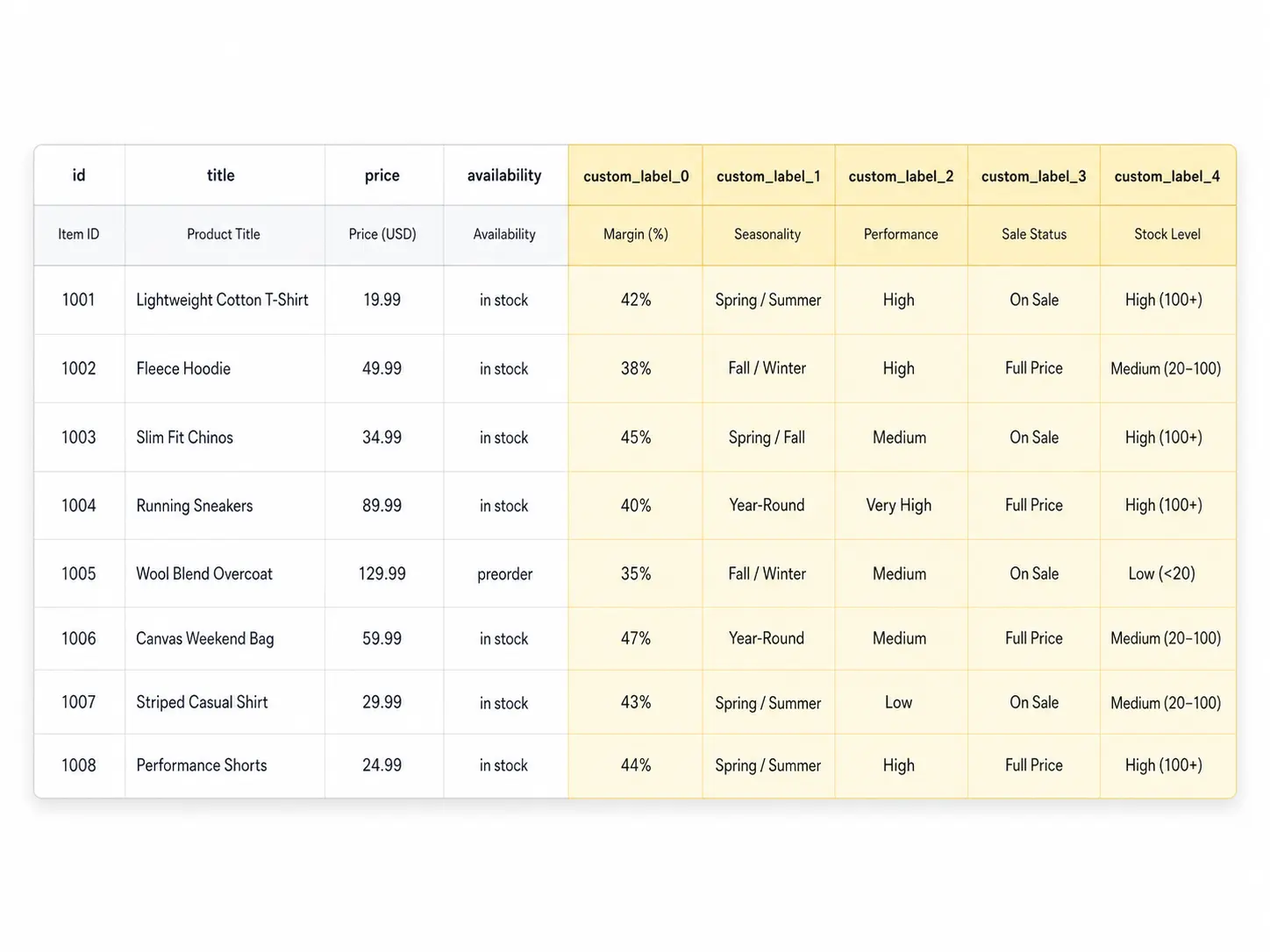
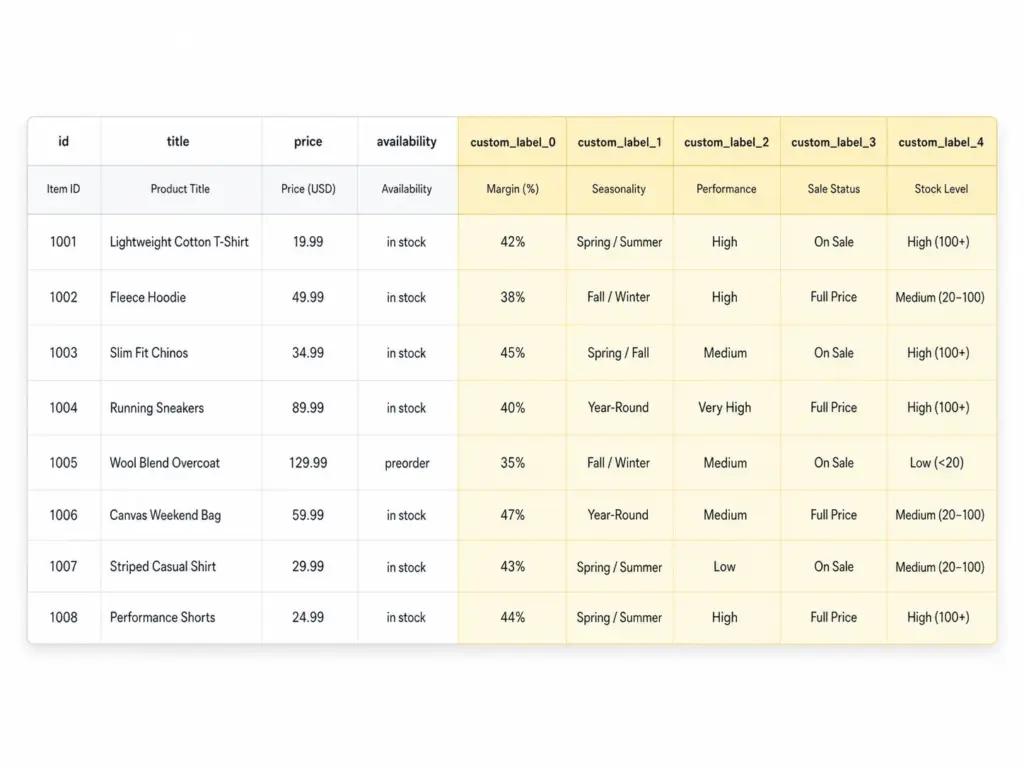
Custom labels (custom_label_0 through custom_label_4) are five optional attributes in your Google Shopping feed that you define yourself. Google does not use them for matching or relevance — they exist purely for your campaign segmentation inside Google Ads.
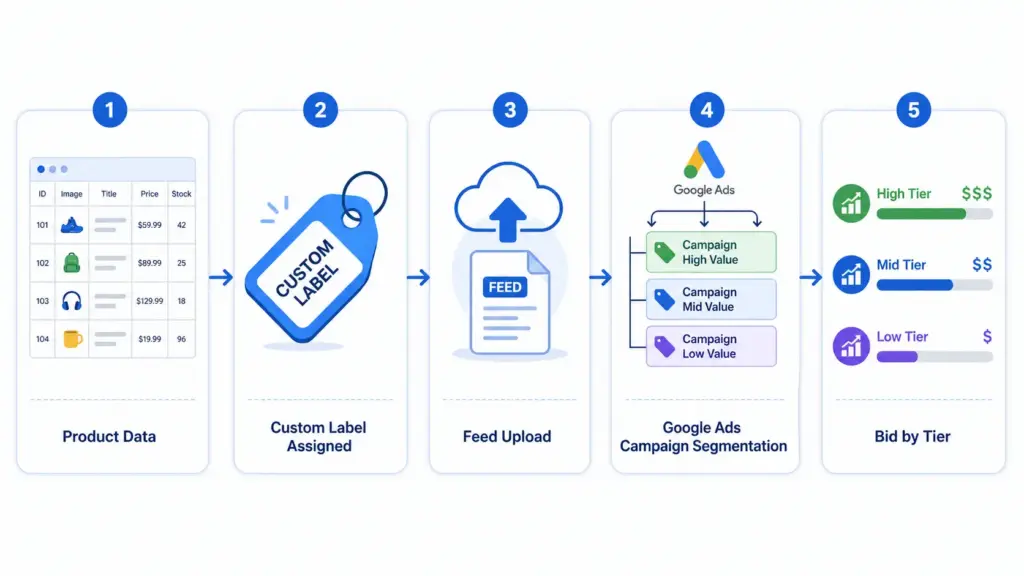
Each label accepts a free-text value up to 100 characters. You assign values in your product feed, then use those values to create product groups inside your Shopping campaigns and set different bids per group. Learn how labels fit into the broader feed structure in the Google Shopping Feed Guide.
The 5 Custom Labels and How to Use Each One
Label
Recommended Use
Example Values
custom_label_0
Margin tier
high-margin, mid-margin, low-margin
custom_label_1
Seasonality
evergreen, summer-2026, clearance
custom_label_2
Performance bucket
top-performer, new-product, slow-mover
custom_label_3
Sale / promotion status
on-sale, full-price, bundle
custom_label_4
Stock level
in-stock, low-stock, backorder
You do not need to use all five. Start with margin (custom_label_0) — it produces the highest ROI impact immediately because it stops you spending high bids on products where the margin does not support it.
Strategy 1: Bid Segmentation by Margin
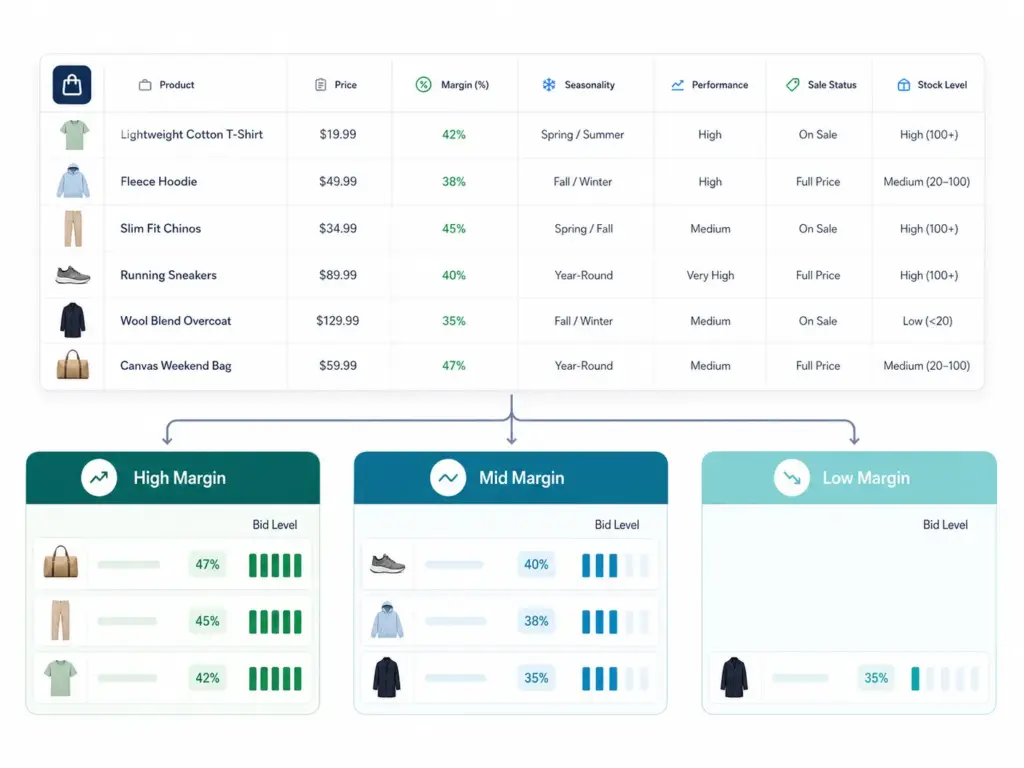
This is the most valuable custom label strategy for most ecommerce businesses. The idea is simple: assign every product a margin tier, then bid proportionally to that margin.
How to implement it
Calculate gross margin % for each SKU (or product group)
Define three to four tiers: for example, high (>50%), mid (25–50%), low (<25%)
Assign the appropriate custom_label_0 value in your feed for every product
In Google Ads, create separate product groups for each margin tier
Set target ROAS or manual CPC bids proportionally — high-margin products get 2–3× the bid of low-margin ones
If you manage your feed through a PIM or feed tool, add a calculated column that assigns the label value based on a margin formula. This keeps labels current as costs change without manual intervention.
Strategy 2: Seasonality Labels
Seasonality labels let you ramp bids up on products entering peak demand and pull them back on products going off-season — without touching your campaign architecture.
evergreen — products with consistent year-round demand. Steady bids.
new-product — less than 30 days data. Moderate bid until you have enough signal.
slow-mover — impressions but no conversions after 30+ days. Investigate before committing budget.
suppress — products you want to exclude from Shopping entirely. Set bid to £0.01.
Review and update performance labels monthly. A new-product that converts well should graduate to top-performer within 30–45 days.
How to Add Custom Labels to Your Feed
Option A: Directly in your product feed file
Add columns named custom_label_0, custom_label_1 etc. to your feed spreadsheet or data source. Assign values per row. Upload the updated feed to Google Merchant Center.
Option B: Using a supplemental feed
If you cannot modify your primary feed directly, use a supplemental feed containing just the ID column and your custom label columns. Merchant Center merges supplemental data onto matching product IDs. This is useful when your primary feed is managed by a platform you do not control directly.
Option C: Rules in Merchant Center
Under Products → Feeds → Feed Rules in Google Merchant Center, you can set conditional rules that assign custom label values based on other attributes — for example, assigning "clearance" to all products with a sale_price more than 30% below regular price. No feed editing required.
For apparel catalogs with multiple variants, reviewing how apparel-specific feed attributes interact with your labels is worthwhile before setting up segmentation.
Common Custom Label Mistakes
Using custom labels for relevance signals — Google ignores label values for matching. They are campaign management tools only.
Inconsistent values — "High Margin", "high-margin", and "HIGH MARGIN" are three different values in Google Ads. Pick a format and stick to it.
Forgetting to update labels when conditions change — A clearance product that returns to full price still carries the clearance label and its low bid.
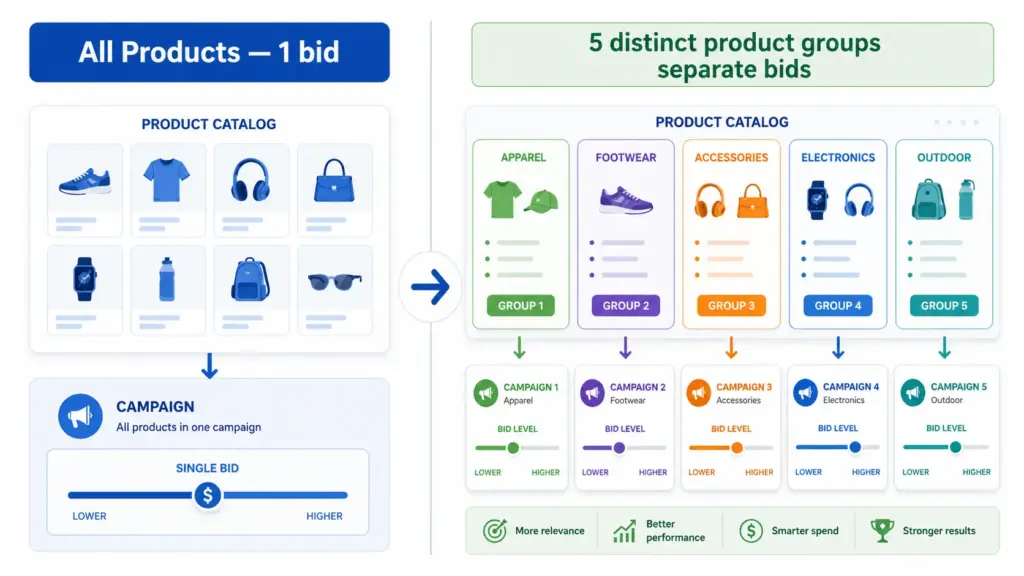
Setting up labels but not creating separate product groups — Labels do nothing if all products sit in the same "All Products" group with one bid.
What to Do Next
Start with one label. Margin is the highest-impact first label for most stores. Assign high / mid / low to every product, create three product groups, and set bids proportionally. Run for 30 days and compare ROAS by tier.
Before setting up labels, run your feed through the GTIN Validator to confirm your product identifiers are clean — label segmentation on a feed with GTIN errors will still underperform at any bid level.
For teams managing large catalogs across multiple channels, maintaining custom label logic inside a PIM means labels update automatically when product data changes rather than requiring manual feed edits every time margins or seasons shift. Try the Google Shopping Feed Generator or explore the LynkPIM free plan to manage this at scale.
Frequently Asked Questions
What are custom labels in Google Shopping?
Custom labels (custom_label_0 through custom_label_4) are five optional feed attributes you define yourself. Google uses them purely for campaign segmentation in Google Ads — not for product matching or relevance. Each accepts a free-text value up to 100 characters.
How many custom labels can you use in Google Shopping?
You can use up to five custom labels per product. You do not need to use all five — start with one, typically margin tier (custom_label_0), and expand once that segmentation is delivering clear ROAS differences between groups.
Do custom labels affect Google Shopping relevance or matching?
No. Custom labels are invisible to Google's matching algorithm. Relevance is determined by your title, description, and google_product_category. Labels exist solely for you to create separate bid groups — they have zero influence on which queries your products appear for.
What is the best first custom label to set up?
Margin tier (custom_label_0) produces the fastest ROI impact for most stores. Assign high, mid, and low values to every product, create three product groups in Google Ads, and set bids proportionally. Run for 30 days and compare ROAS by tier before adding further labels.
Can I add custom labels without editing my main product feed?
Yes. Use a supplemental feed containing just the product ID and custom label columns, or set up Feed Rules in Google Merchant Center to assign label values conditionally based on existing attributes — for example, assigning "clearance" to all products where sale price is more than 30% below regular price. No primary feed editing required.
Amazon Product Feed Guide: Requirements, Errors, and Best Practices for 2026
Amazon does not show customers every product in its catalog for every search. It shows products whose data is complete, accurate, and correctly structured. Your Amazon product feed is the mechanism that determines whether your listings meet that bar — and by how much margin.
A feed with missing required fields gets listings suppressed. A feed with invalid GTINs gets listings rejected or matched to the wrong ASIN. A feed with vague titles and absent bullet points gets deprioritised in search. None of these failures show up as obvious errors in your Seller Central dashboard — they happen quietly while your competitors with better data capture the buy box you should be winning.
This guide covers everything you need for a clean, optimised Amazon product feed in 2026: what an Amazon feed actually is, every required and high-impact optional field, how to structure titles and bullet points that rank, the most common suppression causes and how to fix them, and how flat file uploads compare to the SP-API for different catalog sizes.
Your Amazon product feed is the data layer that determines whether your listings appear, rank, and convert — or get suppressed quietly while your competitors take the traffic.
What is an Amazon product feed?
An Amazon product feed is a structured data file — or a programmatic API submission — that contains the product information Amazon needs to create, update, or manage your listings on the marketplace. Unlike Google Shopping, where you submit a single feed file that Google reads to show products, Amazon’s feed system is bidirectional: you submit product and offer data, Amazon processes it against its catalog, and the result is either a matched listing on an existing product detail page or a new product detail page created from your data.
This matching behaviour is one of the most important things to understand about Amazon feeds. When you submit a product with a valid GTIN, Amazon checks whether that product already exists in its catalog. If it does, your listing joins the existing product detail page — inheriting any reviews, ranking history, and buy box competition already on that page. If it does not, Amazon creates a new page from your data. Getting this matching right is fundamental to Amazon success.
Amazon processes feed data through its inventory management system and applies strict validation at every step. Fields that do not meet format requirements, values that fall outside permitted lists, and identifiers that fail validation all generate errors — some of which block the listing entirely, others that suppress it from search while technically keeping it live.
Amazon product feed: required fields for 2026
Amazon’s required fields are the floor, not the ceiling. Listings that only meet the minimum will rank below listings that also populate high-impact optional fields like bullet points, backend keywords, and enhanced attributes.
Core fields required for all products
Field
Feed name
Requirements
SKU
seller_sku
Your unique internal identifier. Must be consistent across all updates — changing a SKU creates a new listing rather than updating the existing one.
Product title
item_name
Max 200 characters. Must follow Amazon’s category-specific style guide. No promotional language, no all caps, no special characters used as decoration.
Brand
brand_name
The product’s brand or manufacturer. Must match the brand registered in Brand Registry if you are brand-registered. Do not use your store name as a substitute for a brand.
Product description
product_description
Max 2,000 characters. Plain text only in flat file — HTML is not supported in descriptions submitted via flat file but is available via A+ Content for brand-registered sellers.
Bullet points
bullet_point1–bullet_point5
Up to five bullet points, each max 500 characters. These appear prominently on the product detail page and are critical for both conversion and search ranking.
Main image URL
main_image_url
White background, product only, minimum 1,000px on the longest side to enable zoom. No text overlays, no watermarks, no lifestyle photography as the main image.
Price
standard_price
Your selling price in local currency. Must be a valid number. Amazon will compare against other sellers on the same ASIN for buy box eligibility.
Quantity
quantity
Available inventory count. Zero quantity keeps the listing live but removes the buy box. Negative values are invalid.
Condition
condition_type
One of: New, Used, Collectible, Refurbished, Club. Most retail products use New.
Product identifier
external_product_id
GTIN (UPC, EAN, ISBN, or JAN). Required for most categories. If no GTIN exists, apply for a GTIN exemption — do not submit a placeholder.
Product ID type
external_product_id_type
Specifies the identifier type: UPC, EAN, ISBN, JAN, GCID, or ASIN.
Category-specific required fields
Amazon’s flat file templates vary by product category and include additional required fields beyond the core set above. Common category-specific requirements:
Category
Additional required fields
Apparel & Accessories
Size, colour, gender, age range, fabric type, closure type, care instructions
Active ingredients, skin type, item form, target audience, unit count
Grocery & Food
Ingredients, nutritional facts, allergen information, net weight, serving size
Books
Author, publisher, publication date, language, number of pages, ISBN
Tools & Home Improvement
Voltage, wattage, power source, item weight, batteries required
Download the flat file template for your specific category from Amazon Seller Central (Inventory → Add Products via Upload) before building your feed. Templates are category-specific and updated periodically — always use the current version rather than a cached template from months ago.
High-impact optional fields (treat as required)
Backend keywords (generic_keywords) — Up to 250 bytes of search terms that do not appear on the product page but inform Amazon’s search index. Include synonyms, alternate spellings, and related terms your title and bullets cannot naturally accommodate. Do not repeat terms already in your title.
Additional images (other_image_url1–other_image_url8) — Up to eight additional product images. Listings with multiple images consistently outperform single-image listings in conversion rate. Include lifestyle shots, detail close-ups, size comparison images, and infographic-style images showing key features.
Manufacturer part number (part_number) — Helps Amazon’s catalog matching when a GTIN is absent or ambiguous.
Item dimensions and weight — Used for shipping calculations, FBA eligibility, and category-specific filtering. Missing dimensions are a common reason for suppressed listings in Home & Garden and Tools categories.
Variation attributes — If your product has variants (size, colour, style), the variation relationship fields (parent_sku, relationship_type, variation_theme) are essential for grouping them correctly on the product detail page.
How to write Amazon titles and bullet points that rank
Amazon’s A9 search algorithm uses your product title as the primary ranking signal. Unlike Google, where the title is one of many ranking factors, Amazon’s algorithm weights the product title heavily because it is the field most reliably filled with relevant terms by sellers.
Title structure that works
Amazon’s category-specific style guides define title structure precisely, but the pattern that consistently performs well across most categories is:
Good:   Columbia Men's Watertight II Waterproof Rain Jacket, Navy, Large
Good:   Philips Hue White and Colour Ambiance Smart Bulb E27, 800 Lumen, Pack of 2
Good:   Wilton 2109-0409 Perfect Results Premium Non-Stick Bakeware 12-Cup Muffin Pan

Poor:   BEST RAIN JACKET!!! Waterproof Windproof FREE SHIPPING
Poor:   Rain jacket men waterproof outdoor hiking travel lightweight
Poor:   Jacket (see description for details)
Title rules Amazon enforces: no promotional language (Best, #1, Free Shipping, Sale), no all caps except acronyms, no special characters used decoratively (& is acceptable, but ! and ★ are not), no subjective claims (Amazing, Perfect), no seller information. Titles violating these rules risk suppression or stripping by Amazon’s automated quality systems.
Bullet points that convert
Bullet points serve two purposes: they inform the A9 algorithm (they are indexed for search) and they convert browsers into buyers. Each bullet should lead with the key feature name in capitals (this is Amazon’s convention, not a formatting violation) followed by a specific benefit statement:
WATERPROOF PROTECTION: Seam-sealed construction keeps you dry in heavy rain —
tested to withstand 1,200mm of water pressure for all-day outdoor coverage

PACKABLE DESIGN: Weighs just 340g and packs into its own chest pocket for
easy carrying on hikes, travel, and daily commuting

ADJUSTABLE FIT: Zippered hand pockets, adjustable hem, and Omni-Shield
stain-resistant finish for practical everyday use
Write each bullet for the buyer who reads only the bullets — not the full description. Most customers on mobile decide whether to purchase based on the title and bullets alone.
GTIN requirements on Amazon in 2026
Amazon’s GTIN policy is one of the strictest in ecommerce and one of the most commercially consequential to get wrong. Amazon uses GTINs to match your listing to its product catalog — a product with a valid, recognised GTIN joins the correct product detail page. A product with an invalid or unrecognised GTIN either fails to create a listing or creates a duplicate page that competes with (and loses to) established listings.
Key Amazon GTIN rules for 2026:
GTINs must be valid — correct format (8, 12, 13, or 14 digits), correct check digit, registered to a known GS1 company prefix
GTINs must be unique per variant — each size and colour combination needs its own GTIN
GTINs purchased from resellers (not directly from GS1) are frequently rejected because they are not registered to a valid company prefix
For products without manufacturer-assigned GTINs — custom products, handmade items, private label products without GS1 registration — apply for a GTIN exemption through Seller Central rather than submitting a placeholder
Before submitting any Amazon feed, validate your GTINs against GS1 standards. The GTIN Validator checks format, digit count, and check digit compliance instantly. For the full picture on GTIN formats, common errors, and how to fix them, the GTIN compliance guide covers every scenario.
Flat file upload vs SP-API: which to use
Amazon supports two main methods for submitting product data at scale: flat file uploads through Seller Central and programmatic submission via the Selling Partner API (SP-API). The right choice depends on your catalog size, update frequency, and technical capabilities.
Flat file upload
SP-API
Best for
Small to mid catalogs, infrequent updates, non-technical teams
Large catalogs, frequent price/inventory updates, PIM integration
Format
Excel or tab-delimited text, category-specific template
JSON schema, product-type-specific definitions
Update frequency
Manual — as often as you upload
Near real-time for individual listings
Error feedback
Processing report available 15–30 min after upload
Immediate validation response per submission
Technical skill required
Spreadsheet competence
Developer integration required
Bulk operations
Up to 50,000 rows per file
Batch submissions available
For most ecommerce teams managing catalogs under 10,000 SKUs without a developer resource, flat file uploads are the right starting point. The SP-API becomes the right choice when your prices change frequently (daily promotions, dynamic pricing), when you have a PIM or OMS that needs to keep Amazon inventory in sync in near-real-time, or when you are building a multichannel integration that connects multiple marketplaces from one source.
Amazon transitioned its listing feed API from XML to JSON schema in 2025. If you are using an older integration that submits XML-based inventory feeds, check whether it has been updated — the new JSON schema-based SP-API provides clearer validation feedback and faster processing than the legacy XML format.
The most common Amazon feed errors — and exactly how to fix them
Suppressed listings are the most commercially damaging Amazon feed problem — they are live in the catalog but invisible to buyers. Most suppressions are caused by data quality issues fixable in under an hour.
Suppressed listings — the most damaging error
What it looks like: Products show as Active in your inventory but do not appear in Amazon search results. No error message is shown to customers — the listing simply does not rank or appear.
Root causes: Main image does not meet requirements (no white background, too small, has text overlay), missing required fields for the category, price outside acceptable range, or a policy violation flag on the ASIN.
Fix: In Seller Central → Inventory → Manage Inventory → filter by Suppressed. Each suppressed listing shows the specific reason. The most common fix is replacing the main image with a compliant white-background product-only image of at least 1,000px. For missing fields, use the Fix Your Products page which shows exactly which fields need to be populated.
ASIN mismatch or incorrect GTIN
What it looks like: Your product appears on the wrong product detail page — a different product, a different variant, or sometimes a competitor’s listing. Or Amazon creates a duplicate listing instead of matching to an existing ASIN.
Root cause: Invalid GTIN, recycled GTIN (purchased from a reseller rather than directly from GS1), or a GTIN that is registered in Amazon’s catalog to a different product from a previous owner of that GTIN.
Fix: Validate the GTIN first. If the GTIN is valid but matches the wrong product, submit a ticket to Amazon Catalog Support with evidence of your product’s correct information. If the GTIN was purchased from a reseller, obtain a new GTIN directly from GS1 and resubmit. If your product genuinely has no GTIN, apply for a GTIN exemption.
Listing quality warnings and search suppression
What it looks like: Listings are active and appear in search but underperform. Seller Central’s Listing Quality Dashboard shows warnings for missing attributes, incomplete product information, or low-quality content.
Root cause: Missing bullet points, short descriptions, absent backend keywords, missing category-specific attributes (size for apparel, wattage for electronics), or images below minimum quality thresholds.
Fix: Work through the Listing Quality Dashboard systematically, prioritising your highest-revenue ASINs first. Add all five bullet points, ensure the description is at least 500 characters with relevant information, populate all backend keyword fields, and add all category-specific attributes. Products with complete, high-quality data consistently rank higher than products that only meet the minimum bar.
Variation relationship errors
What it looks like: Product variants appear as separate individual listings rather than grouped together as a single listing with colour and size selectors. Or variants appear grouped but the parent-child relationship is broken — clicking a size option does not load the correct variant.
Root cause: Incorrect variation theme for the category, mismatch between parent SKU and child SKUs, or inconsistent variation attributes across the variants in the relationship.
Fix: Check the variation theme field against Amazon’s category-specific flat file template — each category has defined variation themes (SizeColor, Color, Size, etc.) and only those themes are valid for that category. Ensure all child SKUs reference the same parent SKU and use consistent values for variation attributes. Broken variation relationships often require deleting and recreating the parent-child structure from scratch rather than editing existing listings.
Price error or inactive offer
What it looks like: Listing is live but shows no buy box or shows “Currently Unavailable” despite having inventory.
Root cause: Price has been flagged as potentially incorrect (too high relative to historical price or Amazon’s reference price), or a pricing rule conflict has removed the offer from the buy box.
Fix: Check the Pricing Health section of Seller Central for any “Potential Pricing Error” flags. Update the price to within Amazon’s acceptable range, or submit a request to Amazon if you believe your price is correct. For automated pricing rule conflicts, review your pricing rules in the Automate Pricing section and check for conflicts between rules.
Managing Amazon feed data in a PIM
If you sell on Amazon alongside other channels — your own website, Google Shopping, other marketplaces — managing your Amazon product data as a separate spreadsheet from your other channel data creates the same duplication and inconsistency problems that a PIM is designed to prevent.
The right model is to maintain your product data in a PIM as the single source of truth, with a channel-specific output configuration for Amazon that maps your internal attribute names to Amazon’s field names and applies any Amazon-specific transformations (title truncation to 200 characters, bullet point formatting, image URL specification).
When a product description changes, you change it once in the PIM and it propagates to Amazon, Google Shopping, and your website simultaneously. When Amazon updates its category-specific requirements — which happens periodically — you update the channel mapping configuration in your PIM rather than hunting through every flat file template to find what changed.
The PIM data quality guide covers the full data quality framework that makes multichannel feed management reliable at scale. And if you want to check whether your current product data infrastructure is ready to support Amazon alongside your other channels, the PIM Readiness Assessment covers channel syndication readiness as one of its five dimensions.
For teams comparing how Amazon feed requirements differ from Google Shopping requirements — and how to manage both from the same product data — the Google Shopping feed guide covers the Google side of the same comparison.
Amazon product feed checklist for 2026
☐ All products have valid GTINs — correct format, check digit validated, registered to a known GS1 company prefix
☐ Products without GTINs have GTIN exemptions approved in Seller Central
☐ Product titles follow Amazon’s category-specific style guide — no promotional language, no all caps, within 200 characters
☐ All five bullet points populated for every listing
☐ Product descriptions are at least 500 characters with relevant, accurate information
☐ Main product image has a white background, shows only the product, and is at least 1,000px on the longest side
☐ At least three additional images uploaded per listing
☐ Backend keywords populated up to 250 bytes — no repetition of title terms
☐ All category-specific required fields populated (size and colour for apparel, wattage for electronics, etc.)
☐ Variation relationships correctly structured with valid variation theme for each category
☐ No suppressed listings in Inventory → Manage Inventory → Suppressed filter
☐ No Potential Pricing Error flags in Pricing Health
☐ Listing Quality Dashboard reviewed and all high-priority warnings addressed
☐ Flat file template version is current — downloaded from Seller Central within the last 30 days
Frequently asked questions
What is an Amazon product feed?
An Amazon product feed is a structured data file or API submission containing the product information Amazon needs to create and manage your marketplace listings. It includes fields like product title, description, bullet points, images, price, inventory, GTIN, and category-specific attributes. Amazon processes feed submissions against its product catalog — matching your product to an existing detail page where one exists, or creating a new one where it does not.
Why are my Amazon listings suppressed?
The most common suppression causes are: main product image does not meet Amazon’s requirements (non-white background, too small, contains text), missing required fields for the product’s category, price flagged as a potential pricing error, or a policy violation on the ASIN. Check Seller Central → Inventory → Manage Inventory → filter by Suppressed to see the specific reason for each suppressed listing. Most suppressions can be resolved by fixing the flagged field and resubmitting.
Does Amazon require a GTIN for every product?
Yes, for most categories and product types. Amazon uses GTINs (UPC, EAN, ISBN, or JAN) to match your listing to the correct product detail page in its catalog. Products without valid GTINs either fail to list or create duplicate pages that underperform established listings. For products that genuinely do not have manufacturer-assigned GTINs — custom products, private label without GS1 registration — apply for a GTIN exemption through Seller Central. Never submit a placeholder or reseller-sourced GTIN.
What is the difference between a flat file and the SP-API for Amazon listings?
A flat file is a spreadsheet (Excel or tab-delimited) that you upload manually through Seller Central — practical for teams without developer resources and for catalogs that do not change frequently. The SP-API (Selling Partner API) is a programmatic interface that allows near-real-time listing management, automated inventory updates, and integration with PIM systems and order management platforms. Use flat files if your team manages listings manually and prices are relatively stable. Use the SP-API if you need real-time price/inventory updates or are integrating Amazon with other systems.
How do I fix Amazon listing variation errors?
Variation errors — where variants appear as separate listings instead of grouped, or the parent-child relationship is broken — are usually caused by an incorrect variation theme for the category, a mismatch between parent and child SKU references, or inconsistent values for variation attributes across the relationship. Check the variation theme field against Amazon’s current flat file template for your category. If the relationship is broken, it typically needs to be deleted and recreated from scratch rather than edited in place — Amazon’s catalog system does not always propagate edits to broken variation structures correctly.
How often should I update my Amazon product feed?
For price and inventory, update as frequently as your business requires to keep data accurate — daily at minimum for most sellers, more frequently for high-volume or dynamic pricing operations. For product content (titles, descriptions, bullet points, images), update when the product changes or when you are making deliberate improvements to listing quality. Amazon does not have a maximum feed freshness requirement the way Google Shopping does, but stale inventory data (showing In Stock when you are actually out) will generate suppression and can trigger policy warnings for consistently inaccurate data.
How to Compare PIM Platforms: Evaluation Criteria and Scorecard for 2026
Most PIM evaluations go wrong before a single demo is booked. Teams jump straight to vendor websites, watch polished feature walkthroughs, and end up selecting the platform that presented best rather than the one that fits their actual operating model. Six months into implementation they discover the taxonomy is too rigid to match their category structure, the syndication connectors require custom development for their main channels, or the implementation took four times longer than the sales team implied.
A good PIM platform comparison starts before you look at any vendor. It starts with a clear picture of what you actually need — because the criteria that predict success are almost never the ones that get the most attention in demos. This guide gives you a practical framework: eight evaluation criteria that consistently separate PIM platforms that work from those that become expensive problems, a scoring model you can apply to any shortlist, and the questions to ask during pilot testing that demos never show you.
Before evaluating platforms, it is worth confirming you actually need a PIM. The guide to PIM for small and mid-size stores covers the honest answer to that question. If you are already certain, take the PIM Readiness Assessment first — it gives you a scored baseline across five dimensions that makes the evaluation criteria below much more concrete.
A structured scorecard forces every platform through the same lens — preventing the most polished demo from winning over the best operational fit.
Why most PIM evaluations fail
The standard PIM evaluation process is: request demos from four vendors, watch each one show you the best version of their product, compare feature checklists, and pick the one that ticked the most boxes. This process is almost perfectly designed to select the wrong platform.
Three specific failure modes are worth naming:
Evaluating features instead of fit
Feature completeness is not the same as operational fit. A platform with 400 features that requires a specialist to configure each one may be significantly worse for your team than a platform with 150 features that your merchandisers can manage themselves. The question is not “does this platform have a taxonomy module?” — it is “can my team build and maintain the taxonomy we need without a consultant on retainer?”
Letting the vendor control the demo data
Every vendor demo uses clean, pre-configured data that has been optimised to show the platform at its best. The taxonomy is already built. The channel mappings are already configured. The data is already complete. None of this tells you anything about what it feels like to use the platform with your actual messy catalog, your actual supplier data formats, and your actual team’s technical capabilities. The only way to see the real picture is to run a pilot with your own data.
Focusing on today’s catalog instead of next year’s
The platform you select needs to serve you at your current catalog size and at three times that size, across channels you may not be selling on yet. A platform that works beautifully for 500 SKUs on two channels might buckle at 5,000 SKUs across six channels if the taxonomy model is not built to scale. Evaluate for where you are going, not just where you are.
The eight criteria that actually predict PIM success
These eight criteria consistently separate PIM platforms that deliver operational value from those that look good in demos and struggle in practice.
1. Taxonomy control and flexibility
Your taxonomy is the structural skeleton of the PIM. Everything else — attribute templates, validation rules, channel mappings, data quality scoring — sits on top of it. A PIM with weak taxonomy control will constrain your ability to model your products accurately from day one.
What to test: Can you build a 3–5 level hierarchy that matches your category structure? Can you define different attribute templates at different category levels, with required and optional fields and controlled value lists? Can you rename, merge, or restructure categories after products have been assigned to them? Can you maintain separate internal and channel-facing taxonomies with mapping tables between them?
Red flag: platforms that force you into a fixed category structure or that require development work to add a new category level. Your taxonomy needs to evolve as your catalog does — not require a support ticket every time you need a new subcategory. For the full picture on what a well-designed taxonomy needs to support, the category mapping guide covers the structural requirements in depth.
2. Channel syndication — connectors and mapping flexibility
The core value proposition of PIM is one product record publishing correctly to every channel. How well a platform delivers on this depends entirely on its syndication capabilities.
What to test: Does the platform have native connectors for the channels you actually use — Google Shopping, Amazon, your ecommerce platform, any marketplace feeds? Are these connectors maintained and updated when channel requirements change (Google updated its taxonomy in January 2026 — does the connector handle this automatically or manually)? Can you define channel-specific output transformations — different title formats, different attribute mappings, different image specifications — without code? How does the platform handle the Google Shopping January 2026 taxonomy update and the July 31, 2026 compliance deadline?
Red flag: platforms where channel connectors are sold as add-ons, where updating a channel mapping requires developer involvement, or where the connector list is long but most entries have not been updated in over a year. For the specifics of what Google Shopping requires and how feed mapping should work, the Google Shopping feed guide covers the full channel requirement.
3. Data quality and validation
A PIM without built-in data quality enforcement is a more sophisticated spreadsheet. The platform should enforce quality standards actively — not just store data and let you discover problems in channel feed rejections.
What to test: Can you define required fields per category and block publication of incomplete products? Does the platform validate GTIN format and check digit compliance automatically? Can you define controlled value lists for key attributes and prevent non-standard values from entering the catalog? Does the platform show completeness scores by category so you can see where the gaps are? Can you configure custom validation rules for your specific business requirements?
Red flag: platforms where validation is only available as a post-import report rather than a real-time gate at input. By the time a report tells you something is wrong, that product may already be live on a channel. The PIM data quality guide covers the full framework of what quality enforcement needs to cover across all six dimensions.
4. Implementation speed and time to value
The time between signing a contract and having a live, functioning PIM with your products publishing to your channels correctly is one of the most important and least discussed evaluation criteria. Enterprise PIM implementations routinely take six to twelve months. Mid-market implementations should take weeks, not months.
What to ask: What does the implementation process actually look like for a catalog of your size? What is the typical time from contract to first channel going live? Is implementation handled by the vendor, a partner, or your team? What does the onboarding support look like? Can you see a case study from a company similar to yours in terms of catalog size and channel mix?
Red flag: vendors who cannot give you a concrete implementation timeline for your specific scenario. A vendor that says “it depends” to every question about timeline is usually describing a platform that requires extensive custom configuration — which means the implementation cost and timeline are largely open-ended.
For a full picture of what a realistic PIM implementation involves, the PIM implementation guide covers the six steps and realistic timelines by catalog size.
5. Supplier data onboarding
If any of your product data comes from external suppliers — and for most ecommerce operations, it does — how the platform handles supplier onboarding is a daily operational reality, not an edge case.
What to test: Can you define category mapping rules that automatically translate supplier category names to your internal taxonomy? Does the platform flag unmapped or incomplete supplier data for review rather than silently miscategorising it? Can you configure supplier-specific import templates so subsequent imports from the same supplier are largely automated? How does the platform handle supplier data that arrives in different formats — CSV, XML, spreadsheet?
Red flag: platforms where every supplier import requires manual field mapping. This is the most reliable predictor of a PIM that teams quietly stop using — when each new supplier is a multi-day manual project, the path of least resistance becomes going back to spreadsheets.
6. Governance and workflow
Governance is how the platform controls who can do what to product data — who can create categories, who can publish to channels, who can approve changes, who can override validation warnings. For small teams, this may seem like overhead. For any team with more than three people touching product data, it is the difference between a catalog that stays clean and one that degrades back to the state of the spreadsheets it replaced.
What to test: Can you define user roles with different permissions — view only, edit, approve, publish? Can you set up approval workflows for specific types of changes — new category creation, channel publication? Is there an audit log of all changes with timestamps and user attribution? Can you configure different governance rules for different categories or channels?
Red flag: platforms where governance is either completely absent (anyone can do anything) or completely rigid (every action requires an approval workflow that cannot be simplified for low-risk changes). Good governance should be proportionate — lightweight for routine enrichment, robust for structural changes and channel publication.
7. Total cost of ownership
The licence fee is never the full cost of a PIM. Total cost of ownership includes implementation, training, ongoing maintenance, connector updates when channels change their requirements, and the cost of any customisation or professional services work you need over the contract term.
What to ask: What is included in the licence fee versus charged separately? Are channel connector updates included or charged per update? What is the cost of adding a new channel connection? Are there per-user fees that scale with team size? What does professional services cost and when is it required versus optional? What happens to pricing if your SKU count doubles?
Red flag: pricing that is difficult to get in writing before a demo, or that changes significantly between initial conversation and formal proposal. Also: per-channel pricing models that make adding a new marketplace prohibitively expensive — this directly penalises the growth scenario where PIM should be delivering the most value.
8. Usability for non-technical users
In most ecommerce organisations, the people who use the PIM daily are not developers. They are product managers, merchandisers, ecommerce coordinators, and category managers. A platform that requires technical skills for routine tasks will either go underused or generate a permanent dependency on IT or external consultants for basic catalog operations.
What to test: Have someone from your merchandising or product team — not your IT team — complete a set of basic tasks during the evaluation: adding a product, assigning it to a category, completing the required fields, and pushing it to one channel. How long does it take? Do they need help? Do they hit any points of confusion? This test is more revealing than any demo.
Red flag: interfaces that require training before basic tasks are possible, or that have different interfaces for different functions that require switching contexts constantly. The best PIM for most teams is the one their team will actually use — not the one with the most features.
The PIM evaluation scorecard
Use this scorecard to compare platforms consistently. Score each criterion from 1 to 5 for each platform on your shortlist. The weights reflect the relative importance of each criterion for most ecommerce operations — adjust them for your specific situation.
Criterion
Weight
Platform A
Platform B
Platform C
Taxonomy control and flexibility
20%
—
—
—
Channel syndication and connectors
20%
—
—
—
Data quality and validation
15%
—
—
—
Implementation speed
15%
—
—
—
Supplier data onboarding
10%
—
—
—
Governance and workflow
10%
—
—
—
Total cost of ownership
5%
—
—
—
Usability for non-technical users
5%
—
—
—
Weighted total
100%
—
—
—
Score each criterion 1–5: 1 = does not meet requirements, 3 = meets basic requirements, 5 = exceeds requirements with strong fit. Multiply each score by its weight and sum for the weighted total. A platform scoring below 3.0 on any single criterion with a 15%+ weight should be carefully considered — a weak score on a high-weight criterion is often a deal-breaker that a strong overall score masks.
How to run a pilot that actually tells you something
A pilot with your real data reveals what no demo can — how the platform handles your actual catalog structure, your supplier data formats, and your team’s real working patterns.
The most valuable part of any PIM evaluation is the pilot — a hands-on test using your real data on the actual platform. A well-designed pilot takes two to three days and tells you more than six weeks of demos.
What to include in your pilot
Real products from your highest-revenue category. Not a sample of 10 easy products — take 50–100 products that represent the full complexity of your catalog, including products with variants, products with missing fields, and products with non-standard supplier category names.
A real supplier import. Take an actual file from one of your suppliers and run it through the platform’s import process. Does the category mapping work? Does it flag incomplete products correctly? How much manual intervention is required?
A real channel export. After enriching the products in the pilot environment, export them to Google Shopping format and check the output against Google’s product data specification. Are all required fields present? Are the category IDs correct for the January 2026 taxonomy update?
A taxonomy change scenario. Rename a category, add a new subcategory, and move 20 products from one category to another. How long does this take? Does it require administrative access or can a standard user do it? Does the platform update all downstream mappings automatically?
Questions to ask vendors after the pilot
After your pilot, ask every vendor on your shortlist the same set of questions so you can compare answers directly:
What is the implementation timeline for our catalog size and channel mix — not a range, a specific estimate for our scenario?
When Google, Amazon, or Shopify updates their taxonomy or data requirements, how is that reflected in the platform and how long does it take?
What does ongoing support look like after go-live — is there an account manager, a support SLA, a documentation library?
What are the three most common reasons customers churn from your platform?
Can you give us a reference customer with a similar catalog size and channel mix who we can speak with directly?
The last two questions in particular reveal more than any demo. A vendor who cannot answer the third question honestly, or who cannot provide a direct reference, is a vendor who is not confident in their customer outcomes.
Evaluating PIM platforms by catalog size
Not all PIM platforms serve all catalog sizes equally well. Here is how evaluation priorities shift depending on where you are:
Small catalogs (under 2,000 SKUs)
Prioritise implementation speed, usability, and total cost above everything else. You do not need enterprise governance workflows or a data model that supports 40 languages. You need something your team can use without a consultant, that connects to your key channels out of the box, and that you can be live on within a few weeks. Weight usability at 20% and reduce governance to 5% for your scorecard.
Mid-size catalogs (2,000–20,000 SKUs)
This is where all eight criteria are genuinely important. Taxonomy control becomes critical at this scale because restructuring a large taxonomy is expensive. Supplier onboarding quality starts to matter significantly if you have multiple supplier sources. Use the scorecard as written — the weights are calibrated for this range.
Large catalogs (20,000+ SKUs)
Governance, data quality enforcement, and total cost of ownership deserve higher weights at this scale because the operational overhead of managing a large catalog compounds quickly. Weight governance at 15% and total cost at 10%. Also add a ninth criterion — performance and scalability — and test the platform with bulk operations: how long does it take to run a completeness report on 20,000 products? How long does a bulk category reassignment of 1,000 products take?
Side-by-side comparison: what to look for by platform type
PIM platforms broadly fall into three types. Understanding which type you are evaluating changes what you should be testing for:
Platform type
Strengths
Watch for
Best fit
Enterprise PIM (e.g. Akeneo, Salsify, inRiver)
Deep feature sets, large partner ecosystem, proven at scale
Long implementation, high TCO, complex configuration, requires dedicated admin
Large catalogs, complex data models, enterprise IT support available
Mid-market PIM
Faster time to value, purpose-built for ecommerce operations, better usability
May have limits on very large catalogs or highly custom data models
200–20,000 SKUs, multi-channel ecommerce, product team without dedicated IT
Already integrated with your storefront, no additional system
Limited to that platform’s ecosystem, weak multi-channel syndication, limited taxonomy depth
Single channel, simple catalog, no multi-channel ambitions
For direct comparisons between specific platforms, the LynkPIM comparison hub provides neutral, criteria-based evaluations across rollout approach, operating model, and migration planning. The Salsify vs LynkPIM comparison is a useful reference for understanding how an enterprise platform stacks up against a mid-market option on the criteria above.
The pre-shortlist checklist: before you contact a single vendor
Before you reach out to any vendor, have answers to these questions internally. If you cannot answer them, the evaluation process will be driven by what vendors tell you rather than what you actually need:
☐ Current SKU count and projected count in 24 months
☐ Current channels and channels you plan to add in the next 12 months
☐ How many people will use the PIM and what are their technical skill levels
☐ Where your product data currently lives and in what formats
☐ How many supplier sources you have and how they currently send data
☐ Your go-live date requirement and what drives it
☐ Budget range including implementation, not just licence
☐ Which criterion from the scorecard above is your non-negotiable — the one where a low score is a disqualifier regardless of overall performance
Teams that go into PIM evaluations with clear answers to these questions consistently make faster, better decisions. Teams that do not consistently spend twice as long evaluating and still end up selecting based on demo quality rather than operational fit.
Frequently asked questions
What criteria should I use to compare PIM platforms?
The eight criteria that consistently predict PIM success are: taxonomy control and flexibility, channel syndication capabilities, data quality and validation enforcement, implementation speed and time to value, supplier data onboarding, governance and workflow controls, total cost of ownership, and usability for non-technical users. Of these, taxonomy control and channel syndication carry the most weight for most ecommerce operations — they directly determine whether the PIM delivers its core value proposition of one product record publishing correctly to every channel.
How long should a PIM evaluation take?
A well-structured PIM evaluation — from initial requirements definition to vendor selection — typically takes four to eight weeks. The breakdown: one week to define requirements and build your scorecard, one to two weeks for initial vendor research and shortlisting, two to three weeks for demos and pilot testing with your real data, and one week for final scoring and decision. Evaluations that take longer than eight weeks are usually stalled by internal alignment issues rather than vendor complexity — the evaluation framework is a useful forcing function for getting that alignment done early.
Should I run a pilot before selecting a PIM?
Yes, always. A pilot with your real data — real products, real supplier files, real channel export requirements — reveals operational reality that no demo can. The most common finding in pilots is that a platform that looked capable in a demo requires significantly more configuration or technical skill than the demo implied. Run the pilot on your shortlist of two to three platforms before making a final decision. A good pilot takes two to three days and covers: a real import from one supplier, enrichment of 50–100 real products, a channel export to Google Shopping format, and a taxonomy change scenario.
What is the difference between PIM and other systems like MDM or DAM?
PIM (Product Information Management) handles structured product data — attributes, taxonomy, descriptions, channel mappings. MDM (Master Data Management) handles all core business data across an enterprise — customers, suppliers, products, locations — at a governance level that spans systems. DAM (Digital Asset Management) handles files — images, videos, documents. Most growing ecommerce teams need PIM first. The full comparison is covered in the PIM vs MDM vs DAM vs PXM guide.
How do I know if I need an enterprise PIM or a mid-market PIM?
Enterprise PIM is the right choice when you have very large catalogs (20,000+ SKUs), complex data models requiring significant custom configuration, dedicated IT or PIM administrator resources, and a budget and timeline that supports a six-to-twelve month implementation. For most ecommerce teams — especially those with catalogs under 20,000 SKUs, multi-channel selling needs, and product teams without dedicated technical support — a mid-market PIM built for faster time to value and operational simplicity delivers better outcomes at lower total cost. The honest answer is that most teams that buy enterprise PIM because they think they need it would have been better served by a purpose-built mid-market solution.
What questions should I ask PIM vendors?
The most revealing questions are: What is the implementation timeline for our specific catalog size and channel mix — not a range, a specific estimate? When a channel like Google or Amazon updates their taxonomy or data requirements, how is that reflected in the platform and how long does it take? What are the three most common reasons customers churn from your platform? Can you give us a reference customer with a similar catalog size and channel mix who we can speak with directly? And: what is included in the licence fee versus charged separately, including connector updates and professional services?