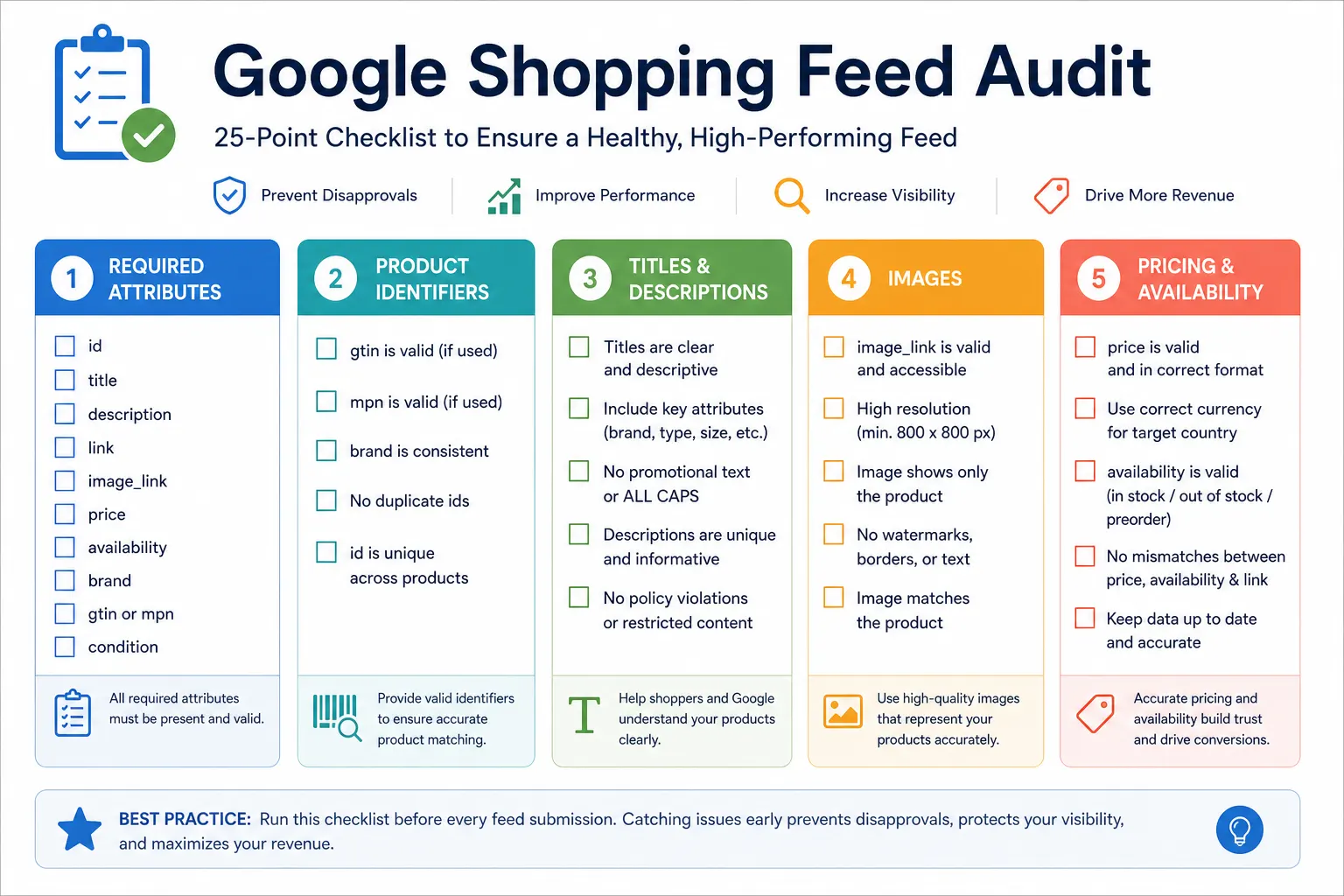
Google Shopping Feed Audit Checklist: 25 Points to Check Before You Submit
A Google Shopping feed with errors is not just underperforming — disapproved products are completely invisible in Shopping results regardless of your bid. This 25-point checklist covers every attribute and compliance check you need to run before submitting your feed to Google Merchant Center. Work through each section before every new feed submission.
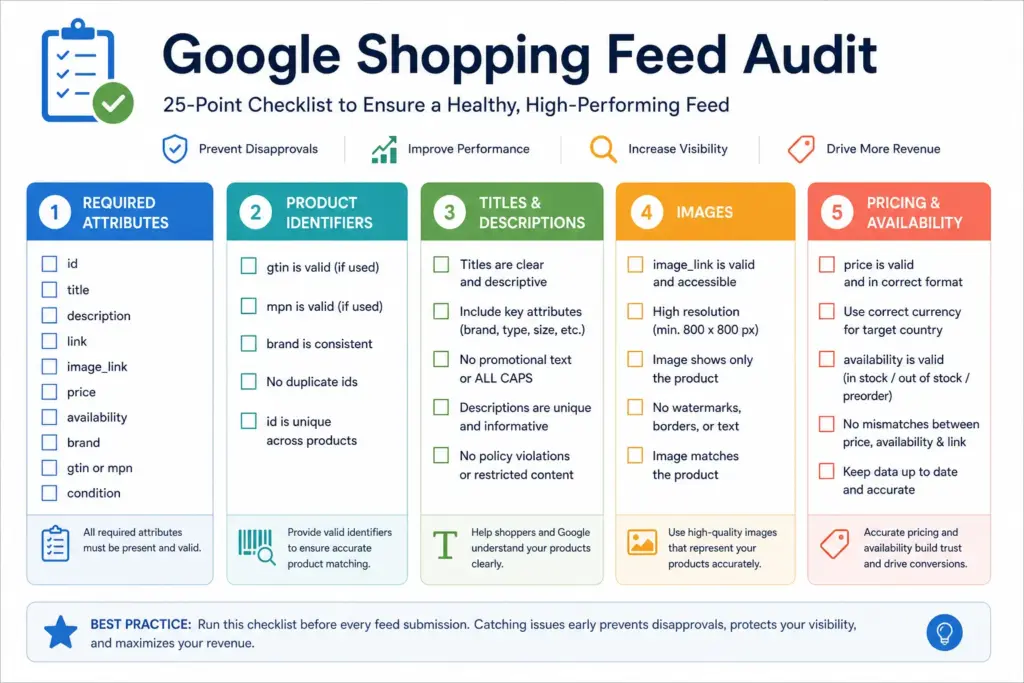
Section 1: Required Attributes (5 checks)
- ☐ id — unique per product/variant, consistent across feed updates, no spaces or special characters
- ☐ title — follows formula: Brand + Key Attribute + Product Type + Detail. Minimum 30 characters, maximum 150. No promotional text (“Free shipping”, “Buy now”).
- ☐ description — minimum 150 characters recommended. No HTML tags. Includes key product attributes (material, size, use case). Not a duplicate of the title.
- ☐ google_product_category — uses the deepest applicable leaf-node ID from Google’s taxonomy, not a parent category. See the GPC Taxonomy Guide for correct mapping.
- ☐ brand — present for all branded products. Not “N/A”, “Unknown”, or your store name for manufacturer brands.
Section 2: Product Identifiers (5 checks)
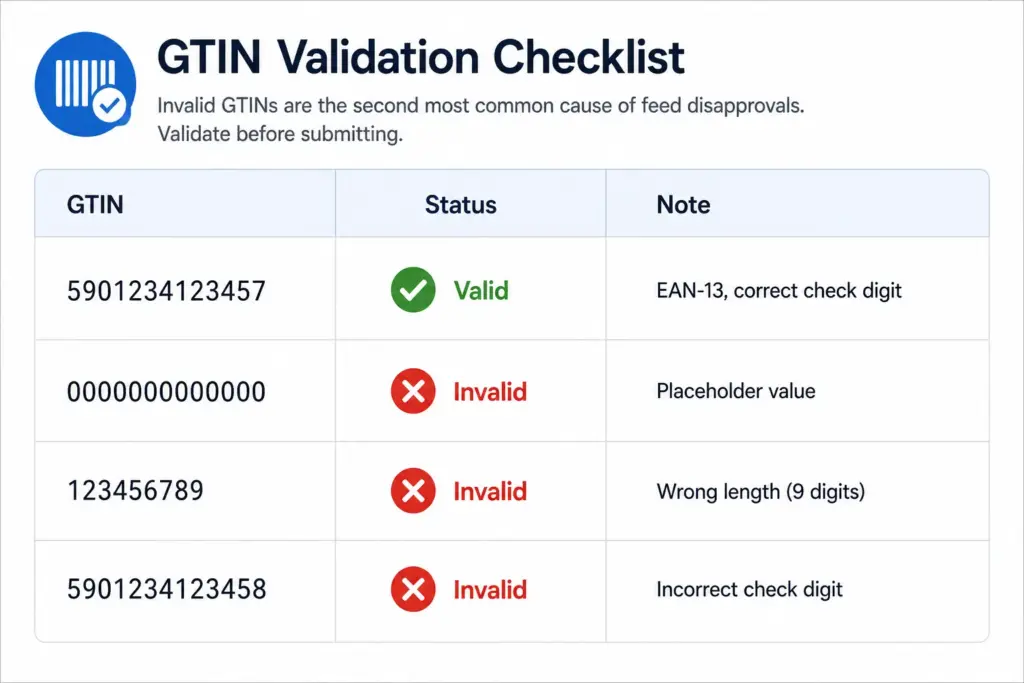
- ☐ gtin — present for all products with a manufacturer-assigned GTIN. Correct format (EAN-13, UPC-12, ISBN-13 etc.). Valid check digit — use the GTIN Validator to verify in bulk.
- ☐ identifier_exists — set to FALSE for any product with no manufacturer GTIN (custom, handmade, or private label without a barcode). Do not leave GTIN blank without this field.
- ☐ mpn (Manufacturer Part Number) — present for products without GTIN where the MPN is the primary product identifier (common in B2B, electronics, automotive parts).
- ☐ No placeholder GTINs — check for test values like 0000000000000, 1234567890123, or repeated digits. These cause immediate disapprovals.
- ☐ Variant GTINs — each size/colour/material variant has its own unique GTIN, not the same GTIN as the parent style.
Section 3: Titles and Descriptions (5 checks)
- ☐ Title formula — Brand + Gender/Age + Material + Product Type + Key Attribute. For apparel: Brand + Gender + Material + Product Type + Colour + Size. Titles should match what buyers search for.
- ☐ No promotional language in titles — “Free shipping”, “On sale”, “Best price”, “Limited time” all violate Google’s title policies and will cause disapprovals.
- ☐ No HTML in descriptions — strip all <p>, <br>, <strong> tags. Feed descriptions must be plain text only.
- ☐ Description length — 150–5,000 characters. Descriptions under 150 characters significantly underperform. Descriptions over 5,000 characters are truncated.
- ☐ No keyword stuffing — descriptions that repeat the same keyword 10+ times violate policy and reduce quality score. Write for the buyer, include key attributes naturally.
Section 4: Images (5 checks)
- ☐ Image dimensions — minimum 100×100px (non-apparel) or 250×250px (apparel). Recommended 800×800px or larger. Google rejects images under minimum dimensions.
- ☐ No watermarks or overlays — no promotional text, no brand watermarks, no “Sale” badges, no borders. White or light neutral background preferred for Shopping ads.
- ☐ Image URL returns 200 — test 10–20 image URLs to confirm they load correctly. 404 image URLs cause product disapprovals.
- ☐ No placeholder images — white squares, question mark boxes, “image coming soon” graphics are all disapproval triggers.
- ☐ Colour-variant images — for apparel products with multiple colours, each colour variant uses an image showing that specific colour. Do not reuse one image across all colour variants.
Section 5: Pricing, Availability, and Landing Pages (5 checks)
- ☐ Price matches landing page — spot-check 10–20 products by comparing feed price against the live product page price. Even a 1p discrepancy triggers a price mismatch disapproval.
- ☐ Availability matches landing page — if feed says “in stock” but the product page shows “out of stock” or “sold out”, you will get an availability mismatch disapproval.
- ☐ Price format — formatted as
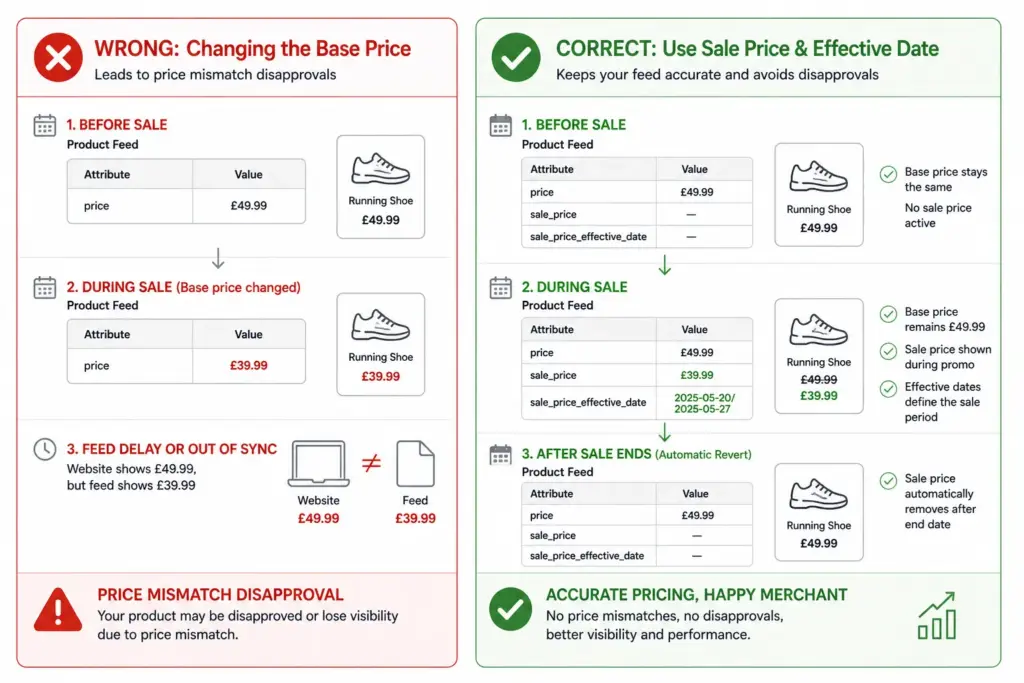
29.99 GBP(number + space + ISO currency code). Not “£29.99”, not “29.99 pounds”, not “29,99”. - ☐ Sale prices use sale_price field — do not change the
pricefield during promotions. Usesale_price+sale_price_effective_dateso prices revert automatically when the promotion ends. - ☐ Landing page returns 200 — confirm
linkURLs return 200, load on mobile, and show the correct product (not a category page or 404).
Section 6: Apparel-Specific Checks (5 checks)
Skip this section if you do not sell clothing, footwear, or accessories. For apparel, these checks are mandatory — see the full Apparel Feed Requirements guide.
- ☐ item_group_id — all variants of the same style share the same item_group_id. Verify no variant is missing this field.
- ☐ color — human-readable values (Navy, Coral, Charcoal), not hex codes or internal codes. Up to 3 values separated by “/”.
- ☐ size — present for every apparel variant. Matches the labelled size on the product.
- ☐ gender — male, female, or unisex. Present for every apparel product.
- ☐ age_group — adult, kids, newborn, infant, or toddler. Present for every apparel product.
After the Audit — Before You Submit
- Run all GTINs through the GTIN Validator
- Run your full feed through the Completeness Checker to catch missing required fields
- Set up Merchant Center email alerts (Settings → Notifications) so feed processing errors notify you immediately
- After submitting, check Merchant Center Diagnostics within 24 hours for any new disapprovals or warnings
For stores managing large catalogs where manual auditing is impractical, the Google Shopping Feed Generator builds feeds with validation built in — catching common errors before the feed reaches Merchant Center.
Frequently Asked Questions
How often should I audit my Google Shopping feed?
Run a full audit before any new feed submission and after major catalog changes. Monitor Merchant Center Diagnostics weekly for ongoing issues. A full audit quarterly is a good rhythm for most stores — more frequently during peak trading periods when prices and stock change rapidly.
What is the most common reason for Google Shopping feed disapprovals?
Price mismatch — where the price in the feed does not match the price on the landing page — is the most common data-related disapproval cause. Invalid or missing GTINs are the second most common. Both are caught by this checklist before submission.
Do I need to audit my feed if I use an automated feed tool?
Yes. Automated tools can generate incorrect attribute values, fail to update on schedule, or apply wrong category mappings without alerting you. Merchant Center Diagnostics should be reviewed weekly regardless of how your feed is generated — automated does not mean error-free.
Leave a Reply