Product Taxonomy for Electronics: Handling Complex Variants at Scale
Electronics catalogs present a different set of taxonomy challenges than fashion or general merchandise. The variant complexity is not size and colour — it is processor speed, RAM configuration, storage tier, connectivity standard, and compatibility matrix. Customers buying a laptop know exactly what specs they need. Your taxonomy either surfaces those specs in filters or loses the sale.
What Makes Electronics Taxonomy Complex
- Technical specification depth: A single laptop model can have 12+ relevant attributes. All need to be captured, validated, and filterable.
- Rapid product obsolescence: New chipsets and standards appear constantly. Your taxonomy needs to accommodate new attributes without breaking existing products.
- Compatibility dependencies: Accessories are valid only for specific parent products. A charger is not just a charger — it is a charger for a specific voltage, connector type, and device family.
- High-consideration buying: Electronics customers compare on specifications more than any other category. Incomplete data does not just affect discoverability — it directly prevents conversion.
For the foundational taxonomy build process before getting into electronics-specific requirements, see How to Build a Product Taxonomy From Scratch.
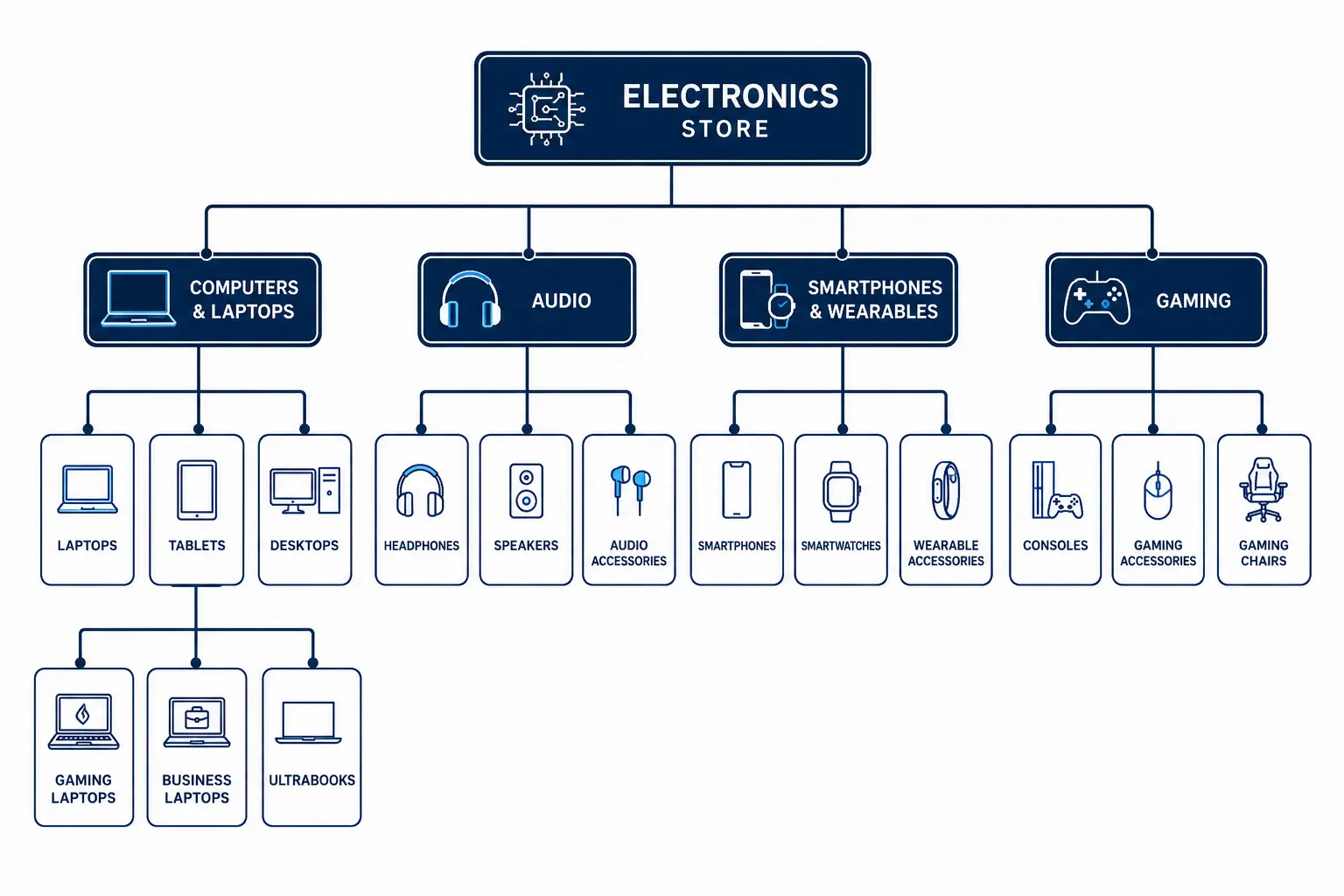
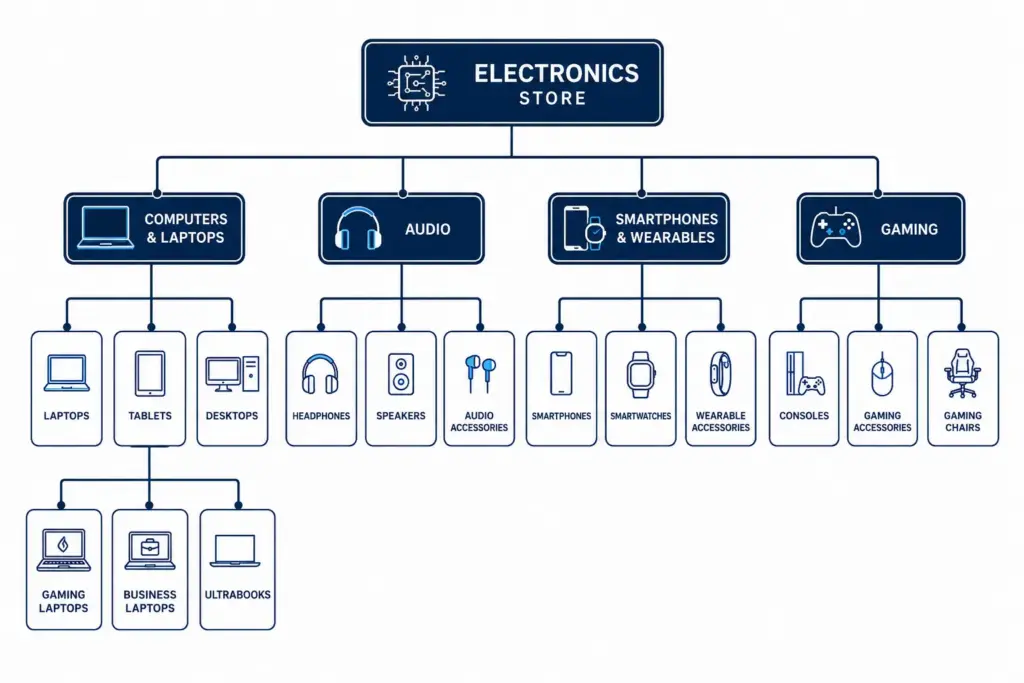
Recommended Top-Level Structure for Electronics
| Level 1 | Level 2 Examples | Level 3 Examples |
|---|---|---|
| Computers & Laptops | Laptops, Desktops, Tablets, All-in-Ones | Gaming Laptops, Business Laptops, Ultrabooks |
| Smartphones & Wearables | Smartphones, Smartwatches, Fitness Trackers | Android Phones, iPhones, Budget Smartphones |
| Audio | Headphones, Speakers, Soundbars, DACs | Over-ear, In-ear, True Wireless, Studio Headphones |
| TV & Home Cinema | TVs, Projectors, Streaming Devices | OLED TVs, QLED TVs, Smart TVs, 4K TVs |
| Cameras & Photography | DSLRs, Mirrorless, Action Cameras, Lenses | Full-frame Mirrorless, APS-C Mirrorless |
| Gaming | Consoles, Controllers, Gaming Monitors, Headsets | PlayStation, Xbox, PC Gaming Peripherals |
| Components & Storage | CPUs, GPUs, RAM, SSDs, HDDs, Motherboards | DDR5 RAM, NVMe SSDs, PCIe 5.0 SSDs |
| Cables & Accessories | Cables, Cases, Chargers, Mounts, Batteries | USB-C Cables, MagSafe Accessories, Power Banks |
Attribute Sets for Key Electronics Categories
Laptops
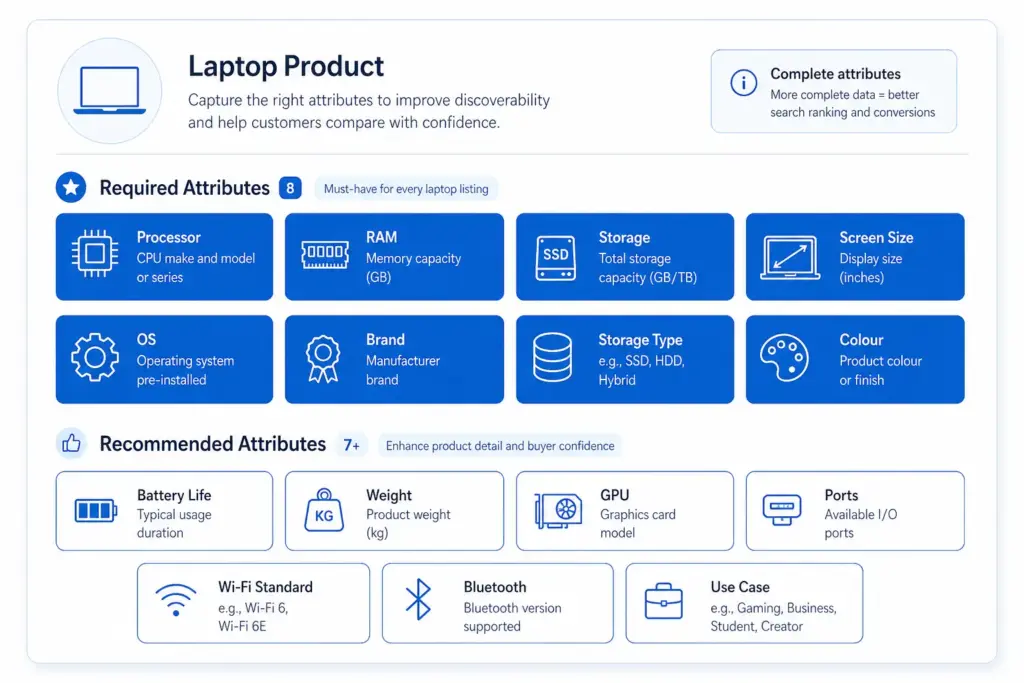
- Required: Brand, Processor family, Processor model, RAM (GB), Storage capacity (GB), Storage type (SSD/HDD/NVMe), Screen size (inches), Operating system
- Recommended: Screen resolution, GPU, Battery life (hours), Weight (kg), Ports, Connectivity (Wi-Fi standard, Bluetooth), Colour, Use case (gaming / business / ultrabook)
Smartphones
- Required: Brand, Model, Storage (GB), RAM (GB), Colour, Operating system, Screen size (inches), Network (5G/4G)
- Recommended: Processor, Camera resolution (MP), Battery capacity (mAh), SIM type, Refresh rate (Hz), Water resistance (IP rating)
Headphones
- Required: Brand, Type (over-ear / in-ear / on-ear / true wireless), Connection (wired / wireless / Bluetooth), Colour
- Recommended: Driver size, Frequency response, Noise cancellation type, Battery life, Impedance, Microphone (yes/no), Codec support (AAC, aptX, LDAC)
Handling Variant Structures in Electronics
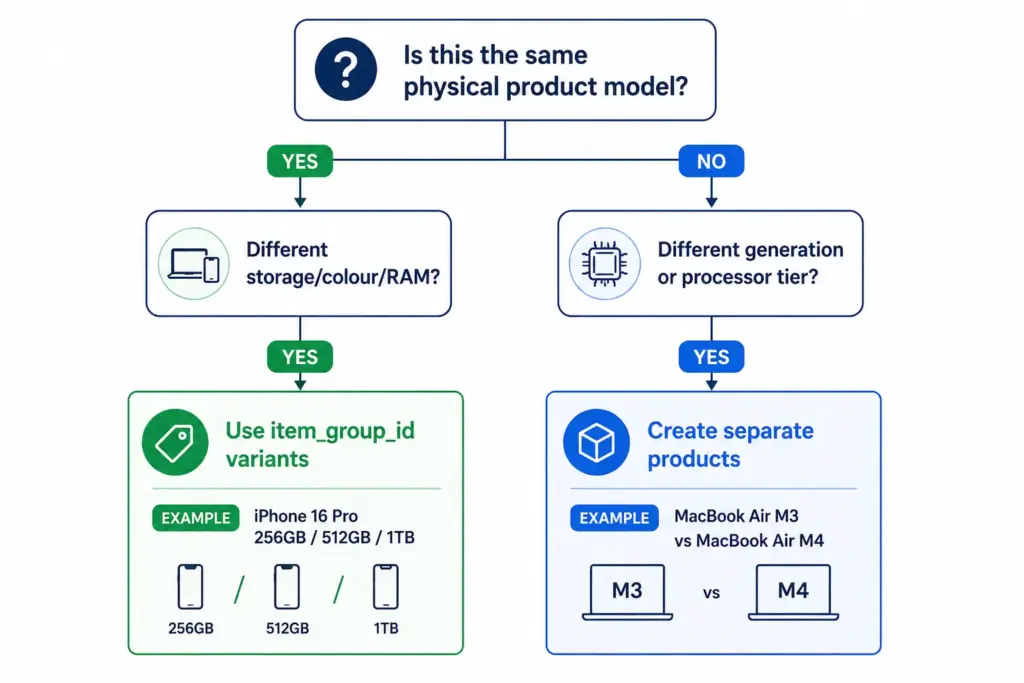
Electronics variants behave differently from fashion variants. In fashion, variants of the same product differ only in size and colour — the product is the same. In electronics, different storage configurations can have meaningfully different prices, performance profiles, and target buyers.
Variant approach (same item_group_id): All configurations of the same physical product model are variants. Customers can switch between them on the same product page. Use this when the products are the same model with configuration differences only.
Separate product approach: When the “variant” is effectively a different product — different processor tier, different generation, meaningfully different positioning — treat as separate products. Different model generations should be separate products, not variants of each other.
For how variant management compares across categories, the fashion taxonomy guide covers the simpler size/colour variant model as a useful contrast.
Compatibility Attributes — The Electronics-Specific Challenge
Accessories in electronics require compatibility data that no other category demands at the same scale. A USB-C cable not rated for Thunderbolt 4 is useless to someone buying it for a high-end laptop. A phone case for one model does not fit its larger variant.
Build compatibility into your taxonomy as a structured attribute, not as free-text description:
- compatible_with — a list of compatible product IDs or model references from your own catalog
- connector_type — USB-C, USB-A, Lightning, Thunderbolt 4, HDMI 2.1 etc.
- voltage / wattage — for chargers and power accessories
- form_factor — for components (ATX, Micro-ATX, Mini-ITX for PC cases and motherboards)
Structured compatibility data enables “compatible accessories” widgets on product pages — a meaningful cross-sell driver in electronics where accessory attach rates are high.
Google Product Category Mapping for Electronics
| Product | Correct Google Category |
|---|---|
| Gaming laptop | Electronics > Computers > Laptops |
| True wireless earbuds | Electronics > Audio > Headphones > In-Ear Headphones |
| NVMe SSD | Electronics > Computers > Computer Components > Hard Drives & Storage > Solid State Drives |
| Mirrorless camera body | Cameras & Optics > Cameras > Digital Cameras |
| Smart TV 65″ | Electronics > Video > Televisions |
Managing Rapid Product Turnover
Electronics catalogs face a unique taxonomy maintenance challenge: product generations. A new processor standard, connectivity format, or storage type can require new attribute values across hundreds of products simultaneously.
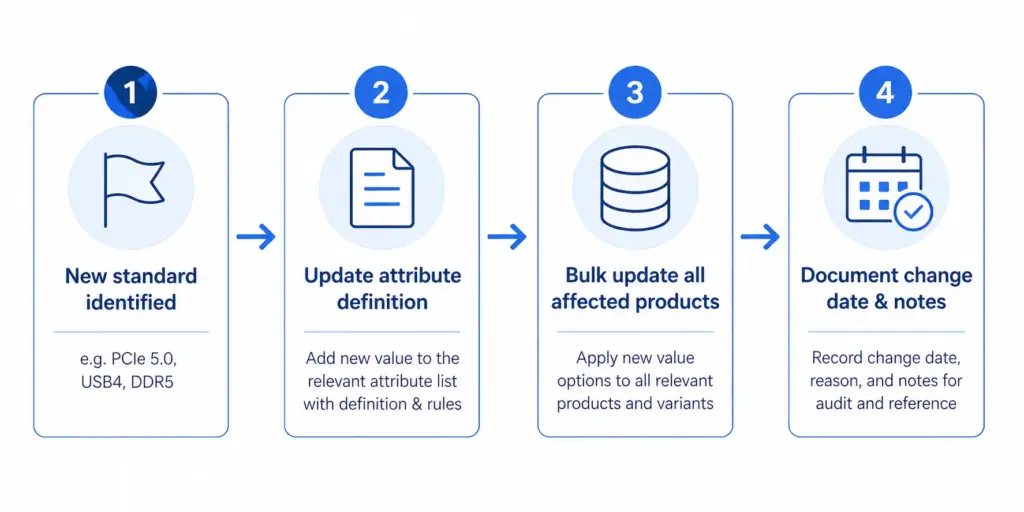
Build this into your taxonomy governance from the start: attribute value lists need a version-controlled update process, not ad hoc additions. When a new standard appears, update the attribute definition, update all products in that category in bulk, and document the change date.
At scale, this requires product data tooling that can apply bulk attribute updates to entire categories. The PIM Readiness Score will show you where your current setup has gaps — and the LynkPIM free plan lets you start managing this properly without a large budget or implementation timeline.
For a broader comparison of how taxonomy decisions differ across industries, see the Flat vs Hierarchical Taxonomy guide — the structural decision matters more for electronics than for most other categories due to the depth of specification attributes required at every level.
Frequently Asked Questions
Should different laptop storage configurations be variants or separate products?
Use variants (same item_group_id) for storage, colour, and RAM configuration differences within the same physical model — customers can switch between them on the same product page. Create separate products for different processor generations or model tiers that represent meaningfully different products with different performance profiles and target buyers.
What compatibility attributes should electronics accessories have?
At minimum: compatible_with (list of compatible product IDs or model references), connector_type (USB-C, USB-A, Thunderbolt 4, HDMI 2.1 etc.), voltage and wattage for chargers and power accessories, and form_factor for PC components. Structured compatibility data enables “compatible accessories” widgets on product pages and reduces returns from incompatible purchases.
How do you handle new technical standards in an electronics taxonomy?
Treat attribute value lists as version-controlled documents. When a new standard appears — PCIe 5.0, USB4, DDR5 — update the attribute definition for the affected subcategory, bulk-update all products in that category, and document the change date. Ad hoc additions without bulk updates leave older products with stale or missing values, which hurts both filter accuracy and feed performance.
What Google product category should I use for NVMe SSDs?
Use the leaf-node category: Electronics > Computers > Computer Components > Hard Drives & Storage > Solid State Drives. Never use a parent category like “Electronics” or “Electronics > Computers” — Shopping relevance and auction performance depend on using the most specific category available for every product.
How many required attributes does a laptop product need?
At minimum 8 required attributes: Brand, Processor family, Processor model, RAM (GB), Storage capacity (GB), Storage type (SSD/HDD/NVMe), Screen size (inches), and Operating system. Recommended additions that significantly improve discoverability and conversion include GPU, battery life, weight, screen resolution, ports, Wi-Fi standard, and use case (gaming / business / ultrabook).
Leave a Reply