Free Product Taxonomy Template: Download for 5 Industries (2026)
Building a product taxonomy from scratch takes days. Validating that it maps correctly to Google’s taxonomy, includes the right attribute sets per subcategory, and uses normalised attribute values takes longer. This template gives you a pre-built, working starting point for five industries — so you spend your time adapting rather than building from zero.
The template is free. No email required for the preview version. The full editable template is available via LynkPIM’s free plan.
What’s in the Template
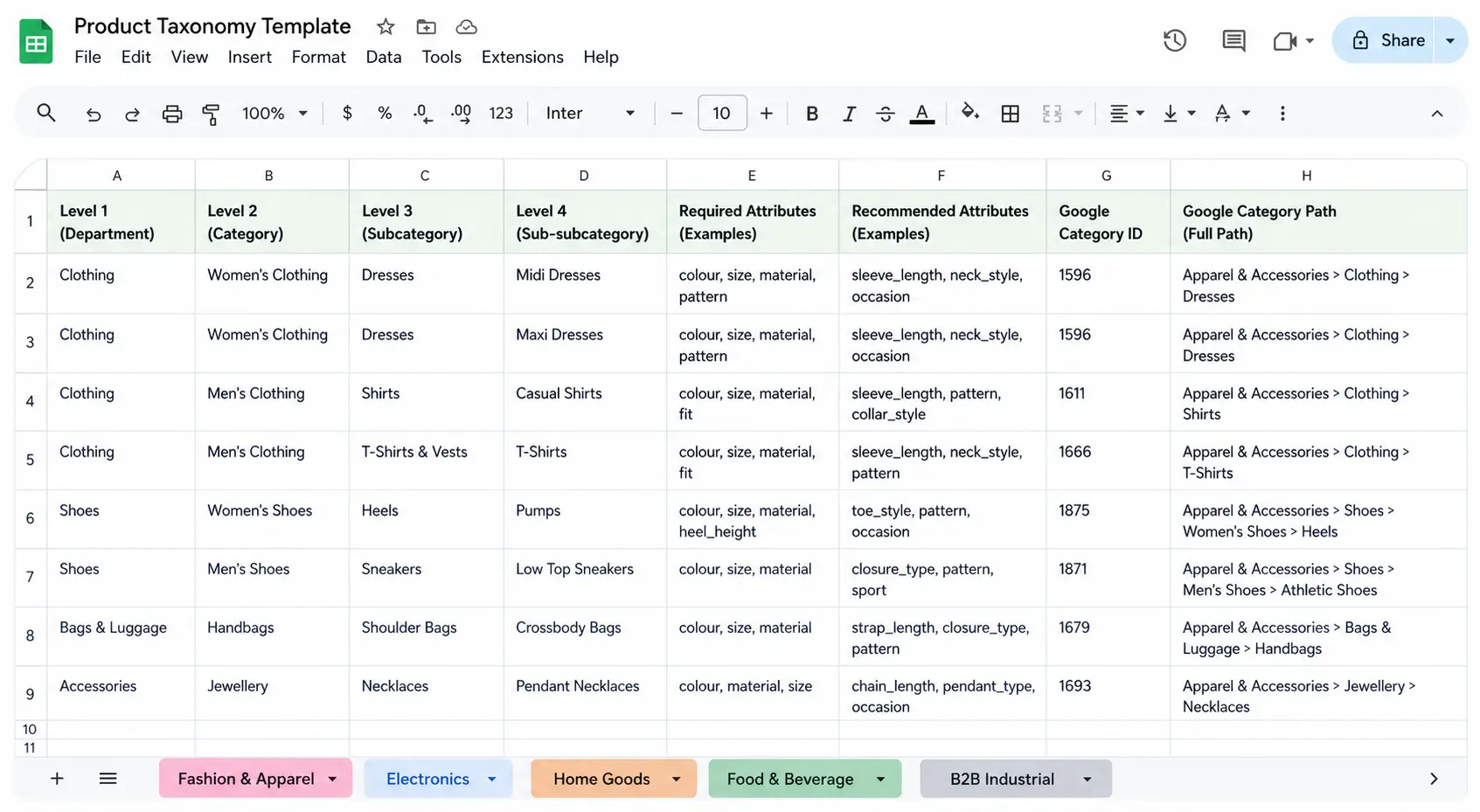
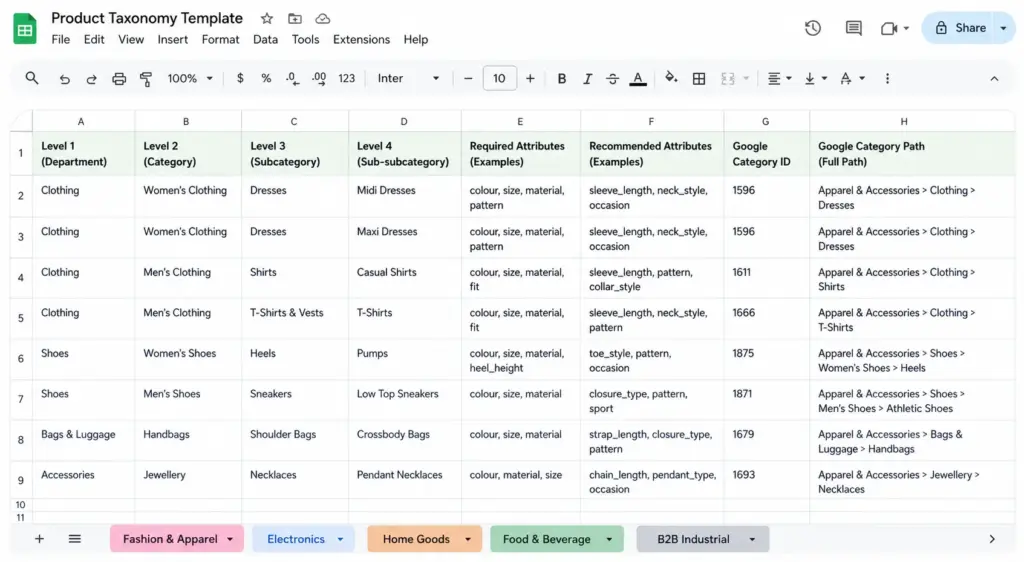
The template is a structured Google Sheets file with five tabs — one per industry. Each tab contains:
Category hierarchy (Levels 1–4) — pre-built category structure from department level down to product type, based on real ecommerce catalog patterns for each industry
Required attribute sets per subcategory — the specific attributes that must be filled for a product in that subcategory to be considered complete (e.g. Colour, Size, Material, Gender for fashion; Processor, RAM, Storage for electronics)
Recommended attribute sets — additional attributes that improve search, filtering, and channel performance without being strictly required
Normalised attribute value lists — controlled vocabulary for colour, size, material, and other attributes that require consistency across the catalog
Google product category ID mapping — the correct leaf-node GPC ID for every subcategory, ready to use directly in your feed
Tab 1: Fashion and Apparel Template
The fashion tab covers: Women’s Clothing, Men’s Clothing, Kids’ Clothing, Footwear, Accessories, Swimwear, and Lingerie & Nightwear — down to Level 4 (Midi Dresses, Rain Jackets, Running Shoes etc.).
Attribute sets include the full apparel requirements for Google Shopping (gender, age_group, color, size, size_system, item_group_id) plus apparel-specific attributes like neckline, length, occasion, and sleeve length. The colour normalisation table maps 200+ common fashion colour names to their normalised values for filters and feeds.
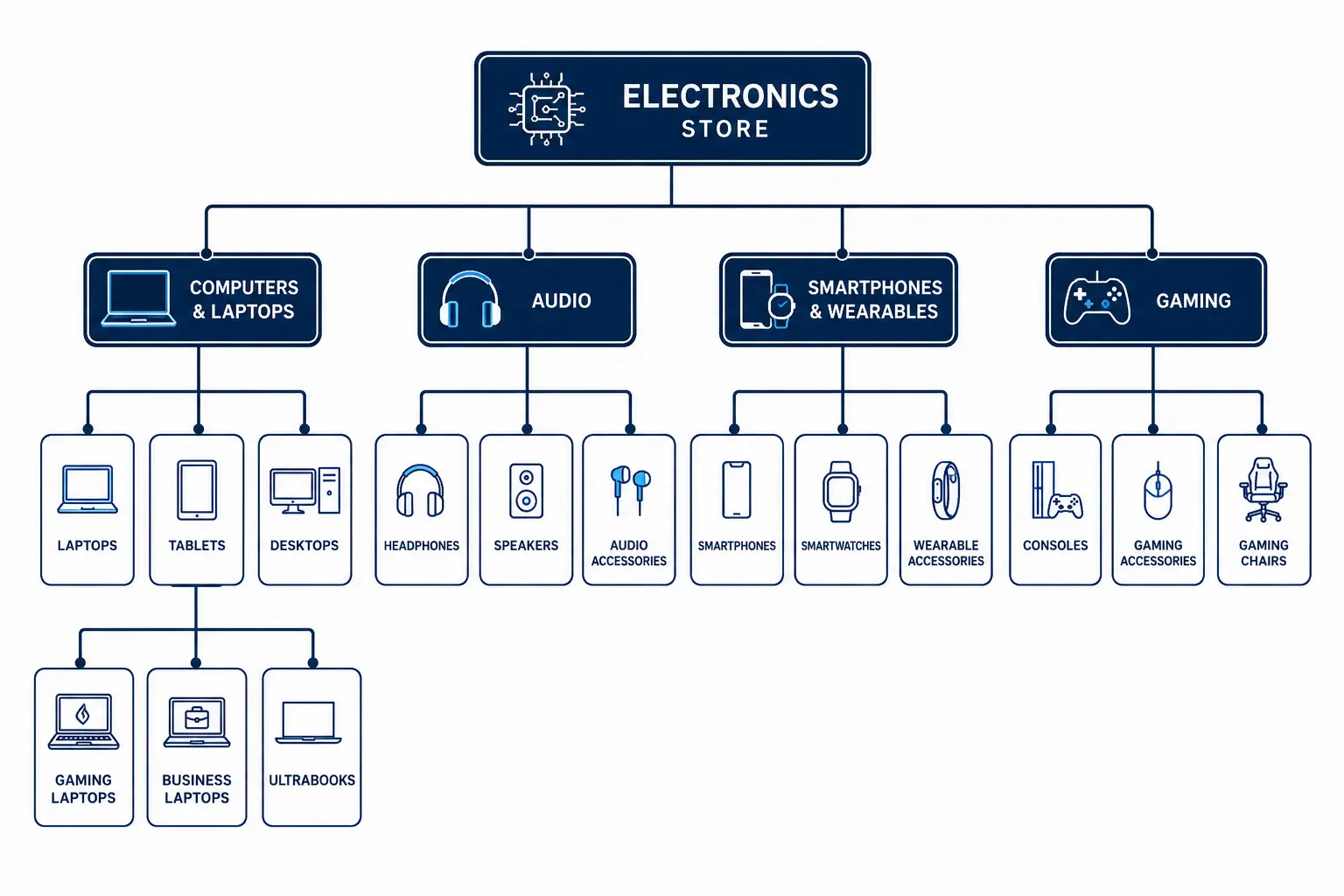
The electronics tab covers: Computers & Laptops, Smartphones & Wearables, Audio, TV & Home Cinema, Cameras & Photography, Gaming, Components & Storage, and Cables & Accessories.
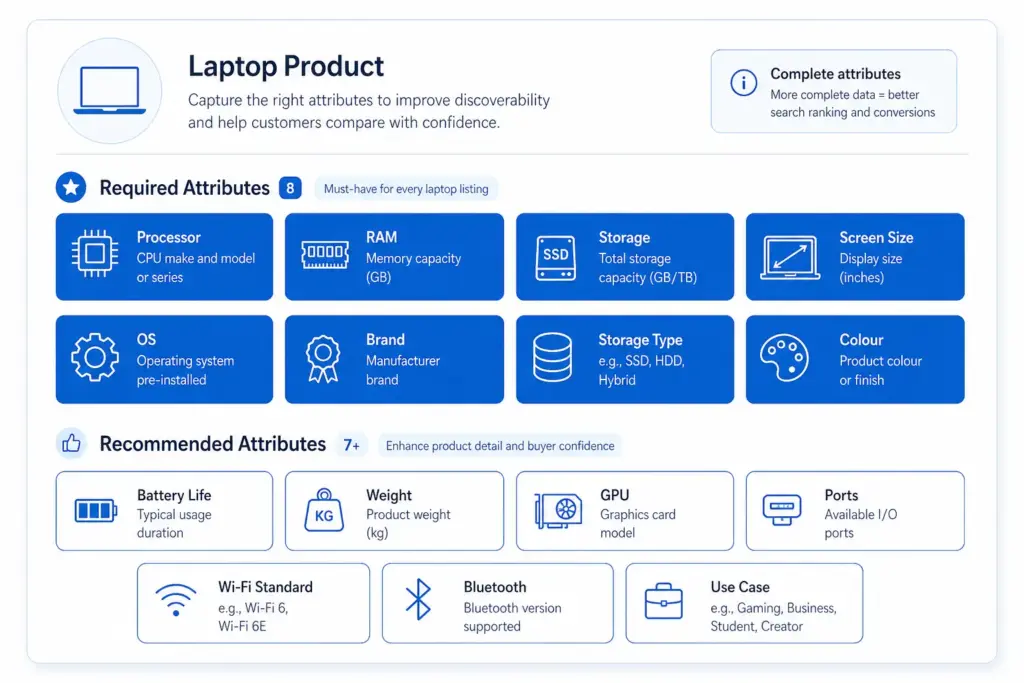
Attribute sets go deep on technical specifications — processor family, RAM, storage type, screen size, connectivity standards for laptops; driver size, noise cancellation type, codec support for headphones; IP rating, connectivity, battery capacity for smartphones. Compatibility attribute fields are included for all accessory subcategories.
The home goods tab covers: Furniture, Lighting, Bedding & Textiles, Kitchen & Dining, Storage & Organisation, Home Decor, and Outdoor.
Attribute sets include the dimension fields critical for furniture (Width, Height, Depth, Weight, Assembly Required, Flat Pack), material normalisation mapping 150+ home goods material names to controlled values, and the two-field approach to style attributes (marketing name vs normalised filter value).
The food & beverage tab covers: Fresh & Chilled, Ambient Grocery, Beverages, Frozen, Health & Nutrition, Snacks & Confectionery, Bakery, and Alcohol.
This tab includes the full 14-allergen attribute set (with Contains / May Contain / Free From value options), dietary attribute fields (Vegan, Vegetarian, Gluten-Free, Halal, Kosher, Organic), shelf life and storage type fields, and the nutritional attribute set required by UK FIC regulations.
Attribute sets include the technical specification fields critical for industrial products (thread standard, material grade, pressure rating, IP rating, temperature range), compliance certification attributes (CE marking, ATEX, RoHS, REACH), and the UNSPSC classification mapping for each subcategory.
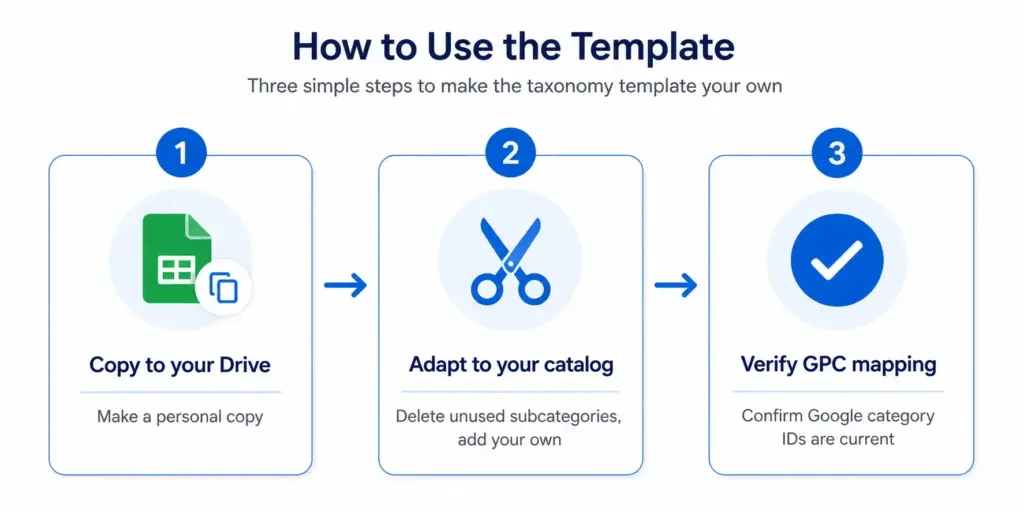
Copy the template to your Google Drive (File → Make a Copy)
Delete subcategories you do not carry — if you do not sell footwear, delete the footwear rows from the fashion tab
Add subcategories specific to your range — if you sell a product type not covered, add a row and fill in the attribute set manually using the existing rows as a format guide
Update attribute value lists — customise the normalised colour, size, and material lists to match your actual product data
Verify Google product category IDs — cross-check any subcategories you have modified against Google’s current taxonomy file to confirm the GPC ID is still the most specific available match
Before building on top of this template, take the PIM Readiness Score to understand where your current product data governance has gaps — the template tells you what your taxonomy should look like, the readiness score tells you how far your current data is from that standard.
Download the full editable template:lynkpim.app/pricing — available on the free plan, no credit card required.
Frequently Asked Questions
What is included in the free product taxonomy template?
Five industry tabs (Fashion & Apparel, Electronics, Home Goods & Furniture, Food & Beverage, B2B Industrial), each with: full category hierarchy (Levels 1–4), required and recommended attribute sets per subcategory, normalised attribute value lists, and Google product category ID mapping for every subcategory.
What format is the template in?
Google Sheets with five tabs — one per industry. It can be downloaded as an Excel file or used directly in Google Sheets. Each tab is a working reference document designed to be adapted, not just read.
Can I use the template for a mixed catalog across multiple industries?
Yes. Take the relevant tabs from each industry and merge them into your own taxonomy document. The Google product category mapping in each tab is self-contained and works independently. If you sell both electronics and home goods, combine those two tabs into a single working taxonomy.
How do I customise the template for my specific catalog?
Copy to your Google Drive, then: delete subcategories you do not carry, add subcategories specific to your range using existing rows as a format guide, update attribute value lists to match your actual product data, and verify GPC IDs against Google’s current taxonomy file for any subcategories you modify or add.
How Bad Product Taxonomy Kills Your Site Search (and What to Fix First)
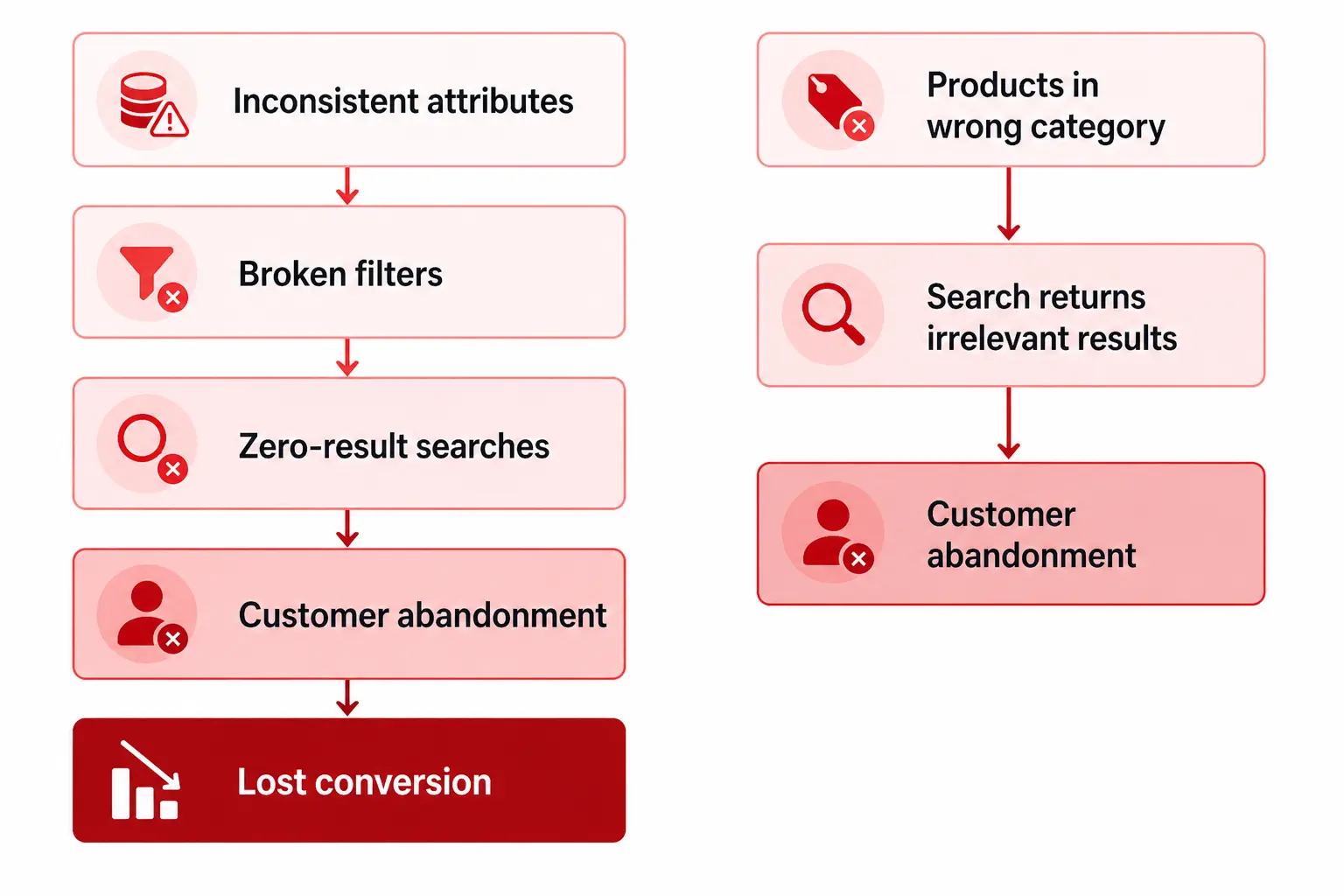
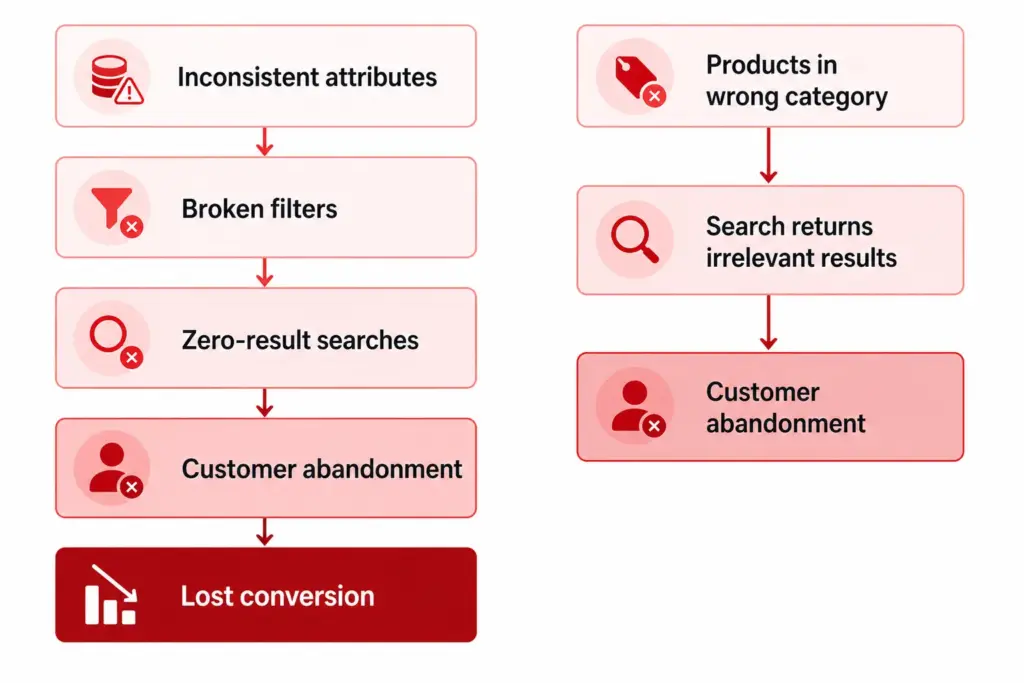
Site search is where buyers with high purchase intent go. A customer using your site search already knows they want something — they are not browsing, they are trying to buy. When that search fails, returns irrelevant results, or shows broken filters, that customer is gone. And bad product taxonomy is the reason it fails more often than any other factor.
This article covers the exact ways taxonomy problems break site search, how to identify which ones are costing you the most, and what to fix first for the fastest conversion impact.
The 5 Ways Bad Taxonomy Destroys Site Search
1. Zero-result searches for products that exist
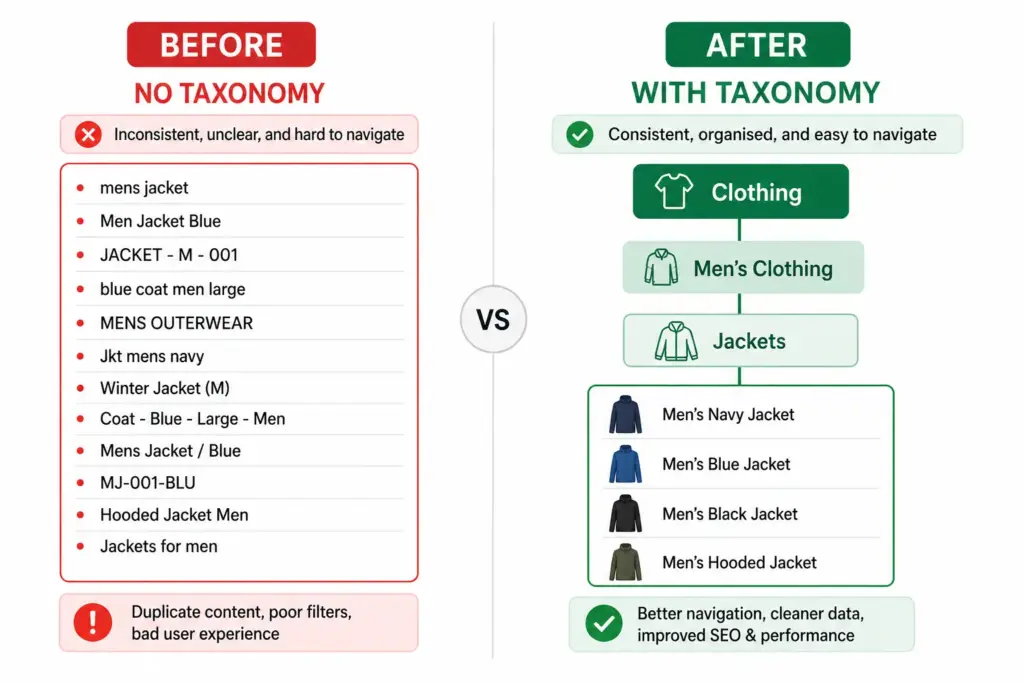
A customer searches for “navy waterproof jacket”. You have three of them in stock. But they do not appear in the results because the colour attribute is stored as “Storm Blue” in one product and “Dark Navy” in another — neither matches “navy”. The filter engine cannot retrieve products it cannot match.
This is the most costly taxonomy failure because it is invisible. Your product catalog tells you nothing is wrong. Your search results tell the customer nothing exists. They leave and buy elsewhere.
2. Broken filters from inconsistent attribute values
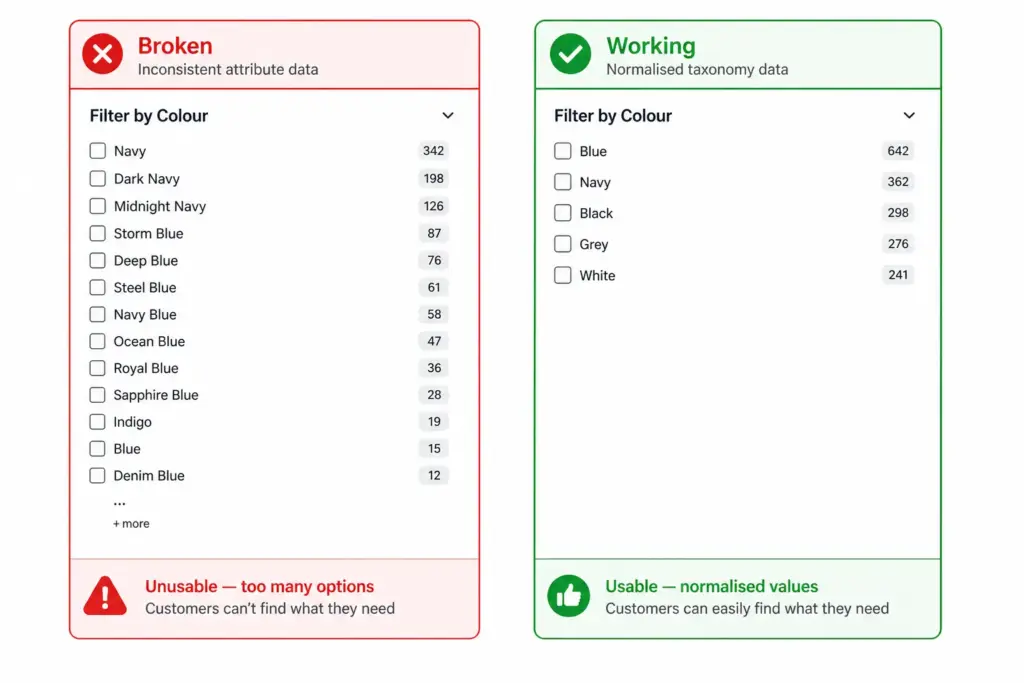
Filters are only as good as the consistency of the attribute data they draw from. If your colour attribute has values like “Navy”, “Dark Navy”, “Midnight Navy”, “Navy Blue”, “Storm Blue”, “Deep Blue”, and “Steel Blue” — your colour filter becomes a list of 40+ options that customers cannot navigate. They give up on filtering and resort to keyword search, which then fails for the reason above.
The same problem affects size (S, Small, SM, Sm, size S), material (Cotton, 100% Cotton, Pure Cotton, Cotton Rich), and almost every attribute that is entered manually without controlled values.
3. Wrong products in search results
A product placed in the wrong category surfaces in the wrong filter context. A customer filtering “Women’s Shoes” should not see men’s boots that were miscategorised. This damages trust immediately — if your search returns obviously wrong products, customers lose confidence in the entire catalog.
If 30% of your sofa products are missing the “Number of Seats” attribute, your seating filter only covers 70% of your sofas. A customer filtering for 3-seater sofas gets an incomplete result set and may conclude you do not stock what they need — when you do, it is just missing the attribute that would surface it.
5. Flat taxonomy making all filters identical
A flat taxonomy with no subcategories means all products in a top-level category share the same filter panel. A home goods store with a flat structure shows size, colour, and material filters for sofas, ceiling lights, and kitchen knives simultaneously — none of the filters are relevant to all products, so none of them are useful to anyone.
Hierarchical taxonomy enables category-specific filter sets — sofas show Number of Seats, Fabric, and Configuration; lighting shows Fitting Type, Bulb Included, and Dimmable. The difference in filter usability is dramatic. See Flat vs Hierarchical Taxonomy for when each applies.
How to Find Which Taxonomy Problems Are Hurting You Most
Before fixing anything, identify where the problem is largest. Three data sources tell you this:
1. Site search zero-results report
Extract your zero-result search queries from your analytics platform. Every query that returned zero results is a potential taxonomy failure. Match these queries against your product catalog — if the product exists but did not surface, the cause is almost always a missing or inconsistent attribute value.
2. High-exit filter paths
Look at which filter combinations have the highest bounce or exit rates. If customers who filter by “Blue” then immediately leave, the blue filter results are irrelevant or incomplete. This points to a colour normalisation problem.
3. Attribute completeness audit
Run an attribute completeness check across every subcategory. What percentage of products in each subcategory have the Size attribute? The Colour attribute? The Material attribute? Any subcategory below 80% completeness on its required attributes has broken filters. Use the Completeness Checker to run this across your full catalog.
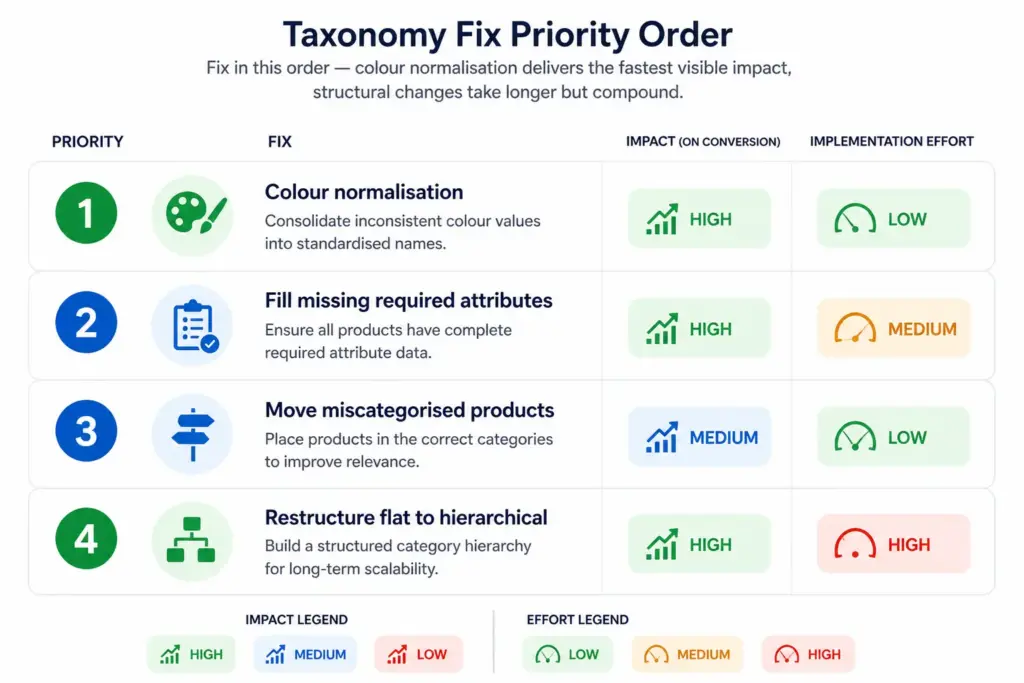
What to Fix First — Priority Order
Colour normalisation (fastest impact, lowest effort) — create a controlled colour value list (Blue, Red, Green, Black, White, Grey, Yellow, Pink, Purple, Brown, Orange, Beige) and remap all existing colour values to it. This immediately fixes colour filters across all affected products.
Fill missing required attributes (high impact, medium effort) — identify which attributes are missing at scale using your completeness checker, then bulk-fill them. Start with the subcategories that have the most products and the lowest completeness scores.
Reclassify miscategorised products (medium impact, low effort per product) — use your zero-results report to identify which searches are failing and cross-reference against product records to find miscategorised items. Fix them in batches by subcategory.
Restructure flat to hierarchical (highest long-term impact, highest effort) — this is the right fix if your underlying structure is flat. It takes longer but compounds — every future product benefits from the correct structure without manual intervention. See How to Build a Product Taxonomy From Scratch for the build process.
The PIM Readiness Score identifies exactly where your current taxonomy and attribute data governance has gaps — and gives you a prioritised action list to work from. Free, takes 5 minutes. Start there before deciding which of the four fixes to tackle first.
Frequently Asked Questions
How does bad product taxonomy affect site search?
Bad taxonomy causes zero-result searches (products exist but are miscategorised or missing attributes), broken filters (attributes not consistently assigned), and irrelevant search results (products from wrong categories surface). Customers see these as a broken site — they do not know the cause is data quality.
What is the fastest taxonomy fix for improving site search conversion?
Colour normalisation delivers the fastest visible impact. If your colour attribute has 40+ inconsistent values instead of a controlled list of 8–12 normalised values, your colour filter is broken for every customer who uses it. Normalising to a controlled list immediately fixes colour-based filtering across all affected products without changing your catalog structure.
How do I find which taxonomy problems are hurting my site search most?
Extract your zero-result search queries from your analytics platform — every query that returned nothing for a product that exists is a taxonomy failure. Cross-reference against your product catalog to identify the specific attribute gaps. Also run an attribute completeness audit by subcategory to find where required attributes are most frequently missing.
Can site search work well with a flat taxonomy?
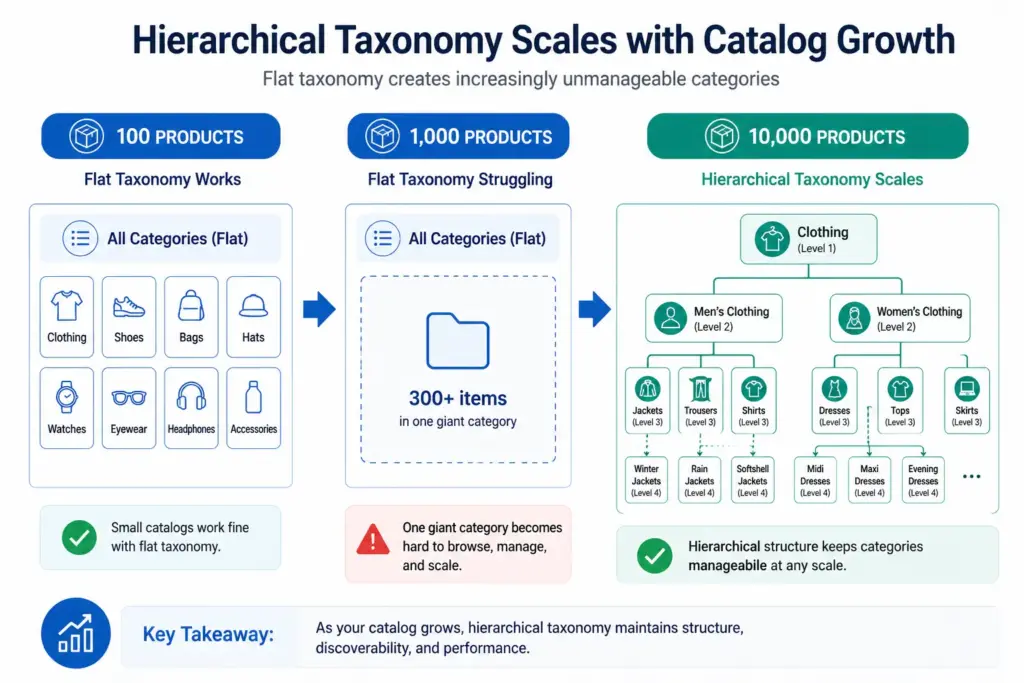
Only for very small catalogs under ~200 products. Once the catalog grows, a flat taxonomy forces all products in a top-level category to share the same filter panel regardless of product type — making filters irrelevant and unusable. Customers abandon filtered search and rely on keyword search, which then fails due to inconsistent attribute values.
Product Taxonomy for B2B Industrial Products: The Complete Guide
B2B industrial product taxonomy is the most technically demanding category structure in ecommerce. Industrial buyers know exactly what they need — often down to a part number, material grade, and certification standard. A taxonomy that cannot surface products by technical specification loses B2B buyers immediately, because they will not browse to find the right hydraulic fitting. They will go somewhere that lets them specify it.
This guide covers how to build an industrial taxonomy that works for procurement buyers, engineers, and maintenance teams — not just for general consumers.
Why B2B Industrial Taxonomy Differs from B2C
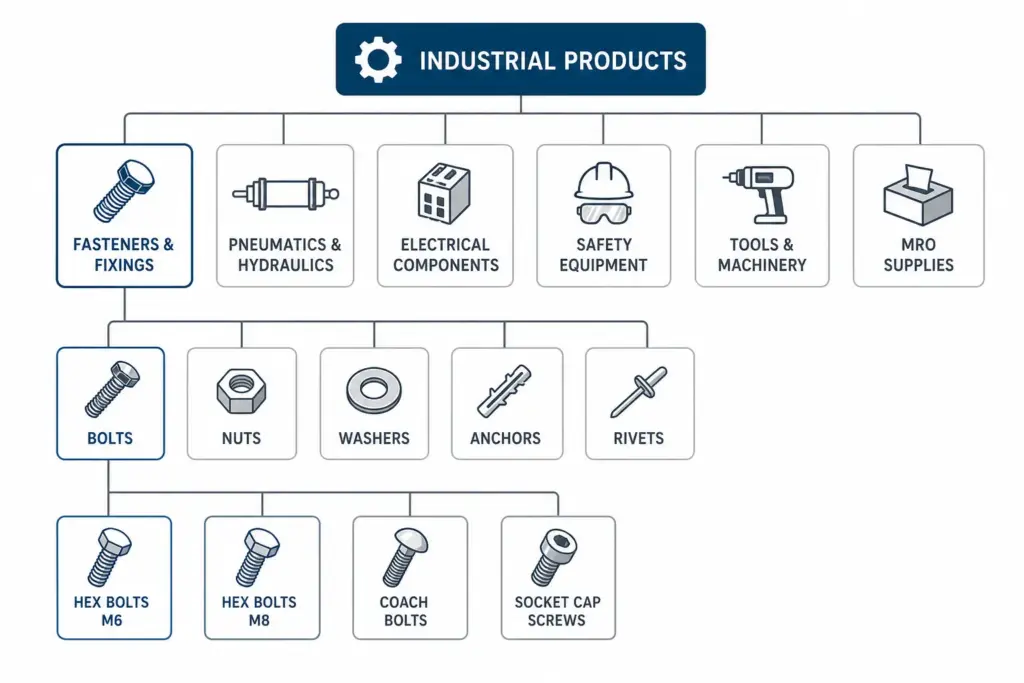
Part number is the primary identifier: B2B buyers often search by manufacturer part number (MPN) or internal reference code. Your taxonomy must support this lookup path, not just category browsing.
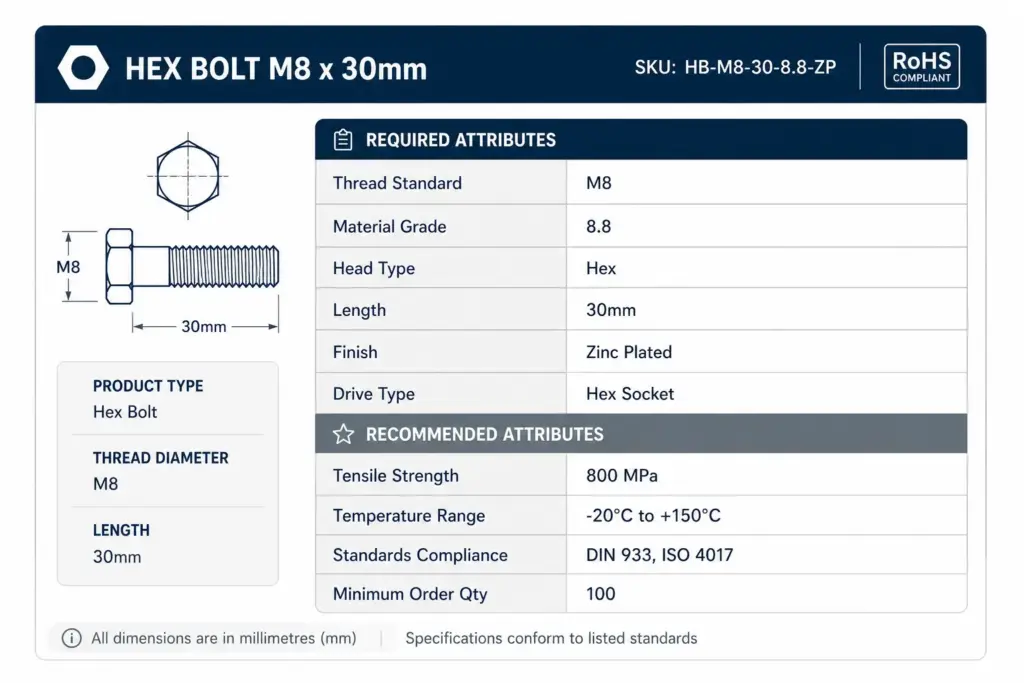
Technical specifications are purchase criteria: An industrial buyer does not choose a bolt by colour. They specify thread standard (M6, M8, M10), material grade (Grade 8.8, 304 stainless, A4 marine grade), head type (hex, socket cap, button head), and length in millimetres.
Compliance is non-negotiable: Many industrial products require specific certifications (CE, ATEX, RoHS, REACH, IP ratings) and buyers will not purchase without visible certification data.
Volume and price structures: B2B products often have quantity-break pricing and minimum order quantities — these need to be attributes, not ad hoc product descriptions.
Unlike B2C categories where you build from customer search behaviour, B2B industrial taxonomy should be anchored to an established classification standard. Do not build from scratch.
UNSPSC (United Nations Standard Products and Services Code) — widely used in procurement and public sector. Free to access at unspsc.org. Four-level hierarchy: Segment → Family → Class → Commodity.
eCl@ss — European standard, widely used in manufacturing and industrial supply chains. More granular than UNSPSC for technical components.
GS1 GPC (Global Product Classification) — used in retail and wholesale supply chains. Better for MRO and maintenance products than for pure manufacturing components.
You do not need to expose these classification codes to buyers. Use them as the structural backbone of your internal taxonomy, then create buyer-friendly category names as a display layer on top.
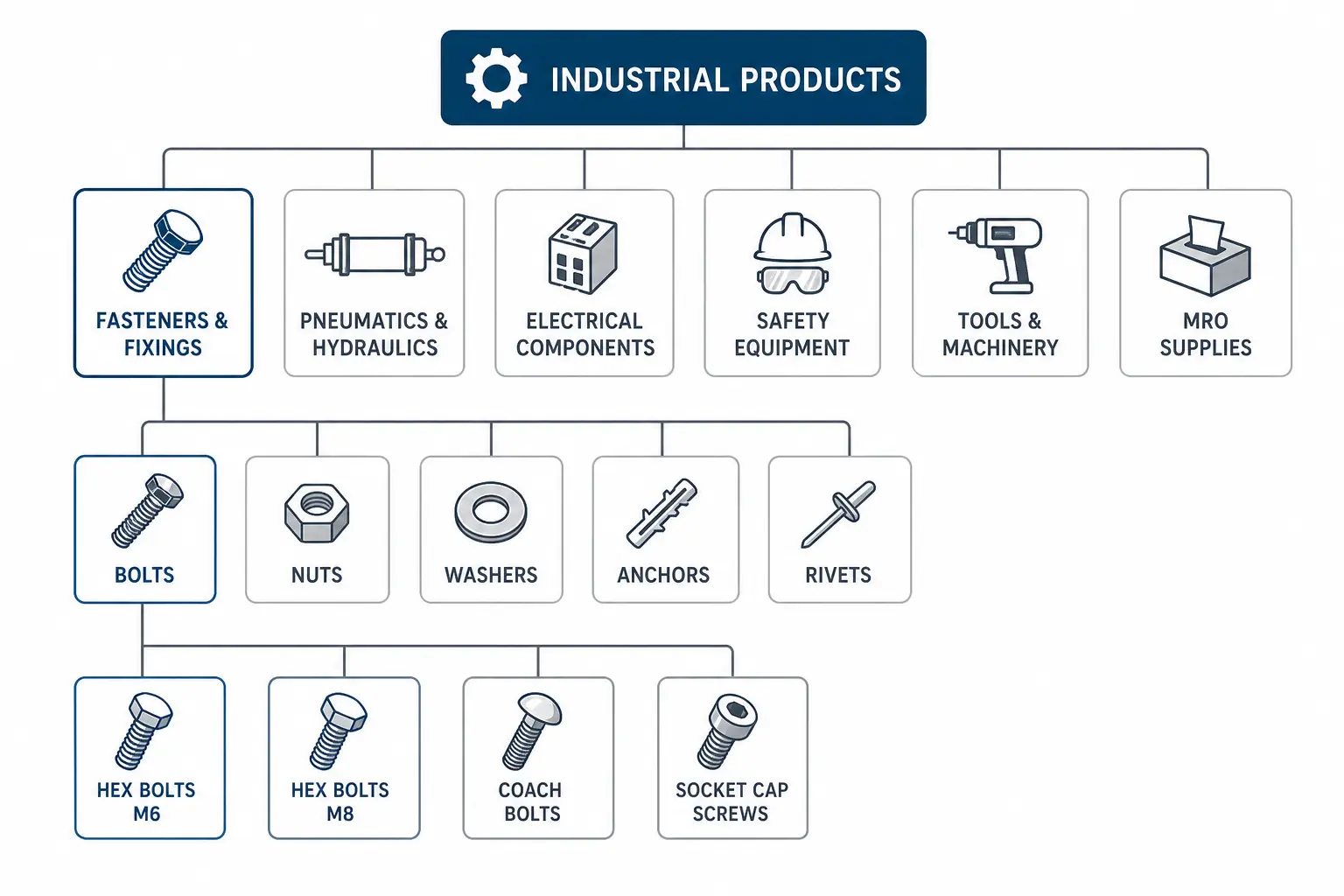
Recommended Top-Level Structure for Industrial
Level 1
Level 2 Examples
Level 3 Examples
Fasteners & Fixings
Bolts, Nuts, Washers, Anchors, Rivets, Screws
Hex Bolts, Socket Cap Screws, Coach Bolts
Pneumatics & Hydraulics
Fittings, Valves, Cylinders, Hoses, Pumps
Push-fit Fittings, Compression Fittings
Electrical Components
Connectors, Cable Management, Switches, Relays
DIN Rail Connectors, Terminal Blocks
Safety Equipment
PPE, Eye Protection, Respiratory, Fall Protection
Safety Helmets, Hi-Vis Jackets
Tools & Machinery
Hand Tools, Power Tools, Measuring, Cutting
Torque Wrenches, Digital Callipers
MRO Supplies
Lubricants, Cleaning, Sealing, Adhesives
Bearing Grease, Thread Sealant
Pipe & Tube
Steel Pipe, Copper Tube, Plastic Pipe, Fittings
Stainless Steel Tube, HDPE Pipe
Technical Specification Attributes
Fasteners (Bolts, Nuts, Screws)
Required: Thread standard (M4, M6, M8, M10 etc.), Material grade (Grade 8.8, Grade 10.9, A2 stainless, A4 marine), Head type, Length (mm), Finish (zinc plated, hot dip galvanised, plain)
Required: Connection type (push-fit, compression, threaded), Port size (BSP, NPT, metric), Tube OD (mm), Material (brass, stainless, nylon), Max pressure (bar), Temperature range (°C)
Recommended: Flow rate (l/min), Seal material (NBR, EPDM, PTFE), ATEX rated (yes/no), IP rating
Safety Equipment (PPE)
Required: CE marking (yes/no), Standard compliance (EN 397, EN 388, EN 166 etc.), Protection class, Size/Fit range, Material
Recommended: EN standard version year, Shelf life, Cleaning instructions, Compatible with other PPE items
Compliance and Certification Attributes
Compliance data is what separates a functional industrial taxonomy from an inadequate one. B2B buyers in regulated industries (construction, oil and gas, food processing, pharmaceuticals) cannot purchase without verified compliance data.
CE marking: Yes / No — mandatory for products sold in EU/UK regulated categories
ATEX certification: Zone rating — for equipment used in explosive atmospheres
RoHS compliance: Yes / No — restriction of hazardous substances in electrical equipment
REACH compliance: SVHC declaration — substances of very high concern disclosure
IP rating: IP54, IP65, IP67 etc. — ingress protection for electrical and electronic products
Industry standards: DIN, ISO, BS, ANSI, ASTM — the specific standard and version the product is manufactured to
Part Number Structure as Taxonomy Signal
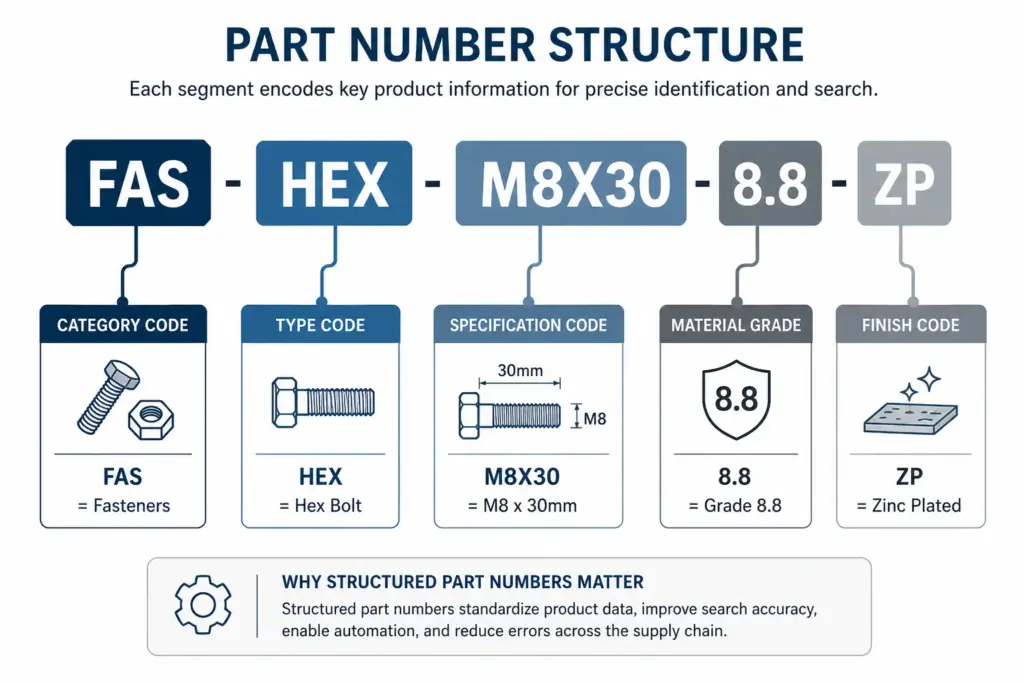
In B2B industrial catalogs, the part number (MPN — Manufacturer Part Number) is often the most important search term. Procurement buyers copy part numbers from approved vendor lists and search for exact matches. Your product records must include manufacturer part numbers, and your site search must index them.
Beyond search, consider encoding category information into your internal part number format. A part number structure like CAT-MFR-SPEC-VARIANT means any product ID immediately signals its category, manufacturer, and variant — making catalog management programmatic rather than dependent on correct manual categorisation.
The PIM Readiness Score identifies where your current B2B catalog data governance has gaps — particularly around technical specification completeness and compliance attribute coverage. The free Taxonomy Template at lynkpim.app includes the B2B Industrial tab with a pre-built category structure and attribute set.
For a comparison of how B2B industrial taxonomy differs structurally from consumer categories, see the Home Goods Taxonomy guide as a contrast point.
Frequently Asked Questions
What classification standard should I use for B2B industrial taxonomy?
UNSPSC is the most widely adopted standard for industrial and procurement catalogs globally. eCl@ss is preferred in European manufacturing and engineering contexts. Use the standard most common in your target buyer’s procurement system — many enterprise procurement platforms require UNSPSC codes on purchase orders and will not process invoices without them.
How important is part number (MPN) in B2B industrial taxonomy?
Extremely important. B2B buyers frequently search by exact manufacturer part number copied from an approved vendor list or Bill of Materials. Your site search must index MPNs and your product records must include both your internal part number and the manufacturer’s part number. Missing MPN data means losing buyers who search by part number — which is a significant share of B2B industrial search volume.
What compliance attributes should industrial products have?
At minimum: CE marking status, relevant EN/ISO/DIN/ANSI standards compliance, RoHS status for electrical products, and IP rating where applicable. ATEX certification is mandatory for products used in potentially explosive atmospheres. REACH SVHC declarations are required for products containing substances of very high concern sold in EU/UK markets.
How do you handle quantity pricing in a B2B product taxonomy?
Quantity break pricing and minimum order quantities should be structured product attributes, not free-text in descriptions. Store them as structured fields: min_order_qty, pack_size, and pricing tiers with corresponding quantity thresholds. This enables filter by minimum order, automated price calculation, and correct price display in Shopping feeds.
Should B2B industrial products use the same Google Shopping feed structure?
Yes, the same Merchant Center feed structure applies. B2B industrial products benefit significantly from detailed technical specifications in the product description (which Google indexes), and from the deepest available google_product_category value. Many B2B industrial searches are long-tail and highly specific — title construction should include thread standard, material grade, and key certifications where character limits allow.
Flat vs Hierarchical Product Taxonomy: Which Is Right for Your Catalog?
The structure of your product taxonomy determines how your catalog scales, how your site filters work, and how well your products map to Google Shopping categories. Flat and hierarchical are the two fundamental structural approaches — and choosing the wrong one for your catalog size and complexity creates problems that get harder to fix the longer they go unaddressed.
What Is a Flat Taxonomy?
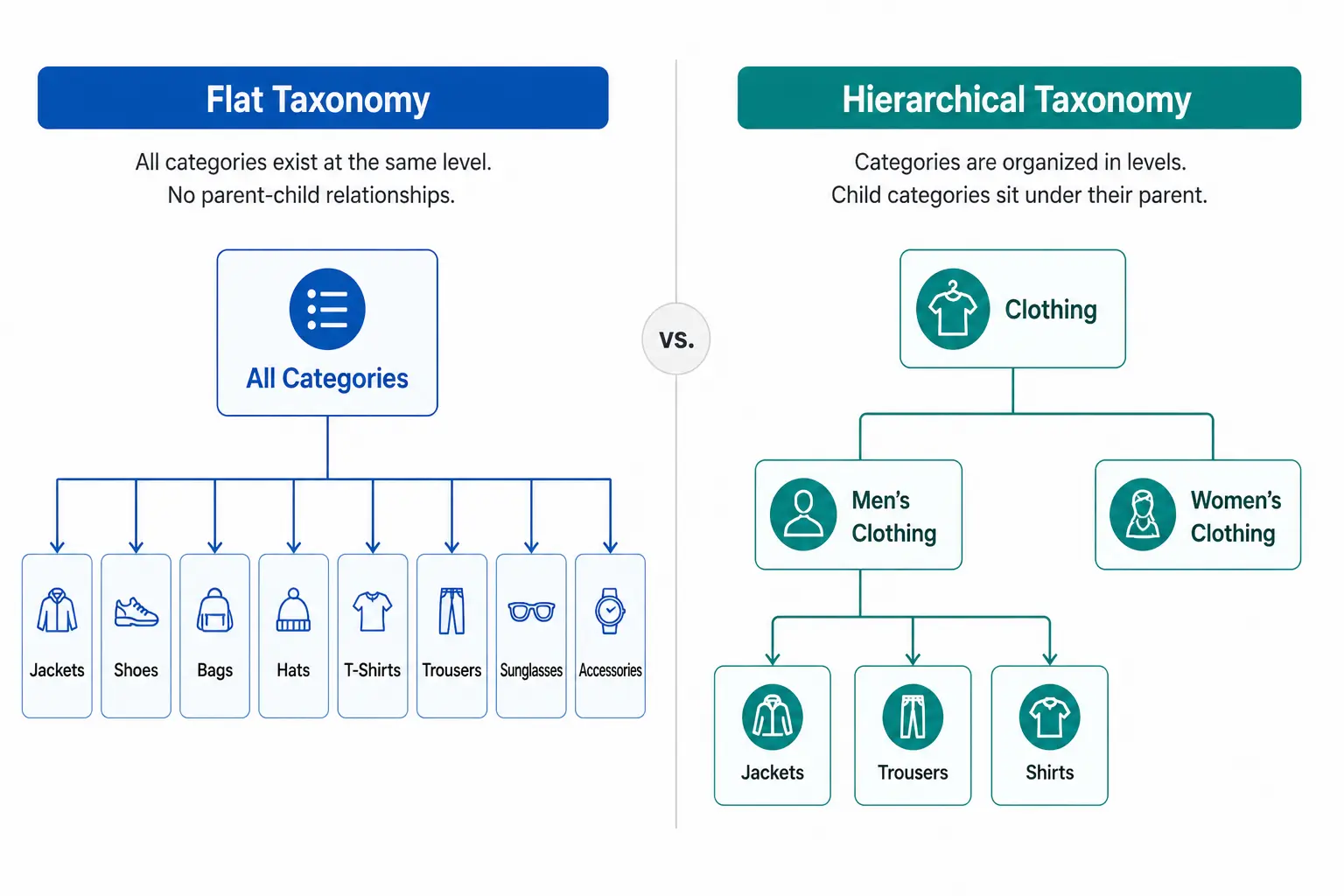
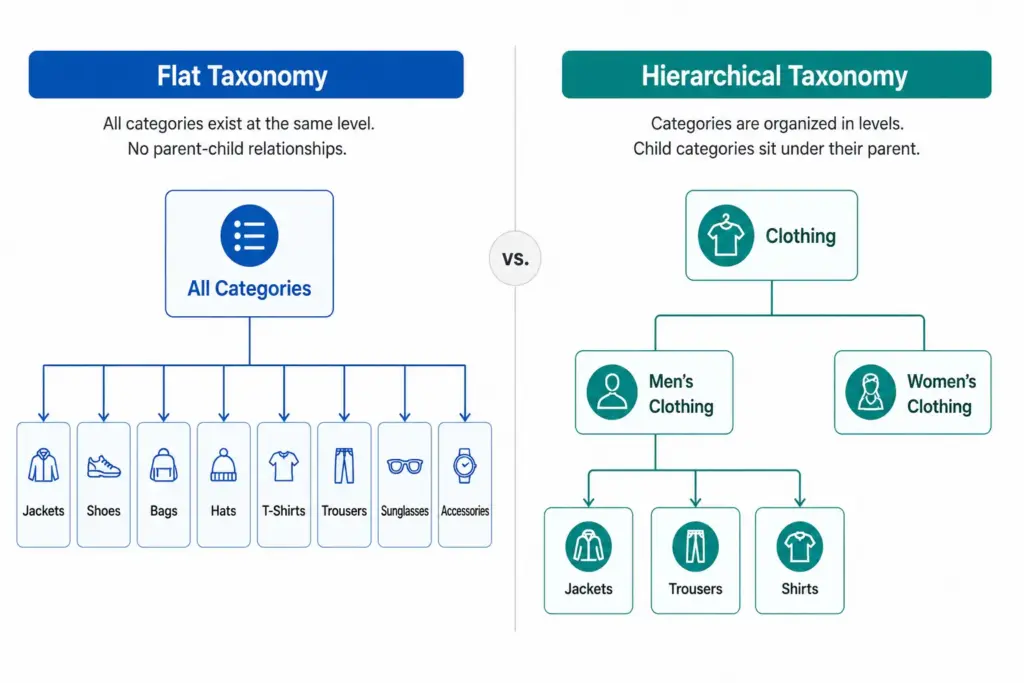
A flat taxonomy has a single level of categories. Products sit directly under a top-level category with no subcategories beneath it. The entire catalog structure is one layer deep.
Example: A small accessories store with a flat taxonomy might have: Bags, Scarves, Hats, Belts, Sunglasses, Jewellery. Every product sits directly under one of those six categories. There are no subcategories — “Bags” is not further divided into Handbags, Crossbody Bags, Clutches, Tote Bags.
Flat taxonomies are easy to set up and easy to understand at a glance. They work well when the catalog is small and products within each category are genuinely similar enough that no further subdivision adds value.
What Is a Hierarchical Taxonomy?
A hierarchical taxonomy has multiple nested levels. Categories contain subcategories, which may contain further subcategories, down to the most specific product type level.
Example: The same accessories store with a hierarchical taxonomy: Bags > Handbags > Leather Handbags. Or Bags > Crossbody Bags. Each level adds specificity — and with it, the ability to filter, map to Google’s taxonomy precisely, and manage products by type without the entire “Bags” category becoming unnavigable.
Any catalog with 200+ products or multiple product types
Navigation
Simple — works when categories are few and clear
More complex but enables breadcrumb navigation and drill-down filtering
Filter accuracy
Limited — attributes apply across entire category
High — attributes defined per subcategory, filters are specific
Google category mapping
Imprecise — top-level categories rarely match Google leaf nodes
Precise — subcategories map directly to Google taxonomy leaf nodes
Scalability
Poor — adding products creates category bloat
High — hierarchy absorbs new product types without structural change
Maintenance
Low initially, high as catalog grows
Higher upfront, lower long-term
Channel mapping
Difficult — manual per-product mapping often required
Systematic — subcategory maps once to each channel
When Flat Taxonomy Works
Flat taxonomies are appropriate in a small number of specific situations:
Catalog under 200 SKUs with a genuinely narrow product range where subcategories would be redundant
Single-category specialty stores — a store that sells only coffee beans, only yoga mats, or only one type of product doesn’t need a hierarchy
Early-stage stores planning to restructure as the catalog grows — a flat structure is a valid starting point if you know it will be replaced
In all other cases, the limitations of flat taxonomy become apparent quickly as the catalog grows. The most damaging limitation is Google Shopping performance — flat taxonomy categories rarely correspond to Google’s taxonomy leaf nodes, resulting in products being assigned to broad parent categories that hurt auction relevance.
When Hierarchical Taxonomy Is Required
Hierarchical taxonomy becomes necessary when any of these conditions are true:
Your catalog has more than 200 products
You sell across multiple product types that require different attribute sets
You need accurate Google Shopping category mapping below the parent level
Your site needs faceted filtering (filter by colour, size, material etc.)
You sell across multiple channels that each have their own taxonomy
Your team needs to manage products by type for buying, merchandising, or reporting
For most ecommerce stores, the answer is hierarchical. The question is not whether to use hierarchical taxonomy but how many levels and how specifically to define subcategories. For the full build process, see How to Build a Product Taxonomy From Scratch.
The Google Shopping Argument for Hierarchical Taxonomy
Google’s product taxonomy has over 6,000 categories. It goes 5–7 levels deep in most categories. A flat internal taxonomy maps to Google’s parent-level categories at best — “Clothing” instead of “Apparel & Accessories > Clothing > Activewear > Track Jackets & Hoodies”.
The difference in Shopping performance between a product mapped to a parent category and one mapped to the correct leaf node can be significant — better relevance matching means your products appear for more specific search queries at lower CPCs. If Google Shopping is a meaningful channel for you, hierarchical taxonomy is not optional.
Migrating from Flat to Hierarchical
If your catalog currently has a flat structure and you are outgrowing it, migration is straightforward in principle — though it requires careful execution to avoid breaking navigation and losing indexed URLs.
Design the new hierarchical structure before touching anything live
Remap every product to its new subcategory in a staging environment
Set up 301 redirects from old category URLs to new subcategory URLs
Update your feed’s google_product_category values to the new leaf-node mapping
Update your sitemap and request GSC re-indexing after going live
Rankings may dip briefly after migration as Google recrawls the new structure. This is normal and temporary — the long-term gains in navigation, filtering, and channel performance outweigh the short-term disruption.
A flat taxonomy has a single level of categories with no subcategories. Every product sits directly under a top-level category. Simple to set up but breaks down as catalog size grows — filters become unwieldy, Google category mapping becomes imprecise, and category pages become unmanageable.
What is a hierarchical product taxonomy?
A hierarchical taxonomy has multiple nested levels — typically Department > Category > Subcategory > Product Type. Products sit at the most specific level. This structure scales to any catalog size and enables precise Google category mapping and deep attribute-based filtering.
When should you use a flat taxonomy?
Flat taxonomies work for small catalogs under 200 products with a genuinely narrow product range where subcategories would be redundant. Specialty retailers with a single product type can use a flat structure effectively. For most ecommerce stores with varied product ranges, hierarchical is the right choice.
Can you migrate from flat to hierarchical taxonomy?
Yes. The process requires designing the new hierarchy, remapping products to new subcategories, setting up 301 redirects from old category URLs, updating feed category mapping, and requesting GSC re-indexing. Rankings may dip briefly during migration but recover as Google processes the new structure — and long-term performance gains are significant.
What Is Product Taxonomy? Definition, Examples and Why It Matters
Product taxonomy is the classification system that organises your products into a structured hierarchy. It determines how products are grouped, named, and navigated — on your website, inside your catalog management system, and across every sales channel you use.
Get it right and customers find products faster, your Google Shopping feed performs better, and your team can manage thousands of SKUs without chaos. Get it wrong and you end up with inconsistent categories, broken filters, and channel mapping errors that cost you sales daily.
Product Taxonomy Definition
A product taxonomy is a hierarchical system for classifying products into groups based on shared characteristics. The word comes from the Greek taxis (arrangement) and nomos (law or method) — it is, literally, the rules by which products are arranged.
In practical ecommerce terms, a product taxonomy answers three questions for every product in your catalog:
What type of product is this? (Product Type / Subcategory)
What category does it belong to? (Category)
What department does that category sit under? (Department)
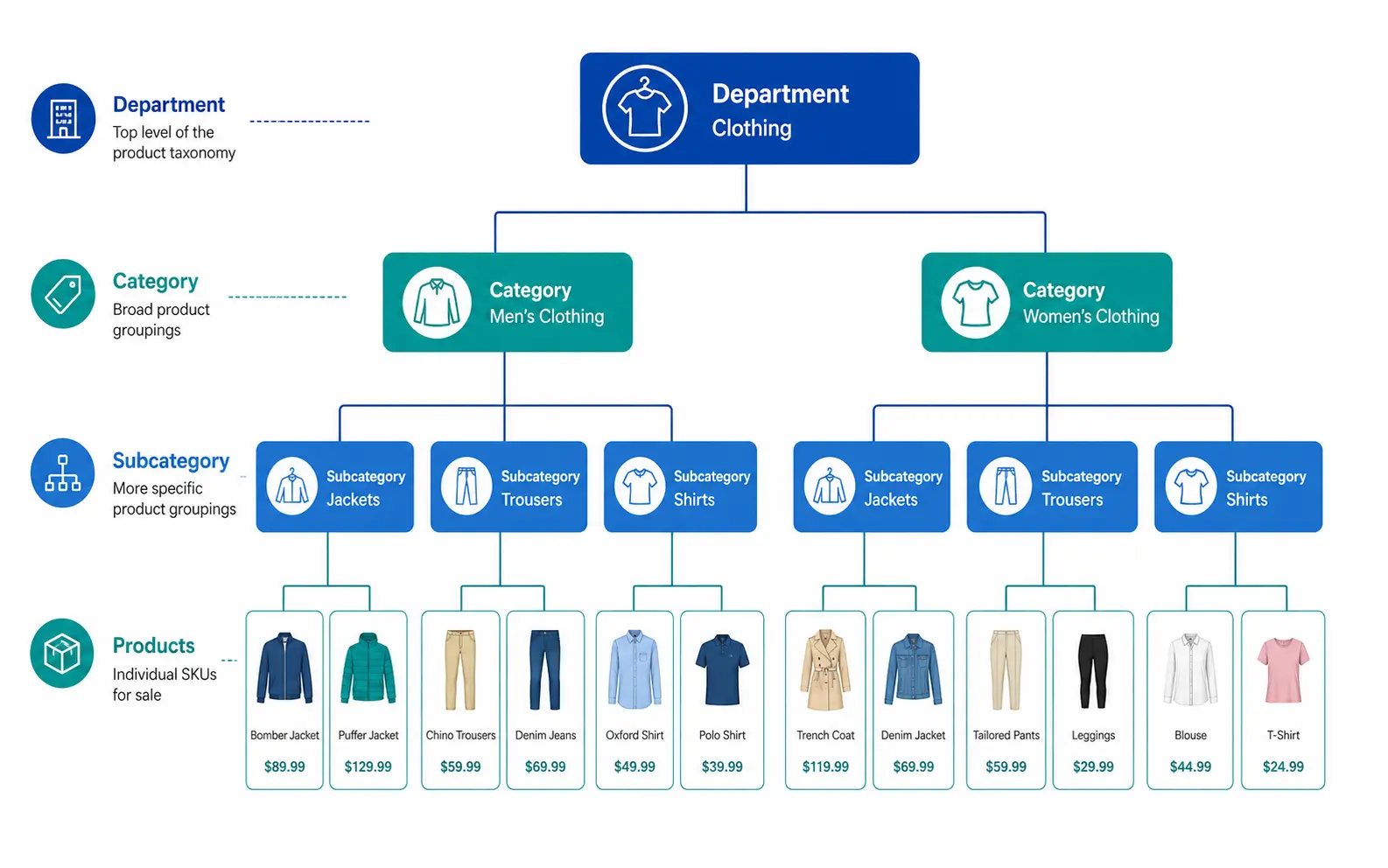
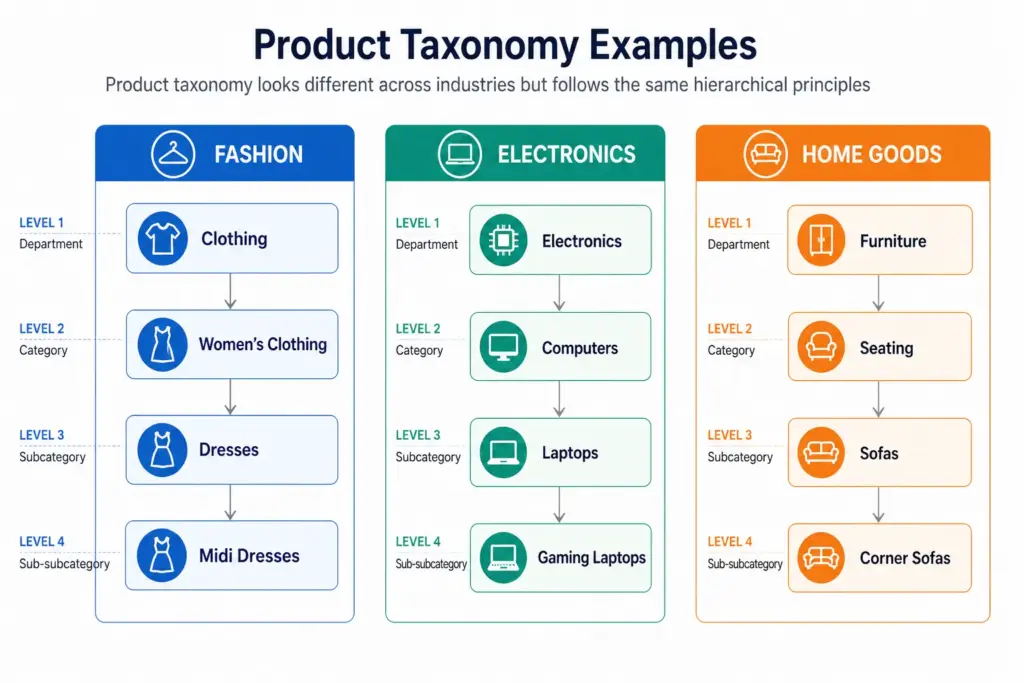
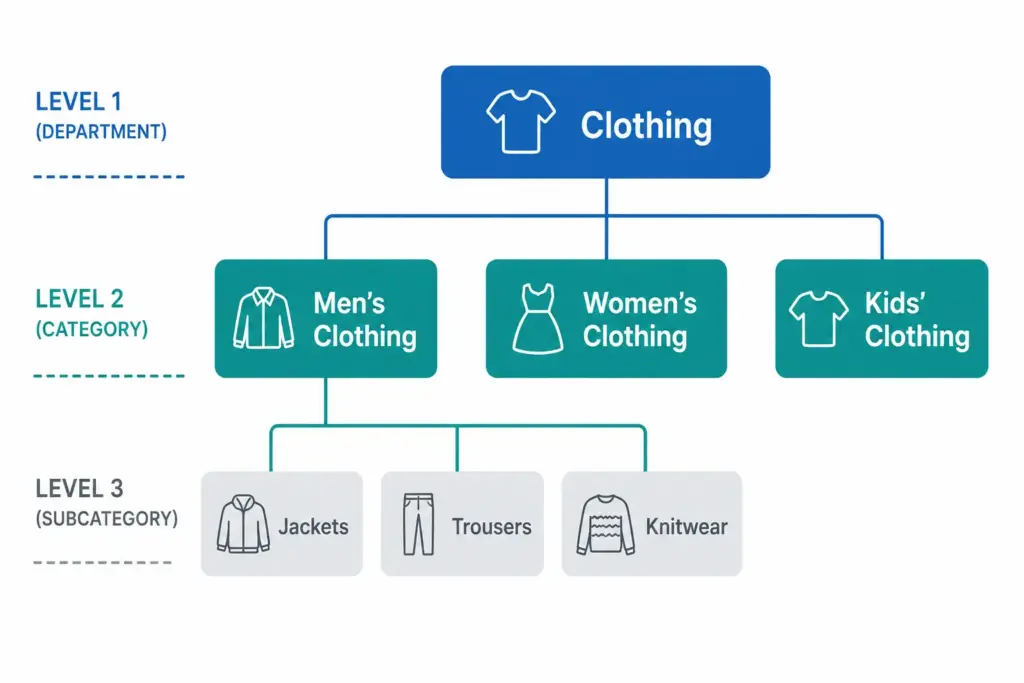
Those three questions map to the three levels every functional taxonomy needs: Department → Category → Subcategory.
A Simple Product Taxonomy Example
Level
Name
Example
Level 1 — Department
Clothing
Clothing, Footwear, Accessories
Level 2 — Category
Men’s Clothing
Men’s, Women’s, Kids’
Level 3 — Subcategory
Men’s Jackets
Jackets, Trousers, Shirts, Knitwear
Level 4 — Product Type
Men’s Rain Jackets
Rain Jackets, Leather Jackets, Puffer Jackets
Every product in the catalog sits at the most specific level — Level 3 or Level 4 — not at the top. A product is never just “Clothing”. It is always “Men’s Rain Jackets” or “Women’s Running Shoes”.
Taxonomy vs Categories vs Attributes — What’s the Difference?
These three terms are often used interchangeably but they are distinct concepts.
Taxonomy — the overall classification system and its rules. The framework.
Categories — the individual nodes within the taxonomy. Men’s Jackets is a category.
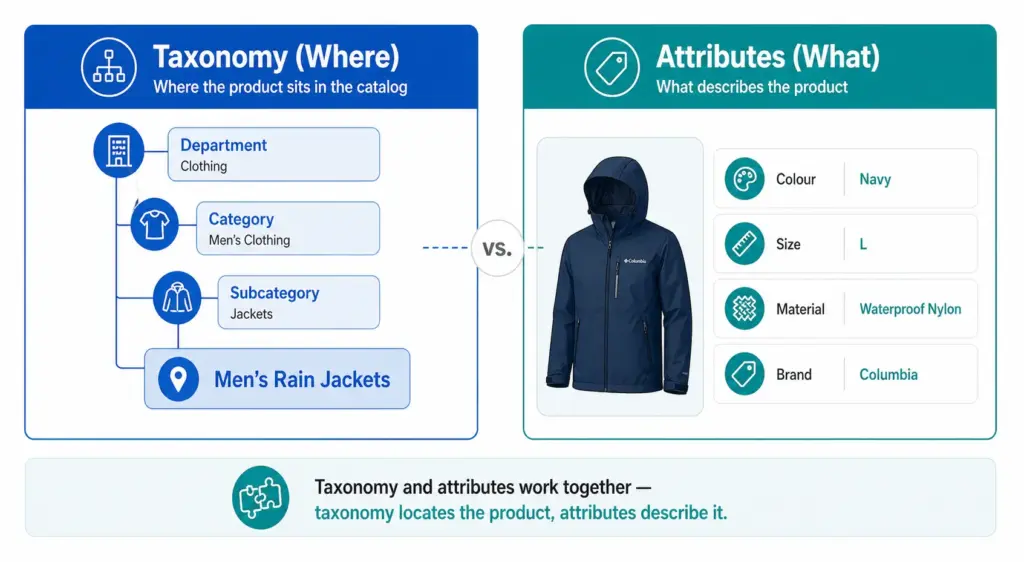
Attributes — the properties of a product within its category. Colour, Size, Material, Brand are attributes of a product in Men’s Jackets.
Taxonomy tells you where the product lives. Attributes describe what the product is. Both are necessary. A product without a taxonomy position cannot be found by browsing. A product without attributes cannot be filtered or matched to specific search queries.
Why Product Taxonomy Matters for Ecommerce
1. Site navigation and search
Your taxonomy is the structure your site navigation and filters are built on. If your taxonomy is flat or inconsistent, your filters do not work. Customers searching for “blue running shoes women size 7” cannot filter to that result if Colour, Activity, Gender, and Size are not structured attributes on products in the correct subcategory.
2. Google Shopping performance
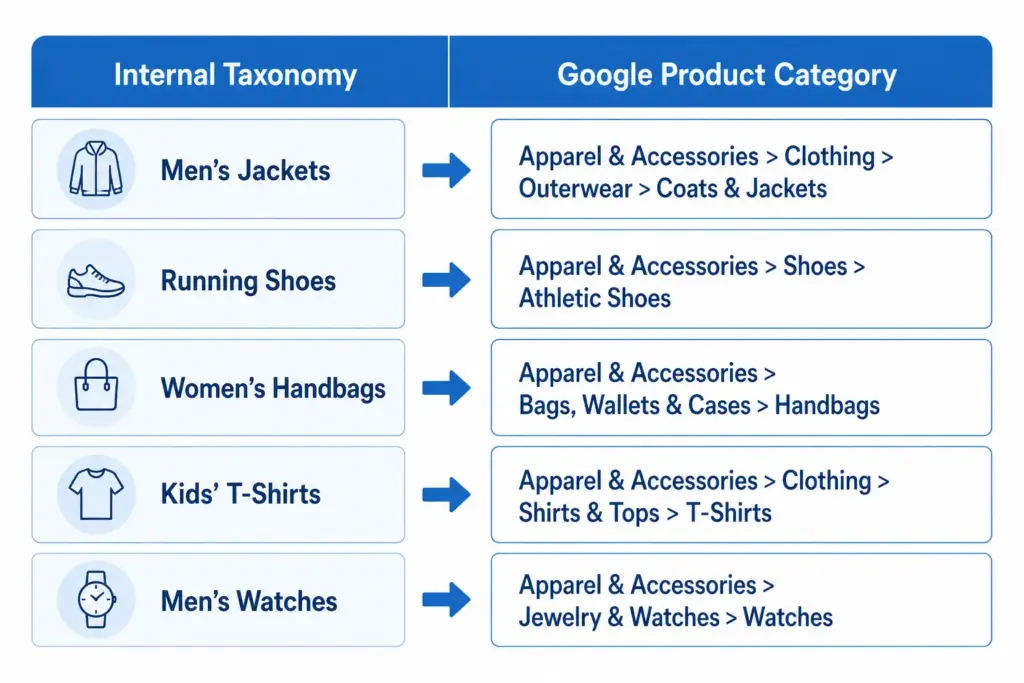
Google Shopping requires a google_product_category value for every product. This value must map to Google’s own taxonomy at the most specific level available. A jacket submitted as “Apparel & Accessories” instead of “Apparel & Accessories > Clothing > Outerwear > Coats & Jackets” loses relevance in every Shopping auction it enters. Your taxonomy must map to Google’s.
3. Channel feed mapping
Every major channel — Google Shopping, Amazon, Facebook Catalogue, retail marketplaces — has its own category taxonomy. Your internal taxonomy needs to translate cleanly to each one. A well-structured internal taxonomy makes this mapping straightforward. A chaotic one makes it a manual monthly project.
4. Internal catalog management
A consistent taxonomy means your team can find, update, and report on products by category without ambiguity. Without it, “running shoes” might live under “Athletic Footwear”, “Sports”, “Men’s Sports”, and “Women’s Running” in the same catalog — making bulk updates, seasonal campaigns, and channel exports all harder than they need to be.
Flat vs Hierarchical Taxonomy
Two structural approaches exist for product taxonomy. For most ecommerce stores with more than a few hundred products, the difference matters significantly. The full comparison is covered in the Flat vs Hierarchical Taxonomy guide, but the key distinction is:
Flat taxonomy: One level of categories, no subcategories. Simple but breaks down above ~200 products. Filters become unwieldy and Google category mapping becomes imprecise.
Hierarchical taxonomy: Multiple nested levels. Scales to any catalog size. Enables precise Google category mapping and deep attribute-based filtering.
Product Taxonomy in Practice — Real Examples
Across industries the hierarchy principle stays the same but the depth and attribute requirements differ significantly. A fashion taxonomy needs colour normalisation, size system declarations, and seasonal attribute management. An electronics taxonomy needs technical specification attributes and compatibility data. A home goods taxonomy needs dimension attributes and material normalisation. Each industry guide is linked below.
How to Build Your Product Taxonomy
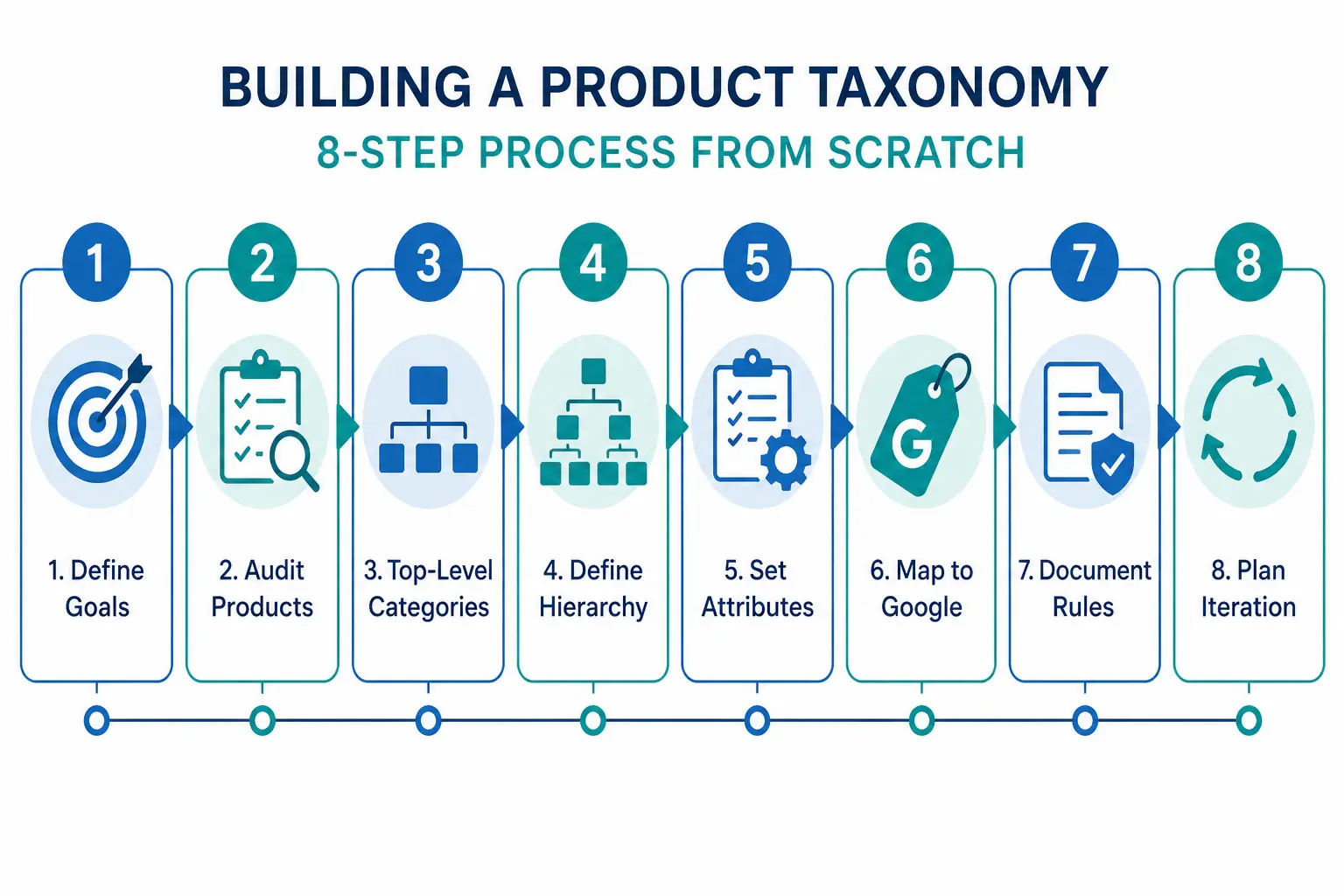
The full step-by-step build process is covered in How to Build a Product Taxonomy From Scratch — from auditing your products through to Google category mapping and documentation. The short version:
Define what your taxonomy needs to do — navigation, channel mapping, or both
Audit your existing products before designing any categories
Design 5–12 top-level departments
Build at minimum three levels of hierarchy
Define attribute sets per subcategory
Map every subcategory to a Google product category leaf node
Document the rules
Before building, take the PIM Readiness Score to identify where your current product data governance has gaps. The free Taxonomy Template at lynkpim.app gives you a pre-built starting point for 5 industries.
Frequently Asked Questions
What is product taxonomy in ecommerce?
Product taxonomy is the hierarchical classification system used to organise products into categories, subcategories, and product types. It defines the structure that powers site navigation, search filters, channel feeds, and internal catalog management.
What is the difference between product taxonomy and product attributes?
Taxonomy defines where a product sits in the hierarchy — Men’s Clothing > Jackets. Attributes define the properties of that product within its category — Colour: Navy, Size: L, Material: Nylon. Taxonomy organises the catalog structure; attributes describe individual products within it.
Why does product taxonomy matter for Google Shopping?
Google Shopping requires a google_product_category value for every product in your feed, mapped to Google’s own taxonomy at the most specific leaf-node level. Broad or incorrect category values reduce relevance matching and hurt Shopping auction performance — your products appear for fewer relevant queries and at lower positions.
How many levels should a product taxonomy have?
A minimum of three levels: Department (Level 1), Category (Level 2), and Subcategory (Level 3). Larger catalogs benefit from a fourth level (Product Type). More than four levels rarely adds value and increases maintenance complexity without meaningful benefit to navigation or channel mapping.
What is the difference between a flat and hierarchical product taxonomy?
A flat taxonomy has one level of categories with no subcategories — simple but breaks down above ~200 products. A hierarchical taxonomy has multiple nested levels that scale to any catalog size, enable precise Google category mapping, and support deep attribute-based filtering. For the full comparison see Flat vs Hierarchical Taxonomy.
Product Taxonomy for Electronics: Handling Complex Variants at Scale
Electronics catalogs present a different set of taxonomy challenges than fashion or general merchandise. The variant complexity is not size and colour — it is processor speed, RAM configuration, storage tier, connectivity standard, and compatibility matrix. Customers buying a laptop know exactly what specs they need. Your taxonomy either surfaces those specs in filters or loses the sale.
What Makes Electronics Taxonomy Complex
Technical specification depth: A single laptop model can have 12+ relevant attributes. All need to be captured, validated, and filterable.
Rapid product obsolescence: New chipsets and standards appear constantly. Your taxonomy needs to accommodate new attributes without breaking existing products.
Compatibility dependencies: Accessories are valid only for specific parent products. A charger is not just a charger — it is a charger for a specific voltage, connector type, and device family.
High-consideration buying: Electronics customers compare on specifications more than any other category. Incomplete data does not just affect discoverability — it directly prevents conversion.
Recommended: Driver size, Frequency response, Noise cancellation type, Battery life, Impedance, Microphone (yes/no), Codec support (AAC, aptX, LDAC)
Handling Variant Structures in Electronics
Electronics variants behave differently from fashion variants. In fashion, variants of the same product differ only in size and colour — the product is the same. In electronics, different storage configurations can have meaningfully different prices, performance profiles, and target buyers.
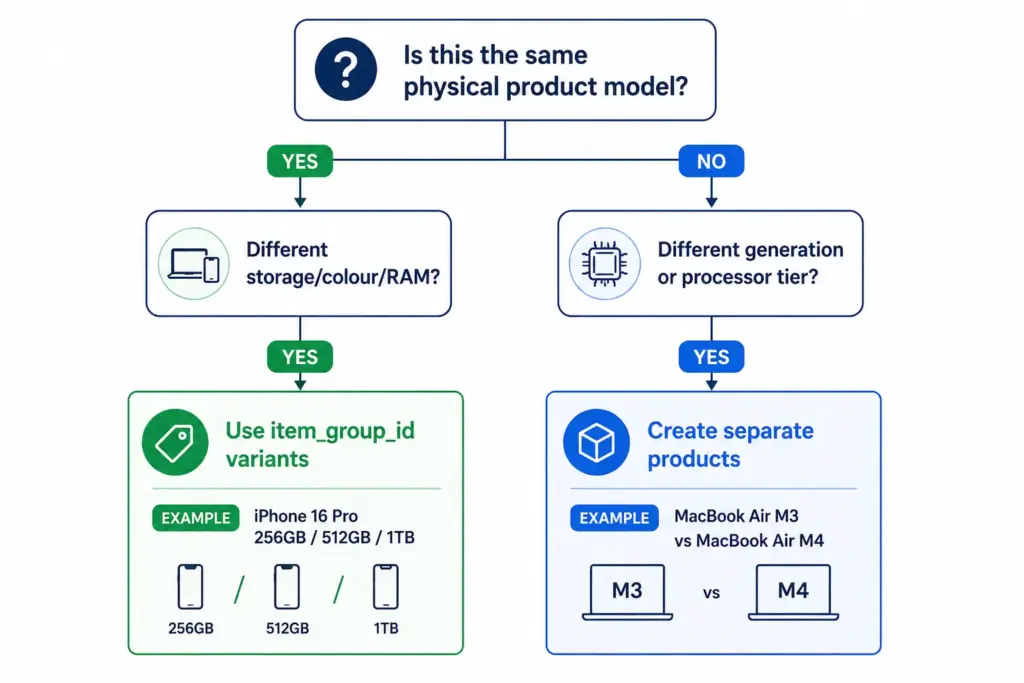
Variant approach (same item_group_id): All configurations of the same physical product model are variants. Customers can switch between them on the same product page. Use this when the products are the same model with configuration differences only.
Separate product approach: When the “variant” is effectively a different product — different processor tier, different generation, meaningfully different positioning — treat as separate products. Different model generations should be separate products, not variants of each other.
For how variant management compares across categories, the fashion taxonomy guide covers the simpler size/colour variant model as a useful contrast.
Compatibility Attributes — The Electronics-Specific Challenge
Accessories in electronics require compatibility data that no other category demands at the same scale. A USB-C cable not rated for Thunderbolt 4 is useless to someone buying it for a high-end laptop. A phone case for one model does not fit its larger variant.
Build compatibility into your taxonomy as a structured attribute, not as free-text description:
compatible_with — a list of compatible product IDs or model references from your own catalog
connector_type — USB-C, USB-A, Lightning, Thunderbolt 4, HDMI 2.1 etc.
voltage / wattage — for chargers and power accessories
form_factor — for components (ATX, Micro-ATX, Mini-ITX for PC cases and motherboards)
Structured compatibility data enables “compatible accessories” widgets on product pages — a meaningful cross-sell driver in electronics where accessory attach rates are high.
Electronics > Computers > Computer Components > Hard Drives & Storage > Solid State Drives
Mirrorless camera body
Cameras & Optics > Cameras > Digital Cameras
Smart TV 65″
Electronics > Video > Televisions
Managing Rapid Product Turnover
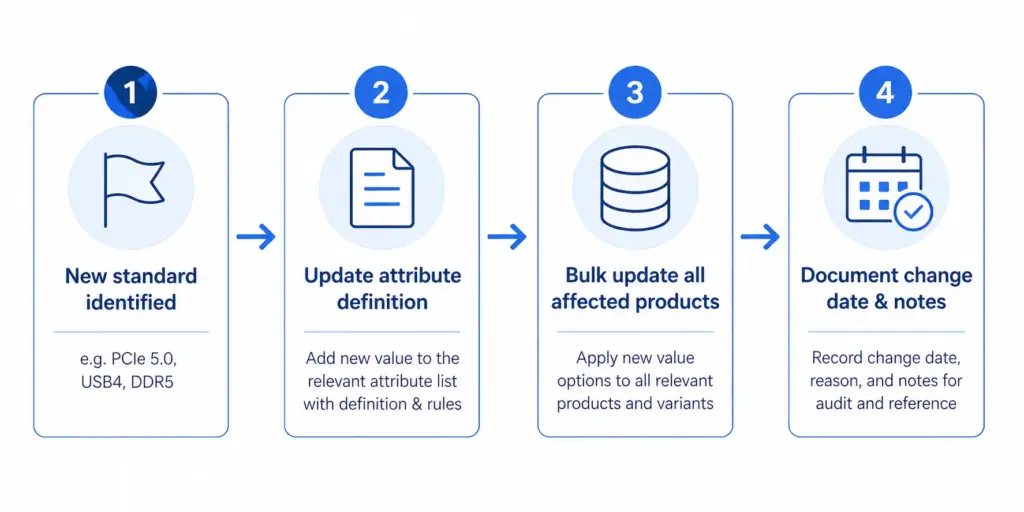
Electronics catalogs face a unique taxonomy maintenance challenge: product generations. A new processor standard, connectivity format, or storage type can require new attribute values across hundreds of products simultaneously.
Build this into your taxonomy governance from the start: attribute value lists need a version-controlled update process, not ad hoc additions. When a new standard appears, update the attribute definition, update all products in that category in bulk, and document the change date.
At scale, this requires product data tooling that can apply bulk attribute updates to entire categories. The PIM Readiness Score will show you where your current setup has gaps — and the LynkPIM free plan lets you start managing this properly without a large budget or implementation timeline.
For a broader comparison of how taxonomy decisions differ across industries, see the Flat vs Hierarchical Taxonomy guide — the structural decision matters more for electronics than for most other categories due to the depth of specification attributes required at every level.
Frequently Asked Questions
Should different laptop storage configurations be variants or separate products?
Use variants (same item_group_id) for storage, colour, and RAM configuration differences within the same physical model — customers can switch between them on the same product page. Create separate products for different processor generations or model tiers that represent meaningfully different products with different performance profiles and target buyers.
What compatibility attributes should electronics accessories have?
At minimum: compatible_with (list of compatible product IDs or model references), connector_type (USB-C, USB-A, Thunderbolt 4, HDMI 2.1 etc.), voltage and wattage for chargers and power accessories, and form_factor for PC components. Structured compatibility data enables “compatible accessories” widgets on product pages and reduces returns from incompatible purchases.
How do you handle new technical standards in an electronics taxonomy?
Treat attribute value lists as version-controlled documents. When a new standard appears — PCIe 5.0, USB4, DDR5 — update the attribute definition for the affected subcategory, bulk-update all products in that category, and document the change date. Ad hoc additions without bulk updates leave older products with stale or missing values, which hurts both filter accuracy and feed performance.
What Google product category should I use for NVMe SSDs?
Use the leaf-node category: Electronics > Computers > Computer Components > Hard Drives & Storage > Solid State Drives. Never use a parent category like “Electronics” or “Electronics > Computers” — Shopping relevance and auction performance depend on using the most specific category available for every product.
How many required attributes does a laptop product need?
At minimum 8 required attributes: Brand, Processor family, Processor model, RAM (GB), Storage capacity (GB), Storage type (SSD/HDD/NVMe), Screen size (inches), and Operating system. Recommended additions that significantly improve discoverability and conversion include GPU, battery life, weight, screen resolution, ports, Wi-Fi standard, and use case (gaming / business / ultrabook).
How to Build a Product Taxonomy From Scratch (Step-by-Step Guide)
Most product taxonomy problems do not start with bad intentions. They start with a spreadsheet, a growing catalog, and someone who just needed to categorise 50 products quickly. Three years later there are 3,000 products, four naming conventions, and no one knows which category rules apply where.
Building a taxonomy properly from the start — or rebuilding one that has grown without structure — requires the same process regardless of catalog size. This guide walks through every step.
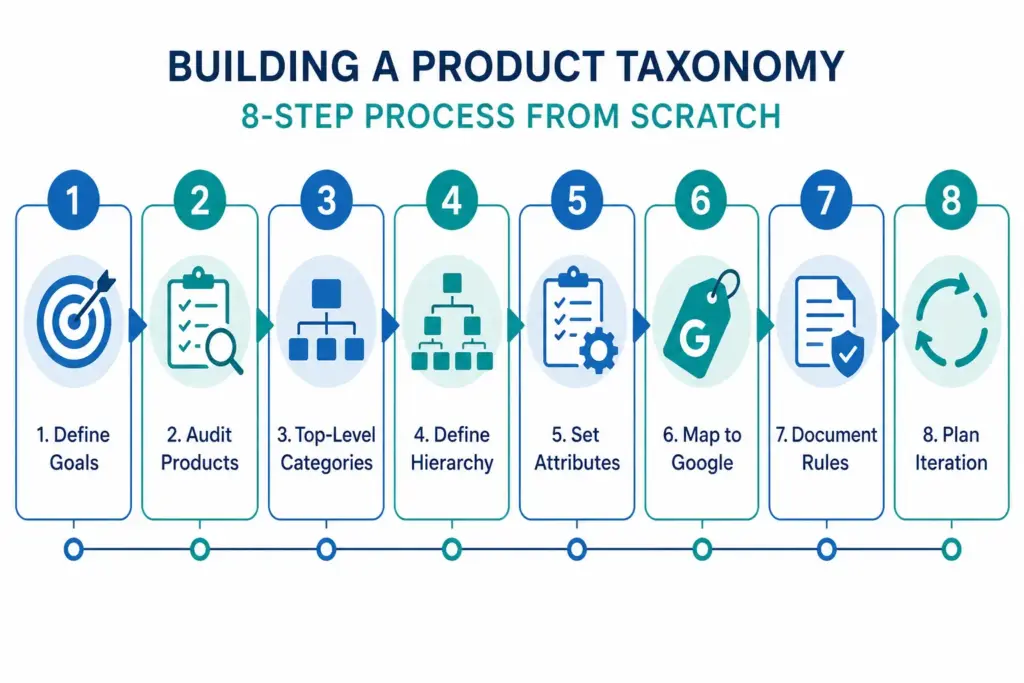
Step 1: Define What Your Taxonomy Needs to Do
Before you name a single category, decide what jobs your taxonomy needs to perform. Most ecommerce catalogs need it to do three things simultaneously:
Power site navigation and search — customers browse by category and use filters. Your taxonomy is the structure those filters sit on.
Map to channel requirements — Google Shopping, Amazon, and marketplaces have their own taxonomies. Yours needs to translate cleanly to theirs.
Organise internal operations — product teams, buyers, and merchandisers use the taxonomy to find, update, and report on products.
These three jobs sometimes conflict. A taxonomy built purely for internal operations often does not map well to how customers search. Understanding the priority before you build prevents rework. For background on what taxonomy is and why it matters, the What Is Product Taxonomy guide covers the foundations.
Step 2: Audit Your Existing Products
Export every SKU you have. Look at the full list before designing any categories. You are looking for:
Natural groupings — what products obviously belong together?
Edge cases — products that do not fit neatly into an obvious category
Volume distribution — how many products fall into each potential category?
Attribute patterns — what attributes do products in the same group share?
A category with 2 products and a category with 2,000 products suggest the hierarchy is off. Aim for relative balance across categories at the same level, with narrow subcategories only where genuine product differentiation exists.
Step 3: Design Your Top-Level Categories
Top-level categories are your broadest groupings. For most ecommerce catalogs, 5–12 top-level categories is the right range. Too few and subcategories get unwieldy. Too many and customers cannot find their starting point.
The test for a top-level category: a customer with no prior knowledge of your store should be able to assign a product to the correct top-level category without thinking about it. If it requires judgment, the category is too vague.
Two approaches to defining top-level categories
Customer-first approach: Start with how customers describe what they are looking for. Use your site search data, Google Search Console queries, and competitor category names as evidence of natural language groupings.
Google-first approach: Start with Google’s product taxonomy at the top level. This makes channel mapping easier later and ensures your categories align with how the largest product discovery platform in the world organises products. You can always use internal-facing names that differ from the Google-facing values.
Step 4: Define 3 Levels of Hierarchy (Minimum)
A functional product taxonomy needs at least three levels:
For larger catalogs, Level 4 (product type) is worth adding: Men’s Jackets → Rain Jackets, Leather Jackets, Padded Jackets.
The difference between a flat and hierarchical taxonomy matters significantly for navigation and channel mapping. The Flat vs Hierarchical Taxonomy guide covers when each structure is appropriate.
Step 5: Define Attributes per Category
Attributes are the product properties that apply within a category. Every category in your taxonomy needs a defined attribute set — the list of fields that must be filled for a product in that category to be considered complete.
Category
Required Attributes
Recommended Additions
Men’s Jackets
Brand, Colour, Size, Material, Gender
Waterproof rating, Fill weight, Packable
Running Shoes
Brand, Colour, Size, Gender, Surface type
Drop height, Cushioning level, Width
Laptops
Brand, Processor, RAM, Storage, Screen size
Battery life, Weight, Graphics card
Step 6: Map to Google’s Product Taxonomy
Once your internal taxonomy is defined, create a mapping document that links each of your subcategories to its corresponding Google product category value. Use Google’s official taxonomy file to find the correct IDs. Map at the most specific level possible — leaf nodes, not parent categories.
Step 7: Document the Rules
A taxonomy that exists only in someone’s head is a single point of failure. Document:
Category definitions — what does and does not belong in each category
Naming conventions — title case vs sentence case, singular vs plural
Attribute validation rules — acceptable values for controlled attributes like colour and size
Exception handling — what happens to products that span categories
The PIM Readiness Score assessment helps you identify where your current product data governance has gaps before you build on top of it. Free, takes 5 minutes.
Step 8: Build with Iteration in Mind
No taxonomy survives contact with a growing catalog unchanged. You will need to add categories as you expand into new product areas. You will discover edge cases your initial rules did not cover. You will probably need to split an overpopulated subcategory 18 months after launch.
Build with this in mind: keep hierarchy levels consistent, avoid category names that are too specific, and review your taxonomy structure annually against site search data and channel performance.
Ready to apply this? Download the free Product Taxonomy Template at lynkpim.app — pre-built for Fashion, Electronics, Home Goods, Food & Beverage, and B2B Industrial. Use it as a starting point rather than building from a blank page.
Once your taxonomy structure is set, see how it applies to specific industries: fashion ecommerce taxonomy and electronics taxonomy both cover the unique requirements of their categories in detail.
Frequently Asked Questions
How many levels should a product taxonomy have?
A minimum of three levels: Department (Level 1), Category (Level 2), and Subcategory (Level 3). Larger catalogs benefit from a fourth level (Product Type). Going beyond four levels rarely adds value and increases maintenance complexity without meaningful improvement to navigation or channel mapping.
How often should you review and update your product taxonomy?
Review your taxonomy structure at least once per year against site search data, channel performance data, and catalog growth. Attribute value lists for technical categories may need updating more frequently — for example when new product standards or formats appear in electronics or components.
Should your internal taxonomy match Google’s product taxonomy?
Not necessarily. Your internal taxonomy should reflect how your team and customers think about products. What matters is that every internal subcategory maps to the correct Google product category leaf node in your feed — the two systems can use different naming as long as the mapping document is maintained and applied consistently.
What is the difference between a category and an attribute in product taxonomy?
A category defines where a product sits in the hierarchy — for example, Men’s Jackets. An attribute defines a property of that product within its category — for example, Colour = Navy, Size = L, Material = Nylon. Categories organise the catalog structure; attributes describe individual products within it.
How many top-level categories should a product taxonomy have?
For most ecommerce catalogs, 5 to 12 top-level categories is the right range. Too few and subcategories become unwieldy. Too many and customers cannot find their starting point. The test: a customer with no prior knowledge should be able to assign any product to the correct top-level category without thinking about it.
Almost every growing product team starts in a spreadsheet.
TL;DR: Then the catalog grows. More people touch it. More channels get added. More suppliers send files in their own format. Variants multiply. Launches get slower. And one day you realize the spreadsheet is
Usually Excel. Sometimes Google Sheets. And at the beginning, that choice is completely reasonable. You have a manageable catalog, a small team, maybe one sales channel, and the spreadsheet feels fast, flexible, and familiar.
Then the catalog grows. More people touch it. More channels get added. More suppliers send files in their own format. Variants multiply. Launches get slower. And one day you realize the spreadsheet is no longer helping you control product data — it is forcing your team to work around it.
This is the real PIM vs spreadsheets conversation. Not the dramatic vendor version. The practical one.
Spreadsheets are fine for small, simple catalogs with limited contributors and one main channel.
They break down when variants, approvals, attribute consistency, and multichannel publishing start to matter.
The biggest spreadsheet cost is not the file itself. It is the repeated manual work, hidden errors, and lack of operational control.
A PIM does not just “store product data.” It gives you structure, validation, workflow, ownership, and controlled output.
You do not need a PIM on day one. But once your spreadsheet starts creating friction every week, it is usually already late in the decision cycle.
Why spreadsheets feel right at first
Because they are easy to start with.
You can create columns quickly. Anyone on the team already knows the basic interface. You do not need implementation planning just to get products listed. For an early-stage catalog, spreadsheets are often the shortest path from “we need to organize this” to “we have something usable.”
That is exactly why so many teams stay with them longer than they should. The early convenience hides the long-term operational cost.
Even Google Sheets supports dropdowns and data validation, which can absolutely help teams behave more consistently for a while. But those controls are still light compared with category-level rules, approval states, inheritance logic, auditability, and governed channel output. Google’s own documentation shows how basic dropdown and validation controls work — useful, but still limited for scaled catalog operations.
When spreadsheets stop being a tool and start being infrastructure
This is the shift most teams miss.
A spreadsheet is fine when it is just a working file. It becomes risky when it quietly turns into the system behind your catalog. That usually happens when the file is doing all of these jobs at once:
master product list
attribute store
supplier import file
launch tracker
channel export base
approval workflow substitute
data-quality checklist
Once one file is trying to be all of that, you are no longer using a spreadsheet for convenience. You are depending on it as operational infrastructure.
8 signs your product catalog has outgrown its spreadsheet
1. You have more than one “master” file
This is usually where the trouble becomes visible first. One file is “the latest version.” Another is the version for Amazon. Another is the “clean one.” Someone has a local backup “just in case.”
If your team has to ask which file is current, you do not have a reliable operating model anymore. You have negotiation.
2. One product update means fixing the same fact in multiple places
A size correction comes in from the supplier. Easy enough. Then someone updates the spreadsheet. Then Shopify. Then the marketplace file. Then a PDF sheet. Then maybe a feed export.
The issue is not only time. It is that repeated manual work creates repeated opportunities for mismatch.
3. Variant management is becoming a flat-row mess
Variants are where spreadsheets start feeling especially unnatural. A product family with 5 colors and 6 sizes becomes 30 rows. Then you add separate barcodes, variant images, pack sizes, or localized copy and the structure becomes fragile very quickly.
Flat rows are not impossible. They are just the wrong model for parent-child product relationships.
This is where teams start relying on unwritten rules.
“Don’t change the green columns.” “Ask before editing that tab.” “Only marketing should touch that field.” Those may sound harmless, but they are not actual controls. They are social agreements trying to do the job of system logic.
Once more than a few people are involved, that becomes a governance problem, not just a spreadsheet problem.
5. Your attribute values are full of near-duplicates
This is one of the most common catalog-quality problems: Cotton, cotton, 100% Cotton, pure cotton, cotton fabric. Technically different values. Operationally the same thing. And that small inconsistency causes bigger downstream problems in filters, feeds, exports, and reporting.
Controlled values are one of the first places where spreadsheet flexibility stops being an advantage and starts becoming a quality risk.
6. Pre-launch cleanup has become a recurring ritual
If every launch depends on somebody manually checking missing images, incomplete attributes, and formatting issues before products go live, that is not a healthy workflow. It is a workaround for missing validation.
At that point, the team is doing quality control by memory and panic instead of by system design.
7. New team members take too long to onboard
When the logic of the catalog lives in tribal knowledge instead of in the system, onboarding becomes slow and risky. New people need the “real explanation” behind tabs, colors, exceptions, formulas, and naming conventions. And every time someone leaves, part of that operating knowledge leaves with them.
8. Your catalog is growing, but launches are getting slower
This is often the clearest sign of all. Growth should make your processes more disciplined, not more chaotic. If the catalog is bigger but every launch is taking longer than it did last year, the problem is usually not effort alone. It is that the underlying workflow no longer scales cleanly.
The hidden costs of spreadsheet-based catalog management
Most teams do not calculate these costs because they do not appear as a single line item. They show up in fragments.
repeated copy-paste work across channels
slow launches caused by manual review
listing errors that reach live channels
broken filters or inconsistent faceting
team time lost to clarifying which version is correct
supplier updates that require cleanup before they can be used
SEO and feed fields that drift because nobody owns them clearly
This is the “spreadsheet tax.” It is real, even when it does not look dramatic in one single week.
What a PIM changes in practice
The biggest difference is not that a PIM stores your product data in a nicer interface. The real difference is that it gives the catalog rules.
one governed product record instead of multiple competing files
structured attributes instead of free-for-all entry
variant relationships that make sense
required-field checks before publishing
approval steps instead of accidental live edits
channel-specific output from one maintained record
change visibility and auditability
If you are comparing categories, this is also where it helps to understand PIM vs MDM vs DAM vs PXM. Most teams stuck in spreadsheets do not need broader enterprise MDM first. They need better product-data operations first.
Spreadsheet vs PIM at the operational level
Capability
Spreadsheet
PIM
Single source of truth
Possible in theory, fragile in practice
Designed for governed product truth
Controlled attribute values
Light validation only
Structured values and stronger rule enforcement
Variant relationships
Usually flat rows
Parent-child model with clearer inheritance
Approval workflow
Mostly manual and social
Built into the operating process
Completeness checks
Manual review or formulas
Category- and channel-aware validation
Channel output
Often separate files per destination
One maintained record, multiple controlled outputs
Auditability
Limited
Better change tracking and accountability
Scaling with catalog growth
Gets heavier and more fragile
Better suited for structured scale
The honest case for staying with spreadsheets
Not every team should switch immediately.
If you have a small catalog, one main channel, very few variants, and one or two people managing product data, a spreadsheet may still be the right tool. There is no prize for introducing more software before the need is real.
In that case, the smarter move is to make your spreadsheet cleaner while you still can:
standardize column naming
use dropdowns where possible
define controlled values in a reference sheet
separate product families from variant-level data as clearly as you can
document required fields for each category
decide who owns which fields
Those habits will still help you later, even if you eventually move to PIM.
How to move from spreadsheet chaos to a cleaner PIM transition
The best migrations do not start with software screens. They start with structure.
Decide what the master product record should contain.
Clean up taxonomy and category naming.
Define core attributes and required fields.
Separate parent-level and variant-level data logically.
Standardize identifiers like SKU, GTIN, MPN, and supplier references where applicable.
Identify which fields differ by channel.
Define who owns enrichment, approval, and publishing.
For identifiers specifically, it helps to align with official guidance. GS1 defines GTIN as the global identifier for trade items, and Google Merchant Center explains how identifiers like GTIN, MPN, and brand help channels understand products correctly. See GS1’s GTIN overview and Google Merchant Center’s unique product identifier guidance.
LynkPIM is for the team that has already crossed the line where spreadsheets are no longer “simple.” It gives you a place to centralize product records, govern attributes, model categories and variants properly, enforce consistency, and publish out to channels with more control.
The goal is not to make your workflow feel heavier. It is to remove the repeated manual work and hidden fragility that spreadsheets create once your operation becomes more complex.
Spreadsheets are not the enemy. They are just easy to outgrow without noticing.
The right question is not “Are spreadsheets bad?” The better question is “Are we now asking a spreadsheet to do the work of a governed product-data system?”
If the answer is yes, the issue is no longer preference. It is operating risk. And that is usually the point where a PIM stops being a nice-to-have and starts becoming the cleaner way to run the catalog.
FAQs
Can’t I just keep using Google Sheets with add-ons?
You can extend a spreadsheet further than most teams expect. But add-ons do not usually solve the deeper problems around governed workflows, variant structure, controlled publishing, and category-aware completeness.
What’s the real difference between a spreadsheet and a PIM?
A spreadsheet is a flexible file. A PIM is an operating system for product information. The key difference is not storage. It is control, structure, and repeatability.
At what SKU count should I consider a PIM?
There is no perfect number. Complexity matters more than count. A few hundred SKUs with variants, multiple channels, and multiple contributors can justify PIM earlier than a larger but simpler catalog.
Will a PIM make the team less flexible?
It usually removes the wrong kind of flexibility. You lose uncontrolled editing and inconsistent field entry, but you gain cleaner structure, faster publishing, and fewer repeated mistakes.
What should I do before migrating from spreadsheets?
Clean taxonomy, define attributes, standardize identifiers, separate parent and variant logic, and decide field ownership. Those steps make implementation much smoother.
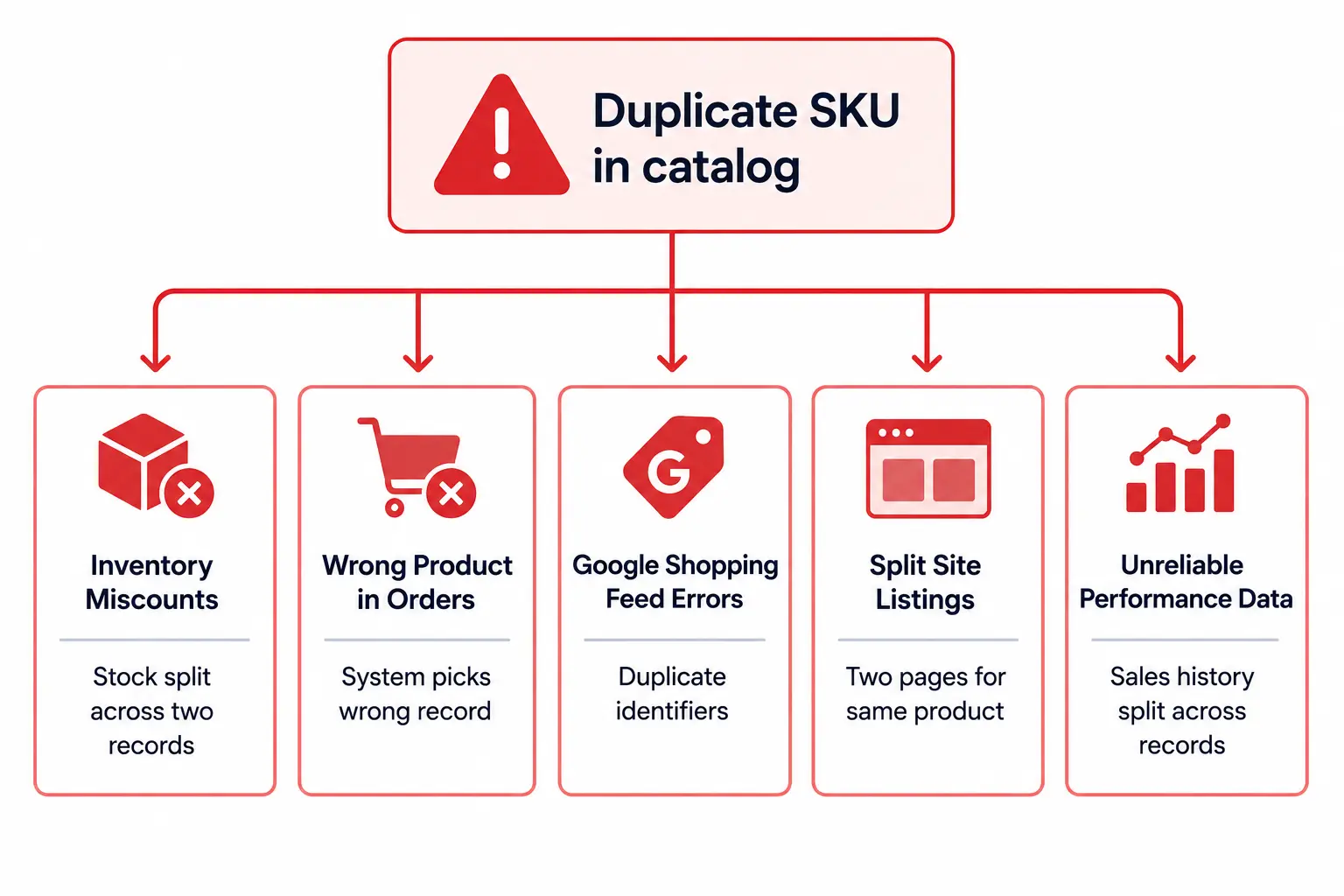
I’ve seen it happen dozens of times. A brand launches their ecommerce site with 5,000 products and thinks, “We’ll just organize them later.” Six months in, their customers can’t find anything, their product team is drowning in spreadsheets, and their conversion rate is half what it should be.
The culprit? A messy product taxonomy—or worse, no real taxonomy at all.
If you’re managing more than a few hundred SKUs, your product taxonomy isn’t just an “internal organization thing.” It’s the invisible architecture that determines whether customers find what they’re looking for, whether your team can work efficiently, and ultimately, whether your products actually sell.
In this guide, I’ll walk you through exactly how to build a product taxonomy that scales—from 1,000 SKUs to 100,000 and beyond. No fluff, just practical frameworks you can implement this week.
What is Product Taxonomy? (And Why It’s Not Just Categories)
Definition: Product Taxonomy
Product taxonomy is the hierarchical classification system that organizes your product catalog into logical, searchable categories that meet customer needs instantly. Think of it as your digital store’s roadmap.
Example: Electronics → Mobile Phones → Smartphones → Apple → iPhone 15 Pro
Here’s what most people get wrong: they think taxonomy is just about creating a menu for their website. “Let’s put shirts under clothing, done.”
But a strong taxonomy does so much more:
Controls which attributes apply to which products (a t-shirt needs “neckline” and “sleeve length,” but a laptop doesn’t)
Defines validation rules (all products in “Electronics” must have a UPC and energy rating)
Powers your internal search (when someone searches “running shoes,” they see the right subcategory)
Enables channel syndication (Google Shopping, Amazon, and your wholesale partners all need products mapped to their category structures)
Guides your content team (what product information do we need to collect for this category?)
According to research by Baymard Institute, stores with poor taxonomy structure can sell up to 50% less than their well-organized counterparts. That’s not a small difference—that’s the difference between barely surviving and thriving.
Before you dive deeper into building your taxonomy, it helps to understand the broader context. Check out our complete guide to Product Information Management (PIM) to see how taxonomy fits into your overall product data strategy.
Why Taxonomy Isn’t Just for Customers—It’s Your Team’s Operating System
Most ecommerce teams think about taxonomy from the customer’s perspective: “How do we help shoppers browse our site?”
That’s important, sure. But here’s what actually breaks when your taxonomy is weak:
Your Product Team Can’t Scale
Without clear taxonomy, every new product becomes a judgment call. “Does this go under ‘Outdoor Gear’ or ‘Camping Equipment’? Should we create a new category or use an existing one?”
Multiply that by 50 products a week and you’ve got chaos. Different team members making different decisions. No consistency. No rules.
Your Data Quality Tanks
When taxonomy is unclear, products end up in the wrong categories. Which means they get the wrong attribute sets. Which means your data is incomplete, incorrect, or just plain missing.
I’ve seen catalogs where 30% of products were missing required attributes simply because they were miscategorized. If you’re struggling with data quality, our guide to cleaning supplier product data can help you fix these issues systematically.
Channel Syndication Becomes Manual Hell
Want to sell on Amazon? They have 20,000+ categories. Google Shopping? Their taxonomy has 6,000+ categories. Your wholesale partners? They each have their own structure.
Without a solid internal taxonomy to map from, you’re manually categorizing products for every single channel. Every. Single. Time.
The 5 Core Principles of Scalable Product Taxonomy
After helping dozens of brands build and fix their taxonomies, I’ve distilled it down to five non-negotiable principles.
1. Design for Both Customers AND Operations
Taxonomy isn’t just “internal organization” or “customer navigation”—it’s both. And that’s where most teams go wrong.
Customer-focused taxonomy: Categories match how people think about shopping. “Women’s Running Shoes” not “Footwear → Athletic → Female → Running.”
Operations-focused taxonomy: Categories control attribute sets, validation rules, and data requirements.
The trick? Build your master taxonomy for operations (attribute control, validation, data model). Then create navigation views for customers that map to your master structure.
Example: Your master taxonomy might be “Footwear → Athletic Shoes → Running → Road Running.” But your customer navigation could show “Men’s Running Shoes” and “Women’s Running Shoes” as separate top-level categories, both pulling from the same master category.
Bad (mixing styles): • Men Shoes • Shoes for Men • Mens Footwear • Men’s Athletic Footwear
Decide early:
Plural or singular? (“Shoes” vs “Shoe”)
Possessive or not? (“Men’s” vs “Mens” vs “Men”)
Broad to specific or specific to broad? (“Women’s → Shoes → Running” vs “Running Shoes → Women’s”)
Then document it. Make it a rule. No exceptions. If you’re new to PIM terminology, our PIM glossary defines all the key terms you’ll need.
3. Keep It Shallow—3 to 5 Levels Max
Deep hierarchies feel organized. “Look at all these well-defined subcategories!”
But they become impossible to maintain. And they confuse customers who have to click through seven layers to find a product.
Instead of this: Clothing → Men’s → Tops → Shirts → Casual → Short Sleeve → Cotton → Crew Neck
Do this: Men’s Shirts → Casual Shirts (Then use attributes for: sleeve length, material, neckline)
Use attributes to handle variation. Categories are for grouping products that share the same type of information, not for describing every possible characteristic.
4. Categories Should Control Rules, Not Just Labels
A category isn’t just a folder. It’s a contract that says: “Products in this category will have these attributes, follow these validation rules, and meet these quality standards.”
For example, products in “Electronics” might require:
Energy efficiency rating (required)
Warranty information (required)
Technical specifications (required)
UPC/GTIN (required)
At least 3 product images (required)
User manual PDF (optional but recommended)
Meanwhile, “Apparel” might require:
Size chart (required)
Material composition (required)
Care instructions (required)
Fit type (slim, regular, relaxed – required)
At least 4 product images including detail shots (required)
If your categories don’t control rules like this, your taxonomy is just a messy navigation menu—not a data model. You can validate these requirements using tools like our completeness checker.
5. Establish Governance from Day One
Taxonomy isn’t a “set it and forget it” project. It needs ongoing governance:
Who can create new categories? (Hint: not everyone)
Who approves category merges or renames?
How are changes communicated? (So your team doesn’t wake up to a reorganized catalog)
How often do you audit for unused or redundant categories?
Without governance, your beautiful taxonomy will slowly turn into a bloated mess with categories like “Miscellaneous,” “Other,” and “New Stuff to Categorize Later.”
Assign a taxonomy owner—someone who owns the structure and has final say on changes. This is usually someone in product operations, merchandising, or data governance.
How to Build Your Product Taxonomy: Step-by-Step Process
Alright, enough theory. Let’s build one.
Step 1: Don’t Start with a Blank Canvas—Start with Your Data
Pull your current product list. Even if it’s a mess, it tells you what you’re actually selling.
Look for natural groupings:
Which products share similar attributes?
Which products have similar customer use cases?
Which products have similar data requirements?
Don’t try to model the entire universe. Start with what you have.
Step 2: Identify Your Top-Level Categories (Start Broad)
Top-level categories should be broad enough to be stable over time, but specific enough to be meaningful.
For a fashion retailer:
Women’s Apparel
Men’s Apparel
Kids Apparel
Footwear
Accessories
For a home goods retailer:
Furniture
Kitchen & Dining
Bedding & Bath
Home Decor
Lighting
Aim for 5-12 top-level categories. Fewer than 5 and they’re too broad. More than 12 and you’re already going too deep.
Step 3: Build Out Second and Third Levels (Where the Real Work Happens)
This is where you get specific. For each top-level category, ask:
“What are the main product types within this category?”
Using “Women’s Apparel” as an example:
Tops
Bottoms
Dresses
Outerwear
Activewear
Swimwear
Sleepwear
Then go one more level if needed:
Women’s Apparel → Tops → T-Shirts
Women’s Apparel → Tops → Blouses
Women’s Apparel → Tops → Sweaters
Stop there. Don’t create “Women’s Apparel → Tops → T-Shirts → Crew Neck → Short Sleeve.” That’s what attributes are for.
Step 4: Define Attribute Sets for Each Category
This is the part most people skip—and it’s why their taxonomy falls apart.
For each category (especially at the lowest level), document:
Required attributes (must have to publish)
Recommended attributes (should have for best results)
Optional attributes (nice to have)
Example: Women’s T-Shirts
Required:
Size (XS, S, M, L, XL, XXL)
Color
Material composition
Neckline (crew, v-neck, scoop)
Sleeve length (short, long, sleeveless)
Care instructions
At least 2 product images
Recommended:
Fit type (slim, regular, relaxed)
Pattern (solid, striped, graphic)
Occasion (casual, dressy, athletic)
Size chart
Optional:
Sustainability certifications
Country of origin
Style inspiration images
This becomes your data quality checklist. Products can’t be published until required attributes are complete.
Step 5: Map to External Taxonomies (Google, Amazon, etc.)
Your internal taxonomy is your source of truth. But you’ll need to map it to external systems.
Clothing, Shoes & Jewelry > Men > Shoes > Athletic
Do this mapping once, maintain it centrally, and your channel syndication becomes automatic instead of manual. Use our Google Shopping feed generator to test your category mappings.
Step 6: Test with Real Products
Before rolling out your taxonomy to the entire catalog, test it with 50-100 products that represent your range:
Best sellers
New products
Complex products (bundles, variants)
Edge cases (products that don’t fit neatly)
Ask your product team: “Can you easily categorize these? Do the attribute sets make sense? Are there missing categories or attributes?”
Fix issues now, before you’ve categorized 10,000 products incorrectly.
Step 7: Document Everything
Create a taxonomy guide that includes:
Full category tree (visual hierarchy)
Category definitions (“What goes here vs. there?”)
Attribute sets by category
Naming conventions
Governance rules (who can make changes)
Edge case guidance (“Where do we put products that fit multiple categories?”)
Share this with your entire product team. Update it quarterly.
Common Taxonomy Mistakes (And How to Avoid Them)
Mistake 1: Copying Your Competitor’s Taxonomy
“Nike organizes their products this way, so we should too.”
Nope. Nike’s taxonomy works for Nike’s catalog, Nike’s customers, and Nike’s operations. Yours is different.
By all means, study how competitors organize products. But build taxonomy for your business, not theirs.
Mistake 2: Making Taxonomy and Navigation the Same Thing
Your website navigation might be merchandising-driven: “Best Sellers,” “New Arrivals,” “Sale.”
Your product taxonomy should be data-driven: “What attributes and rules apply to this product type?”
They can overlap, but they’re not the same.
Mistake 3: Creating “Miscellaneous” or “Other” Categories
These are dumping grounds for products you didn’t know how to categorize.
If you have an “Other” category with 500 products in it, your taxonomy is broken. Either create a proper category for those products or figure out why they don’t fit your model.
Mistake 4: Building Taxonomy for Your Current Catalog Only
“We only sell shirts and pants right now, so we’ll just have two categories.”
What happens when you add shoes next quarter? Outerwear the quarter after that?
Build a taxonomy that can grow. Don’t over-engineer it, but think one or two product expansions ahead.
Mistake 5: No Clear Owner or Governance
If everyone can create categories, your taxonomy will become a free-for-all.
Assign ownership. Require approval for changes. Communicate updates. Review quarterly. Not sure if you’re ready? Take our free PIM readiness assessment to find out.
Tools and Templates to Get Started
You don’t need expensive software to start. Here’s what actually helps:
1. Spreadsheet Template (Start Here)
Before you build anything in a system, map it out in a spreadsheet.
Columns to include:
Level 1 Category
Level 2 Category
Level 3 Category
Category Description
Required Attributes
Recommended Attributes
Validation Rules
Google Shopping Mapping
Amazon Mapping
Download our free product taxonomy template with examples for Fashion, Electronics, Home Goods, Food & Beverage, and B2B Industrial categories.
2. Visual Mind Mapping Tools
For brainstorming your hierarchy, visual tools help:
Miro – Great for collaborative taxonomy workshops
Lucidchart – Clean hierarchy diagrams
Whimsical – Simple, fast mind maps
3. PIM Systems (When You’re Ready to Scale)
Once you have your taxonomy designed, you’ll want a system to enforce it:
LynkPIM – Modern PIM built for taxonomy control, attribute management, and channel syndication
Salsify – Enterprise-focused with strong channel integrations
But honestly? Don’t buy a PIM until you’ve designed your taxonomy. The software won’t fix a broken taxonomy—it’ll just enforce your mistakes faster. Learn more about when you actually need a PIM before investing.
Real-World Example: Fashion Retailer Taxonomy
Let’s look at a practical example for a mid-size fashion retailer selling men’s, women’s, and kids apparel plus accessories.
Level 1 (Top Categories)
Women’s
Men’s
Kids
Accessories
Footwear
Level 2 (Product Types) – Using “Women’s” as Example
Women’s → Tops
Women’s → Bottoms
Women’s → Dresses
Women’s → Outerwear
Women’s → Activewear
Women’s → Sleepwear
Women’s → Swimwear
Level 3 (Specific Products) – Using “Tops” as Example
Women’s → Tops → T-Shirts
Women’s → Tops → Tank Tops
Women’s → Tops → Blouses
Women’s → Tops → Sweaters
Women’s → Tops → Hoodies & Sweatshirts
Attribute Set for “Women’s T-Shirts”
Required Attributes:
Product Name
SKU
Brand
Size (XS, S, M, L, XL, XXL, 1X, 2X, 3X)
Color
Material Composition (% cotton, polyester, etc.)
Neckline (crew, v-neck, scoop, boat neck)
Sleeve Length (short sleeve, long sleeve, sleeveless, 3/4 sleeve)
Care Instructions
Price
Product Images (minimum 2: front view, back view)
Recommended Attributes:
Fit Type (slim, regular, relaxed, oversized)
Pattern (solid, striped, graphic print, floral)
Occasion (casual, work, athletic)
Length (cropped, regular, tunic)
Size Chart
Model Height & Size Worn
Validation Rules:
Material composition must add up to 100%
At least one image must be 2000px minimum width
Product description must be 50-500 characters
Price must be greater than $0
Notice how we stopped at Level 3. We didn’t create separate categories for “Short Sleeve T-Shirts” and “Long Sleeve T-Shirts”—that’s handled by the “Sleeve Length” attribute.
When to Rebuild Your Taxonomy (Signs It’s Time)
Sometimes you inherit a messy taxonomy, or your business outgrows your structure. Here are clear signs it’s time to rebuild:
20%+ of products are in “Other” or “Miscellaneous” categories
Your team can’t agree on where new products should go
Products are in multiple categories with conflicting attribute requirements
You have 8+ levels of hierarchy (too deep)
Category names are inconsistent (mixing “Mens,” “Men’s,” “Men,” “For Men”)
You can’t map cleanly to external taxonomies (Google, Amazon)
Data quality is consistently poor across the catalog
Rebuilding taxonomy is painful, yes. But limping along with a broken structure is worse.
Taxonomy Governance: Who Owns What
Taxonomy isn’t a “build once and walk away” project. It needs ongoing maintenance and governance.
Here’s a simple RACI matrix for taxonomy management:
Role
Taxonomy Owner
Product Team
Merchandising
IT/Systems
Create new categories
Responsible
Consulted
Consulted
Informed
Define attribute sets
Responsible
Consulted
Informed
Informed
Categorize products
Accountable
Responsible
Consulted
–
Approve category changes
Responsible
Consulted
Consulted
Informed
Map to external taxonomies
Responsible
Consulted
–
Consulted
Quarterly taxonomy audit
Responsible
Informed
Informed
–
Taxonomy Owner is typically someone in:
Product Operations
Data Governance
Product Information Management
Senior Merchandising (for smaller teams)
This person has final say on taxonomy structure, naming conventions, and changes.
Understanding PIM Systems vs PXM vs MDM vs DAM
Once your taxonomy is solid, you might consider implementing a full PIM system. But it’s important to understand what you’re actually getting.
Many teams confuse PIM (Product Information Management) with related systems like PXM (Product Experience Management), MDM (Master Data Management), and DAM (Digital Asset Management). Each serves a different purpose:
PIM manages product content and marketing information
PXM focuses on customer-facing product experiences
MDM handles enterprise-wide master data governance
DAM stores and organizes digital assets like images and videos
For a detailed breakdown, read our comparison guide on PIM vs MDM vs DAM vs PXM to understand which system (or combination) your team actually needs.
The Single Source of Truth: What It Really Means
You’ll often hear that taxonomy and PIM create a “single source of truth” for your product data. But what does that actually mean in practice?
It’s not just about having one place where data lives. It’s about having one authoritative version of each data point that all systems reference. When your product manager updates a product description, that change should flow automatically to your website, your Amazon listings, your wholesale portal, and your sales team’s materials.
Without strong taxonomy, you can’t achieve this. Your “single source” becomes fragmented across dozens of category structures, each with different validation rules and attribute requirements.
Most successful ecommerce catalogs use 3-5 levels maximum. Beyond that, you’re creating maintenance burden without improving usability. Use attributes to handle product variation instead of creating endless subcategories.
Should I use the same taxonomy as my website navigation?
Not necessarily. Your master taxonomy should be built for data management—controlling attribute sets and validation rules. Your website navigation can be a merchandising-focused view that maps to your master taxonomy. Think of navigation as a “view” of your taxonomy, not the taxonomy itself.
What’s the difference between taxonomy and categorization?
Taxonomy is the structure—the framework of categories and rules. Categorization is the act of assigning specific products to that structure. You build taxonomy once (and maintain it); you categorize products continuously.
Can a product be in multiple categories?
It depends on your needs, but generally it’s better to have a single primary category (which controls attribute sets and validation rules) and then allow secondary category tagging for navigation or merchandising purposes. This prevents conflicting attribute requirements.
How do I handle products that fit multiple categories?
Choose the most specific category that best describes the product’s primary function. For example, a “yoga tank top” should go in “Women’s → Activewear → Tops” rather than “Women’s → Tops” because the activewear category has specific attributes (like moisture-wicking, fabric weight) that apply.
Should I follow Google’s product taxonomy exactly?
No. Google’s taxonomy is for Google Shopping feed submission—it’s not designed to be your internal taxonomy. Build your taxonomy for your operations, then map your categories to Google’s taxonomy. Same goes for Amazon, Facebook, and other channels.
How often should I review and update my taxonomy?
At minimum, quarterly. More frequently if you’re launching new product lines or experiencing rapid growth. Look for: unused categories, over-used “Other” categories, products in wrong categories, and new attribute requirements emerging from your team.
What if I don’t have a PIM system yet?
Start with a spreadsheet. Document your taxonomy structure, attribute sets, and validation rules. You can enforce much of this manually or with simple scripts before investing in software. The important thing is designing the taxonomy correctly first.
How do I get buy-in from leadership for taxonomy work?
Frame it in business terms: increased conversion rates (better findability), reduced operational costs (less manual categorization), faster time-to-market (clear rules for new products), and channel expansion capability (clean mapping to external taxonomies). Show the ROI, not just the technical benefits.
Free Tools to Help You Build Better Taxonomy
Before you invest in expensive software, try these free tools from LynkPIM:
PIM Readiness Assessment – Is your catalog ready for a proper taxonomy? Get your score in 5 minutes
GTIN Validator – Check UPC/EAN compliance instantly to ensure your product identifiers are correct
Assign a taxonomy owner on your team who will maintain governance (30 minutes)
Test your taxonomy with 50 representative products (1-2 hours)
Document your attribute sets for top categories (2-3 hours)
Schedule a quarterly review to keep it maintained (15 minutes to schedule)
Total time investment: About 8-10 hours to get your foundation solid. Compare that to the hundreds of hours you’ll waste over the next year with a messy taxonomy.
If you need help implementing taxonomy in a PIM system, check out LynkPIM’s plans or book a demo to see how we handle complex taxonomy requirements.
For more guides on product data management, visit our PIM blog or explore our documentation.