Supplemental Feeds in Google Merchant Center: What They Are and When to Use Them
Most Google Shopping guides focus on primary feeds — the main data source that contains all your product information. Supplemental feeds are less discussed but solve a very specific and common problem: what do you do when you need to add or change attributes in your feed without being able to modify your primary data source?
This guide covers exactly what supplemental feeds are, the most valuable use cases, and how to set one up correctly.
What Is a Supplemental Feed?
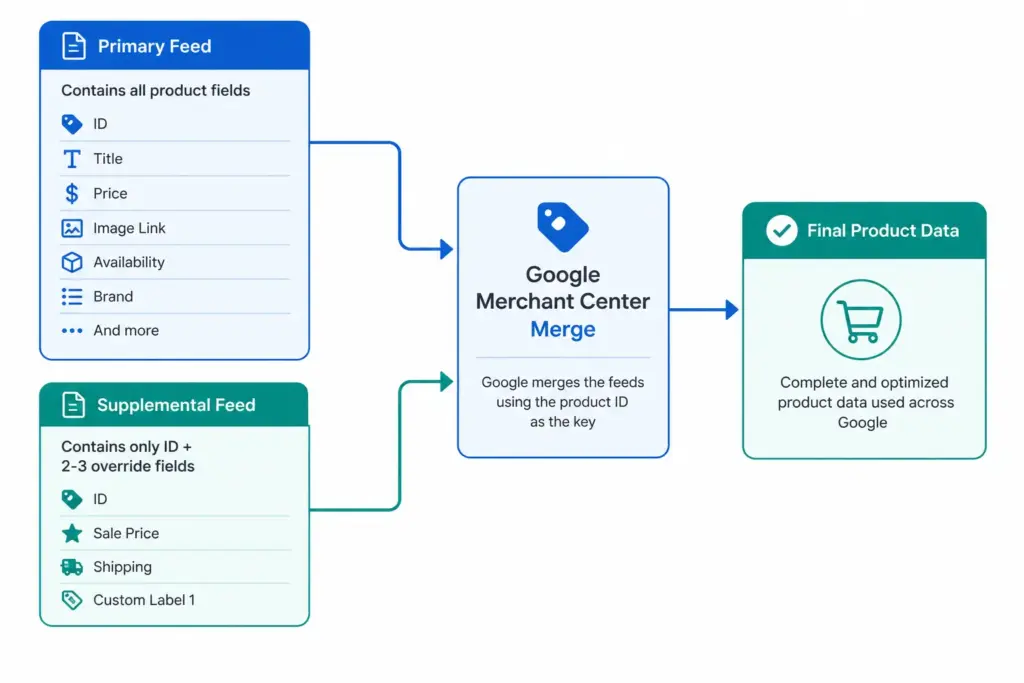
A supplemental feed is a secondary data source in Google Merchant Center that adds or overrides specific product attributes on top of an existing primary feed. It does not replace the primary feed — it merges with it, using the product ID as the matching key.
You can have multiple supplemental feeds attached to one primary feed. Each supplemental feed only needs to contain the product ID column and the specific attributes you want to add or change.
For foundational context on how primary feeds work, the Google Shopping Feed Guide covers the complete attribute set before you layer supplemental data on top.
Primary Feed vs Supplemental Feed — Key Differences
| Primary Feed | Supplemental Feed | |
|---|---|---|
| Contains | All required product attributes | Only attributes being added or overridden |
| Required? | Yes — at least one required | No — optional |
| Can stand alone? | Yes | No — must link to a primary feed |
| Update frequency | Daily minimum for price/availability | Depends on use case |
| Override behaviour | Base data | Overwrites primary feed value for the same attribute |
| Multiple allowed? | Yes (one per target country/language) | Yes — multiple supplemental feeds per primary |
The 6 Most Valuable Supplemental Feed Use Cases
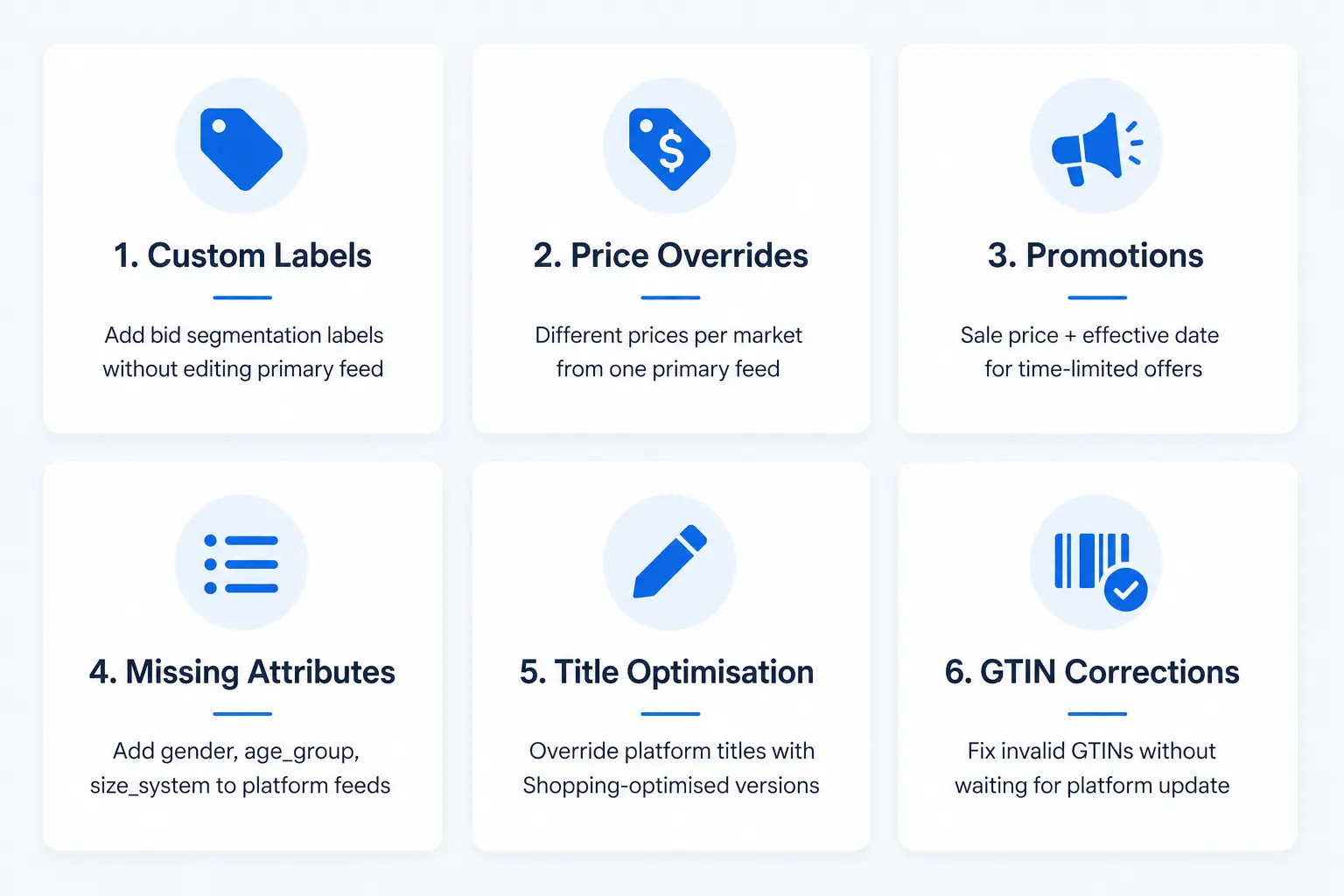
1. Adding Custom Labels Without Editing Your Primary Feed
This is the most common supplemental feed use case. You want to add custom_label_0 through custom_label_4 values for bid segmentation, but your primary feed is generated by your ecommerce platform and you cannot add columns to it.
Solution: Create a supplemental feed in Google Sheets with two columns — id and custom_label_0. Assign label values per product. Merchant Center merges the labels onto matching product IDs from your primary feed. No primary feed changes required. For the full custom labels strategy, see the Custom Labels guide.
2. Price Overrides for Specific Markets
If you run the same primary feed across multiple target countries but need different prices per market, a supplemental feed per market containing id and price allows you to override prices without duplicating your entire primary feed.
3. Promotion and Sale Price Management
When you run a time-limited promotion, rather than modifying your primary feed, create a supplemental feed containing id, sale_price, and sale_price_effective_date. Upload it for the promotion period and remove or update it when the promotion ends. Cleaner than modifying your primary feed and easier to manage as a scheduled operation.
4. Adding Missing Attributes to Platform-Generated Feeds
Ecommerce platforms like Shopify and WooCommerce generate basic Shopping feeds, but often omit attributes like age_group, gender, size_system, or product_type. A supplemental feed lets you add these without switching your primary feed source or installing additional plugins.
5. Title and Description Optimisation
If your primary feed generates product titles from your ecommerce platform’s product names (which are written for website display, not Shopping), a supplemental feed can override the title field with Shopping-optimised versions — without changing your website product names.
6. Correcting GTIN Issues on Specific Products
If a subset of your products has invalid or missing GTINs in your primary feed, you can supply correct GTIN values via supplemental feed while you fix the underlying data issue in your PIM or platform. First validate your GTINs with the GTIN Validator to confirm which ones need correcting.
How to Set Up a Supplemental Feed in Merchant Center
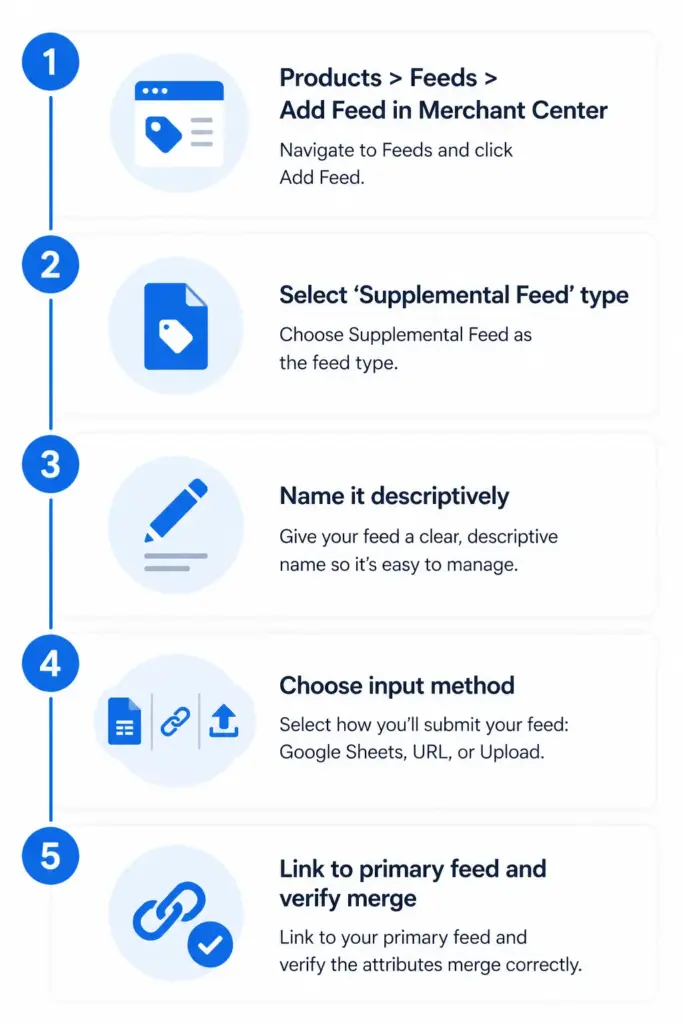
- In Google Merchant Center, go to Products → Feeds → + (Add Feed)
- Select Supplemental feed as the feed type
- Give it a descriptive name — e.g. “Custom Labels — Margin Tier” or “Promotion Sale Prices May 2026”
- Choose input method: Google Sheets (easiest for manual management), scheduled fetch from a URL, or file upload
- Select which primary feed this supplemental feed applies to
- Build your feed file — include only
idcolumn plus the attributes you are adding or overriding - Submit and verify — check individual product pages in Merchant Center to confirm supplemental attributes are applied
Supplemental Feed Rules and Limitations
- Supplemental feeds cannot add products — only modify or supplement existing products from the primary feed
- If a supplemental feed supplies the same attribute as the primary feed, the supplemental value wins
- There is no limit on the number of supplemental feeds per primary feed, but keep them organised with clear naming conventions
- Supplemental feeds must use the same product IDs as the primary feed — mismatched IDs result in no merge
- Google Sheets supplemental feeds update when you edit the sheet — useful for quick manual changes during promotions
For stores managing supplemental feed logic across multiple channels and markets, keeping these overrides centralised in a PIM rather than scattered across multiple Merchant Center supplemental feed files is significantly easier to maintain. See how the PIM to Google Shopping integration handles this at scale, or try the Feed Generator to build and manage your feeds from one place.
Frequently Asked Questions
Can a supplemental feed add new products to Google Shopping?
No. Supplemental feeds can only modify or add attributes to products that already exist in your primary feed. New products must first be included in the primary feed before a supplemental feed can reference them.
What happens if supplemental and primary feeds supply the same attribute?
The supplemental feed value overwrites the primary feed value for that attribute on all matching products. This is the intended behaviour — it is how supplemental feeds override titles, prices, or other fields you cannot change in your primary source.
How many supplemental feeds can I have in Merchant Center?
There is no published hard limit. In practice, keep supplemental feeds organised with descriptive names — “Custom Labels March 2026”, “Sale Prices Bank Holiday” — and consolidate overlapping feeds where possible. Multiple supplemental feeds affecting the same products in contradictory ways can be difficult to troubleshoot.
Can I use a Google Sheet as a supplemental feed?
Yes. Google Sheets is one of the supported input methods for supplemental feeds in Merchant Center. It is the easiest option for manually managed data like custom labels or promotion prices — edits to the sheet reflect in the feed without requiring any file export or upload step.
What is the minimum a supplemental feed needs to contain?
At minimum the id column (matching product IDs from your primary feed) plus at least one additional attribute you are adding or overriding. A file with only IDs and no additional attributes will merge successfully but have no visible effect on your product data.