Tag: PIM

  • Product Taxonomy for Electronics: Handling Complex Variants at Scale

    Product Taxonomy for Electronics: Handling Complex Variants at Scale

    Product Taxonomy for Electronics: Handling Complex Variants at Scale

    Electronics catalogs present a different set of taxonomy challenges than fashion or general merchandise. The variant complexity is not size and colour — it is processor speed, RAM configuration, storage tier, connectivity standard, and compatibility matrix. Customers buying a laptop know exactly what specs they need. Your taxonomy either surfaces those specs in filters or loses the sale.
    What Makes Electronics Taxonomy Complex

    • Technical specification depth: A single laptop model can have 12+ relevant attributes. All need to be captured, validated, and filterable.
    • Rapid product obsolescence: New chipsets and standards appear constantly. Your taxonomy needs to accommodate new attributes without breaking existing products.
    • Compatibility dependencies: Accessories are valid only for specific parent products. A charger is not just a charger — it is a charger for a specific voltage, connector type, and device family.
    • High-consideration buying: Electronics customers compare on specifications more than any other category. Incomplete data does not just affect discoverability — it directly prevents conversion.

    For the foundational taxonomy build process before getting into electronics-specific requirements, see How to Build a Product Taxonomy From Scratch.

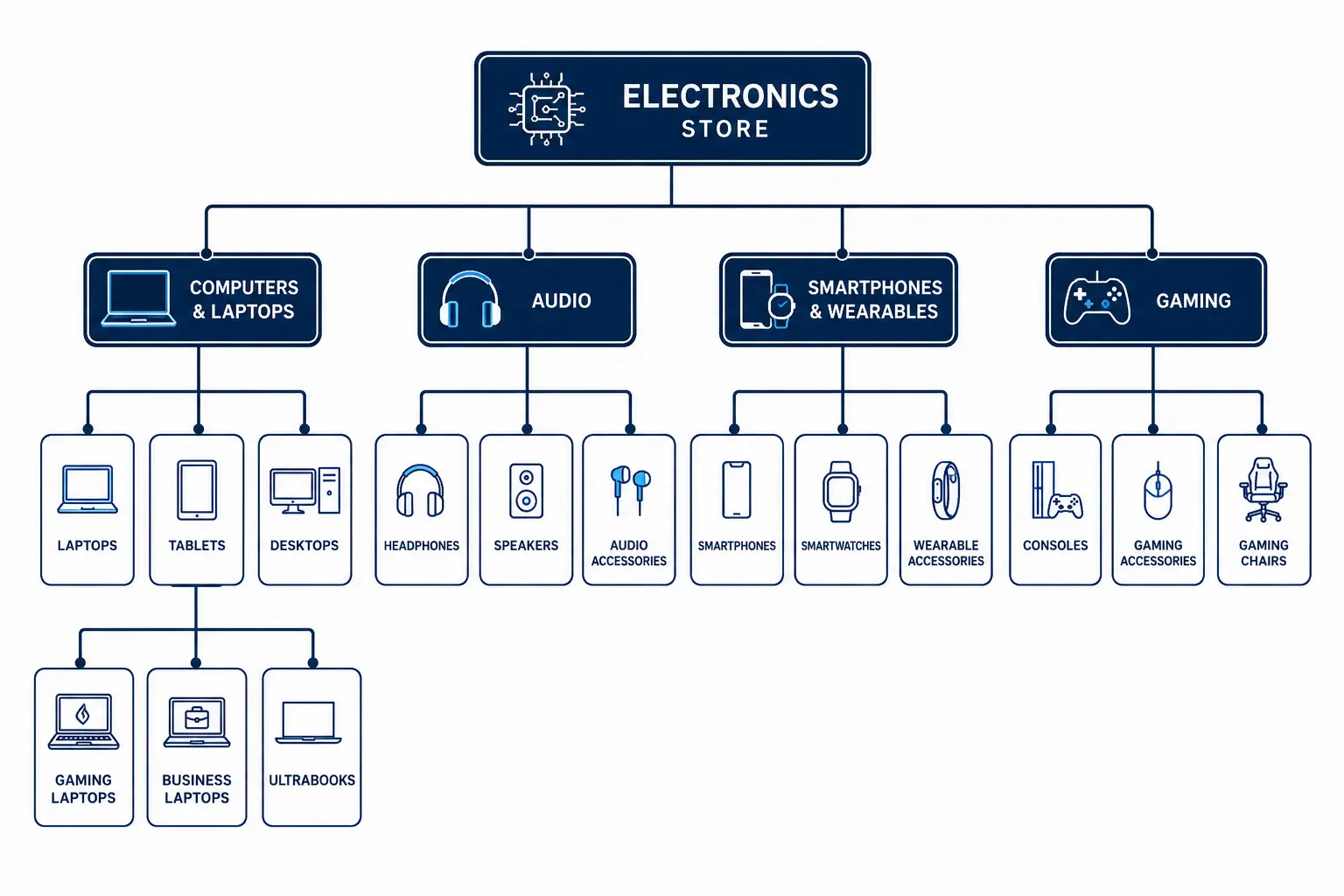
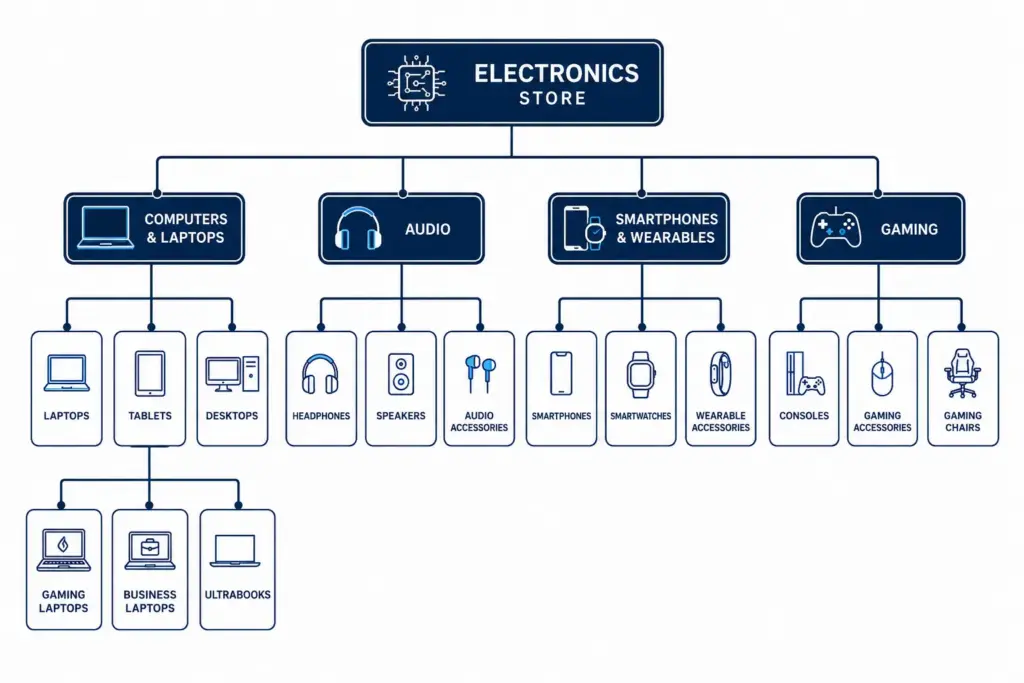
    Recommended Top-Level Structure for Electronics

    Level 1Level 2 ExamplesLevel 3 Examples
    Computers & LaptopsLaptops, Desktops, Tablets, All-in-OnesGaming Laptops, Business Laptops, Ultrabooks
    Smartphones & WearablesSmartphones, Smartwatches, Fitness TrackersAndroid Phones, iPhones, Budget Smartphones
    AudioHeadphones, Speakers, Soundbars, DACsOver-ear, In-ear, True Wireless, Studio Headphones
    TV & Home CinemaTVs, Projectors, Streaming DevicesOLED TVs, QLED TVs, Smart TVs, 4K TVs
    Cameras & PhotographyDSLRs, Mirrorless, Action Cameras, LensesFull-frame Mirrorless, APS-C Mirrorless
    GamingConsoles, Controllers, Gaming Monitors, HeadsetsPlayStation, Xbox, PC Gaming Peripherals
    Components & StorageCPUs, GPUs, RAM, SSDs, HDDs, MotherboardsDDR5 RAM, NVMe SSDs, PCIe 5.0 SSDs
    Cables & AccessoriesCables, Cases, Chargers, Mounts, BatteriesUSB-C Cables, MagSafe Accessories, Power Banks

    Attribute Sets for Key Electronics Categories
    Laptops

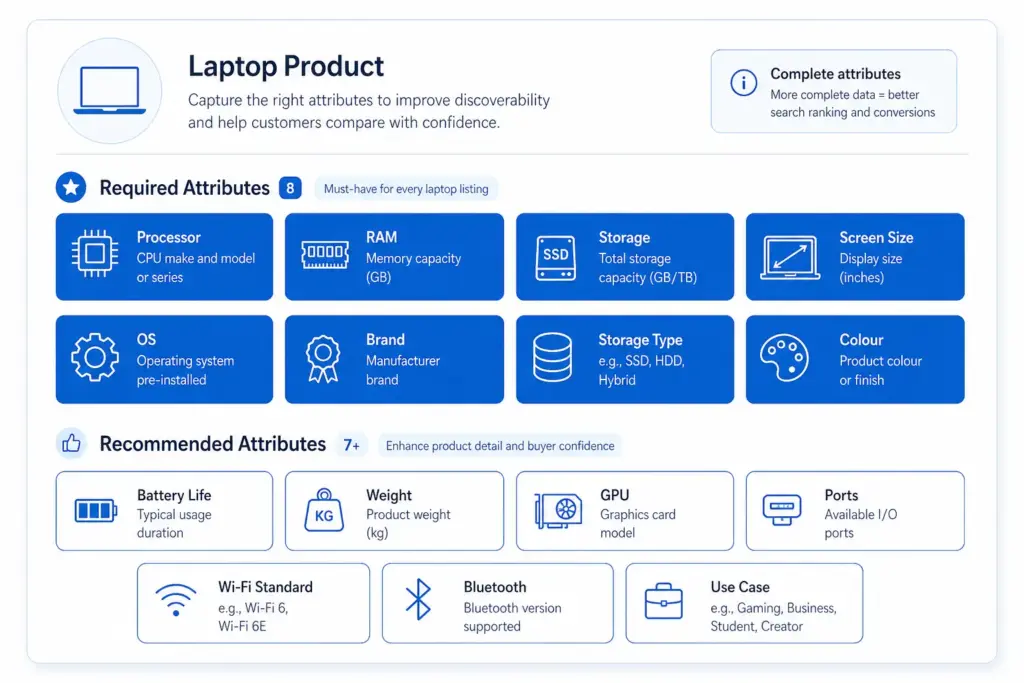
    • Required: Brand, Processor family, Processor model, RAM (GB), Storage capacity (GB), Storage type (SSD/HDD/NVMe), Screen size (inches), Operating system
    • Recommended: Screen resolution, GPU, Battery life (hours), Weight (kg), Ports, Connectivity (Wi-Fi standard, Bluetooth), Colour, Use case (gaming / business / ultrabook)

    Smartphones

    • Required: Brand, Model, Storage (GB), RAM (GB), Colour, Operating system, Screen size (inches), Network (5G/4G)
    • Recommended: Processor, Camera resolution (MP), Battery capacity (mAh), SIM type, Refresh rate (Hz), Water resistance (IP rating)

    Headphones

    • Required: Brand, Type (over-ear / in-ear / on-ear / true wireless), Connection (wired / wireless / Bluetooth), Colour
    • Recommended: Driver size, Frequency response, Noise cancellation type, Battery life, Impedance, Microphone (yes/no), Codec support (AAC, aptX, LDAC)

    Handling Variant Structures in Electronics

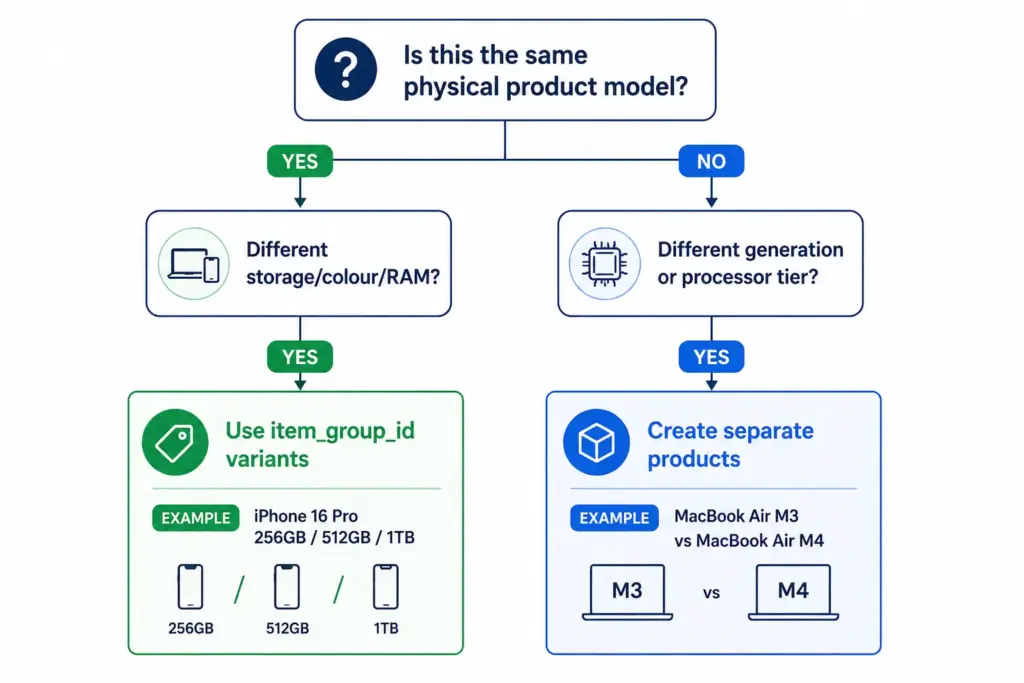
    Electronics variants behave differently from fashion variants. In fashion, variants of the same product differ only in size and colour — the product is the same. In electronics, different storage configurations can have meaningfully different prices, performance profiles, and target buyers.
    Variant approach (same item_group_id): All configurations of the same physical product model are variants. Customers can switch between them on the same product page. Use this when the products are the same model with configuration differences only.

    Separate product approach: When the “variant” is effectively a different product — different processor tier, different generation, meaningfully different positioning — treat as separate products. Different model generations should be separate products, not variants of each other.

    For how variant management compares across categories, the fashion taxonomy guide covers the simpler size/colour variant model as a useful contrast.

    Compatibility Attributes — The Electronics-Specific Challenge

    Accessories in electronics require compatibility data that no other category demands at the same scale. A USB-C cable not rated for Thunderbolt 4 is useless to someone buying it for a high-end laptop. A phone case for one model does not fit its larger variant.

    Build compatibility into your taxonomy as a structured attribute, not as free-text description:

    • compatible_with — a list of compatible product IDs or model references from your own catalog
    • connector_type — USB-C, USB-A, Lightning, Thunderbolt 4, HDMI 2.1 etc.
    • voltage / wattage — for chargers and power accessories
    • form_factor — for components (ATX, Micro-ATX, Mini-ITX for PC cases and motherboards)

    Structured compatibility data enables “compatible accessories” widgets on product pages — a meaningful cross-sell driver in electronics where accessory attach rates are high.

    Google Product Category Mapping for Electronics

    ProductCorrect Google Category
    Gaming laptopElectronics > Computers > Laptops
    True wireless earbudsElectronics > Audio > Headphones > In-Ear Headphones
    NVMe SSDElectronics > Computers > Computer Components > Hard Drives & Storage > Solid State Drives
    Mirrorless camera bodyCameras & Optics > Cameras > Digital Cameras
    Smart TV 65″Electronics > Video > Televisions

    Managing Rapid Product Turnover

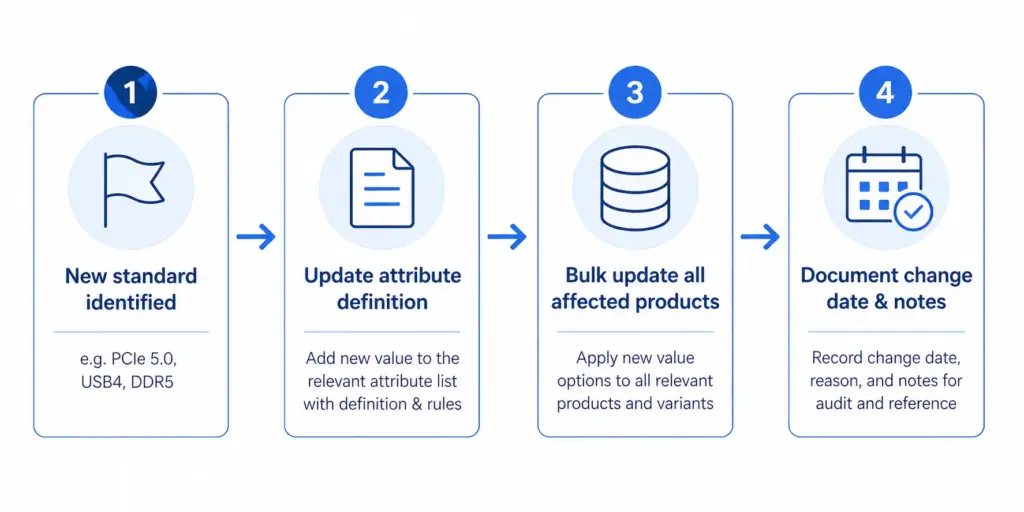
    Electronics catalogs face a unique taxonomy maintenance challenge: product generations. A new processor standard, connectivity format, or storage type can require new attribute values across hundreds of products simultaneously.

    Build this into your taxonomy governance from the start: attribute value lists need a version-controlled update process, not ad hoc additions. When a new standard appears, update the attribute definition, update all products in that category in bulk, and document the change date.

    At scale, this requires product data tooling that can apply bulk attribute updates to entire categories. The PIM Readiness Score will show you where your current setup has gaps — and the LynkPIM free plan lets you start managing this properly without a large budget or implementation timeline.

    For a broader comparison of how taxonomy decisions differ across industries, see the Flat vs Hierarchical Taxonomy guide — the structural decision matters more for electronics than for most other categories due to the depth of specification attributes required at every level.

    Frequently Asked Questions

    Should different laptop storage configurations be variants or separate products?

    Use variants (same item_group_id) for storage, colour, and RAM configuration differences within the same physical model — customers can switch between them on the same product page. Create separate products for different processor generations or model tiers that represent meaningfully different products with different performance profiles and target buyers.

    What compatibility attributes should electronics accessories have?

    At minimum: compatible_with (list of compatible product IDs or model references), connector_type (USB-C, USB-A, Thunderbolt 4, HDMI 2.1 etc.), voltage and wattage for chargers and power accessories, and form_factor for PC components. Structured compatibility data enables “compatible accessories” widgets on product pages and reduces returns from incompatible purchases.

    How do you handle new technical standards in an electronics taxonomy?

    Treat attribute value lists as version-controlled documents. When a new standard appears — PCIe 5.0, USB4, DDR5 — update the attribute definition for the affected subcategory, bulk-update all products in that category, and document the change date. Ad hoc additions without bulk updates leave older products with stale or missing values, which hurts both filter accuracy and feed performance.

    What Google product category should I use for NVMe SSDs?

    Use the leaf-node category: Electronics > Computers > Computer Components > Hard Drives & Storage > Solid State Drives. Never use a parent category like “Electronics” or “Electronics > Computers” — Shopping relevance and auction performance depend on using the most specific category available for every product.

    How many required attributes does a laptop product need?

    At minimum 8 required attributes: Brand, Processor family, Processor model, RAM (GB), Storage capacity (GB), Storage type (SSD/HDD/NVMe), Screen size (inches), and Operating system. Recommended additions that significantly improve discoverability and conversion include GPU, battery life, weight, screen resolution, ports, Wi-Fi standard, and use case (gaming / business / ultrabook).
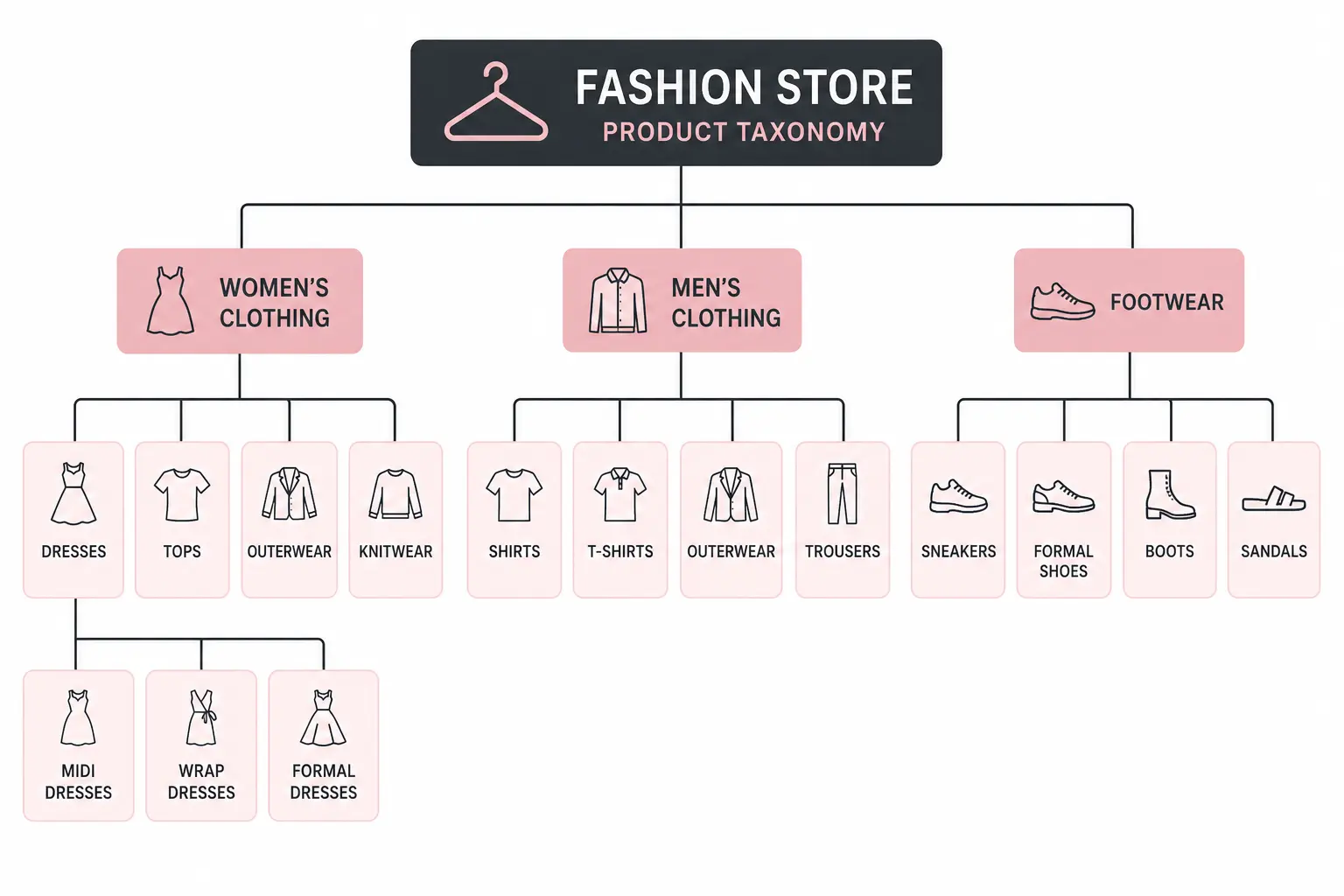
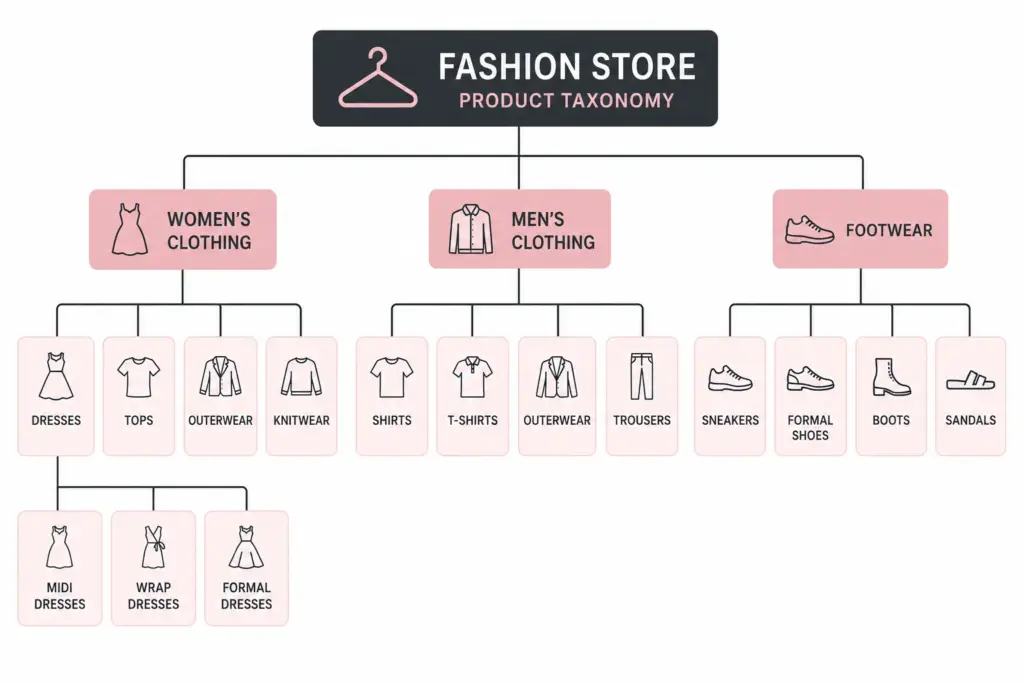
  • Product Taxonomy for Fashion Ecommerce: The Complete Industry Guide

    Product Taxonomy for Fashion Ecommerce: The Complete Industry Guide

    Product Taxonomy for Fashion Ecommerce: The Complete Industry Guide

    Fashion is the most complex product taxonomy challenge in ecommerce. No other category has the same combination of variant depth (size × colour × material), seasonal rotation, brand complexity, and the need to align with both customer search language and Google’s own category hierarchy simultaneously.

    This guide covers how to structure a fashion taxonomy that works for site navigation, Google Shopping, and internal catalog operations at the same time.

    Why Fashion Taxonomy Is Uniquely Difficult

    • High variant depth: A single jacket style can generate 40+ variants (4 colours × 5 sizes × 2 materials). Each needs proper categorisation.
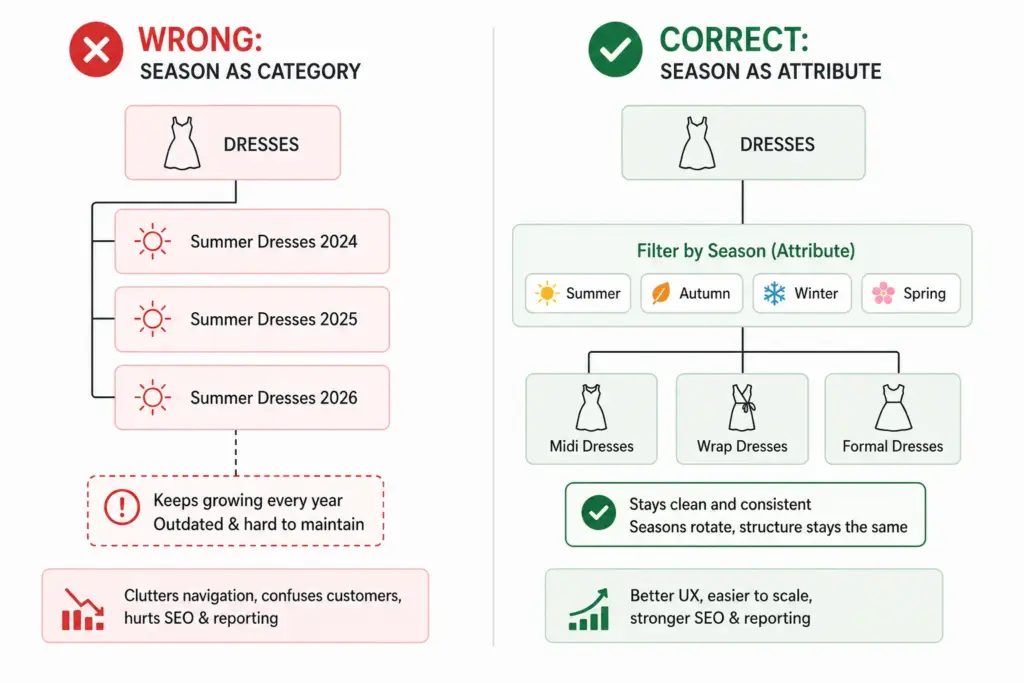
    • Seasonal rotation: Categories like “Summer Dresses” need to exist, disappear, and reappear without breaking your taxonomy structure.
    • Cross-gender categorisation: Unisex products that appear in both Men’s and Women’s categories require clear rules.
    • Trend-driven additions: New product types appear faster in fashion than almost any other category — your taxonomy needs to accommodate them without restructuring.

    For the full taxonomy build process that applies to all industries before you get into fashion-specific requirements, see How to Build a Product Taxonomy From Scratch.

    Recommended Top-Level Structure for Fashion

    Level 1 (Department)Level 2 Examples (Category)Level 3 Examples (Subcategory)
    Women’s ClothingDresses, Tops, Bottoms, Outerwear, KnitwearMidi Dresses, Wrap Dresses, Formal Dresses
    Men’s ClothingShirts, Trousers, Jackets, Knitwear, ActivewearCasual Shirts, Formal Shirts, Linen Shirts
    Kids’ ClothingGirls’ Clothing, Boys’ Clothing, Baby & ToddlerSchool Uniforms, Outerwear, Swimwear
    FootwearWomen’s Shoes, Men’s Shoes, Kids’ ShoesHeels, Flats, Boots, Trainers, Sandals
    AccessoriesBags, Belts, Scarves, Hats, JewelleryHandbags, Crossbody Bags, Tote Bags
    SwimwearWomen’s Swimwear, Men’s SwimwearBikinis, One-pieces, Board Shorts
    Lingerie & NightwearBras, Underwear, Nightwear, ShapewearPadded Bras, Sports Bras, Balcony Bras

    Attribute Sets by Fashion Subcategory

    Each subcategory needs a defined attribute set. Below are the recommended required and optional attributes for key fashion categories.

    Outerwear (Jackets, Coats, Gilets)

    • Required: Brand, Colour, Size, Material, Gender, Age Group
    • Recommended: Waterproof (yes/no), Insulation type, Fill power, Packable (yes/no), Season
    • Google category: Apparel & Accessories > Clothing > Outerwear > Coats & Jackets

    Women’s Dresses

    • Required: Brand, Colour, Size, Neckline, Length, Occasion
    • Recommended: Pattern, Sleeve length, Care instructions, Season
    • Google category: Apparel & Accessories > Clothing > Dresses

    Footwear

    • Required: Brand, Colour, Size, Size system, Gender, Heel height (where applicable)
    • Recommended: Material (upper), Sole material, Closure type, Occasion, Width
    • Google category: Apparel & Accessories > Shoes > [specific shoe type]

    For the full list of apparel attributes required by Google Shopping feeds, see the Google Shopping Apparel Requirements guide.

    Managing Colour in a Fashion Taxonomy

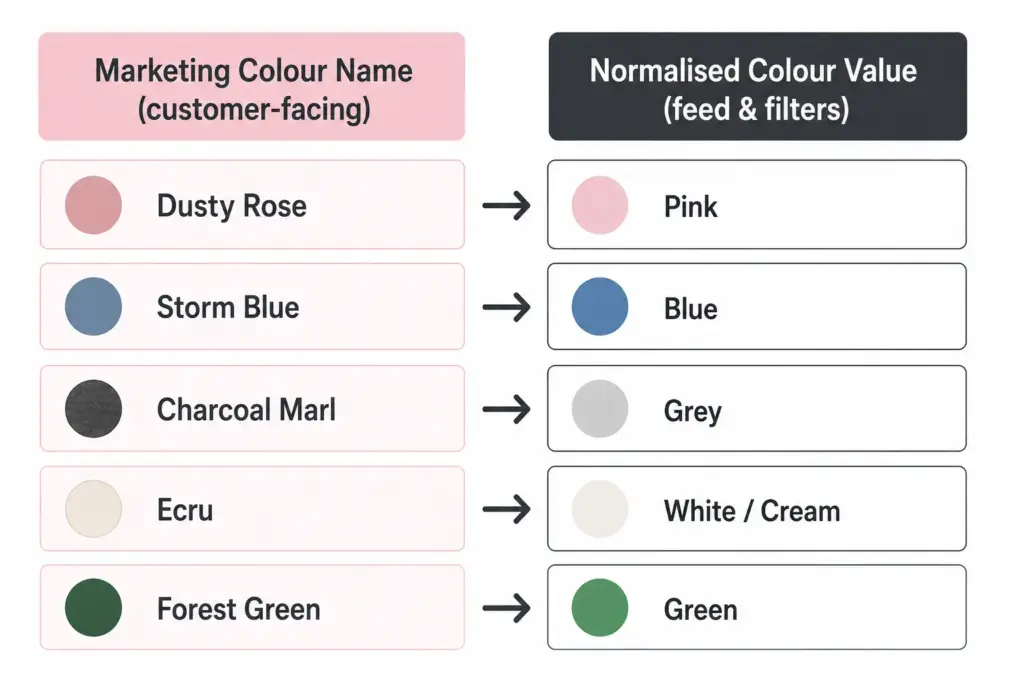
    Colour management is where fashion taxonomy most often breaks down. Fashion brands use marketing colour names (“Dusty Rose”, “Storm Blue”) that are meaningful to buyers but problematic for Google Shopping and site search filtering.

    The solution is a two-field colour approach:

    • Marketing colour name: Used in product titles and descriptions facing customers — “Storm Blue Puffer Jacket”
    • Normalised colour value: Used for feed submission and filter attributes — “Blue”. This maps to Google’s accepted colour values and makes site filters work correctly (“Filter by: Blue, Green, Red”).

    Without normalised colour values, your “Navy”, “Dark Navy”, “Midnight Navy”, and “Storm Blue” all appear as separate filter options rather than grouping under “Blue”. Customers cannot find what they are looking for and conversion on filtered searches drops.

    Size Management and International Sizing

    Fashion brands selling internationally face size system conflicts. A UK 10 dress and a US 10 dress are different sizes. A European 40 and a US 8 are the same women’s dress size. Declare your size system in every product record using the size_system attribute.

    For brands selling across regions from a single catalog, the cleanest solution is to store size in your primary size system and maintain a size conversion reference table as a documented data standard — not as additional product fields that will create mapping errors when updated.

    Seasonal Category Management

    Fashion taxonomy needs seasonal flexibility without permanent structural changes. Two approaches work well:

    Season as an attribute, not a category: Keep “Summer Dresses” as a filter value (season = Summer) rather than a permanent subcategory. This prevents your taxonomy from accumulating dead branches as seasons pass.

    Evergreen subcategories with seasonal tags: “Dresses” is the permanent subcategory. “Summer” is a tag or attribute. Products appear in the Dresses subcategory year-round; the Summer filter surfaces them seasonally. This is the more scalable approach for catalogs with high seasonal turnover.

    Mapping Fashion Taxonomy to Google Product Categories

    Every fashion subcategory needs a Google product category mapping. Use Google’s leaf-node values (the most specific level) for best Shopping performance. The mapping should be documented and applied consistently — not manually re-entered per product.

    The difference between flat and hierarchical taxonomy structures for fashion is covered in detail in the Flat vs Hierarchical Taxonomy guide — worth reading before finalising your structure.

    Once your fashion taxonomy is structured correctly, implementing it at scale requires a system that can enforce attribute validation and apply category-level rules automatically. The PIM Readiness Score takes 5 minutes and shows you where your current product data setup has gaps.

    Download the free Product Taxonomy Template at lynkpim.app — the Fashion & Apparel tab includes the full category hierarchy, attribute set, and Google mapping pre-built for clothing, footwear, and accessories.

    Frequently Asked Questions

    How should fashion ecommerce handle seasonal categories in a product taxonomy?

    Use season as an attribute rather than a permanent category. Keep “Dresses” as the permanent subcategory and assign season = Summer as a tag or attribute value. This prevents the taxonomy from accumulating obsolete branches (Summer Dresses 2024, Summer Dresses 2025) that clog navigation and require ongoing cleanup.

    What is the two-field colour approach for fashion product data?

    Store two colour values per product: a marketing colour name for customer-facing content (Dusty Rose, Storm Blue) and a normalised colour value for feed submission and site filters (Pink, Blue). Without normalised values, multiple shades of the same colour appear as separate filter options — “Navy”, “Dark Navy”, “Midnight Navy” become three separate filter choices instead of one “Blue” group.

    How many top-level categories should a fashion taxonomy have?

    Most fashion stores work well with 6 to 8 top-level departments: Women’s Clothing, Men’s Clothing, Kids’ Clothing, Footwear, Accessories, Swimwear, and Lingerie & Nightwear. Avoid creating top-level categories for product types you carry fewer than 20 products in — use attributes and filters instead.

    How do you handle unisex products in a fashion taxonomy?

    Set gender = unisex in the product attributes and assign the product to the most appropriate department based on primary customer intent. For your Google Shopping feed, use gender = unisex and surface products in both Men’s and Women’s navigation via tags or multi-category assignment depending on your platform.

    What Google product category should I use for women’s dresses?

    Use the leaf-node value: Apparel & Accessories > Clothing > Dresses. Avoid the parent category Apparel & Accessories > Clothing — the more specific your Google product category, the better your Shopping feed relevance. For formal dresses, go one level deeper if possible.

  • How to Build a Product Taxonomy From Scratch (Step-by-Step Guide)

    How to Build a Product Taxonomy From Scratch (Step-by-Step Guide)

    How to Build a Product Taxonomy From Scratch (Step-by-Step Guide)

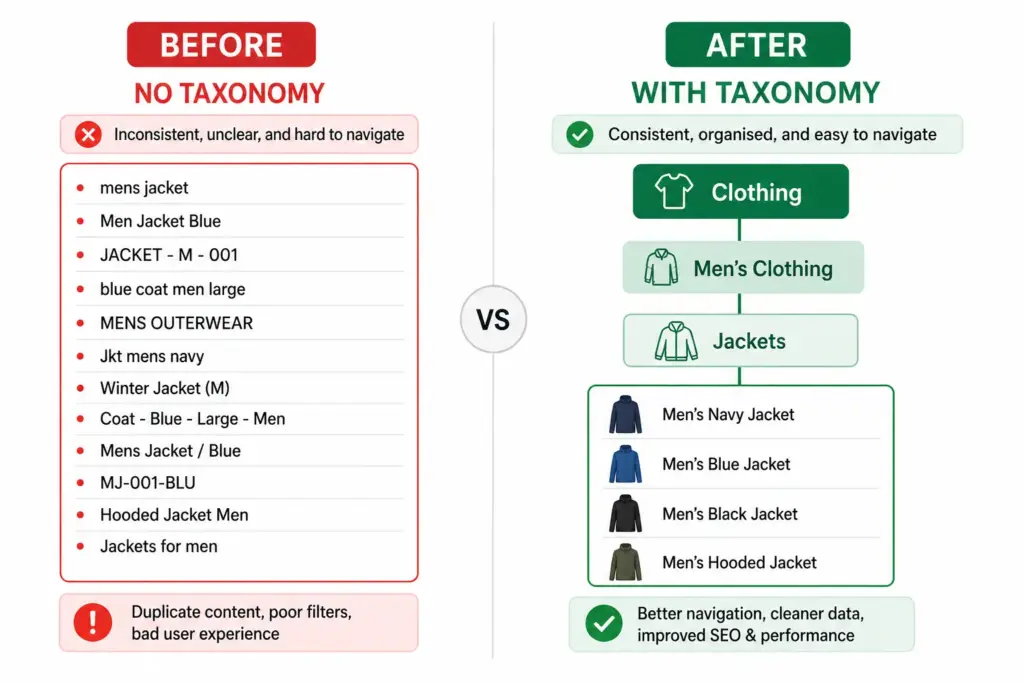
    Most product taxonomy problems do not start with bad intentions. They start with a spreadsheet, a growing catalog, and someone who just needed to categorise 50 products quickly. Three years later there are 3,000 products, four naming conventions, and no one knows which category rules apply where.

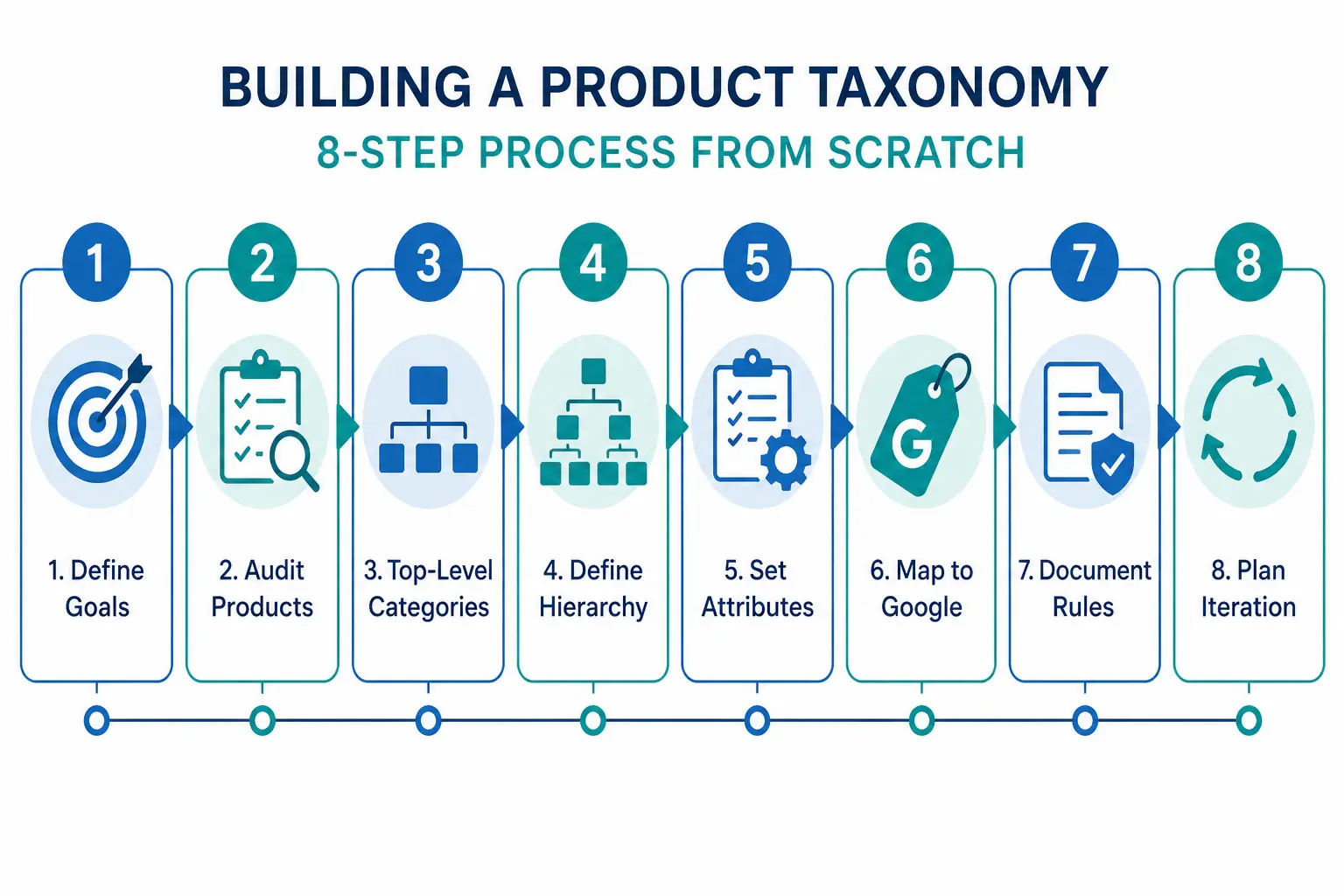
    Building a taxonomy properly from the start — or rebuilding one that has grown without structure — requires the same process regardless of catalog size. This guide walks through every step.

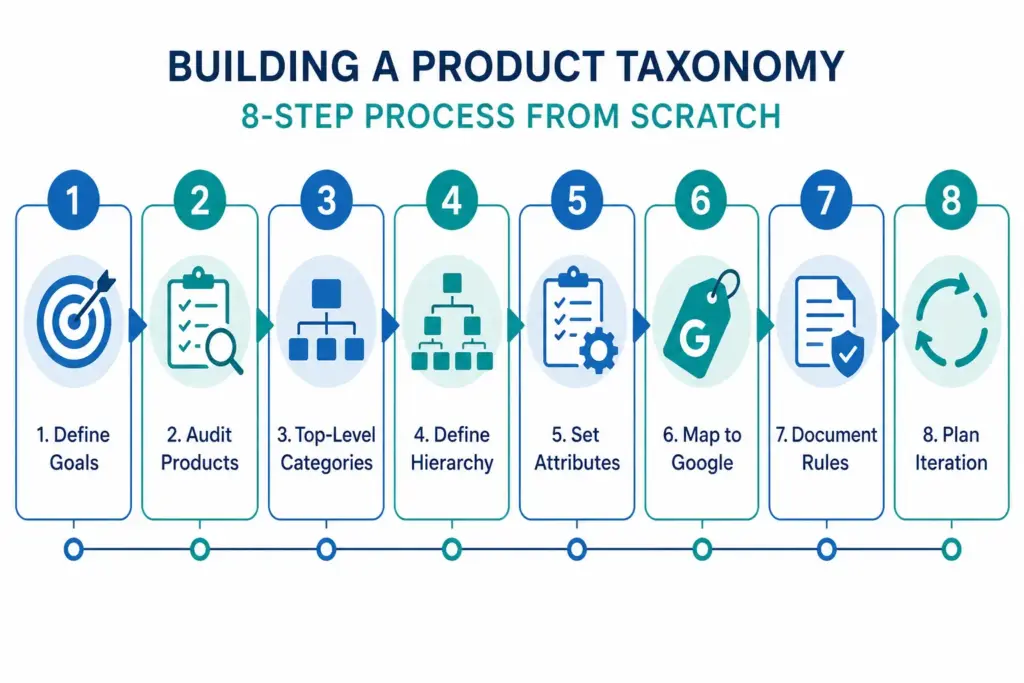
    Step 1: Define What Your Taxonomy Needs to Do

    Before you name a single category, decide what jobs your taxonomy needs to perform. Most ecommerce catalogs need it to do three things simultaneously:

    1. Power site navigation and search — customers browse by category and use filters. Your taxonomy is the structure those filters sit on.
    2. Map to channel requirements — Google Shopping, Amazon, and marketplaces have their own taxonomies. Yours needs to translate cleanly to theirs.
    3. Organise internal operations — product teams, buyers, and merchandisers use the taxonomy to find, update, and report on products.

    These three jobs sometimes conflict. A taxonomy built purely for internal operations often does not map well to how customers search. Understanding the priority before you build prevents rework. For background on what taxonomy is and why it matters, the What Is Product Taxonomy guide covers the foundations.

    Step 2: Audit Your Existing Products

    Export every SKU you have. Look at the full list before designing any categories. You are looking for:

    • Natural groupings — what products obviously belong together?
    • Edge cases — products that do not fit neatly into an obvious category
    • Volume distribution — how many products fall into each potential category?
    • Attribute patterns — what attributes do products in the same group share?

    A category with 2 products and a category with 2,000 products suggest the hierarchy is off. Aim for relative balance across categories at the same level, with narrow subcategories only where genuine product differentiation exists.

    Step 3: Design Your Top-Level Categories

    Top-level categories are your broadest groupings. For most ecommerce catalogs, 5–12 top-level categories is the right range. Too few and subcategories get unwieldy. Too many and customers cannot find their starting point.

    The test for a top-level category: a customer with no prior knowledge of your store should be able to assign a product to the correct top-level category without thinking about it. If it requires judgment, the category is too vague.

    Two approaches to defining top-level categories

    Customer-first approach: Start with how customers describe what they are looking for. Use your site search data, Google Search Console queries, and competitor category names as evidence of natural language groupings.

    Google-first approach: Start with Google’s product taxonomy at the top level. This makes channel mapping easier later and ensures your categories align with how the largest product discovery platform in the world organises products. You can always use internal-facing names that differ from the Google-facing values.

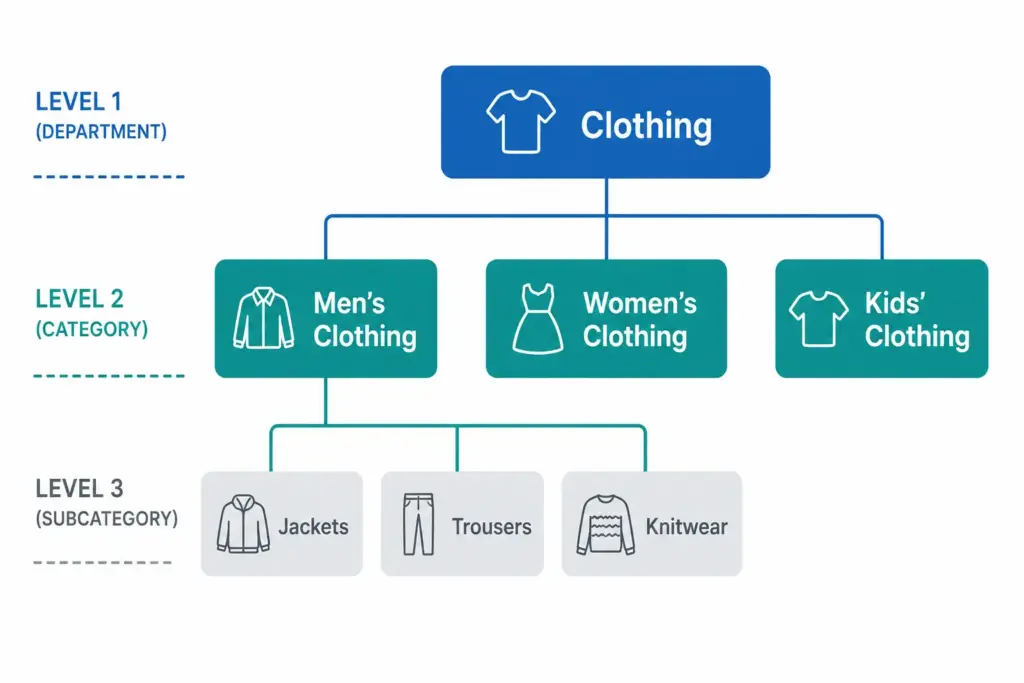
    Step 4: Define 3 Levels of Hierarchy (Minimum)

    A functional product taxonomy needs at least three levels:

    • Level 1 (Department): Clothing, Footwear, Accessories
    • Level 2 (Category): Men’s Clothing, Women’s Clothing, Kids’ Clothing
    • Level 3 (Subcategory): Men’s Jackets, Men’s Trousers, Men’s Knitwear

    For larger catalogs, Level 4 (product type) is worth adding: Men’s Jackets → Rain Jackets, Leather Jackets, Padded Jackets.

    The difference between a flat and hierarchical taxonomy matters significantly for navigation and channel mapping. The Flat vs Hierarchical Taxonomy guide covers when each structure is appropriate.

    Step 5: Define Attributes per Category

    Attributes are the product properties that apply within a category. Every category in your taxonomy needs a defined attribute set — the list of fields that must be filled for a product in that category to be considered complete.

    CategoryRequired AttributesRecommended Additions
    Men’s JacketsBrand, Colour, Size, Material, GenderWaterproof rating, Fill weight, Packable
    Running ShoesBrand, Colour, Size, Gender, Surface typeDrop height, Cushioning level, Width
    LaptopsBrand, Processor, RAM, Storage, Screen sizeBattery life, Weight, Graphics card

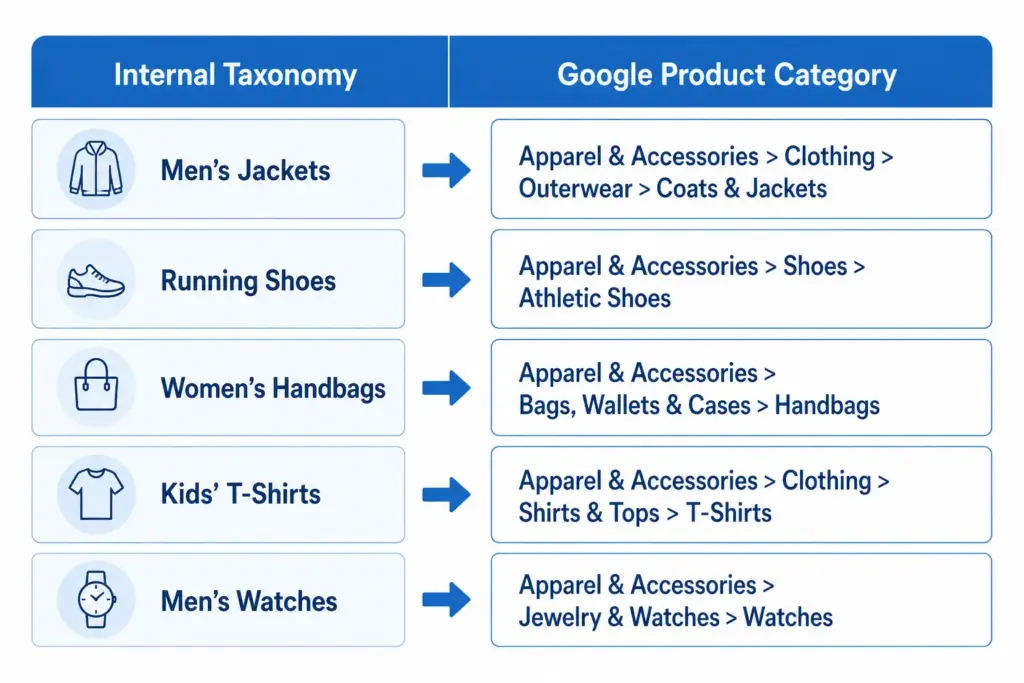
    Step 6: Map to Google’s Product Taxonomy

    Once your internal taxonomy is defined, create a mapping document that links each of your subcategories to its corresponding Google product category value. Use Google’s official taxonomy file to find the correct IDs. Map at the most specific level possible — leaf nodes, not parent categories.

    Step 7: Document the Rules

    A taxonomy that exists only in someone’s head is a single point of failure. Document:

    • Category definitions — what does and does not belong in each category
    • Naming conventions — title case vs sentence case, singular vs plural
    • Attribute validation rules — acceptable values for controlled attributes like colour and size
    • Exception handling — what happens to products that span categories

    The PIM Readiness Score assessment helps you identify where your current product data governance has gaps before you build on top of it. Free, takes 5 minutes.

    Step 8: Build with Iteration in Mind

    No taxonomy survives contact with a growing catalog unchanged. You will need to add categories as you expand into new product areas. You will discover edge cases your initial rules did not cover. You will probably need to split an overpopulated subcategory 18 months after launch.

    Build with this in mind: keep hierarchy levels consistent, avoid category names that are too specific, and review your taxonomy structure annually against site search data and channel performance.

    Ready to apply this? Download the free Product Taxonomy Template at lynkpim.app — pre-built for Fashion, Electronics, Home Goods, Food & Beverage, and B2B Industrial. Use it as a starting point rather than building from a blank page.

    Once your taxonomy structure is set, see how it applies to specific industries: fashion ecommerce taxonomy and electronics taxonomy both cover the unique requirements of their categories in detail.

    Frequently Asked Questions

    How many levels should a product taxonomy have?

    A minimum of three levels: Department (Level 1), Category (Level 2), and Subcategory (Level 3). Larger catalogs benefit from a fourth level (Product Type). Going beyond four levels rarely adds value and increases maintenance complexity without meaningful improvement to navigation or channel mapping.

    How often should you review and update your product taxonomy?

    Review your taxonomy structure at least once per year against site search data, channel performance data, and catalog growth. Attribute value lists for technical categories may need updating more frequently — for example when new product standards or formats appear in electronics or components.

    Should your internal taxonomy match Google’s product taxonomy?

    Not necessarily. Your internal taxonomy should reflect how your team and customers think about products. What matters is that every internal subcategory maps to the correct Google product category leaf node in your feed — the two systems can use different naming as long as the mapping document is maintained and applied consistently.

    What is the difference between a category and an attribute in product taxonomy?

    A category defines where a product sits in the hierarchy — for example, Men’s Jackets. An attribute defines a property of that product within its category — for example, Colour = Navy, Size = L, Material = Nylon. Categories organise the catalog structure; attributes describe individual products within it.

    How many top-level categories should a product taxonomy have?

    For most ecommerce catalogs, 5 to 12 top-level categories is the right range. Too few and subcategories become unwieldy. Too many and customers cannot find their starting point. The test: a customer with no prior knowledge should be able to assign any product to the correct top-level category without thinking about it.