Tag: Google Product Category

  • Google Product Category vs Your Internal Taxonomy: What’s the Difference?

    Google Product Category vs Your Internal Taxonomy: What’s the Difference?

    Google Product Category vs Your Internal Taxonomy: What’s the Difference?

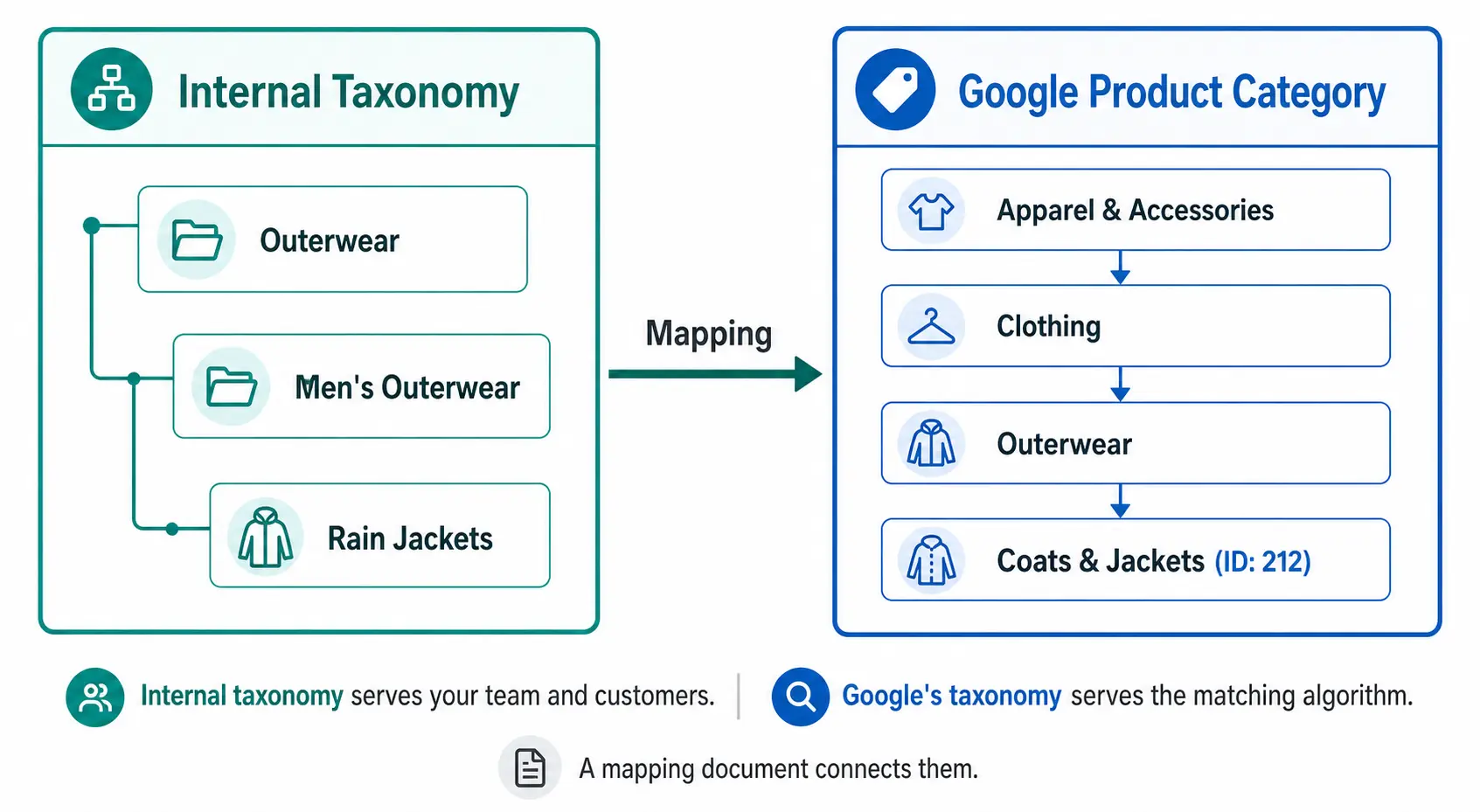
    Two taxonomies. One product. This is the reality of modern ecommerce — every product needs to live somewhere in your internal catalog structure, and simultaneously needs to be classified in Google’s own taxonomy for Shopping performance. These two systems serve completely different purposes and should never be confused for each other.
    Your Internal Taxonomy — What It’s For

    Your internal product taxonomy is the classification system you design for your own business. It reflects how your team organises products, how your customers browse your site, and how your buying and merchandising teams think about the catalog.

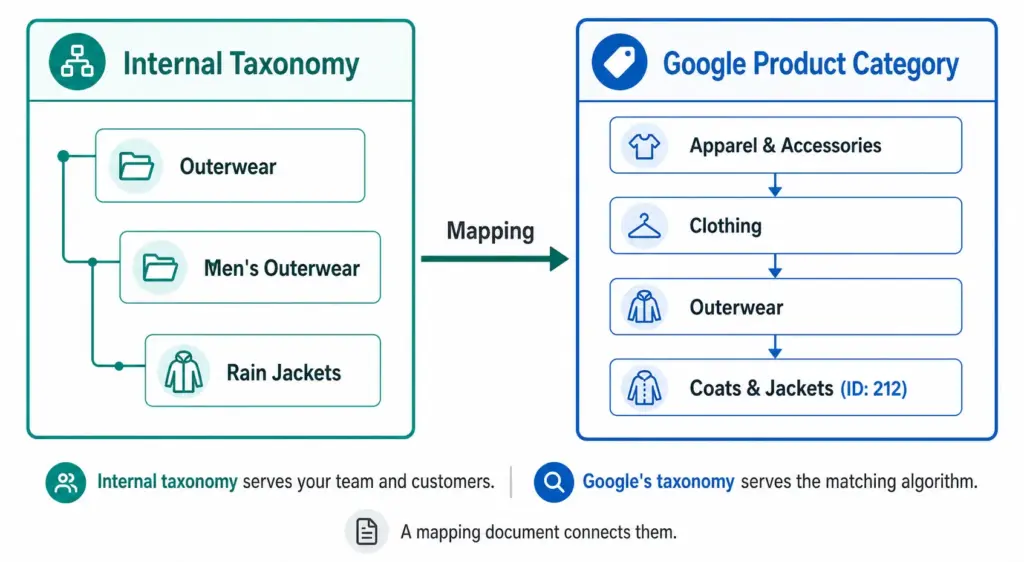
    It uses your naming conventions. “Outerwear” might be at Level 2 in your taxonomy. “Men’s Rain Jackets” might be your Level 3 subcategory. These names work for your team because they reflect how you buy, stock, and sell these products.

    Your internal taxonomy also drives your site navigation, search filters, and internal reporting. It is designed for humans — your buyers, your customers, and your ecommerce team. For a full guide on building it correctly, see What Is Product Taxonomy and How to Build a Product Taxonomy From Scratch.

    Google’s Product Category Taxonomy — What It’s For

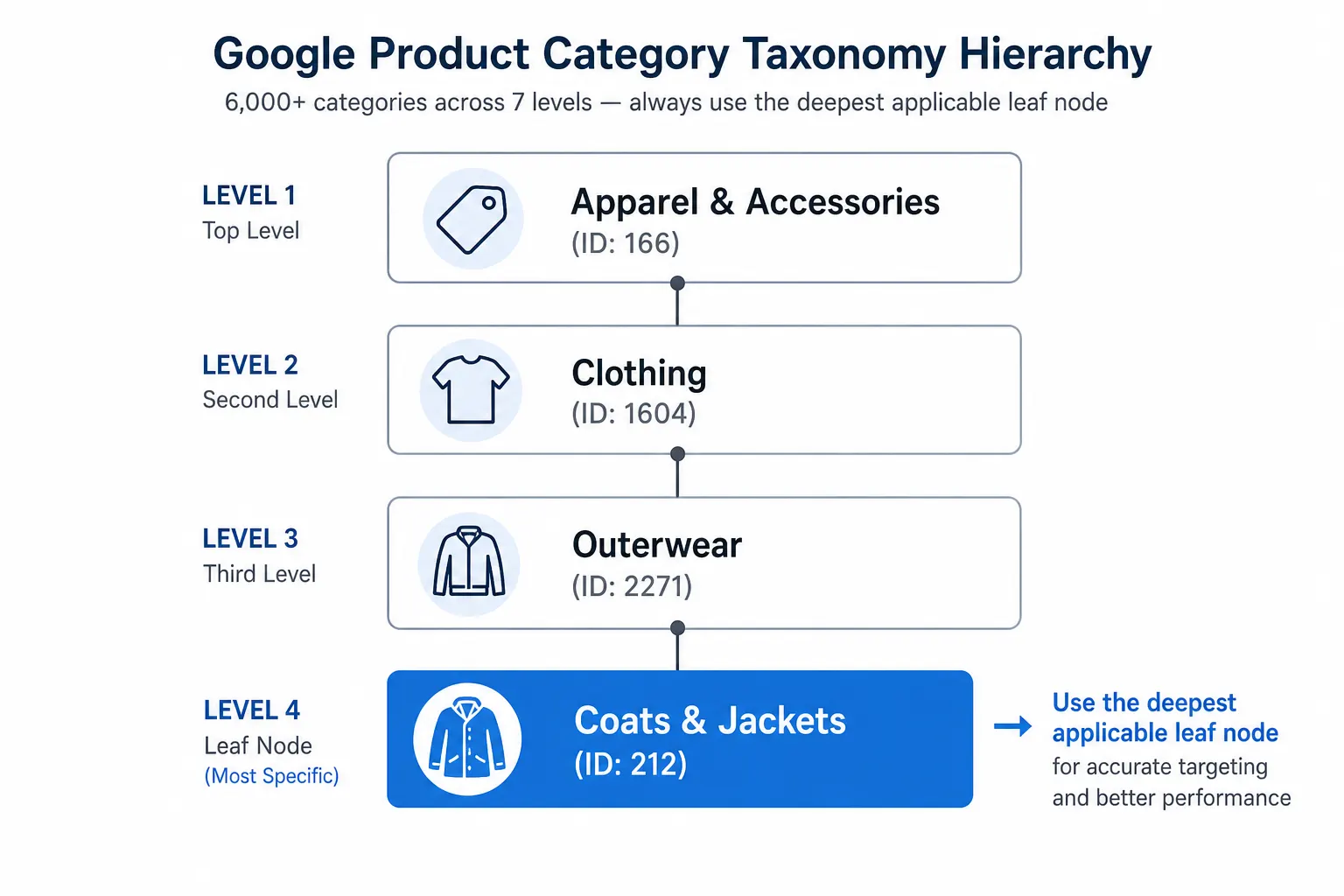
    Google’s product category taxonomy is a fixed, hierarchical classification system that Google uses to understand what your product is. It has over 6,000 categories across up to 7 levels, maintained by Google and updated periodically.

    It is designed for Google’s matching algorithm — not for humans. When you assign a product to “Apparel & Accessories > Clothing > Outerwear > Coats & Jackets” (ID: 212), you are telling Google’s algorithm which auction pool this product belongs in, which additional attribute requirements apply, and how to match it to buyer search queries.

    You do not modify it. You map your products to it. The full taxonomy ID list is available publicly and should be used as a reference, not a foundation for your own catalog structure. Full details in the Google Product Category Taxonomy guide.

    The Key Differences

    Internal TaxonomyGoogle Product Category
    Who designs itYouGoogle
    Who it servesYour team and customersGoogle’s matching algorithm
    Naming conventionYour own namingGoogle’s fixed naming
    How deep3–4 levels typicalUp to 7 levels, 6,000+ nodes
    Where it livesYour PIM / platform / spreadsheetThe google_product_category feed field
    What it powersNavigation, filters, internal ops, reportingShopping auction relevance, attribute requirements, tax rules
    How often it changesWhen your catalog evolves1–2 times per year by Google
    Can you modify itYes — it’s yoursNo — you only map to it

    Why You Need Both — and Why They’re Different

    A common mistake is trying to build an internal taxonomy that mirrors Google’s. This creates several problems:

    • Google’s naming doesn’t match customer language — “Coats & Jackets” is fine for an algorithm but might not reflect how your buyers describe products on your site
    • Google’s structure doesn’t match your business — your business may organise products by season, by brand, by collection, or by customer segment in ways that don’t correspond to Google’s classification
    • Google updates break your internal structure — if your navigation and filters are built on Google’s taxonomy, every Google taxonomy update requires changes to your site

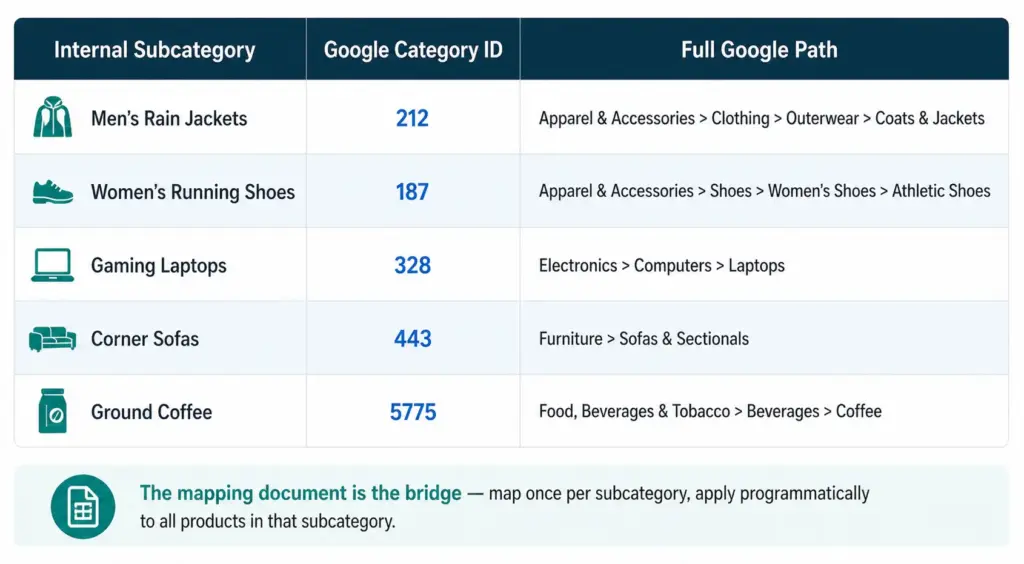
    Your internal taxonomy should be built for your customers and your team. Google’s taxonomy should be mapped to from your internal taxonomy — a separate, maintained mapping document that connects your subcategories to the correct Google category IDs.
    How to Build the Mapping Document

    The mapping document is a simple table: your internal subcategory name on the left, the corresponding Google category ID on the right. This is the only connection you need between your taxonomy and Google’s.

    1. List every subcategory in your internal taxonomy
    2. For each subcategory, search Google’s taxonomy file for the most specific matching leaf node
    3. Record the numeric ID — not the text path string
    4. Apply the ID to all products in that subcategory programmatically — not product by product
    5. Review annually when Google publishes taxonomy updates

    This approach means a taxonomy change on Google’s side only requires updating the mapping document, not restructuring your internal taxonomy, your site navigation, or your product records.

    The product_type Field — the Third Layer

    Google Shopping feeds support a third category-related field: product_type. Unlike google_product_category, this is a free-form field you control completely.

    Use product_type to include your internal taxonomy path in the feed — for example, “Outerwear > Men’s Outerwear > Rain Jackets”. This value does not affect Google’s matching algorithm but it does appear as a segmentation option in Google Ads, letting you create Shopping campaigns and bid strategies based on your own category structure rather than Google’s.

    This means you can have all three in your feed simultaneously:

    • google_product_category: 212 (tells Google what the product is)
    • product_type: Outerwear > Men’s Outerwear > Rain Jackets (your internal naming for campaign segmentation)
    • Internal taxonomy: stored in your PIM, driving your site and your team’s workflow

    Check the Flat vs Hierarchical Taxonomy guide to ensure your internal structure is appropriately deep before building your mapping document. Take the PIM Readiness Score to see how well your current product data governance supports this dual-taxonomy approach.

    Frequently Asked Questions

    Do I need both an internal taxonomy and Google product categories?

    Yes. Your internal taxonomy serves your team and customers using your naming conventions. Google’s taxonomy serves their matching algorithm using their naming conventions. You need both, connected by a mapping document that translates your subcategory names to Google category IDs.

    Should I build my internal taxonomy to match Google’s?

    No. Build your internal taxonomy for how your team and customers think about your products. Keep the mapping to Google’s taxonomy in a separate document. If you build your internal structure to mirror Google’s, you tie your site navigation and team workflows to a taxonomy you don’t control — and every Google update risks breaking something in your catalog.

    What is the product_type field and how does it relate to my internal taxonomy?

    The product_type field is a free-form field in your Google Shopping feed where you include your own internal category path. It does not affect Google matching but enables campaign segmentation in Google Ads based on your own taxonomy naming. It is the bridge between your internal taxonomy and your Google Shopping campaigns.

    How often does Google’s taxonomy change and how does that affect my internal taxonomy?

    Google updates its taxonomy 1–2 times per year. These changes do not affect your internal taxonomy at all — they only affect the mapping document. Using numeric IDs in your feed (not text path strings) means most updates have zero impact on your feed, since IDs remain valid even when Google renames a category path.
  • Google Product Category Taxonomy: The Complete 2026 Guide

    Google Product Category Taxonomy: The Complete 2026 Guide

    Google Product Category Taxonomy: The Complete 2026 Guide

    Google’s product category taxonomy is one of the most impactful — and most misused — attributes in Google Shopping feeds. Every product in your feed needs a google_product_category value. Get it right and your products appear in the correct auctions for relevant searches. Get it wrong and you are competing for irrelevant traffic at the wrong price.

    This guide covers how Google’s taxonomy works, how to find the right category for any product, and the most common mapping mistakes costing stores auction performance.

    What Is Google’s Product Category Taxonomy?

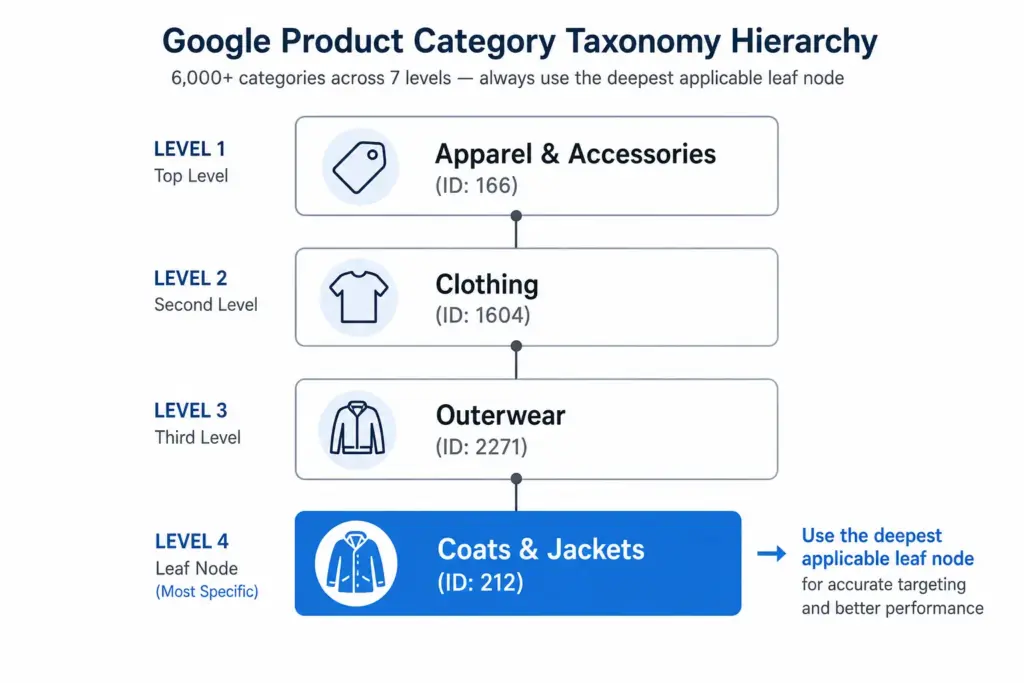
    Google’s product taxonomy is a hierarchical classification system with over 6,000 categories across up to 7 levels of depth. Every product sold through Google Shopping must be classified within this taxonomy using the google_product_category feed attribute.

    Unlike your own internal product taxonomy — which you design for your team and customers — Google’s taxonomy is fixed. You do not modify it. You map your products to it. The full taxonomy file is publicly available and updated periodically. Understanding how it relates to your own internal category structure is covered in detail in the Google Product Category vs Internal Taxonomy guide.

    How google_product_category Affects Shopping Performance

    The category value you assign determines which auction pool your product enters. Google uses it to:

    • Match products to relevant search queries — a product in the correct leaf-node category is matched to more specific searches
    • Set category-specific requirements — some categories (apparel, alcohol, healthcare) have additional required attributes that only apply once Google knows your product’s category
    • Power Shopping filters — the filter options available to buyers on Shopping results pages are partly driven by the category the product is in
    • Determine tax and shipping rules — in some markets, tax treatment is category-dependent

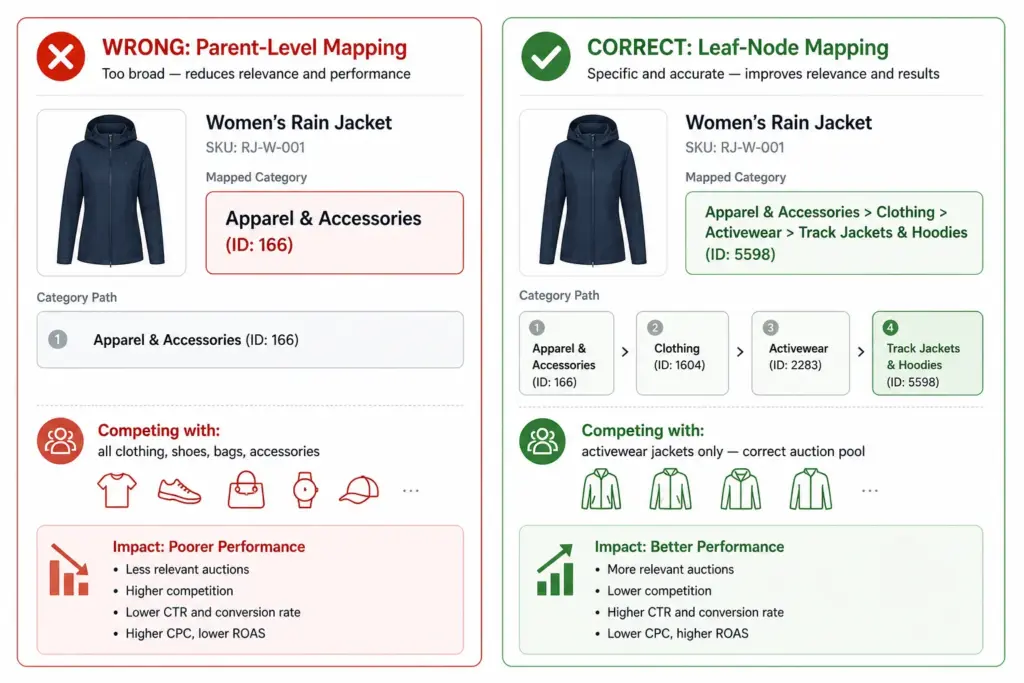
    The difference between a parent category and a leaf node is significant. A product mapped to “Apparel & Accessories” (ID: 166) enters a much broader auction pool than the same product mapped to “Apparel & Accessories > Clothing > Outerwear > Coats & Jackets” (ID: 212). The leaf-node product appears for more specific queries at lower CPCs and with higher relevance scores.

    The taxonomy Attribute: ID vs Text String

    Google accepts google_product_category in two formats:

    • Numeric ID: 212 — the unique identifier for that category node. Stable across taxonomy updates.
    • Full path string: Apparel & Accessories > Clothing > Outerwear > Coats & Jackets — human-readable but can break if Google renames any node in the path.

    Use the numeric ID. If Google restructures a category path or renames a node, the numeric ID continues to resolve correctly. The text path string will return an error or be ignored if the exact wording changes.

    How to Find the Right Category ID

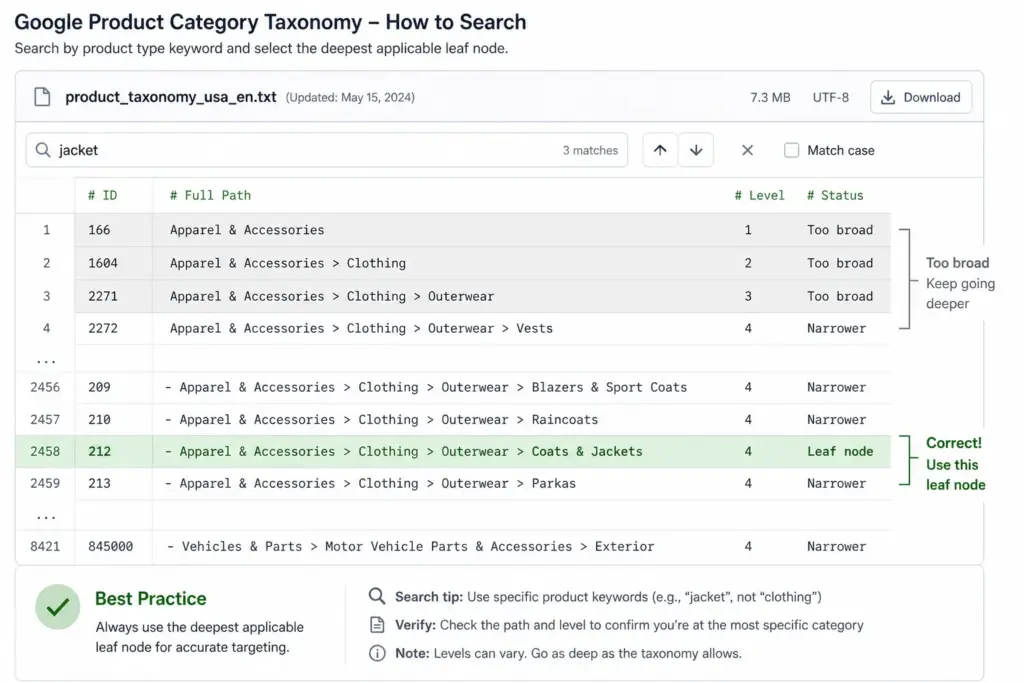
    1. Download the official taxonomy file from google.com/basepages/producttype/taxonomy-with-ids.en-GB.txt
    2. Open it in a spreadsheet or text editor. Each row shows: ID - Full Path
    3. Search (Ctrl+F) for the most specific term describing your product — e.g. “Rain Jacket”, “Sofa”, “NVMe SSD”
    4. Review all matching rows and select the most specific leaf node that accurately describes your product
    5. Record both the ID and the full path — use the ID in your feed, keep the path in your mapping document for human reference

    Most Common google_product_category Mistakes

    MistakeImpactFix
    Using a parent category instead of leaf nodeReduced relevance, wrong auction poolAlways map to the deepest available level
    Using text path instead of numeric IDBreaks when Google renames categoriesSwitch to numeric IDs in your feed
    One category for all productsAll products compete in wrong auctionsMap per subcategory, not per store
    Mapping manually per productInconsistency, errors at scaleMap subcategory → GPC once, apply programmatically
    Never updating after taxonomy changesStale mappings, possible errorsReview taxonomy file annually

    Category Mapping by Industry — Quick Reference

    Product TypeGoogle Category IDFull Path
    Women’s running jacket5598Apparel & Accessories > Clothing > Activewear > Track Jackets & Hoodies
    Men’s leather Oxford shoes187Apparel & Accessories > Shoes > Men’s Shoes > Oxfords
    Gaming laptop328Electronics > Computers > Laptops
    True wireless earbuds3989Electronics > Audio > Headphones > In-Ear Headphones
    3-seater sofa443Furniture > Sofas & Sectionals
    King duvet set569Home & Garden > Linens & Bedding > Duvet Covers
    Ground coffee5775Food, Beverages & Tobacco > Beverages > Coffee
    NVMe SSD1723Electronics > Computers > Computer Components > Hard Drives & Storage > Solid State Drives

    product_type vs google_product_category — What’s the Difference?

    These two attributes are frequently confused. They serve completely different purposes:

    • google_product_category — uses Google’s fixed taxonomy. Affects auction relevance, Shopping matching, and category-specific attribute requirements. Required.
    • product_type — a free-form field you define using your own category naming. Does not affect Google matching. Can be used for campaign segmentation in Google Ads (similar to custom labels). Optional but recommended.

    Both can coexist in the same feed. Use google_product_category to tell Google what your product is. Use product_type to reflect your own internal category naming for campaign management purposes.

    For how to build and maintain your internal taxonomy alongside Google’s, see What Is Product Taxonomy and How to Build a Product Taxonomy From Scratch. To generate a correctly structured feed with category mapping applied, use the Google Shopping Feed Generator.

    Frequently Asked Questions

    Is google_product_category required in Google Shopping feeds?

    Yes, it is required for all products. Products submitted without it may still appear but Google auto-assigns a category — almost always a broad parent level that will underperform compared to the correct leaf-node mapping.

    Should I use the numeric ID or the text string?

    Use the numeric ID. It is stable across taxonomy updates — if Google renames or restructures a category path, the ID continues to resolve correctly. The text path string can break silently if Google changes the exact wording of any node.

    What happens if I use the wrong google_product_category?

    Wrong or overly broad categories reduce Shopping relevance — your products appear for fewer relevant queries and compete in incorrect auction pools. A jacket in “Apparel & Accessories” (parent) is in a completely different and far broader auction than the same jacket in “Apparel & Accessories > Clothing > Outerwear > Coats & Jackets” (leaf node).

    How often does Google update its product taxonomy?

    Typically 1–2 times per year. Numeric IDs remain valid across updates but text path strings may become outdated. Review the taxonomy file annually and after major Google Merchant Center announcements.

    What is the difference between google_product_category and product_type?

    google_product_category uses Google’s fixed taxonomy and directly affects auction relevance and matching. product_type is a free-form field you define using your own naming — it does not affect Google matching but can be used for campaign segmentation in Google Ads similar to custom labels.