How to Build a Product Taxonomy From Scratch (Step-by-Step Guide)
Most product taxonomy problems do not start with bad intentions. They start with a spreadsheet, a growing catalog, and someone who just needed to categorise 50 products quickly. Three years later there are 3,000 products, four naming conventions, and no one knows which category rules apply where.
Building a taxonomy properly from the start — or rebuilding one that has grown without structure — requires the same process regardless of catalog size. This guide walks through every step.
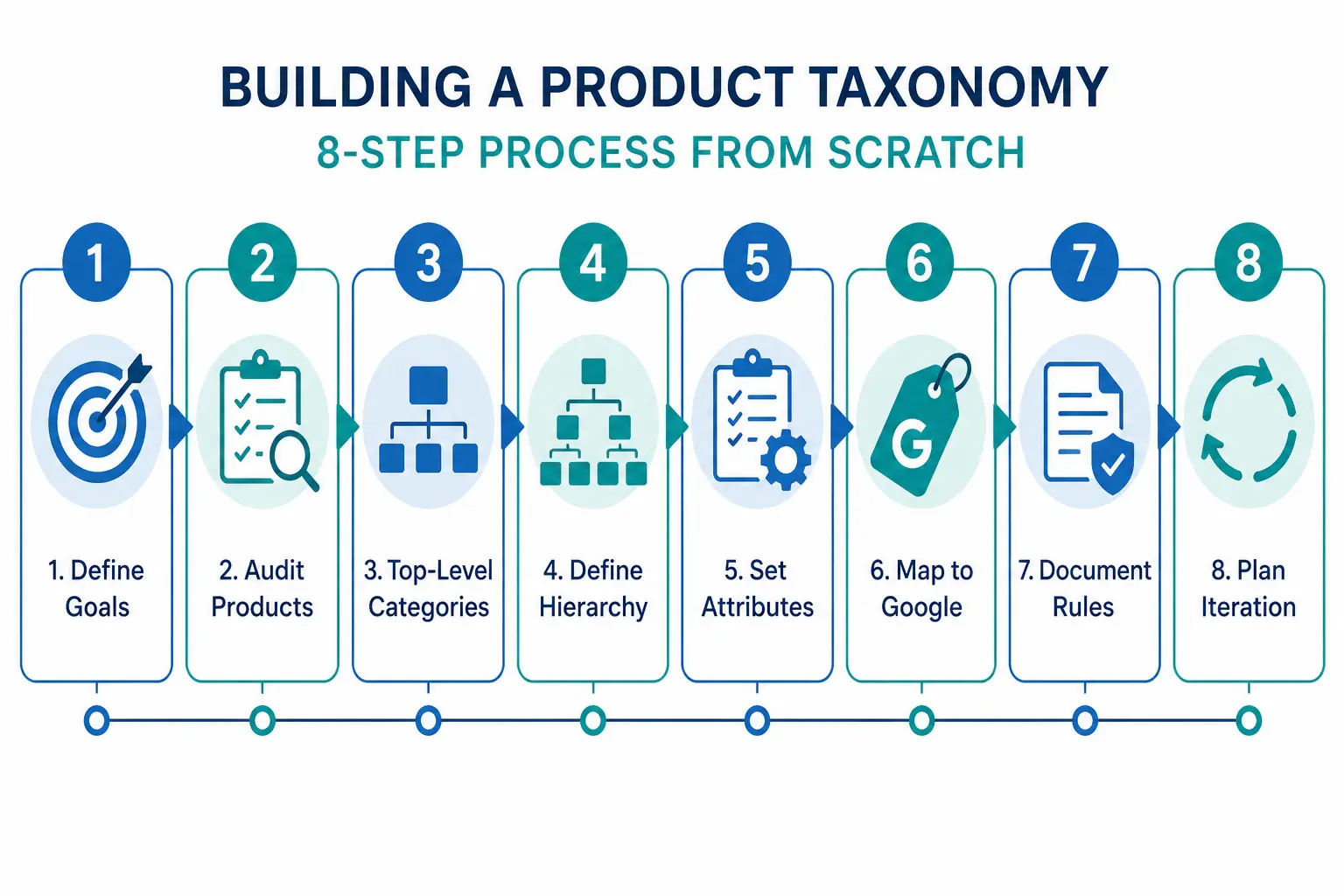
Step 1: Define What Your Taxonomy Needs to Do
Before you name a single category, decide what jobs your taxonomy needs to perform. Most ecommerce catalogs need it to do three things simultaneously:
- Power site navigation and search — customers browse by category and use filters. Your taxonomy is the structure those filters sit on.
- Map to channel requirements — Google Shopping, Amazon, and marketplaces have their own taxonomies. Yours needs to translate cleanly to theirs.
- Organise internal operations — product teams, buyers, and merchandisers use the taxonomy to find, update, and report on products.
These three jobs sometimes conflict. A taxonomy built purely for internal operations often does not map well to how customers search. Understanding the priority before you build prevents rework. For background on what taxonomy is and why it matters, the What Is Product Taxonomy guide covers the foundations.
Step 2: Audit Your Existing Products
Export every SKU you have. Look at the full list before designing any categories. You are looking for:
- Natural groupings — what products obviously belong together?
- Edge cases — products that do not fit neatly into an obvious category
- Volume distribution — how many products fall into each potential category?
- Attribute patterns — what attributes do products in the same group share?
A category with 2 products and a category with 2,000 products suggest the hierarchy is off. Aim for relative balance across categories at the same level, with narrow subcategories only where genuine product differentiation exists.
Step 3: Design Your Top-Level Categories
Top-level categories are your broadest groupings. For most ecommerce catalogs, 5–12 top-level categories is the right range. Too few and subcategories get unwieldy. Too many and customers cannot find their starting point.
The test for a top-level category: a customer with no prior knowledge of your store should be able to assign a product to the correct top-level category without thinking about it. If it requires judgment, the category is too vague.
Two approaches to defining top-level categories
Customer-first approach: Start with how customers describe what they are looking for. Use your site search data, Google Search Console queries, and competitor category names as evidence of natural language groupings.
Google-first approach: Start with Google’s product taxonomy at the top level. This makes channel mapping easier later and ensures your categories align with how the largest product discovery platform in the world organises products. You can always use internal-facing names that differ from the Google-facing values.
Step 4: Define 3 Levels of Hierarchy (Minimum)
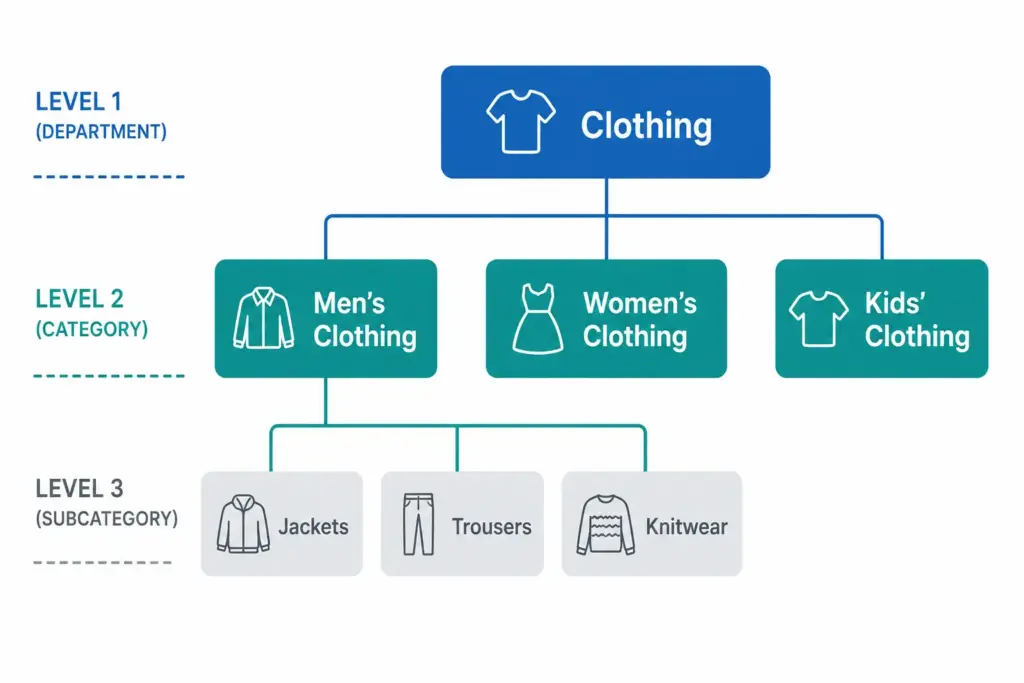
A functional product taxonomy needs at least three levels:
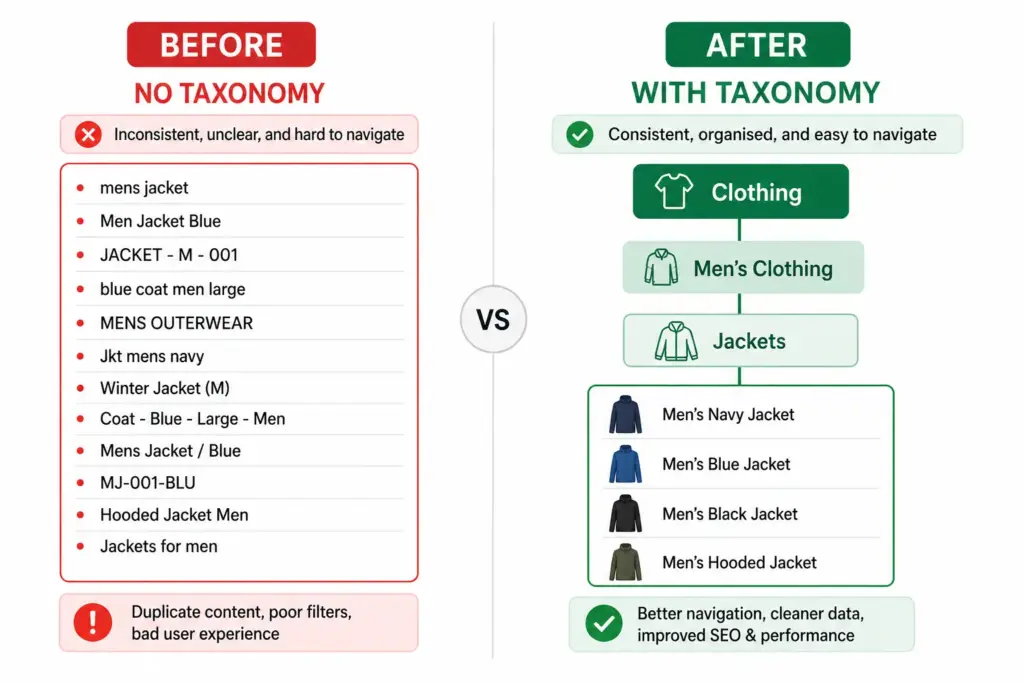
- Level 1 (Department): Clothing, Footwear, Accessories
- Level 2 (Category): Men’s Clothing, Women’s Clothing, Kids’ Clothing
- Level 3 (Subcategory): Men’s Jackets, Men’s Trousers, Men’s Knitwear
For larger catalogs, Level 4 (product type) is worth adding: Men’s Jackets → Rain Jackets, Leather Jackets, Padded Jackets.
The difference between a flat and hierarchical taxonomy matters significantly for navigation and channel mapping. The Flat vs Hierarchical Taxonomy guide covers when each structure is appropriate.
Step 5: Define Attributes per Category
Attributes are the product properties that apply within a category. Every category in your taxonomy needs a defined attribute set — the list of fields that must be filled for a product in that category to be considered complete.
| Category | Required Attributes | Recommended Additions |
|---|---|---|
| Men’s Jackets | Brand, Colour, Size, Material, Gender | Waterproof rating, Fill weight, Packable |
| Running Shoes | Brand, Colour, Size, Gender, Surface type | Drop height, Cushioning level, Width |
| Laptops | Brand, Processor, RAM, Storage, Screen size | Battery life, Weight, Graphics card |
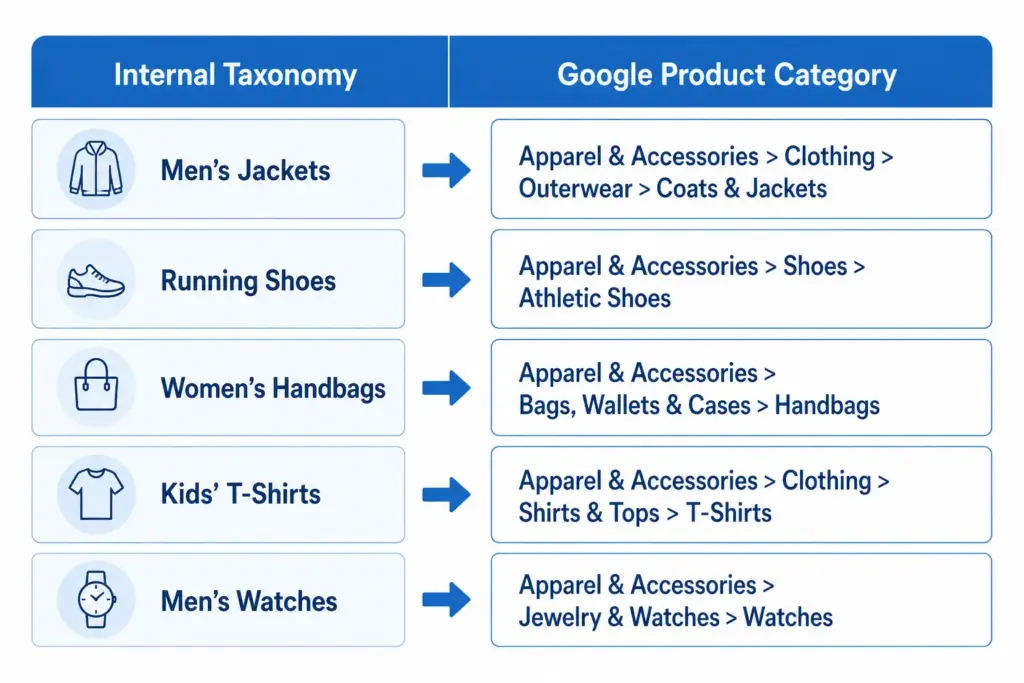
Step 6: Map to Google’s Product Taxonomy
Once your internal taxonomy is defined, create a mapping document that links each of your subcategories to its corresponding Google product category value. Use Google’s official taxonomy file to find the correct IDs. Map at the most specific level possible — leaf nodes, not parent categories.
Step 7: Document the Rules
A taxonomy that exists only in someone’s head is a single point of failure. Document:
- Category definitions — what does and does not belong in each category
- Naming conventions — title case vs sentence case, singular vs plural
- Attribute validation rules — acceptable values for controlled attributes like colour and size
- Exception handling — what happens to products that span categories
The PIM Readiness Score assessment helps you identify where your current product data governance has gaps before you build on top of it. Free, takes 5 minutes.
Step 8: Build with Iteration in Mind
No taxonomy survives contact with a growing catalog unchanged. You will need to add categories as you expand into new product areas. You will discover edge cases your initial rules did not cover. You will probably need to split an overpopulated subcategory 18 months after launch.
Build with this in mind: keep hierarchy levels consistent, avoid category names that are too specific, and review your taxonomy structure annually against site search data and channel performance.
Ready to apply this? Download the free Product Taxonomy Template at lynkpim.app — pre-built for Fashion, Electronics, Home Goods, Food & Beverage, and B2B Industrial. Use it as a starting point rather than building from a blank page.
Once your taxonomy structure is set, see how it applies to specific industries: fashion ecommerce taxonomy and electronics taxonomy both cover the unique requirements of their categories in detail.
Frequently Asked Questions
How many levels should a product taxonomy have?
A minimum of three levels: Department (Level 1), Category (Level 2), and Subcategory (Level 3). Larger catalogs benefit from a fourth level (Product Type). Going beyond four levels rarely adds value and increases maintenance complexity without meaningful improvement to navigation or channel mapping.
How often should you review and update your product taxonomy?
Review your taxonomy structure at least once per year against site search data, channel performance data, and catalog growth. Attribute value lists for technical categories may need updating more frequently — for example when new product standards or formats appear in electronics or components.
Should your internal taxonomy match Google’s product taxonomy?
Not necessarily. Your internal taxonomy should reflect how your team and customers think about products. What matters is that every internal subcategory maps to the correct Google product category leaf node in your feed — the two systems can use different naming as long as the mapping document is maintained and applied consistently.
What is the difference between a category and an attribute in product taxonomy?
A category defines where a product sits in the hierarchy — for example, Men’s Jackets. An attribute defines a property of that product within its category — for example, Colour = Navy, Size = L, Material = Nylon. Categories organise the catalog structure; attributes describe individual products within it.
How many top-level categories should a product taxonomy have?
For most ecommerce catalogs, 5 to 12 top-level categories is the right range. Too few and subcategories become unwieldy. Too many and customers cannot find their starting point. The test: a customer with no prior knowledge should be able to assign any product to the correct top-level category without thinking about it.