Tag: Category Structure

  • Product Taxonomy for Food and Beverage Ecommerce: Full Setup Guide

    Product Taxonomy for Food and Beverage Ecommerce: Full Setup Guide

    Product Taxonomy for Food and Beverage Ecommerce: Full Setup Guide

    Food and beverage ecommerce has a taxonomy challenge that no other category faces at the same level: regulatory compliance. Allergen data, nutritional information, country of origin, and storage requirements are not optional attributes — they are legal requirements in most markets. A food taxonomy that gets the category hierarchy right but misses the compliance attribute layer is both incomplete and a legal liability.

    This guide covers how to build a food and beverage taxonomy that works for customers, for Google Shopping, and for regulatory compliance simultaneously.
    Why Food Taxonomy Needs a Compliance Layer

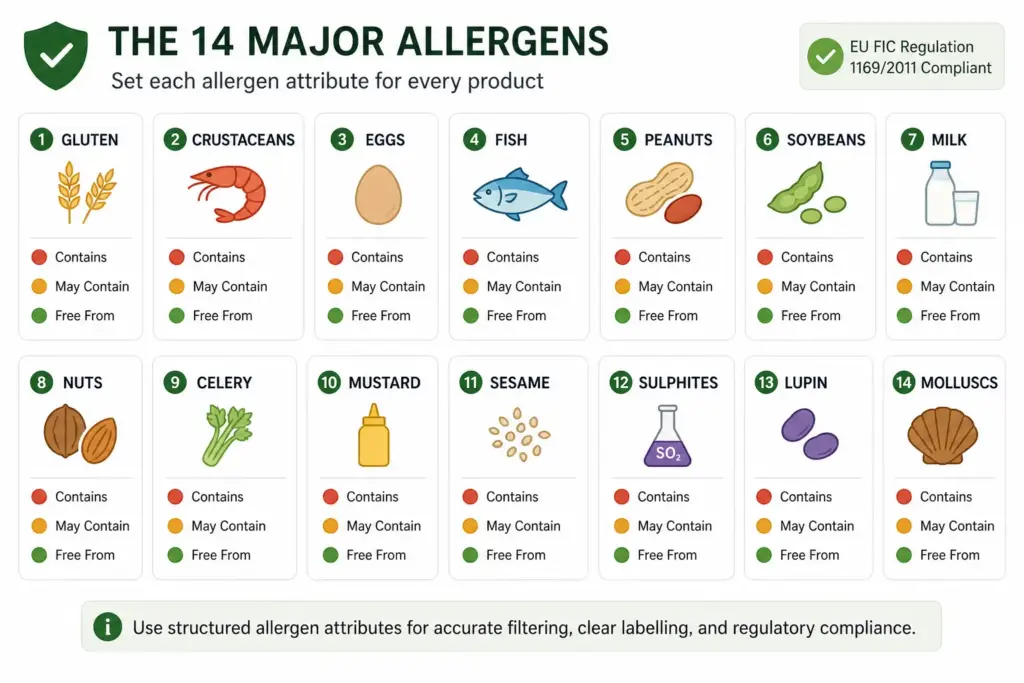
    Food ecommerce has obligations that other ecommerce categories do not. In UK and EU markets, the Food Information for Consumers Regulation (FIC) requires that 14 major allergens are clearly identified on all pre-packaged food products sold online. Nutritional information per 100g is also required for most food products.

    This means your product taxonomy must support a compliance attribute layer — not just a category hierarchy. Every food product record needs structured allergen fields, nutritional values, and country of origin. These cannot be buried in free-text descriptions — they must be structured attributes that can be displayed, filtered, and audited.

    For the foundational taxonomy structure applicable to all industries before adding food-specific requirements, see How to Build a Product Taxonomy From Scratch.

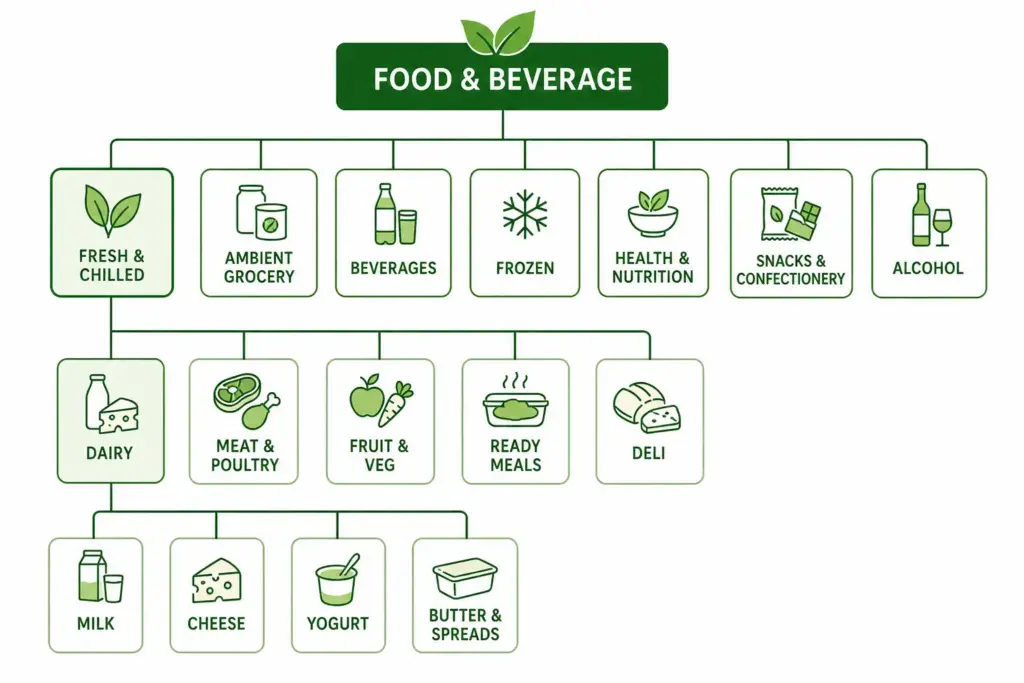
    Recommended Top-Level Structure for Food and Beverage

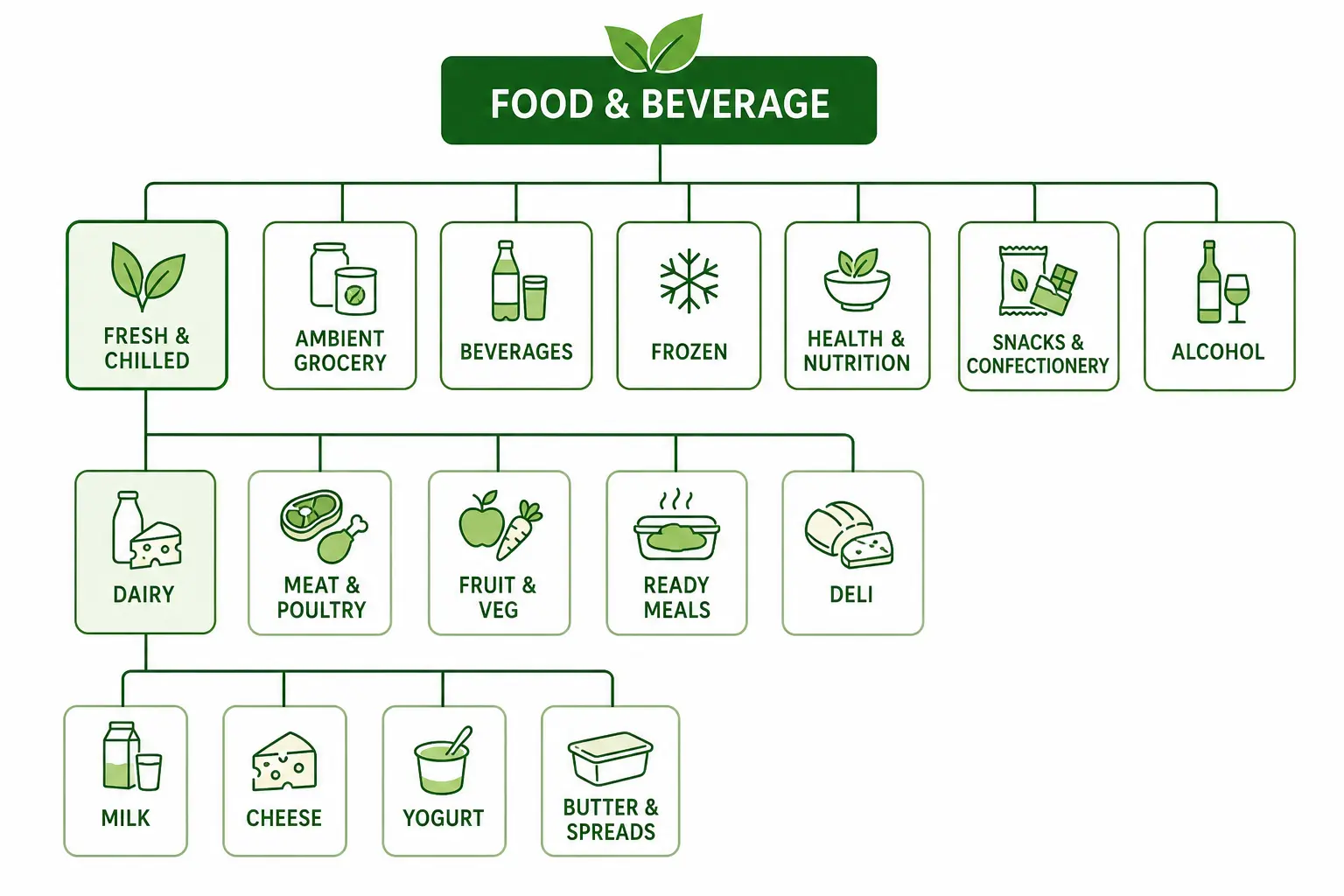
    Level 1Level 2 ExamplesLevel 3 Examples
    Fresh & ChilledDairy, Meat & Poultry, Fruit & Vegetables, Ready Meals, DeliMilk, Cheese, Yogurt, Butter & Spreads
    Ambient GroceryPasta & Rice, Tinned Goods, Sauces & Condiments, Oils & VinegarsDried Pasta, Tinned Tomatoes, Pasta Sauces
    BeveragesCoffee, Tea, Soft Drinks, Juices, Water, Hot ChocolateGround Coffee, Whole Bean, Coffee Pods
    FrozenFrozen Meals, Frozen Meat, Ice Cream, Frozen Vegetables, Frozen BakeryFrozen Pizza, Frozen Fish Fillets
    Health & NutritionProtein Supplements, Vitamins, Sports Nutrition, SuperfoodsWhey Protein, Plant Protein, BCAA
    Snacks & ConfectioneryCrisps, Nuts, Chocolate, Sweets, Cereal Bars, BiscuitsDark Chocolate, Milk Chocolate, Vegan Chocolate
    BakeryBread, Pastries, Cakes, Gluten-Free BakerySourdough, White Sliced, Seeded Loaves
    AlcoholWine, Beer & Cider, Spirits, Low & No AlcoholRed Wine, White Wine, Champagne & Sparkling

    The 14 Mandatory Allergen Attributes

    Each of the 14 major allergens must be a separate structured attribute on every food product record with three possible values:

    • Contains — the allergen is a declared ingredient
    • May Contain — manufactured in a facility that also processes this allergen (cross-contamination risk)
    • Free From — the product does not contain and is not cross-contamination risk for this allergen

    The 14 allergens are: Gluten, Crustaceans, Eggs, Fish, Peanuts, Soybeans, Milk, Nuts, Celery, Mustard, Sesame, Sulphur Dioxide & Sulphites, Lupin, Molluscs.

    Structured allergen attributes enable allergen-specific filtering (customers can filter “Nut-Free” or “Gluten-Free”) and allow your compliance team to audit allergen data across the full catalog efficiently. Free-text allergen data in descriptions cannot be audited or filtered.

    Dietary Attribute Set

    Beyond the mandatory allergen layer, structured dietary attributes drive high-value customer filtering. These are among the most-used filters on food ecommerce sites:

    • Vegan — contains no animal products or by-products
    • Vegetarian — contains no meat or fish
    • Gluten-Free — certified gluten-free (below 20ppm threshold)
    • Dairy-Free — contains no milk or dairy derivatives
    • Nut-Free — contains no nuts and produced in a nut-free facility
    • Halal — certified Halal
    • Kosher — certified Kosher
    • Organic — certified organic (specify certification body)
    • No Added Sugar
    • Low Calorie (define threshold — e.g. <100kcal per serving)

    Shelf Life and Storage Attributes

    Storage and shelf life attributes serve both customer information and operational fulfilment routing. Products with different storage requirements (ambient, chilled, frozen) need to be identifiable programmatically — your fulfilment system needs to know which warehouse zone and which delivery service applies to each product.

    • storage_type: ambient / chilled (2-8°C) / frozen (-18°C)
    • shelf_life_days: total shelf life from production date
    • minimum_remaining_life_on_despatch: minimum days remaining when shipped (e.g. 60% of total shelf life)
    • best_before_guidance: “Best Before”, “Use By”, “Display Until” — the label type

    Nutritional Attributes (Required for UK/EU Markets)
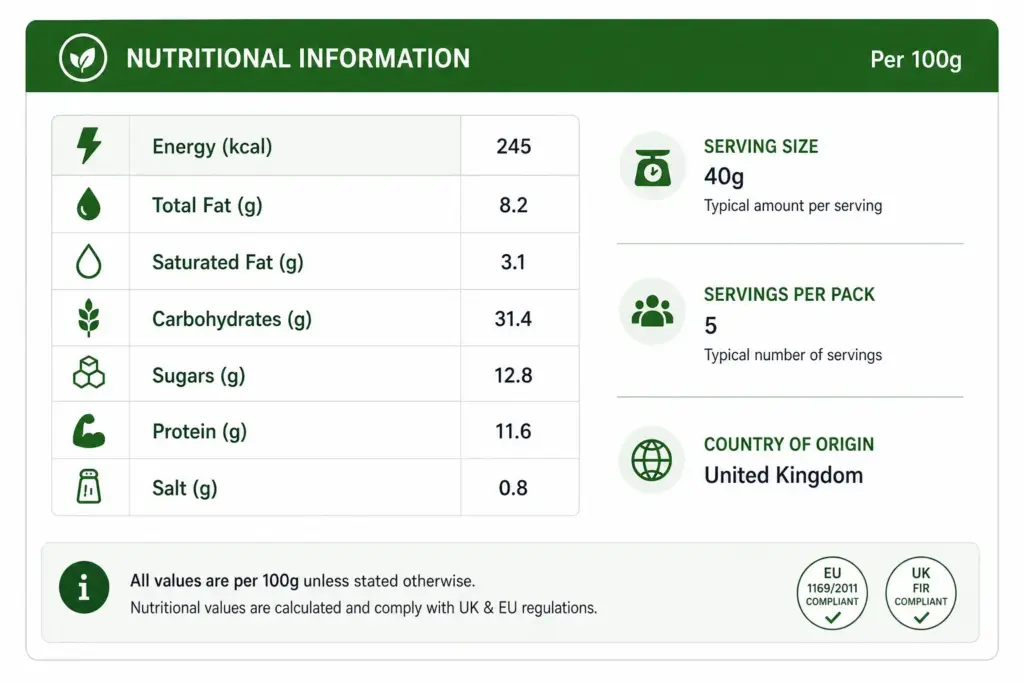
    Under UK FIC regulations, the following nutritional values are required per 100g/100ml on food product pages:

    • Energy (kJ and kcal)
    • Total Fat (g)
    • Saturated Fat (g)
    • Carbohydrates (g)
    • Sugars (g)
    • Protein (g)
    • Salt (g)

    These must be structured attributes in your product data — not embedded in label images. Structured data can be indexed by search engines, displayed dynamically, and audited for completeness. Image-embedded nutritional data cannot.

    Google Product Category Mapping for Food

    ProductCorrect Google Category
    Ground coffeeFood, Beverages & Tobacco > Beverages > Coffee
    Whey protein powderHealth & Beauty > Health Care > Fitness Nutrition > Protein Supplements
    Gluten-free pastaFood, Beverages & Tobacco > Food Items > Grains, Rice & Pasta
    Red wineFood, Beverages & Tobacco > Beverages > Alcoholic Beverages > Wine
    Vegan chocolate barFood, Beverages & Tobacco > Food Items > Sweets & Snacks > Candy & Chocolate

    Managing allergen data, nutritional values, and shelf life attributes at scale across a large food catalog requires a system that enforces attribute completeness before products are published. The PIM Readiness Score identifies exactly where your current data governance has gaps. Download the free Taxonomy Template at lynkpim.app — the Food & Beverage tab includes the full category hierarchy and compliance attribute set.

    For context on how food taxonomy compares structurally to another attribute-heavy category, see the Home Goods Taxonomy guide.

    Frequently Asked Questions

    Are allergen attributes legally required for food ecommerce in the UK?

    Yes. Under the UK Food Information for Consumers Regulation (FIC), all 14 major allergens must be clearly indicated on pre-packaged food products sold online. Structured allergen attributes ensure these are displayed accurately, consistently, and can be audited across the full catalog. Free-text allergen data in descriptions does not meet this standard reliably.

    How should dietary attributes like Vegan and Gluten-Free be structured?

    Dietary attributes should be structured boolean or controlled-value attributes on every food product — not free-text descriptions. Structured dietary attributes enable accurate site filtering, prevent manual errors when products are updated, and allow your compliance team to audit attribute accuracy across the full catalog at any time.

    Should food categories be organised by cuisine type or by food category?

    Organise by food type (Dairy, Bakery, Beverages) rather than cuisine (Italian, Asian, Mexican) for the primary taxonomy structure. Cuisine and origin work well as filterable attributes. Type-based categories map directly to Google’s taxonomy and match how customers search for food online — “gluten-free pasta” not “Italian gluten-free”.

    What shelf life attributes should food products have?

    Include storage_type (ambient / chilled / frozen), shelf_life_days (total from production), minimum_remaining_life_on_despatch (days remaining when shipped to customer), and best_before_guidance (Best Before / Use By / Display Until). These drive fulfilment routing, customer-facing freshness communication, and return rate management.

    Does Google Shopping allow food and beverage products?

    Yes, food and beverage products are allowed in Google Shopping with some exceptions. Alcohol requires age verification compliance and may be restricted by country targeting. Supplements and health food products must comply with local regulations. Most ambient grocery, beverages, and specialty food products can be advertised without restrictions — verify your specific product types in Google Merchant Center’s product data specification.
  • Product Taxonomy for Home Goods and Furniture: The Complete Guide

    Product Taxonomy for Home Goods and Furniture: The Complete Guide

    Product Taxonomy for Home Goods and Furniture: The Complete Guide

    Home goods and furniture present a taxonomy challenge that is distinct from fashion or electronics. Products are large, physical, and often customisable. Customers search by room, by style, by material, and by dimension — sometimes all at once. A sofa is not just a sofa: it is a 3-seater, right-hand-facing, grey velvet, Scandi-style corner sofa with a specific width that must fit through a standard doorframe.

    This guide covers how to build a home goods taxonomy that handles all of those dimensions without becoming unmanageable.

    Room-Based vs Type-Based Hierarchy: Which to Choose

    The first decision in home goods taxonomy is whether to organise by room or by product type at the top level. Both approaches appear in the market. Both have genuine pros and cons.

    Room-Based (Living Room, Bedroom, Kitchen)Type-Based (Sofas, Beds, Tables)
    Customer navigationIntuitive for browsing by project (“doing up my bedroom”)Intuitive for specific product search (“I need a sofa”)
    Cross-room productsProblem — a side table works in bedroom AND living roomNo problem — side tables are just side tables
    Google Shopping mappingDifficult — Google organises by type, not roomEasy — maps directly to Google taxonomy
    SEORoom keywords have high volume but low commercial intentType + material + size keywords have high commercial intent
    VerdictWorks for editorial/inspiration contentBetter for ecommerce catalog and feed performance

    The recommended approach: use type-based categories as your primary taxonomy structure and add room as a filterable attribute on each product. This gives customers both navigation paths without creating structural problems for products that belong in multiple rooms. For a full comparison of hierarchy approaches, see Flat vs Hierarchical Taxonomy.

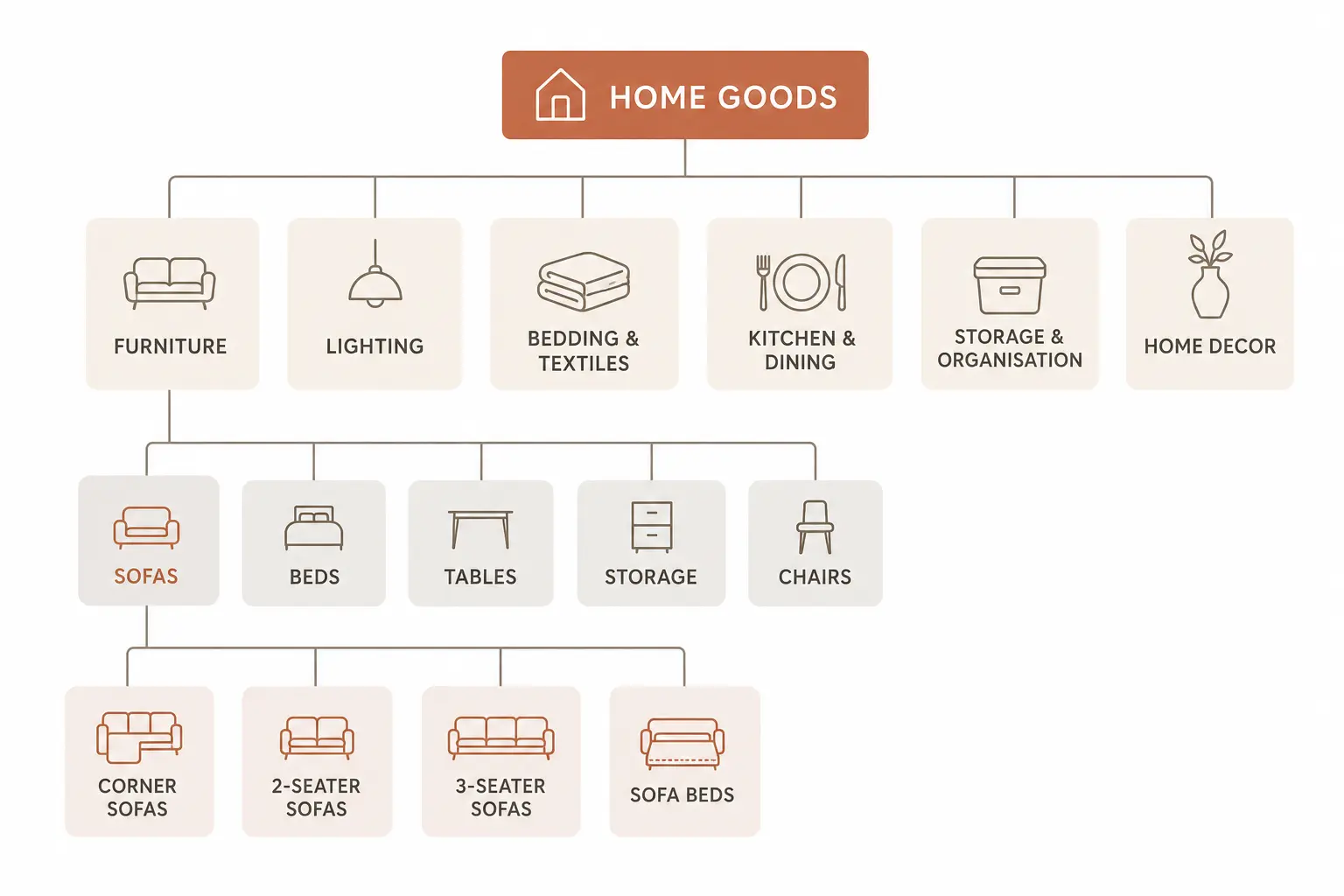
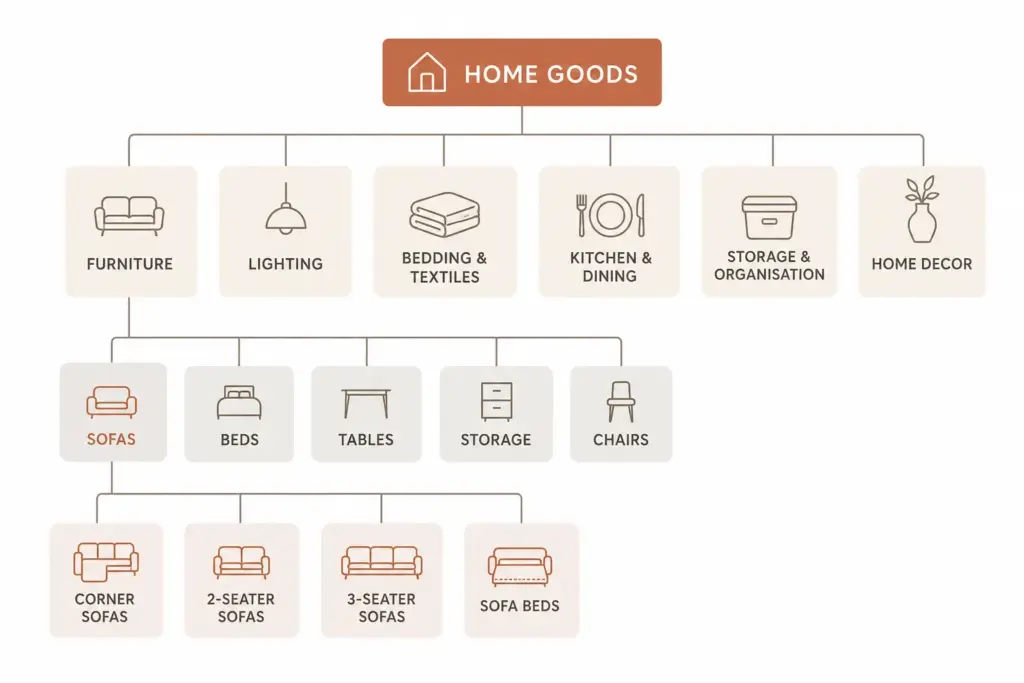
    Recommended Top-Level Structure for Home Goods

    Level 1Level 2 ExamplesLevel 3 Examples
    FurnitureSofas, Beds, Tables, Storage, Chairs, WardrobesCorner Sofas, 2-Seater Sofas, Sofa Beds
    LightingCeiling Lights, Floor Lamps, Table Lamps, Wall LightsPendant Lights, Chandeliers, Spotlights
    Bedding & TextilesDuvet Sets, Pillowcases, Throws, Curtains, RugsKing Duvet Sets, Blackout Curtains
    Kitchen & DiningCookware, Tableware, Kitchen Storage, AppliancesNon-stick Pans, Dinner Sets, Knife Blocks
    Storage & OrganisationShelving, Boxes & Baskets, Hooks, Drawer OrganisersFloating Shelves, Wicker Storage Baskets
    Home DecorMirrors, Vases, Picture Frames, Candles, ArtworkWall Mirrors, Full-Length Mirrors
    OutdoorGarden Furniture, Outdoor Lighting, Planters, BBQsGarden Dining Sets, Garden Sofas

    Attribute Sets for Home Goods

    Furniture (Sofas, Tables, Chairs, Beds)

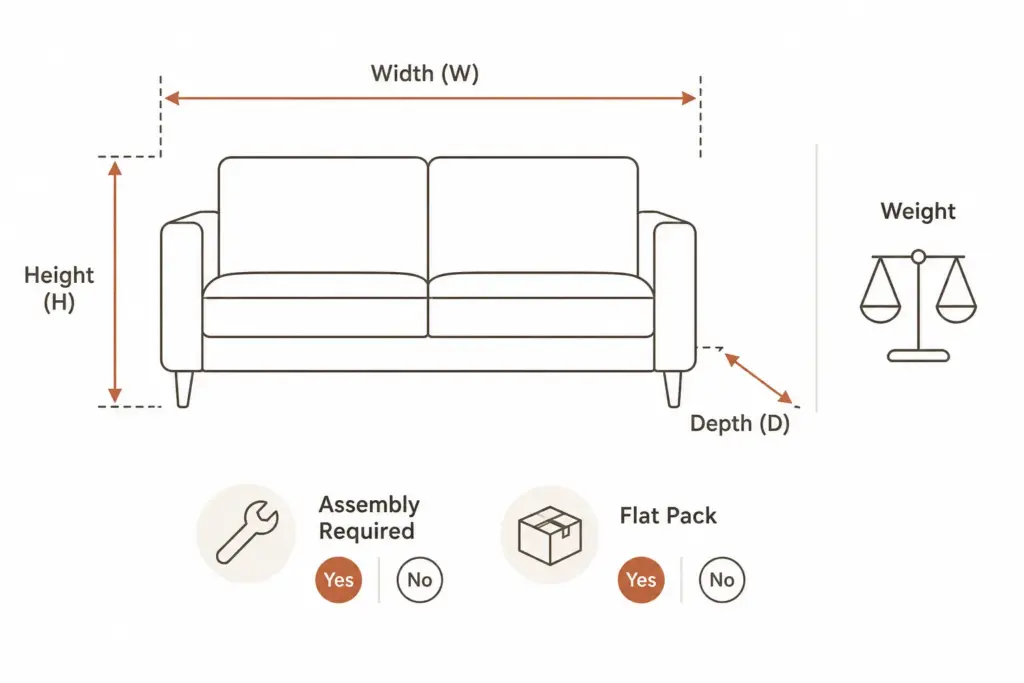
    • Required: Brand, Colour, Material (primary), Dimensions (W × H × D in cm), Weight (kg), Assembly required (yes/no)
    • Recommended: Frame material, Leg material, Interior style, Room (Living Room / Bedroom / etc.), Maximum load (kg), Flat pack (yes/no), Number of seats (sofas/chairs)
    • Google category: Furniture → [specific type] e.g. Furniture > Sofas & Sectionals

    Lighting

    • Required: Brand, Colour/Finish, Fitting type (E27, B22, GU10 etc.), IP rating (for outdoor/bathroom), Material
    • Recommended: Bulb included (yes/no), Bulb type, Max wattage, Dimmable (yes/no), Height (cm), Shade diameter (cm), Interior style
    • Google category: Furniture > Lamps & Lighting > [specific type]

    Bedding & Textiles

    • Required: Brand, Colour, Size (Single / Double / King / Super King), Material composition, Care instructions
    • Recommended: Thread count (sheets), Tog rating (duvets), Pattern, Weave type, Hypoallergenic (yes/no)
    • Google category: Home & Garden > Linens & Bedding > [specific type]

    Dimension Attributes — Non-Negotiable for Furniture

    Dimension data is the most common missing attribute in home goods feeds, and it is the attribute customers are most likely to abandon without when making a buying decision. Furniture customers need to know if a sofa fits their space before they buy. A sofa listing without dimensions loses that sale before it begins.

    • Width, Height, Depth: In centimetres. Required for all furniture and large home goods.
    • Seat height: For chairs and sofas — critical for accessibility and ergonomics.
    • Weight: In kilograms. Important for customer planning and delivery expectations.
    • Assembly required: Yes / No — customers plan their time around this.
    • Flat pack: Yes / No — relevant for customers with size-restricted access (e.g. lifts, narrow staircases).

    Material Management in Home Goods

    Material naming in home goods has the same problem as colour naming in fashion. Marketing names (“Smoked Oak”, “Brushed Concrete Effect”, “Warm Walnut”) are meaningful to buyers but problematic for site filters and Google Shopping.

    Use a two-field approach: store the marketing material name for product copy and an additional normalised material value for filtering and feed submission:

    • Smoked Oak → Oak
    • Brushed Concrete Effect → Concrete / MDF
    • Warm Walnut Veneer → Walnut
    • Hammered Antique Brass → Brass

    Without normalised material values, your filter “Shop by Material” becomes unusable — customers cannot find all oak products because they appear under fifteen different marketing material names.

    Style as a Filterable Attribute

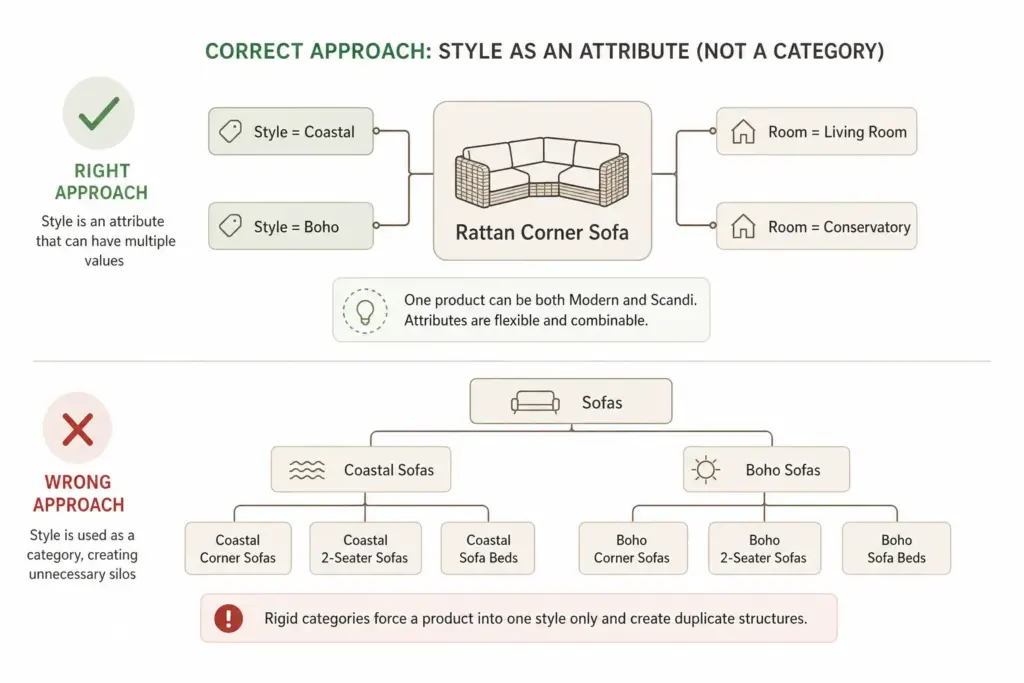
    Interior style — Modern, Scandinavian, Industrial, Traditional, Coastal, Maximalist — is a genuine purchase driver for home goods customers. But style should be a filterable attribute, not a category. Here is why:

    • A product can have multiple applicable styles — a rattan sofa is both Coastal and Boho
    • Style trends change — “Cottagecore” did not exist as a search term five years ago; you cannot build permanent category structure on trends
    • Style categories create structural debt — “Industrial Living Room Furniture” and “Scandinavian Living Room Furniture” as subcategories double your category maintenance without adding navigational value

    Assign style values as multi-value attributes and surface them as filters. A product can carry two or three style tags and appear in all relevant filter results without duplicating the product record.

    Google Product Category Mapping for Home Goods

    ProductCorrect Google Category
    3-seater sofaFurniture > Sofas & Sectionals
    King size bed frameFurniture > Beds & Bed Frames
    Pendant ceiling lightFurniture > Lamps & Lighting > Ceiling Lights & Fans
    King duvet setHome & Garden > Linens & Bedding > Duvet Covers
    Non-stick frying panKitchen & Dining > Cookware > Frying Pans & Skillets
    Floating shelfFurniture > Shelving > Wall Shelves & Ledges

    Once your home goods taxonomy is structured, managing dimension attributes and material values at scale benefits significantly from a PIM that enforces attribute completeness before products are published. Take the PIM Readiness Score to identify your current gaps, or download the free Taxonomy Template — including the Home Goods & Furniture tab — at lynkpim.app.

    For a broader framework applicable across all industries before diving into home-specific requirements, see How to Build a Product Taxonomy From Scratch.

    Frequently Asked Questions

    Should a home goods taxonomy be room-based or product-type-based?

    Product-type-based is recommended for the primary taxonomy structure. Room should be a filterable attribute on each product, not a top-level category. This avoids the structural problem of cross-room products and maps far more cleanly to Google’s product taxonomy — which organises by type, not by room.

    What dimension attributes are required for furniture?

    Width, Height, and Depth in centimetres are required for all furniture and large home goods. Additionally include Weight (kg), Assembly Required (yes/no), and Flat Pack (yes/no). Seat height is strongly recommended for chairs and sofas as it is a key purchase decision factor.

    How should interior style be handled in a home goods taxonomy?

    Style should be a multi-value filterable attribute, not a permanent category. One product can carry multiple style tags — Coastal and Boho, for example — and appear in all relevant filter results without duplicating the product record. Creating style-named categories creates structural debt that becomes difficult to manage when interior trends shift.

    What Google product category should I use for sofas?

    Use the leaf-node: Furniture > Sofas & Sectionals. Avoid parent categories like “Furniture” alone. The more specific your Google product category, the better your Shopping feed relevance and the more accurately Google matches your products to buyer queries.

    How should material be managed in a home goods taxonomy?

    Use a two-field approach: marketing material name (Smoked Oak, Warm Walnut Veneer) for customer-facing copy, and a normalised material value (Oak, Walnut) for feed attributes and site filters. Without normalised values, your “Shop by Material” filter becomes a list of marketing names rather than a useful browsing tool.

  • Flat vs Hierarchical Product Taxonomy: Which Is Right for Your Catalog?

    Flat vs Hierarchical Product Taxonomy: Which Is Right for Your Catalog?

    Flat vs Hierarchical Product Taxonomy: Which Is Right for Your Catalog?

    The structure of your product taxonomy determines how your catalog scales, how your site filters work, and how well your products map to Google Shopping categories. Flat and hierarchical are the two fundamental structural approaches — and choosing the wrong one for your catalog size and complexity creates problems that get harder to fix the longer they go unaddressed.

    What Is a Flat Taxonomy?

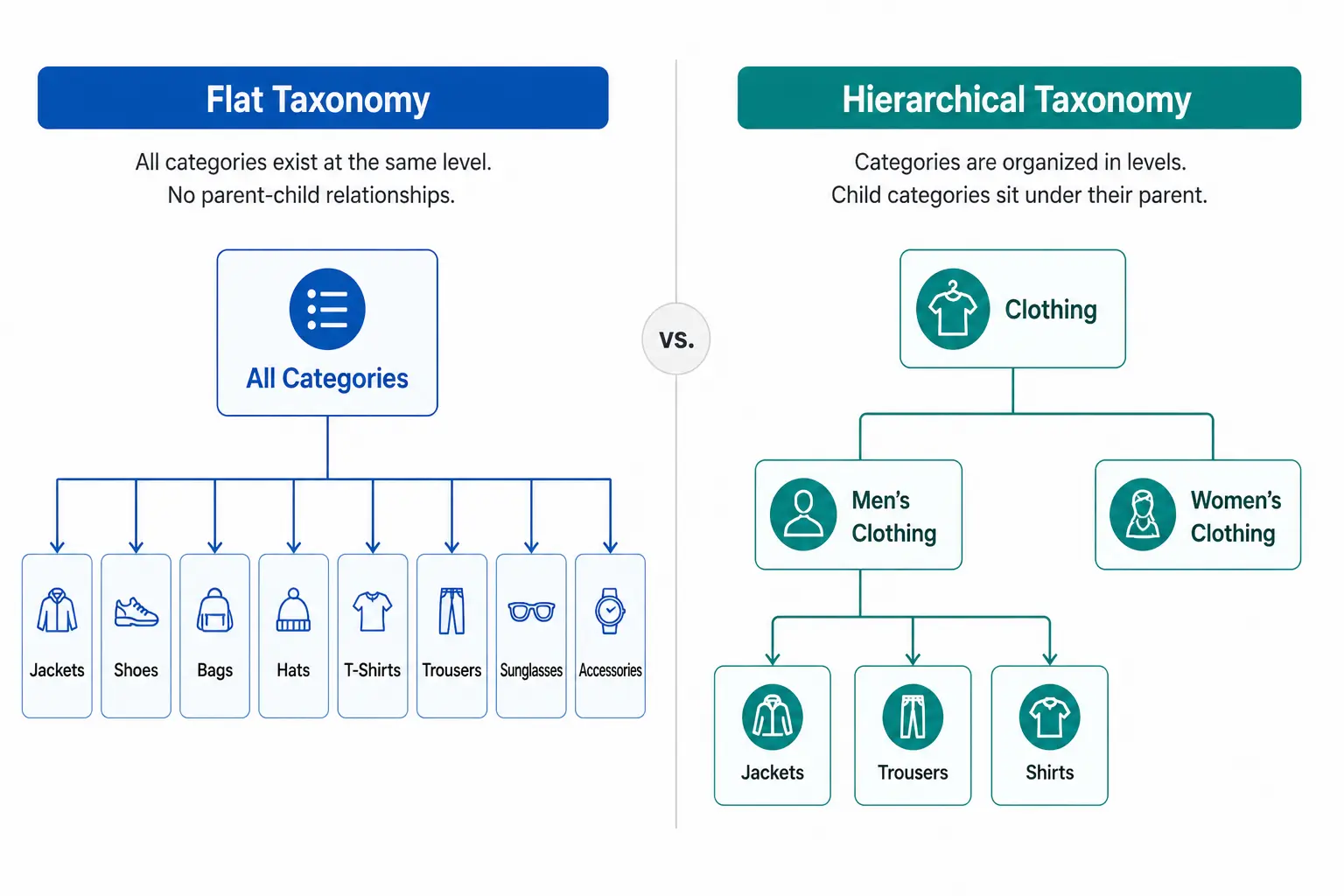
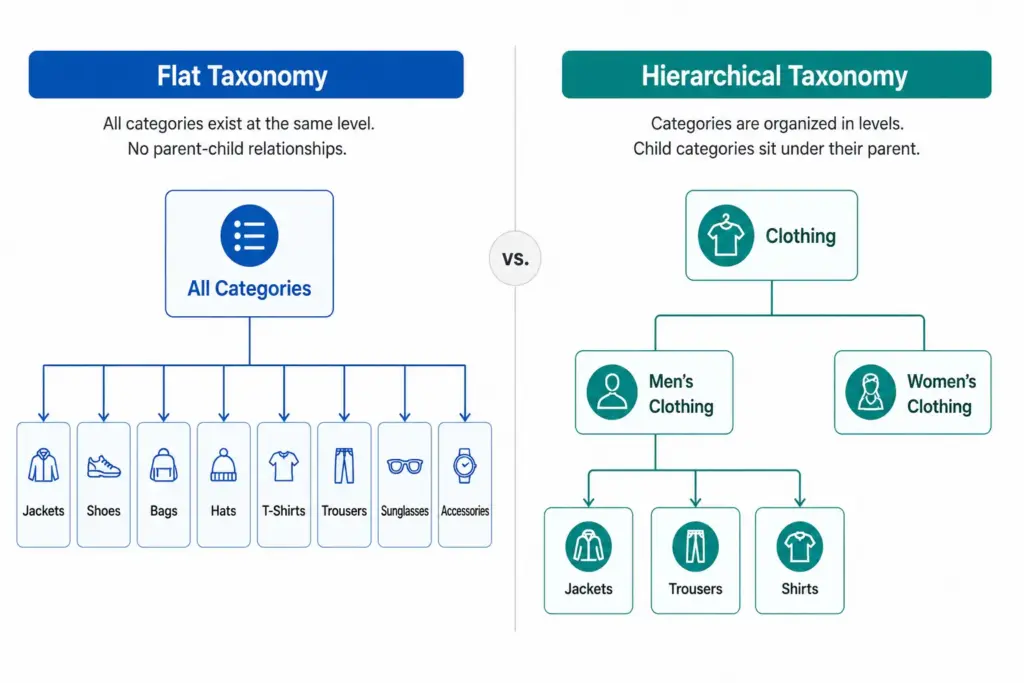
    A flat taxonomy has a single level of categories. Products sit directly under a top-level category with no subcategories beneath it. The entire catalog structure is one layer deep.

    Example: A small accessories store with a flat taxonomy might have: Bags, Scarves, Hats, Belts, Sunglasses, Jewellery. Every product sits directly under one of those six categories. There are no subcategories — “Bags” is not further divided into Handbags, Crossbody Bags, Clutches, Tote Bags.

    Flat taxonomies are easy to set up and easy to understand at a glance. They work well when the catalog is small and products within each category are genuinely similar enough that no further subdivision adds value.

    What Is a Hierarchical Taxonomy?

    A hierarchical taxonomy has multiple nested levels. Categories contain subcategories, which may contain further subcategories, down to the most specific product type level.

    Example: The same accessories store with a hierarchical taxonomy: Bags > Handbags > Leather Handbags. Or Bags > Crossbody Bags. Each level adds specificity — and with it, the ability to filter, map to Google’s taxonomy precisely, and manage products by type without the entire “Bags” category becoming unnavigable.

    Head-to-Head Comparison

    Flat TaxonomyHierarchical Taxonomy
    StructureOne level — all categories at the same depthMultiple levels — categories contain subcategories
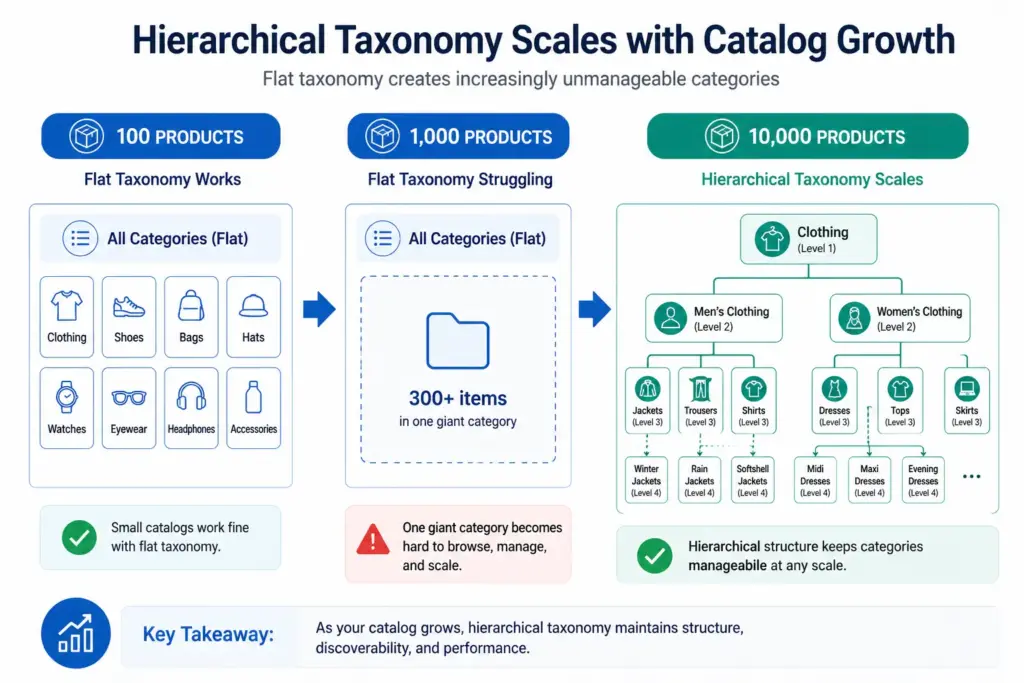
    Best forCatalogs under ~200 products, narrow rangeAny catalog with 200+ products or multiple product types
    NavigationSimple — works when categories are few and clearMore complex but enables breadcrumb navigation and drill-down filtering
    Filter accuracyLimited — attributes apply across entire categoryHigh — attributes defined per subcategory, filters are specific
    Google category mappingImprecise — top-level categories rarely match Google leaf nodesPrecise — subcategories map directly to Google taxonomy leaf nodes
    ScalabilityPoor — adding products creates category bloatHigh — hierarchy absorbs new product types without structural change
    MaintenanceLow initially, high as catalog growsHigher upfront, lower long-term
    Channel mappingDifficult — manual per-product mapping often requiredSystematic — subcategory maps once to each channel

    When Flat Taxonomy Works

    Flat taxonomies are appropriate in a small number of specific situations:

    • Catalog under 200 SKUs with a genuinely narrow product range where subcategories would be redundant
    • Single-category specialty stores — a store that sells only coffee beans, only yoga mats, or only one type of product doesn’t need a hierarchy
    • Early-stage stores planning to restructure as the catalog grows — a flat structure is a valid starting point if you know it will be replaced

    In all other cases, the limitations of flat taxonomy become apparent quickly as the catalog grows. The most damaging limitation is Google Shopping performance — flat taxonomy categories rarely correspond to Google’s taxonomy leaf nodes, resulting in products being assigned to broad parent categories that hurt auction relevance.

    When Hierarchical Taxonomy Is Required

    Hierarchical taxonomy becomes necessary when any of these conditions are true:

    • Your catalog has more than 200 products
    • You sell across multiple product types that require different attribute sets
    • You need accurate Google Shopping category mapping below the parent level
    • Your site needs faceted filtering (filter by colour, size, material etc.)
    • You sell across multiple channels that each have their own taxonomy
    • Your team needs to manage products by type for buying, merchandising, or reporting

    For most ecommerce stores, the answer is hierarchical. The question is not whether to use hierarchical taxonomy but how many levels and how specifically to define subcategories. For the full build process, see How to Build a Product Taxonomy From Scratch.

    The Google Shopping Argument for Hierarchical Taxonomy

    Google’s product taxonomy has over 6,000 categories. It goes 5–7 levels deep in most categories. A flat internal taxonomy maps to Google’s parent-level categories at best — “Clothing” instead of “Apparel & Accessories > Clothing > Activewear > Track Jackets & Hoodies”.

    The difference in Shopping performance between a product mapped to a parent category and one mapped to the correct leaf node can be significant — better relevance matching means your products appear for more specific search queries at lower CPCs. If Google Shopping is a meaningful channel for you, hierarchical taxonomy is not optional.

    Migrating from Flat to Hierarchical

    If your catalog currently has a flat structure and you are outgrowing it, migration is straightforward in principle — though it requires careful execution to avoid breaking navigation and losing indexed URLs.

    1. Design the new hierarchical structure before touching anything live
    2. Remap every product to its new subcategory in a staging environment
    3. Set up 301 redirects from old category URLs to new subcategory URLs
    4. Update your feed’s google_product_category values to the new leaf-node mapping
    5. Update your sitemap and request GSC re-indexing after going live

    Rankings may dip briefly after migration as Google recrawls the new structure. This is normal and temporary — the long-term gains in navigation, filtering, and channel performance outweigh the short-term disruption.

    For industry-specific guidance on what a hierarchical structure should look like in practice, see the fashion taxonomy guide and electronics taxonomy guide. Take the PIM Readiness Score to identify where your current taxonomy structure has gaps.

    Frequently Asked Questions

    What is a flat product taxonomy?

    A flat taxonomy has a single level of categories with no subcategories. Every product sits directly under a top-level category. Simple to set up but breaks down as catalog size grows — filters become unwieldy, Google category mapping becomes imprecise, and category pages become unmanageable.

    What is a hierarchical product taxonomy?

    A hierarchical taxonomy has multiple nested levels — typically Department > Category > Subcategory > Product Type. Products sit at the most specific level. This structure scales to any catalog size and enables precise Google category mapping and deep attribute-based filtering.

    When should you use a flat taxonomy?

    Flat taxonomies work for small catalogs under 200 products with a genuinely narrow product range where subcategories would be redundant. Specialty retailers with a single product type can use a flat structure effectively. For most ecommerce stores with varied product ranges, hierarchical is the right choice.

    Can you migrate from flat to hierarchical taxonomy?

    Yes. The process requires designing the new hierarchy, remapping products to new subcategories, setting up 301 redirects from old category URLs, updating feed category mapping, and requesting GSC re-indexing. Rankings may dip briefly during migration but recover as Google processes the new structure — and long-term performance gains are significant.

  • What Is Product Taxonomy? Definition, Examples and Why It Matters

    What Is Product Taxonomy? Definition, Examples and Why It Matters

    What Is Product Taxonomy? Definition, Examples and Why It Matters

    Product taxonomy is the classification system that organises your products into a structured hierarchy. It determines how products are grouped, named, and navigated — on your website, inside your catalog management system, and across every sales channel you use.

    Get it right and customers find products faster, your Google Shopping feed performs better, and your team can manage thousands of SKUs without chaos. Get it wrong and you end up with inconsistent categories, broken filters, and channel mapping errors that cost you sales daily.

    Product Taxonomy Definition

    A product taxonomy is a hierarchical system for classifying products into groups based on shared characteristics. The word comes from the Greek taxis (arrangement) and nomos (law or method) — it is, literally, the rules by which products are arranged.

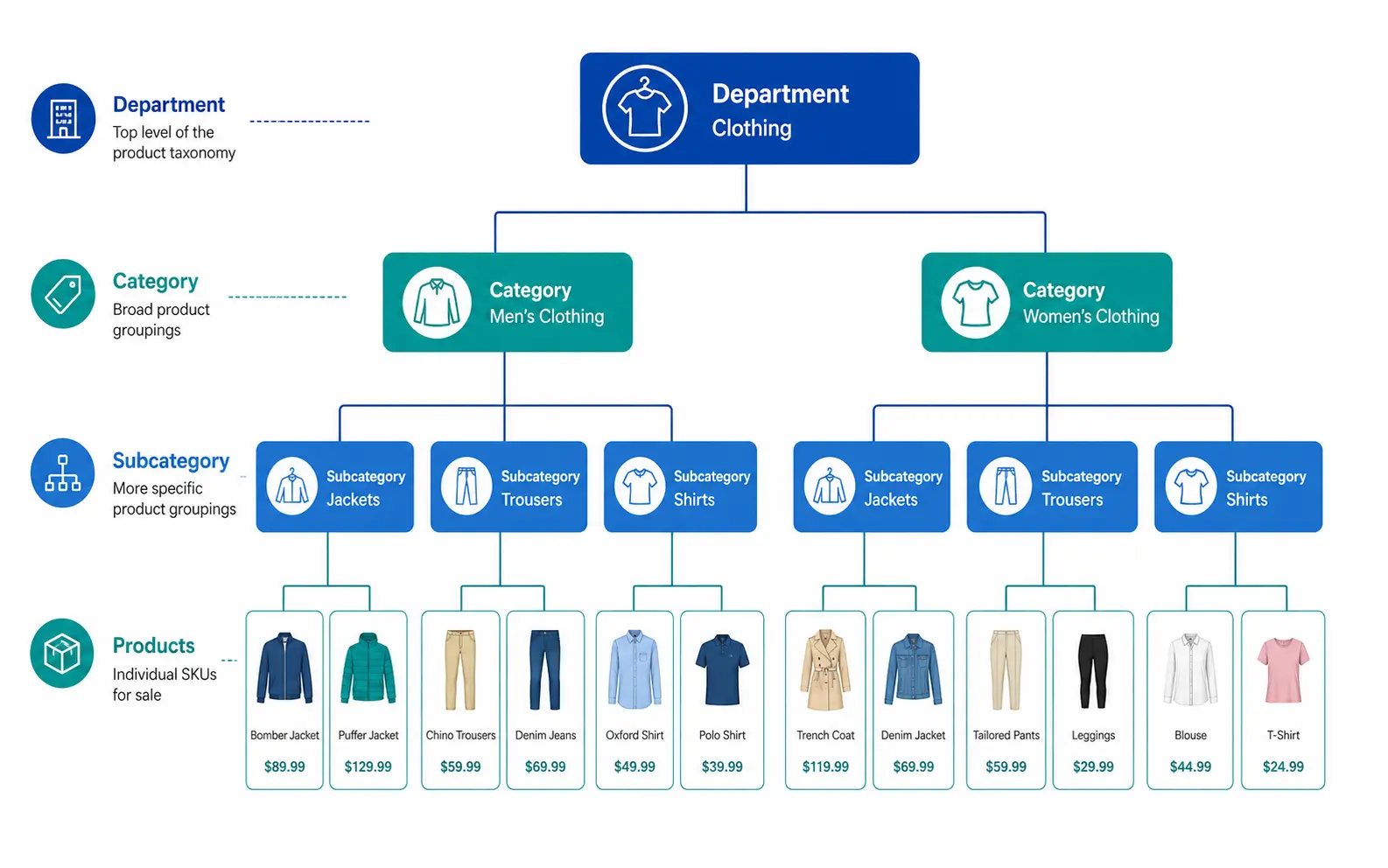
    In practical ecommerce terms, a product taxonomy answers three questions for every product in your catalog:

    1. What type of product is this? (Product Type / Subcategory)
    2. What category does it belong to? (Category)
    3. What department does that category sit under? (Department)

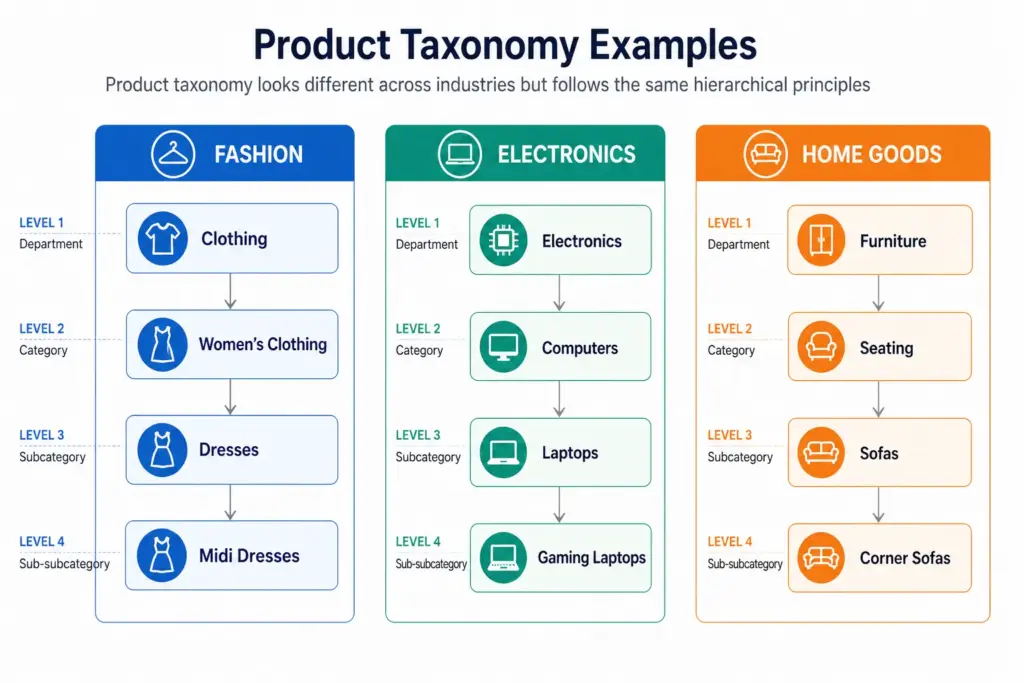
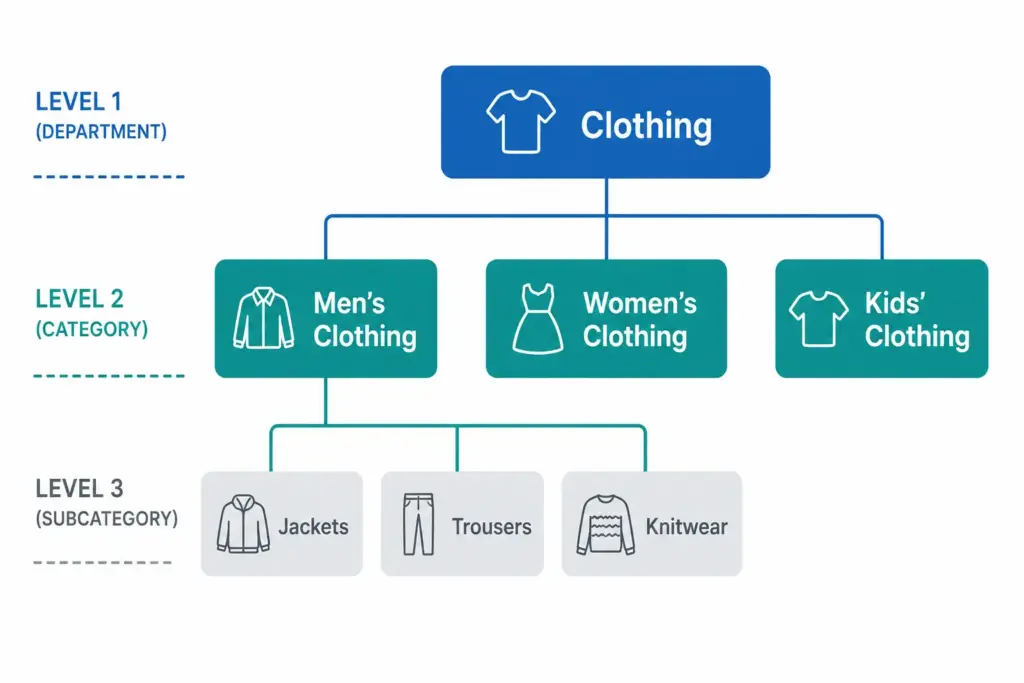
    Those three questions map to the three levels every functional taxonomy needs: Department → Category → Subcategory.

    A Simple Product Taxonomy Example

    LevelNameExample
    Level 1 — DepartmentClothingClothing, Footwear, Accessories
    Level 2 — CategoryMen’s ClothingMen’s, Women’s, Kids’
    Level 3 — SubcategoryMen’s JacketsJackets, Trousers, Shirts, Knitwear
    Level 4 — Product TypeMen’s Rain JacketsRain Jackets, Leather Jackets, Puffer Jackets

    Every product in the catalog sits at the most specific level — Level 3 or Level 4 — not at the top. A product is never just “Clothing”. It is always “Men’s Rain Jackets” or “Women’s Running Shoes”.

    Taxonomy vs Categories vs Attributes — What’s the Difference?

    These three terms are often used interchangeably but they are distinct concepts.

    • Taxonomy — the overall classification system and its rules. The framework.
    • Categories — the individual nodes within the taxonomy. Men’s Jackets is a category.
    • Attributes — the properties of a product within its category. Colour, Size, Material, Brand are attributes of a product in Men’s Jackets.

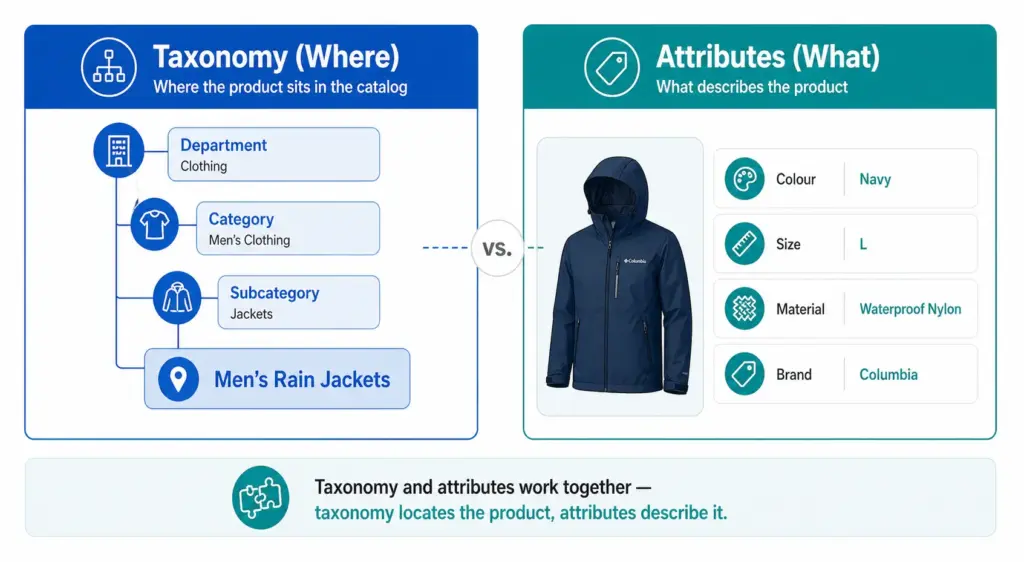
    Taxonomy tells you where the product lives. Attributes describe what the product is. Both are necessary. A product without a taxonomy position cannot be found by browsing. A product without attributes cannot be filtered or matched to specific search queries.

    Why Product Taxonomy Matters for Ecommerce

    1. Site navigation and search

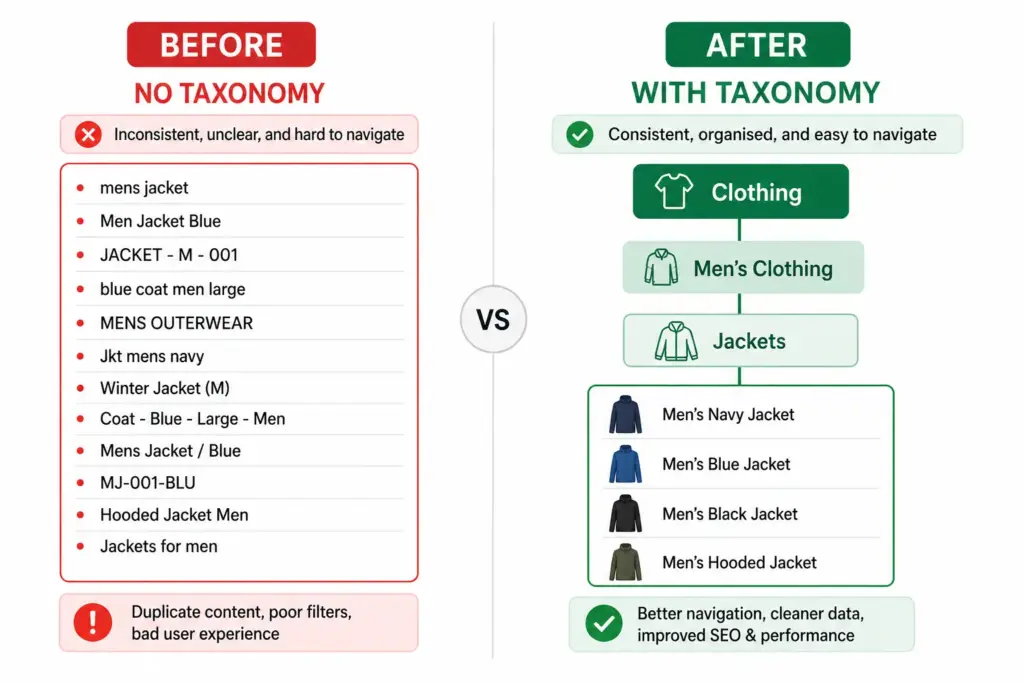
    Your taxonomy is the structure your site navigation and filters are built on. If your taxonomy is flat or inconsistent, your filters do not work. Customers searching for “blue running shoes women size 7” cannot filter to that result if Colour, Activity, Gender, and Size are not structured attributes on products in the correct subcategory.

    2. Google Shopping performance

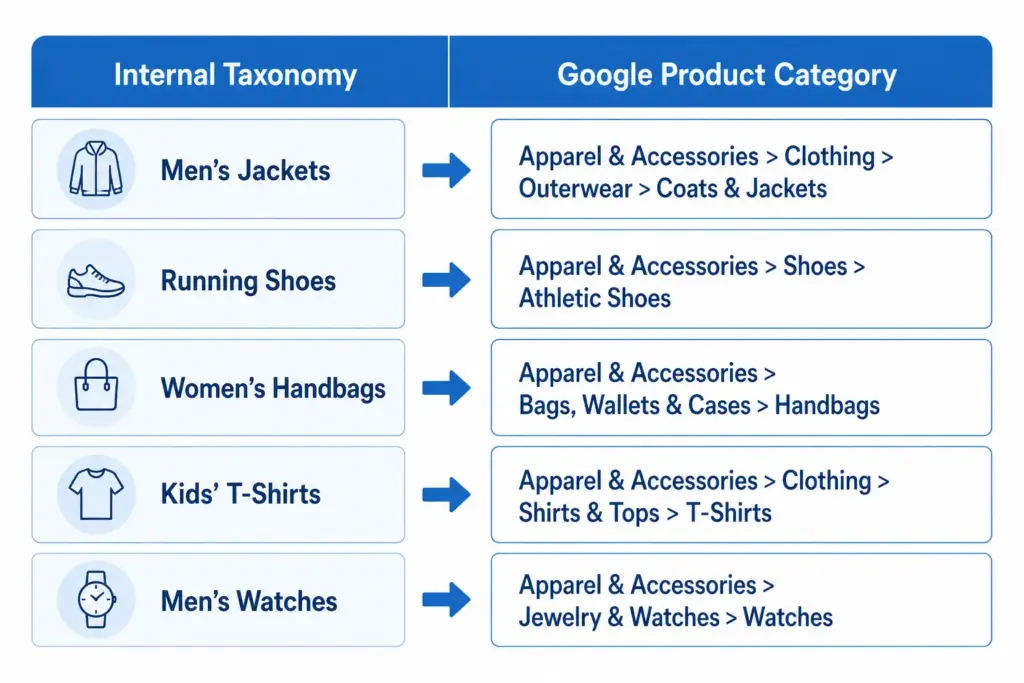
    Google Shopping requires a google_product_category value for every product. This value must map to Google’s own taxonomy at the most specific level available. A jacket submitted as “Apparel & Accessories” instead of “Apparel & Accessories > Clothing > Outerwear > Coats & Jackets” loses relevance in every Shopping auction it enters. Your taxonomy must map to Google’s.

    3. Channel feed mapping

    Every major channel — Google Shopping, Amazon, Facebook Catalogue, retail marketplaces — has its own category taxonomy. Your internal taxonomy needs to translate cleanly to each one. A well-structured internal taxonomy makes this mapping straightforward. A chaotic one makes it a manual monthly project.

    4. Internal catalog management

    A consistent taxonomy means your team can find, update, and report on products by category without ambiguity. Without it, “running shoes” might live under “Athletic Footwear”, “Sports”, “Men’s Sports”, and “Women’s Running” in the same catalog — making bulk updates, seasonal campaigns, and channel exports all harder than they need to be.

    Flat vs Hierarchical Taxonomy

    Two structural approaches exist for product taxonomy. For most ecommerce stores with more than a few hundred products, the difference matters significantly. The full comparison is covered in the Flat vs Hierarchical Taxonomy guide, but the key distinction is:

    • Flat taxonomy: One level of categories, no subcategories. Simple but breaks down above ~200 products. Filters become unwieldy and Google category mapping becomes imprecise.
    • Hierarchical taxonomy: Multiple nested levels. Scales to any catalog size. Enables precise Google category mapping and deep attribute-based filtering.

    Product Taxonomy in Practice — Real Examples

    Across industries the hierarchy principle stays the same but the depth and attribute requirements differ significantly. A fashion taxonomy needs colour normalisation, size system declarations, and seasonal attribute management. An electronics taxonomy needs technical specification attributes and compatibility data. A home goods taxonomy needs dimension attributes and material normalisation. Each industry guide is linked below.

    How to Build Your Product Taxonomy

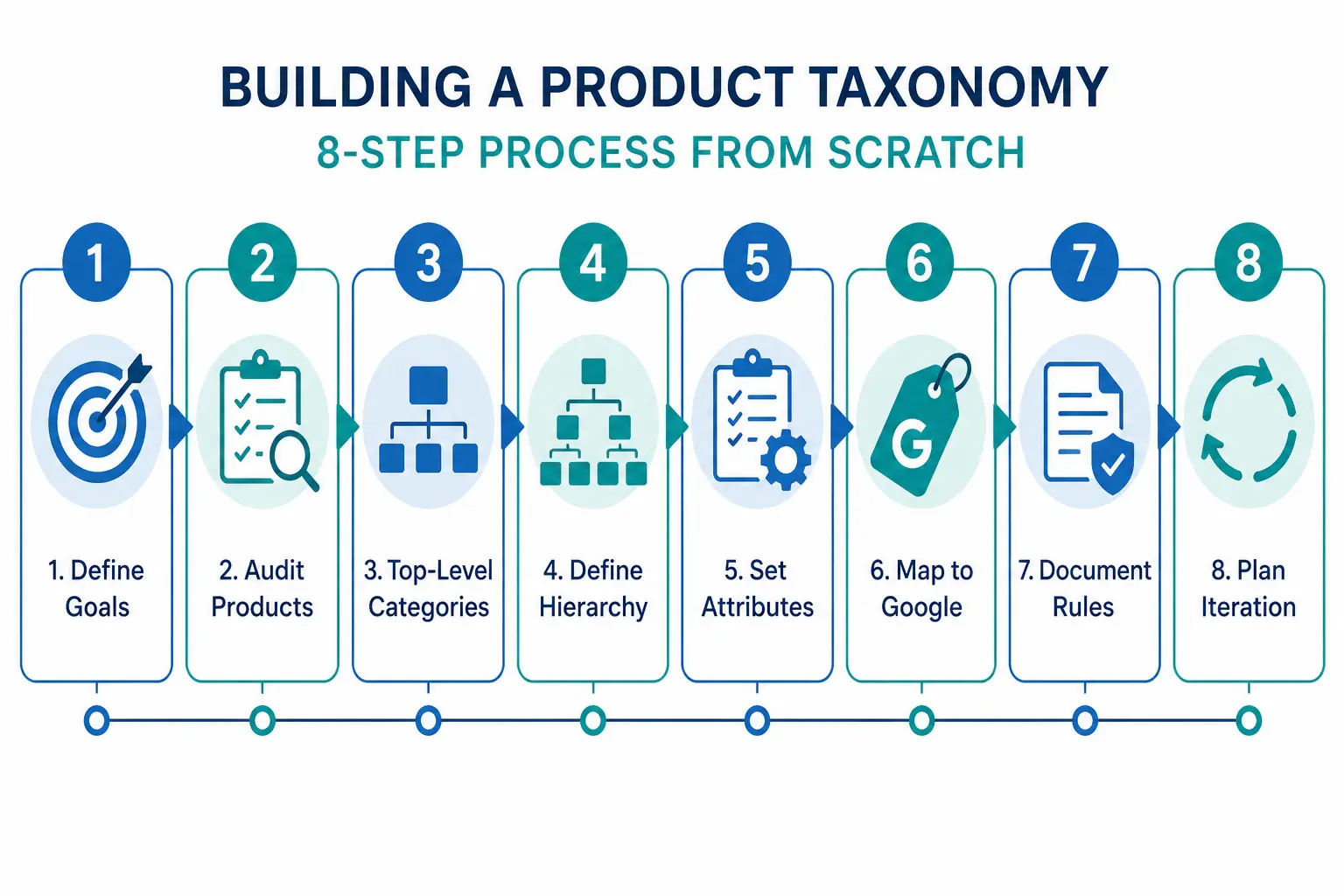
    The full step-by-step build process is covered in How to Build a Product Taxonomy From Scratch — from auditing your products through to Google category mapping and documentation. The short version:

    1. Define what your taxonomy needs to do — navigation, channel mapping, or both
    2. Audit your existing products before designing any categories
    3. Design 5–12 top-level departments
    4. Build at minimum three levels of hierarchy
    5. Define attribute sets per subcategory
    6. Map every subcategory to a Google product category leaf node
    7. Document the rules

    Before building, take the PIM Readiness Score to identify where your current product data governance has gaps. The free Taxonomy Template at lynkpim.app gives you a pre-built starting point for 5 industries.

    Frequently Asked Questions

    What is product taxonomy in ecommerce?

    Product taxonomy is the hierarchical classification system used to organise products into categories, subcategories, and product types. It defines the structure that powers site navigation, search filters, channel feeds, and internal catalog management.

    What is the difference between product taxonomy and product attributes?

    Taxonomy defines where a product sits in the hierarchy — Men’s Clothing > Jackets. Attributes define the properties of that product within its category — Colour: Navy, Size: L, Material: Nylon. Taxonomy organises the catalog structure; attributes describe individual products within it.

    Why does product taxonomy matter for Google Shopping?

    Google Shopping requires a google_product_category value for every product in your feed, mapped to Google’s own taxonomy at the most specific leaf-node level. Broad or incorrect category values reduce relevance matching and hurt Shopping auction performance — your products appear for fewer relevant queries and at lower positions.

    How many levels should a product taxonomy have?

    A minimum of three levels: Department (Level 1), Category (Level 2), and Subcategory (Level 3). Larger catalogs benefit from a fourth level (Product Type). More than four levels rarely adds value and increases maintenance complexity without meaningful benefit to navigation or channel mapping.

    What is the difference between a flat and hierarchical product taxonomy?

    A flat taxonomy has one level of categories with no subcategories — simple but breaks down above ~200 products. A hierarchical taxonomy has multiple nested levels that scale to any catalog size, enable precise Google category mapping, and support deep attribute-based filtering. For the full comparison see Flat vs Hierarchical Taxonomy.

  • Product Taxonomy for Fashion Ecommerce: The Complete Industry Guide

    Product Taxonomy for Fashion Ecommerce: The Complete Industry Guide

    Product Taxonomy for Fashion Ecommerce: The Complete Industry Guide

    Fashion is the most complex product taxonomy challenge in ecommerce. No other category has the same combination of variant depth (size × colour × material), seasonal rotation, brand complexity, and the need to align with both customer search language and Google’s own category hierarchy simultaneously.

    This guide covers how to structure a fashion taxonomy that works for site navigation, Google Shopping, and internal catalog operations at the same time.

    Why Fashion Taxonomy Is Uniquely Difficult

    • High variant depth: A single jacket style can generate 40+ variants (4 colours × 5 sizes × 2 materials). Each needs proper categorisation.
    • Seasonal rotation: Categories like “Summer Dresses” need to exist, disappear, and reappear without breaking your taxonomy structure.
    • Cross-gender categorisation: Unisex products that appear in both Men’s and Women’s categories require clear rules.
    • Trend-driven additions: New product types appear faster in fashion than almost any other category — your taxonomy needs to accommodate them without restructuring.

    For the full taxonomy build process that applies to all industries before you get into fashion-specific requirements, see How to Build a Product Taxonomy From Scratch.

    Recommended Top-Level Structure for Fashion

    Level 1 (Department)Level 2 Examples (Category)Level 3 Examples (Subcategory)
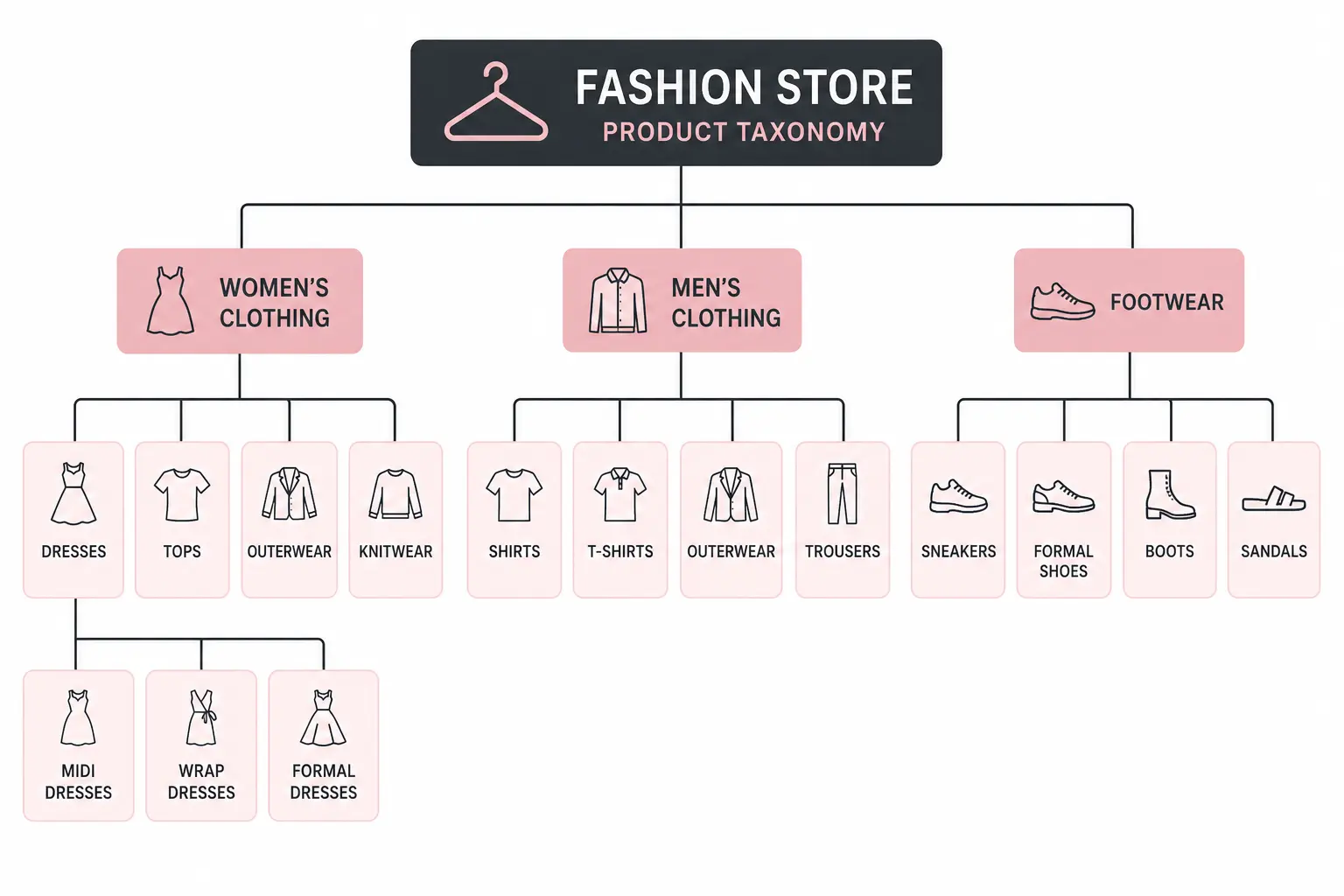
    Women’s ClothingDresses, Tops, Bottoms, Outerwear, KnitwearMidi Dresses, Wrap Dresses, Formal Dresses
    Men’s ClothingShirts, Trousers, Jackets, Knitwear, ActivewearCasual Shirts, Formal Shirts, Linen Shirts
    Kids’ ClothingGirls’ Clothing, Boys’ Clothing, Baby & ToddlerSchool Uniforms, Outerwear, Swimwear
    FootwearWomen’s Shoes, Men’s Shoes, Kids’ ShoesHeels, Flats, Boots, Trainers, Sandals
    AccessoriesBags, Belts, Scarves, Hats, JewelleryHandbags, Crossbody Bags, Tote Bags
    SwimwearWomen’s Swimwear, Men’s SwimwearBikinis, One-pieces, Board Shorts
    Lingerie & NightwearBras, Underwear, Nightwear, ShapewearPadded Bras, Sports Bras, Balcony Bras

    Attribute Sets by Fashion Subcategory

    Each subcategory needs a defined attribute set. Below are the recommended required and optional attributes for key fashion categories.

    Outerwear (Jackets, Coats, Gilets)

    • Required: Brand, Colour, Size, Material, Gender, Age Group
    • Recommended: Waterproof (yes/no), Insulation type, Fill power, Packable (yes/no), Season
    • Google category: Apparel & Accessories > Clothing > Outerwear > Coats & Jackets

    Women’s Dresses

    • Required: Brand, Colour, Size, Neckline, Length, Occasion
    • Recommended: Pattern, Sleeve length, Care instructions, Season
    • Google category: Apparel & Accessories > Clothing > Dresses

    Footwear

    • Required: Brand, Colour, Size, Size system, Gender, Heel height (where applicable)
    • Recommended: Material (upper), Sole material, Closure type, Occasion, Width
    • Google category: Apparel & Accessories > Shoes > [specific shoe type]

    For the full list of apparel attributes required by Google Shopping feeds, see the Google Shopping Apparel Requirements guide.

    Managing Colour in a Fashion Taxonomy

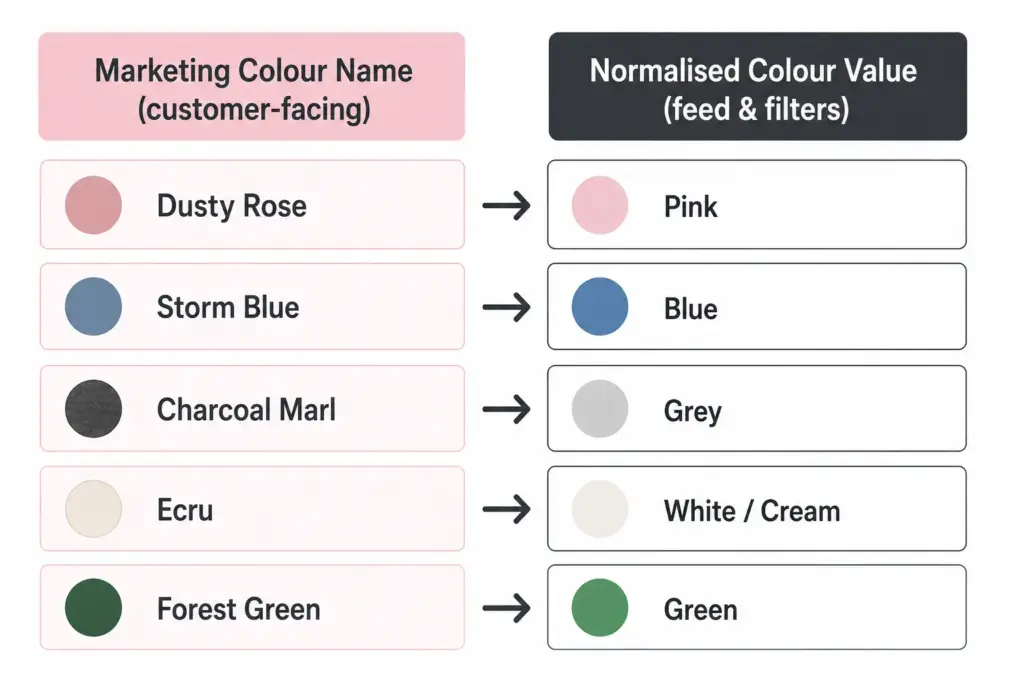
    Colour management is where fashion taxonomy most often breaks down. Fashion brands use marketing colour names (“Dusty Rose”, “Storm Blue”) that are meaningful to buyers but problematic for Google Shopping and site search filtering.

    The solution is a two-field colour approach:

    • Marketing colour name: Used in product titles and descriptions facing customers — “Storm Blue Puffer Jacket”
    • Normalised colour value: Used for feed submission and filter attributes — “Blue”. This maps to Google’s accepted colour values and makes site filters work correctly (“Filter by: Blue, Green, Red”).

    Without normalised colour values, your “Navy”, “Dark Navy”, “Midnight Navy”, and “Storm Blue” all appear as separate filter options rather than grouping under “Blue”. Customers cannot find what they are looking for and conversion on filtered searches drops.

    Size Management and International Sizing

    Fashion brands selling internationally face size system conflicts. A UK 10 dress and a US 10 dress are different sizes. A European 40 and a US 8 are the same women’s dress size. Declare your size system in every product record using the size_system attribute.

    For brands selling across regions from a single catalog, the cleanest solution is to store size in your primary size system and maintain a size conversion reference table as a documented data standard — not as additional product fields that will create mapping errors when updated.

    Seasonal Category Management

    Fashion taxonomy needs seasonal flexibility without permanent structural changes. Two approaches work well:

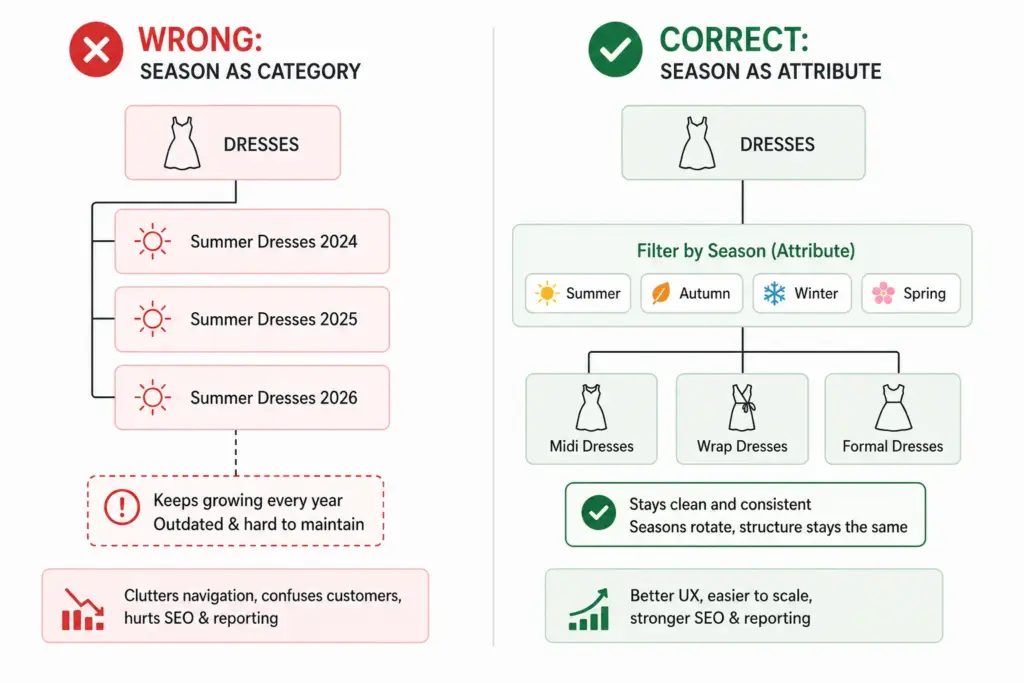
    Season as an attribute, not a category: Keep “Summer Dresses” as a filter value (season = Summer) rather than a permanent subcategory. This prevents your taxonomy from accumulating dead branches as seasons pass.

    Evergreen subcategories with seasonal tags: “Dresses” is the permanent subcategory. “Summer” is a tag or attribute. Products appear in the Dresses subcategory year-round; the Summer filter surfaces them seasonally. This is the more scalable approach for catalogs with high seasonal turnover.

    Mapping Fashion Taxonomy to Google Product Categories

    Every fashion subcategory needs a Google product category mapping. Use Google’s leaf-node values (the most specific level) for best Shopping performance. The mapping should be documented and applied consistently — not manually re-entered per product.

    The difference between flat and hierarchical taxonomy structures for fashion is covered in detail in the Flat vs Hierarchical Taxonomy guide — worth reading before finalising your structure.

    Once your fashion taxonomy is structured correctly, implementing it at scale requires a system that can enforce attribute validation and apply category-level rules automatically. The PIM Readiness Score takes 5 minutes and shows you where your current product data setup has gaps.

    Download the free Product Taxonomy Template at lynkpim.app — the Fashion & Apparel tab includes the full category hierarchy, attribute set, and Google mapping pre-built for clothing, footwear, and accessories.

    Frequently Asked Questions

    How should fashion ecommerce handle seasonal categories in a product taxonomy?

    Use season as an attribute rather than a permanent category. Keep “Dresses” as the permanent subcategory and assign season = Summer as a tag or attribute value. This prevents the taxonomy from accumulating obsolete branches (Summer Dresses 2024, Summer Dresses 2025) that clog navigation and require ongoing cleanup.

    What is the two-field colour approach for fashion product data?

    Store two colour values per product: a marketing colour name for customer-facing content (Dusty Rose, Storm Blue) and a normalised colour value for feed submission and site filters (Pink, Blue). Without normalised values, multiple shades of the same colour appear as separate filter options — “Navy”, “Dark Navy”, “Midnight Navy” become three separate filter choices instead of one “Blue” group.

    How many top-level categories should a fashion taxonomy have?

    Most fashion stores work well with 6 to 8 top-level departments: Women’s Clothing, Men’s Clothing, Kids’ Clothing, Footwear, Accessories, Swimwear, and Lingerie & Nightwear. Avoid creating top-level categories for product types you carry fewer than 20 products in — use attributes and filters instead.

    How do you handle unisex products in a fashion taxonomy?

    Set gender = unisex in the product attributes and assign the product to the most appropriate department based on primary customer intent. For your Google Shopping feed, use gender = unisex and surface products in both Men’s and Women’s navigation via tags or multi-category assignment depending on your platform.

    What Google product category should I use for women’s dresses?

    Use the leaf-node value: Apparel & Accessories > Clothing > Dresses. Avoid the parent category Apparel & Accessories > Clothing — the more specific your Google product category, the better your Shopping feed relevance. For formal dresses, go one level deeper if possible.

  • How to Build a Product Taxonomy From Scratch (Step-by-Step Guide)

    How to Build a Product Taxonomy From Scratch (Step-by-Step Guide)

    How to Build a Product Taxonomy From Scratch (Step-by-Step Guide)

    Most product taxonomy problems do not start with bad intentions. They start with a spreadsheet, a growing catalog, and someone who just needed to categorise 50 products quickly. Three years later there are 3,000 products, four naming conventions, and no one knows which category rules apply where.

    Building a taxonomy properly from the start — or rebuilding one that has grown without structure — requires the same process regardless of catalog size. This guide walks through every step.

    Step 1: Define What Your Taxonomy Needs to Do

    Before you name a single category, decide what jobs your taxonomy needs to perform. Most ecommerce catalogs need it to do three things simultaneously:

    1. Power site navigation and search — customers browse by category and use filters. Your taxonomy is the structure those filters sit on.
    2. Map to channel requirements — Google Shopping, Amazon, and marketplaces have their own taxonomies. Yours needs to translate cleanly to theirs.
    3. Organise internal operations — product teams, buyers, and merchandisers use the taxonomy to find, update, and report on products.

    These three jobs sometimes conflict. A taxonomy built purely for internal operations often does not map well to how customers search. Understanding the priority before you build prevents rework. For background on what taxonomy is and why it matters, the What Is Product Taxonomy guide covers the foundations.

    Step 2: Audit Your Existing Products

    Export every SKU you have. Look at the full list before designing any categories. You are looking for:

    • Natural groupings — what products obviously belong together?
    • Edge cases — products that do not fit neatly into an obvious category
    • Volume distribution — how many products fall into each potential category?
    • Attribute patterns — what attributes do products in the same group share?

    A category with 2 products and a category with 2,000 products suggest the hierarchy is off. Aim for relative balance across categories at the same level, with narrow subcategories only where genuine product differentiation exists.

    Step 3: Design Your Top-Level Categories

    Top-level categories are your broadest groupings. For most ecommerce catalogs, 5–12 top-level categories is the right range. Too few and subcategories get unwieldy. Too many and customers cannot find their starting point.

    The test for a top-level category: a customer with no prior knowledge of your store should be able to assign a product to the correct top-level category without thinking about it. If it requires judgment, the category is too vague.

    Two approaches to defining top-level categories

    Customer-first approach: Start with how customers describe what they are looking for. Use your site search data, Google Search Console queries, and competitor category names as evidence of natural language groupings.

    Google-first approach: Start with Google’s product taxonomy at the top level. This makes channel mapping easier later and ensures your categories align with how the largest product discovery platform in the world organises products. You can always use internal-facing names that differ from the Google-facing values.

    Step 4: Define 3 Levels of Hierarchy (Minimum)

    A functional product taxonomy needs at least three levels:

    • Level 1 (Department): Clothing, Footwear, Accessories
    • Level 2 (Category): Men’s Clothing, Women’s Clothing, Kids’ Clothing
    • Level 3 (Subcategory): Men’s Jackets, Men’s Trousers, Men’s Knitwear

    For larger catalogs, Level 4 (product type) is worth adding: Men’s Jackets → Rain Jackets, Leather Jackets, Padded Jackets.

    The difference between a flat and hierarchical taxonomy matters significantly for navigation and channel mapping. The Flat vs Hierarchical Taxonomy guide covers when each structure is appropriate.

    Step 5: Define Attributes per Category

    Attributes are the product properties that apply within a category. Every category in your taxonomy needs a defined attribute set — the list of fields that must be filled for a product in that category to be considered complete.

    CategoryRequired AttributesRecommended Additions
    Men’s JacketsBrand, Colour, Size, Material, GenderWaterproof rating, Fill weight, Packable
    Running ShoesBrand, Colour, Size, Gender, Surface typeDrop height, Cushioning level, Width
    LaptopsBrand, Processor, RAM, Storage, Screen sizeBattery life, Weight, Graphics card

    Step 6: Map to Google’s Product Taxonomy

    Once your internal taxonomy is defined, create a mapping document that links each of your subcategories to its corresponding Google product category value. Use Google’s official taxonomy file to find the correct IDs. Map at the most specific level possible — leaf nodes, not parent categories.

    Step 7: Document the Rules

    A taxonomy that exists only in someone’s head is a single point of failure. Document:

    • Category definitions — what does and does not belong in each category
    • Naming conventions — title case vs sentence case, singular vs plural
    • Attribute validation rules — acceptable values for controlled attributes like colour and size
    • Exception handling — what happens to products that span categories

    The PIM Readiness Score assessment helps you identify where your current product data governance has gaps before you build on top of it. Free, takes 5 minutes.

    Step 8: Build with Iteration in Mind

    No taxonomy survives contact with a growing catalog unchanged. You will need to add categories as you expand into new product areas. You will discover edge cases your initial rules did not cover. You will probably need to split an overpopulated subcategory 18 months after launch.

    Build with this in mind: keep hierarchy levels consistent, avoid category names that are too specific, and review your taxonomy structure annually against site search data and channel performance.

    Ready to apply this? Download the free Product Taxonomy Template at lynkpim.app — pre-built for Fashion, Electronics, Home Goods, Food & Beverage, and B2B Industrial. Use it as a starting point rather than building from a blank page.

    Once your taxonomy structure is set, see how it applies to specific industries: fashion ecommerce taxonomy and electronics taxonomy both cover the unique requirements of their categories in detail.

    Frequently Asked Questions

    How many levels should a product taxonomy have?

    A minimum of three levels: Department (Level 1), Category (Level 2), and Subcategory (Level 3). Larger catalogs benefit from a fourth level (Product Type). Going beyond four levels rarely adds value and increases maintenance complexity without meaningful improvement to navigation or channel mapping.

    How often should you review and update your product taxonomy?

    Review your taxonomy structure at least once per year against site search data, channel performance data, and catalog growth. Attribute value lists for technical categories may need updating more frequently — for example when new product standards or formats appear in electronics or components.

    Should your internal taxonomy match Google’s product taxonomy?

    Not necessarily. Your internal taxonomy should reflect how your team and customers think about products. What matters is that every internal subcategory maps to the correct Google product category leaf node in your feed — the two systems can use different naming as long as the mapping document is maintained and applied consistently.

    What is the difference between a category and an attribute in product taxonomy?

    A category defines where a product sits in the hierarchy — for example, Men’s Jackets. An attribute defines a property of that product within its category — for example, Colour = Navy, Size = L, Material = Nylon. Categories organise the catalog structure; attributes describe individual products within it.

    How many top-level categories should a product taxonomy have?

    For most ecommerce catalogs, 5 to 12 top-level categories is the right range. Too few and subcategories become unwieldy. Too many and customers cannot find their starting point. The test: a customer with no prior knowledge should be able to assign any product to the correct top-level category without thinking about it.