Category: Catalog Management

  • How to Find and Eliminate Duplicate SKUs in Your Product Catalog

    How to Find and Eliminate Duplicate SKUs in Your Product Catalog

    How to Find and Eliminate Duplicate SKUs in Your Product Catalog

    Duplicate SKUs are one of the most damaging catalog quality problems because they are invisible until they cause a serious incident — wrong products shipping to customers, inventory counts that do not match reality, Google Shopping disapprovals from duplicate product identifiers. And they are extremely common. Most catalogs that have grown over several years without strict governance have duplicate records that have never been identified.
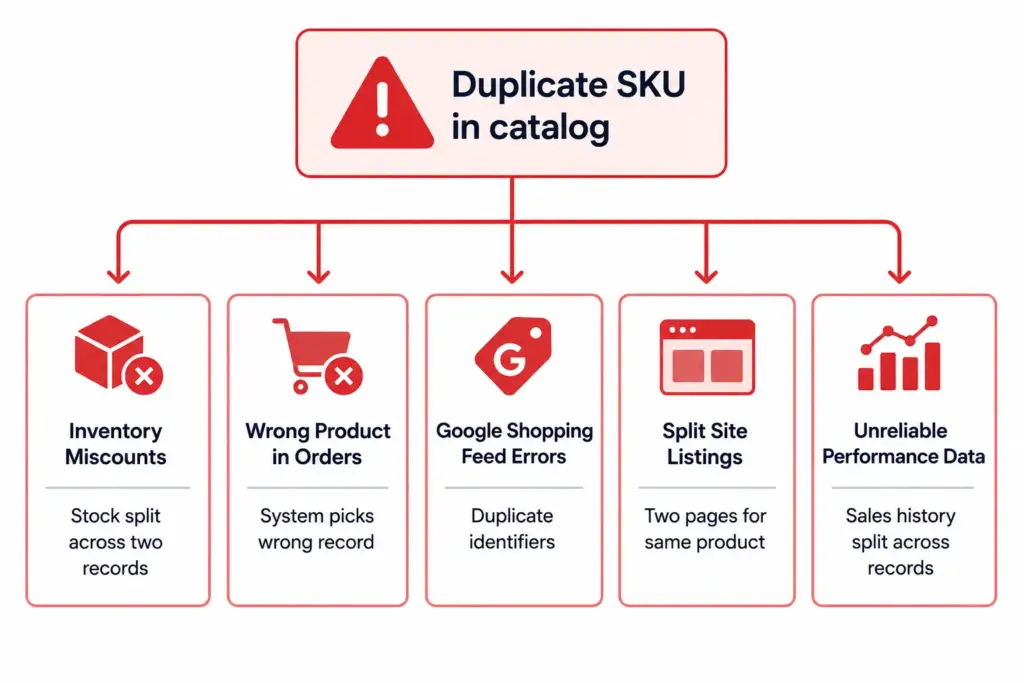
    How Duplicate SKUs Form

    Duplicate SKUs rarely appear overnight. They accumulate through specific, predictable patterns:

    • Multiple people creating SKUs manually without a centralised reference — two team members independently create records for the same product using different SKU formats
    • Supplier data imports without duplicate checking — supplier feeds include products already in your catalog, creating a second record with the supplier’s SKU alongside your existing record
    • Platform migrations — importing products from one system to another creates duplicates when migration logic fails to match existing records
    • SKU reuse after product discontinuation — a discontinued product’s SKU is reassigned to a new product, creating historical confusion even if it is not technically a current duplicate
    • Variant management errors — each size/colour combination of a product is created as a standalone product instead of as variants, with new SKUs each time

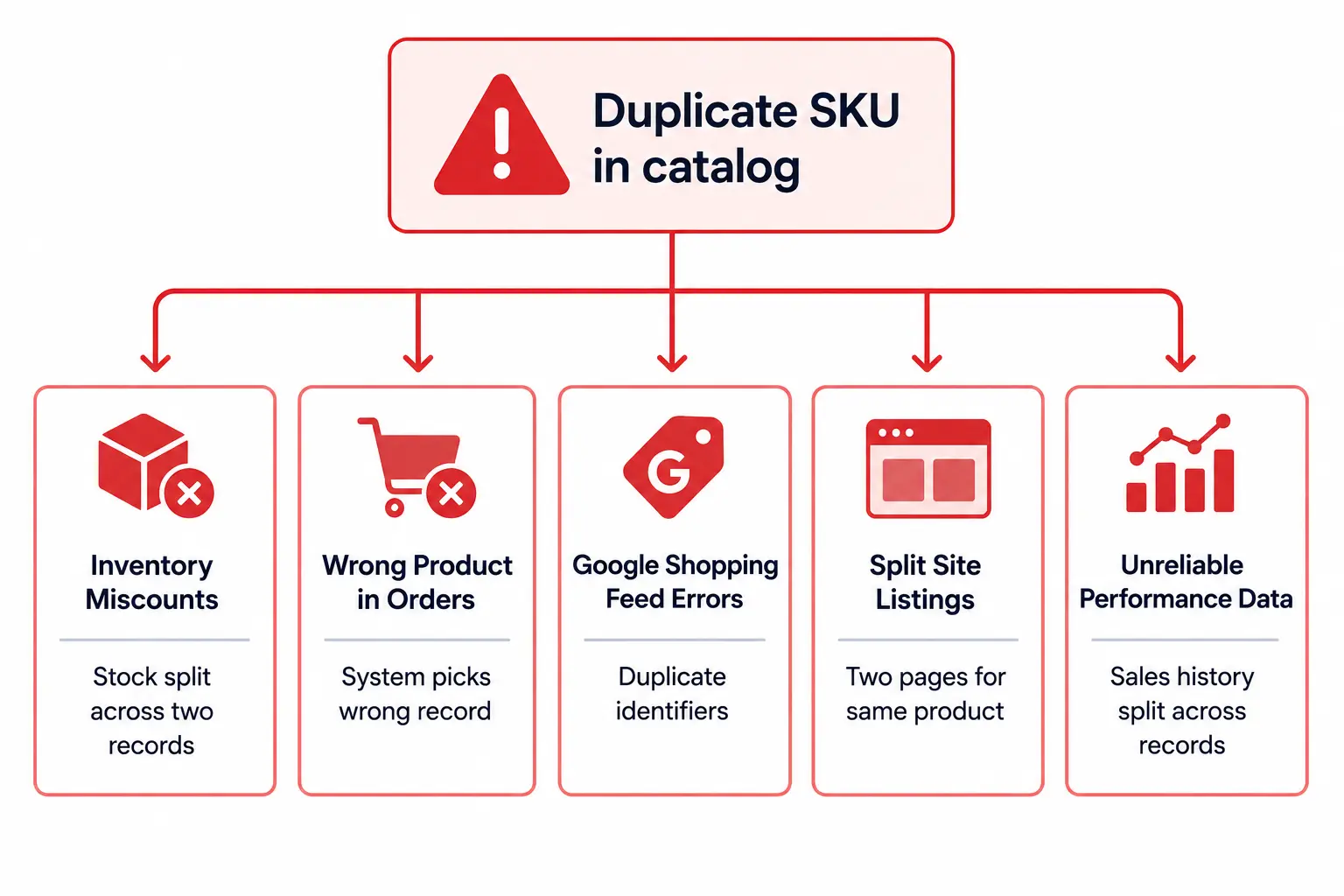
    The Business Impact of Duplicate SKUs

    ProblemImpact
    Inventory split across duplicate recordsStock appears lower than it is in each record — triggers false out-of-stock, missed sales, unnecessary reorders
    Wrong record picked for ordersWrong product ships, or the correct product ships but from the wrong inventory pool
    Google Shopping feed errorsTwo products with the same GTIN in one feed cause disapprovals for both
    Two site listings for same productCustomers see duplicate listings, sales and reviews are split, cannibalisation of the same keyword
    Split sales historyPerformance reports undercount actual sales, making reorder and pricing decisions unreliable

    Step-by-Step: Finding Duplicate SKUs

    Method 1: Exact SKU duplicates

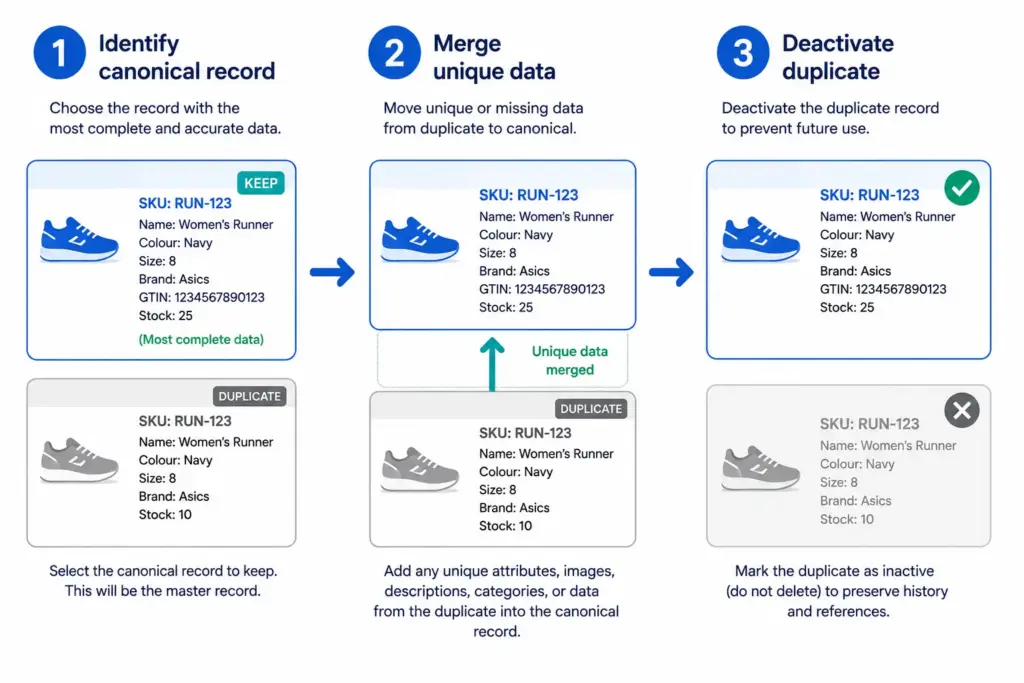
    Export your full product list with SKU as the first column. Sort by SKU. Any SKU that appears more than once is a confirmed exact duplicate. Flag all instances and review which is the canonical record (typically the older record with more order history).

    Method 2: GTIN-based duplicates

    Export your product list with GTIN column. Sort by GTIN. Any GTIN that appears more than once (excluding variant records that legitimately share a parent GTIN) is a duplicate product with different SKUs. These are the most common type of duplicate in catalogs built from multiple supplier data imports.

    Method 3: Name similarity duplicates

    Sort your product list by Product Name. Review near-matches — “Columbia Rain Jacket Men Navy L” and “Columbia Waterproof Jacket Men Navy L” may be the same product entered twice with slightly different names. These require manual review because naming differences can be legitimate variants.

    The Duplicate Detector automates all three detection methods across your full catalog and returns a prioritised list of confirmed and suspected duplicates for review.
    How to Prevent Duplicate SKUs From Recurring

    1. Unique SKU enforcement — configure your platform or PIM to reject any SKU that already exists in the system. This is the single most effective prevention mechanism.
    2. Centralised SKU generation — assign SKUs through one system using a defined naming convention rather than allowing team members to create them manually. A sequential number generator or structured code generator (BRAND-CAT-001) eliminates manual SKU conflicts.
    3. GTIN validation at import — when importing supplier data, check incoming GTINs against your existing catalog before creating new records. If a GTIN already exists, update the existing record rather than creating a new one.
    4. Never reuse discontinued SKUs — mark discontinued products as inactive rather than deleting them, and never reassign their SKUs to new products. SKU history must remain intact for order history and audit purposes.

    Run a duplicate check monthly using the Duplicate Detector as part of your routine catalog maintenance. For the full catalog health audit process, see How to Audit Your Product Catalog in One Weekend.

    Frequently Asked Questions

    What causes duplicate SKUs in ecommerce catalogs?

    The most common causes are: multiple team members creating SKUs without a centralised system, importing supplier data without checking for existing records, platform migrations that duplicate product records, and SKU conventions that allow reuse after product discontinuation. Supplier data imports are the most frequent source of externally-introduced duplicates in mid-to-large catalogs.

    What problems do duplicate SKUs cause?

    Inventory miscounts (stock split across two records), wrong products in orders (system picks wrong duplicate), Google Shopping feed errors (duplicate GTIN causes disapprovals for both records), site search returning two listings for the same product, and split sales history that makes performance reporting unreliable.

    How do I prevent duplicate SKUs from being created?

    Three mechanisms work together: unique SKU enforcement at the system level (reject any SKU that already exists), centralised SKU generation (all SKUs assigned by one system using a defined convention), and GTIN validation at import (check incoming product GTINs against existing records before creating new ones). Implementing all three eliminates the most common duplicate creation paths.
  • How to Build a Product Catalog From Scratch (Free Template Included)

    How to Build a Product Catalog From Scratch (Free Template Included)

    How to Build a Product Catalog From Scratch (Free Template Included)

    Building a product catalog correctly from the start prevents years of cleanup work later. A catalog built without a taxonomy, without consistent attribute definitions, and without SKU conventions accumulates inconsistency with every product added — until fixing it takes longer than rebuilding it from scratch would have. This guide covers how to build it right the first time.

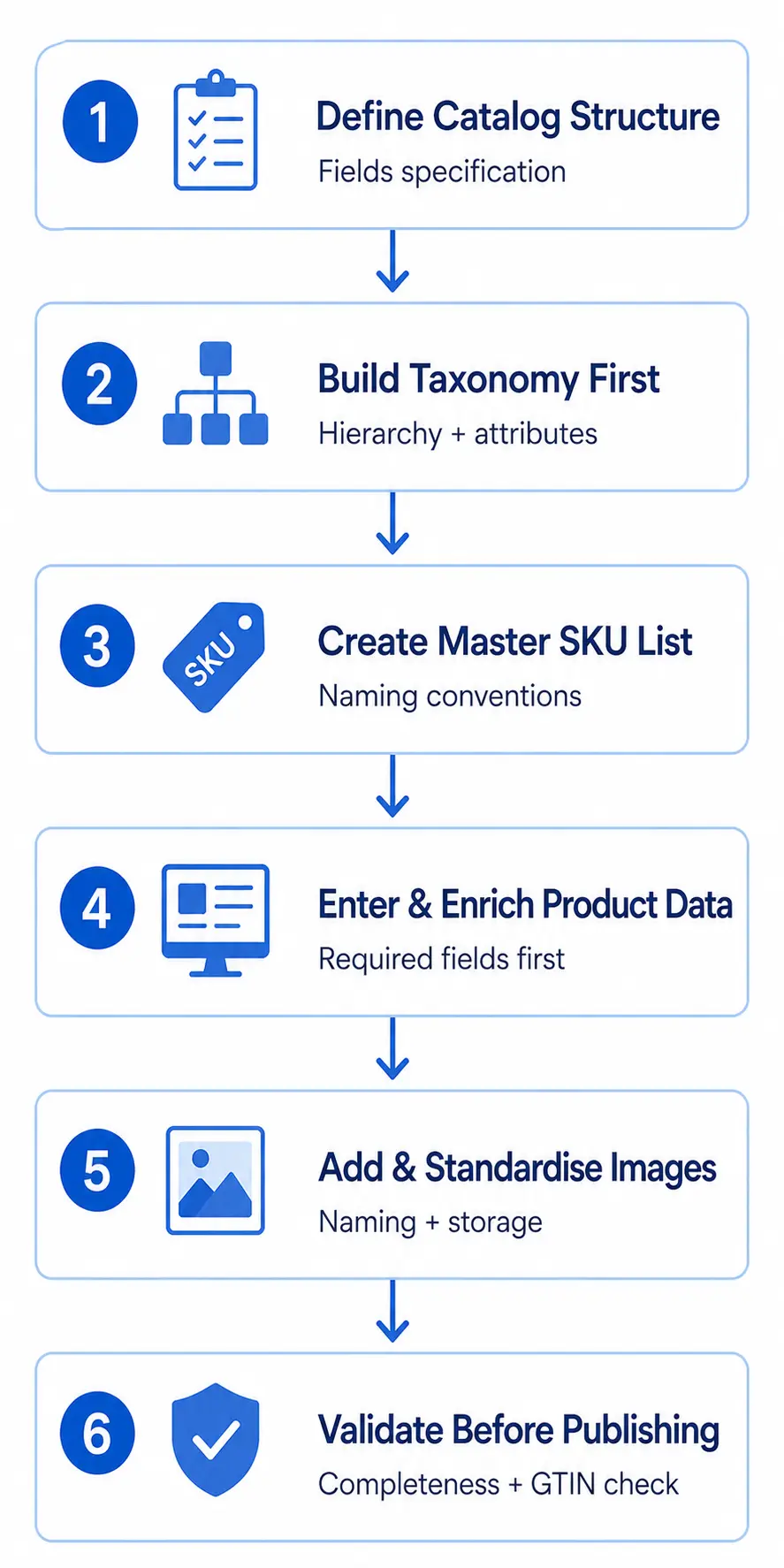
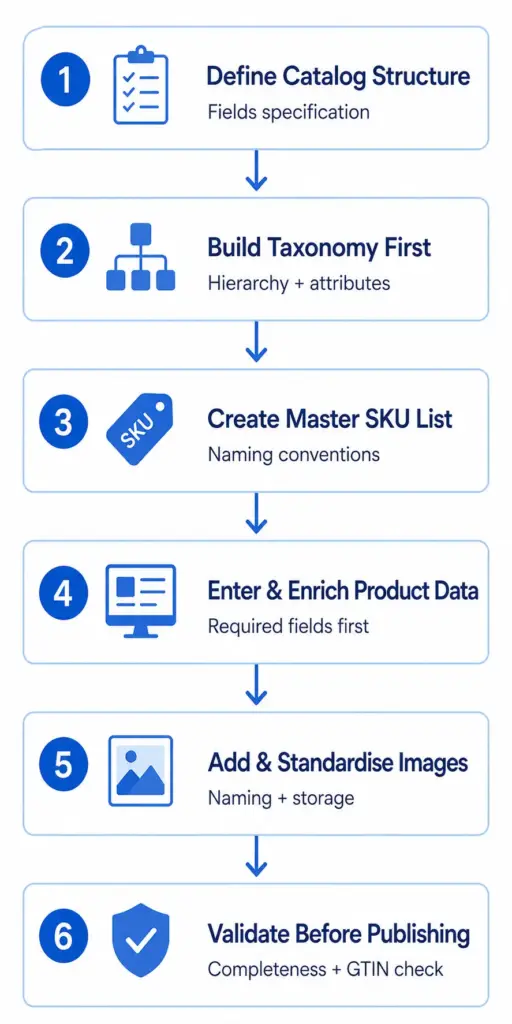
    Step 1: Define Your Catalog Structure Before Adding Any Products

    The most common catalog building mistake is starting with products before defining the structure those products will sit in. Decide these three things first:

    • Universal fields — fields that every product record must have regardless of category: SKU, Product Name, Description, Price, Category, Brand, GTIN, Primary Image URL, Availability
    • Category-specific fields — attributes that apply only within specific subcategories: Colour, Size for apparel; Processor, RAM for electronics; Width, Height, Depth for furniture
    • Channel-specific fields — content generated specifically for each sales channel: Google Shopping Title, Amazon Bullet Points, Facebook Description

    Document this as a field specification. It becomes your data standard — the reference every team member uses when entering product data.

    Step 2: Build Your Taxonomy Before Your Products

    Your product taxonomy — the category hierarchy — must be designed before any products are entered. Products cannot be correctly catalogued without a taxonomy to put them in. A product entered before the taxonomy exists will be assigned to a category that may not match where it should go once the proper structure is in place.

    Design your taxonomy to at least three levels (Department → Category → Subcategory), define the attribute set for each subcategory, and map every subcategory to its Google product category ID. The full process is covered in How to Build a Product Taxonomy From Scratch. Use the free Product Taxonomy Template as your starting point.

    Step 3: Establish SKU Conventions Before Creating Records

    SKUs are permanent identifiers. Changing them after products are live in your platform, in customer orders, and in channel feeds is a significant operational task. Establish your SKU naming convention before creating any product records.

    Common conventions: BRAND-CATEGORY-VARIANT (e.g. COL-RJ-M8NVY for Columbia Rain Jacket Men Size 8 Navy), or a simpler numeric sequence. What matters is consistency — the same format for every SKU, with clear rules for how variants relate to parent SKUs.

    Step 4: Enter Required Attributes Before Optional Ones

    When entering product data, complete all required attributes across all products before moving to optional attributes. A catalog that is 100% complete on required fields and 0% complete on optional fields is more useful than one that is 60% complete on everything. Required completeness enables publishing and channel submission. Optional completeness improves performance over time.

    Step 5: Image Standards From Day One

    Establish image standards at the start: naming conventions, minimum dimensions (800×800px for Google Shopping), file format (JPEG for product shots), folder structure in your DAM or storage system. Retroactively standardising thousands of image files is one of the most time-consuming catalog cleanup tasks — avoid it by setting standards before the first image is added.

    Step 6: Validate Before Publishing

    Before any product goes live, run these checks:

    • Completeness check — all required fields populated for every product
    • GTIN validation — all product identifiers are valid format
    • Duplicate SKU check — no two products share the same identifier
    • Category assignment — every product is in the correct subcategory
    • Image URL validation — all image links load correctly

    The PIM Readiness Score assesses your current setup against these dimensions. Download the free catalog template at lynkpim.app — pre-structured with the field definitions, taxonomy, and validation rules to start from rather than a blank spreadsheet. For what to do once your catalog starts growing, see How to Manage 1,000+ SKUs Without Losing Your Mind.

    Frequently Asked Questions

    What fields should every product catalog include?

    Every product record needs at minimum: SKU, Product Name, Description, Price, Category, Brand, GTIN or identifier_exists = FALSE, Primary Image URL, and Availability status. Category-specific attributes (Colour, Size, Material etc.) are added per subcategory based on your taxonomy attribute sets. Channel-specific content fields (Google Shopping Title, Amazon Bullet Points) add value once basic data is complete.

    Should I build my product catalog in a spreadsheet or a PIM?

    Spreadsheets work for catalogs under approximately 200 SKUs with a single channel and a single person managing data. For anything larger or multi-channel, a dedicated PIM system is necessary to maintain data quality and prevent version control problems. Start with a well-structured spreadsheet template and migrate to a PIM when the spreadsheet starts breaking — which typically happens around 500 SKUs or when you add a second channel.

  • What Is Product Catalog Management? The Complete Guide for Ecommerce

    What Is Product Catalog Management? The Complete Guide for Ecommerce

    What Is Product Catalog Management? The Complete Guide for Ecommerce

    Product catalog management is how ecommerce businesses organise, maintain, and distribute their product data. It sounds operational — because it is. But it is also one of the highest-leverage functions in ecommerce growth, because product data quality directly determines how well products perform in search, on channels, and with customers.

    This guide covers what catalog management is, what it involves, why it matters at scale, and how to approach it without enterprise software or a large team.

    What Product Catalog Management Covers

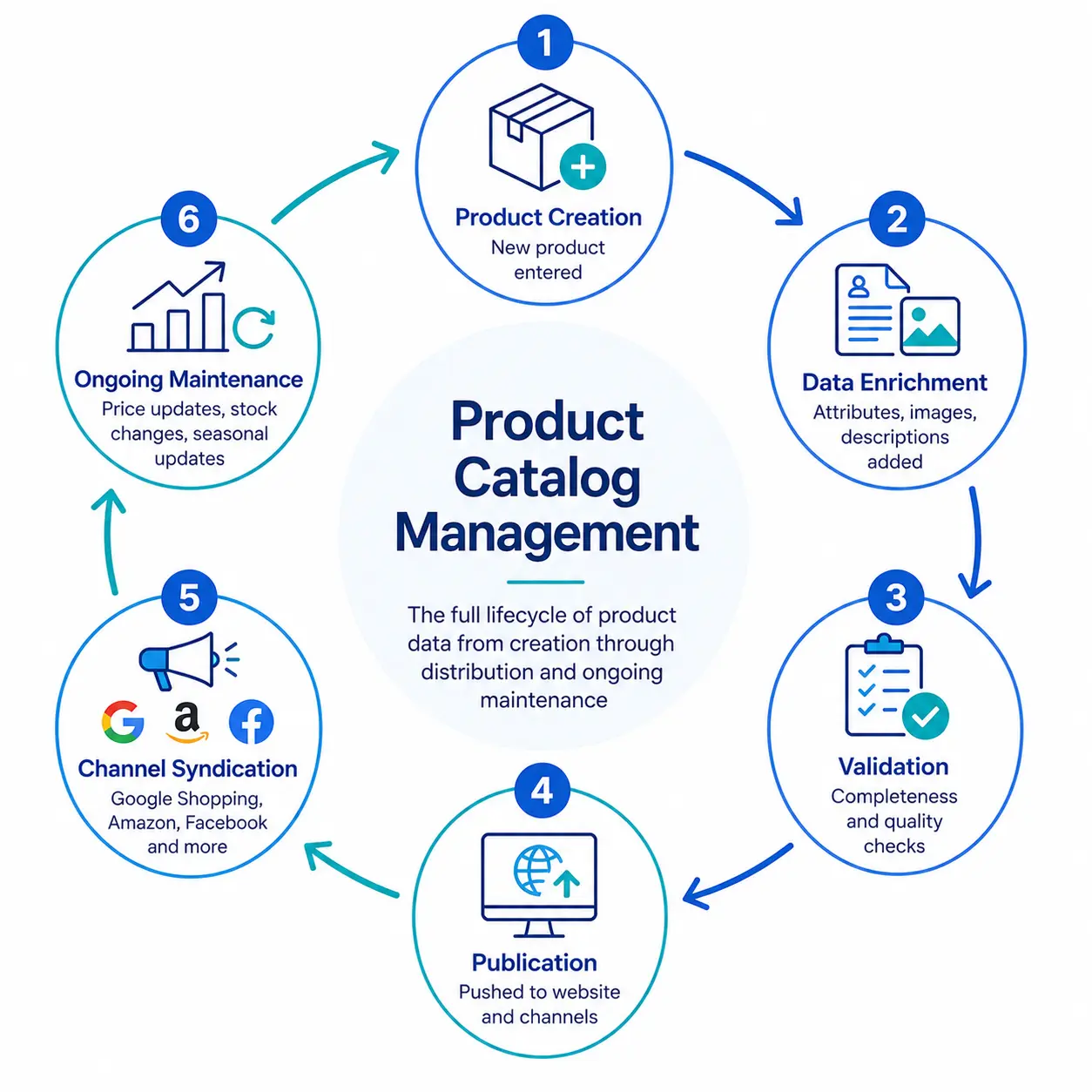
    Product catalog management encompasses every activity involved in making product data accurate, complete, and available where it needs to be. In practice, this means:

    Product data creation and onboarding

    Creating new product records when products are added to the catalog — entering base data (SKU, name, description, price), assigning taxonomy categories, and populating attribute fields. For businesses with many suppliers, this includes receiving, cleaning, and transforming supplier-provided data into your catalog’s format.

    Taxonomy and category management

    Building and maintaining the category structure that organises your catalog — defining hierarchies, attribute sets per category, and the rules that determine where products belong. This is the structural foundation everything else is built on. See What Is Product Taxonomy for the full overview.

    Content enrichment

    Adding and improving the content that makes products sell — writing product descriptions, capturing or sourcing product images, adding marketing copy, and ensuring completeness of attributes that drive search and filter performance.

    Data quality management

    Monitoring and maintaining the accuracy and completeness of product data over time — fixing errors, normalising inconsistent attribute values, validating GTINs and product identifiers, and auditing for missing required data. This is ongoing, not a one-time project.

    Channel syndication

    Distributing product data to every channel where products are sold or marketed — website, Google Shopping, Amazon, Facebook Catalogue, wholesale buyers, print catalogs. Each channel has different format requirements, and catalog management includes managing those transformations without duplicating manual work.

    Variant management

    Managing the relationship between parent products and their variants (sizes, colours, materials) — ensuring each variant has correct identifiers, images, pricing, and stock information while maintaining the link to the parent product for shopping feed purposes (item_group_id).

    Why Catalog Management Matters for Ecommerce Growth

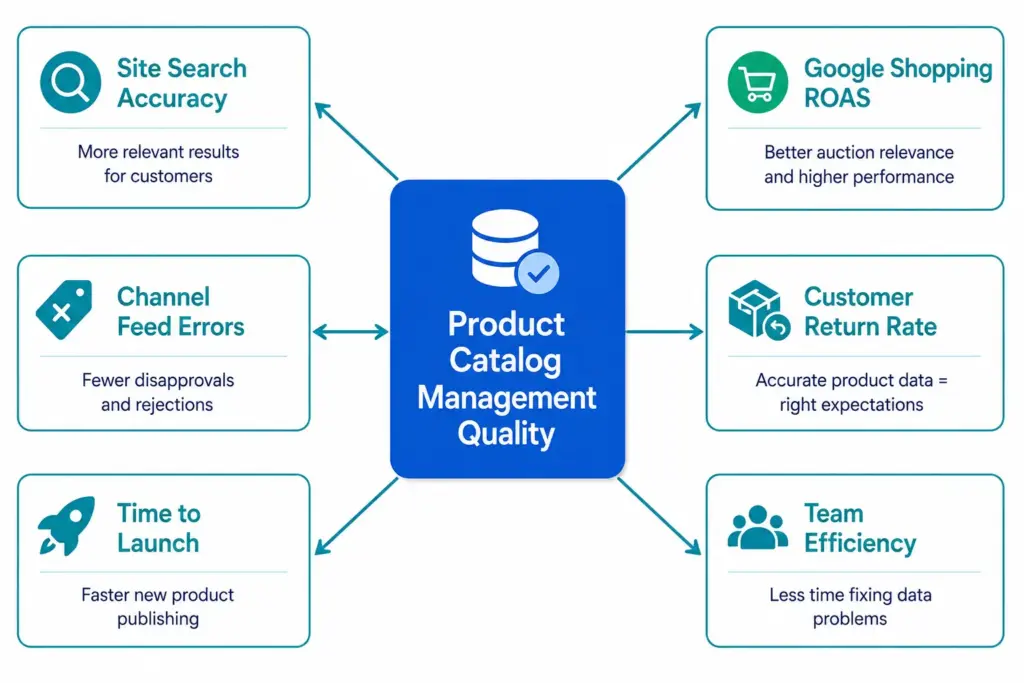
    Catalog management quality touches every commercial outcome in ecommerce:

    • Search and discovery: Complete, structured product data means products appear for the queries they should appear for — in site search and Google Shopping
    • Conversion rate: Accurate product data sets correct buyer expectations, which reduces returns and increases repeat purchase
    • Channel performance: Clean feed data means fewer disapprovals, better auction relevance, and higher ROAS
    • Operational efficiency: A well-managed catalog means teams spend less time fixing data errors and more time on commercial activities
    • Speed to market: A systematic catalog management process means new products launch faster because the workflow is defined, not ad hoc

    The Catalog Management Maturity Stages

    StageHow it looksTypical SKU range
    Stage 1: Ad HocProduct data in spreadsheets, one person “knows everything”, no formal processes1–200 SKUs
    Stage 2: StructuredDefined taxonomy, consistent attribute entry, single platform for product data, basic workflows200–2,000 SKUs
    Stage 3: GovernedValidation rules enforce completeness, channel-specific content, automated feed syndication, data quality monitoring2,000–20,000 SKUs
    Stage 4: AutomatedAI-assisted enrichment, real-time channel sync, self-service product publishing, catalog health dashboards20,000+ SKUs

    Most SMB ecommerce stores start at Stage 1 and need to reach Stage 2 or 3 to scale effectively. The transition from Stage 1 to Stage 2 is the most impactful — it is where the spreadsheet chaos ends and a governed catalog begins.

    What You Need to Manage a Product Catalog

    • A taxonomy: The category structure that organises your products. Without this, product data has no consistent home and filters do not work.
    • Attribute sets per category: The defined list of fields that must be filled for a product in each category to be considered complete.
    • A single source of truth: One place where authoritative product data lives. Either a spreadsheet (for small catalogs) or a PIM system (for anything larger).
    • Data validation rules: Rules that prevent incorrect or incomplete data from being published — required fields, controlled value lists, format checks.
    • Channel mapping: The translation layer that converts your internal product data to the format each channel requires — Google Shopping feed, Amazon flat file, Facebook catalogue.

    The PIM Readiness Score assesses where your current catalog management setup sits across all five of these dimensions and gives you a prioritised improvement list. The Catalog Health Score benchmarks the quality of your actual product data. Both are free, take under 10 minutes, and give you a clear picture of what to address first.

    For the practical next steps, start with How to Build a Product Catalog From Scratch, or if you are managing an existing catalog that has grown without structure, How to Audit Your Product Catalog in One Weekend.

    Frequently Asked Questions

    What is product catalog management?

    Product catalog management is the process of creating, organising, enriching, maintaining, and distributing product data across all the places it is used — your website, sales channels, marketing, and internal operations. It covers product data entry, taxonomy structure, attribute management, image management, channel syndication, and ongoing data quality.

    What is the difference between product catalog management and PIM?

    Catalog management is the practice — the ongoing process of managing your product data. PIM (Product Information Management) is the software category used to do it at scale. You can practice catalog management using spreadsheets, but at scale — more than a few hundred SKUs, multiple channels, multiple team members — a dedicated PIM becomes necessary to maintain data quality and operational efficiency.

    When does a business need formal product catalog management?

    Most businesses need formal catalog management processes once they cross approximately 200 SKUs, sell on more than one channel, have more than one person managing product data, or start experiencing data quality problems. The trigger is usually a data incident (wrong prices going live, products missing from Shopping) or a growth milestone that makes the current approach visibly unscalable.

    What does product catalog management software do?

    It centralises all product data in one place, enforces completeness and validation rules, manages relationships between products and variants, enables channel-specific content, automates feed generation and syndication, and provides visibility into data quality across the full catalog. The goal is a single source of truth that feeds every channel consistently and accurately.